Download: [Duplex 0.98](/topic/27886-duplex-beta-versions/page view findpost p 218954) (including XYPad)
Duplex comes with XYPad pre-installed for a number of devices
7354
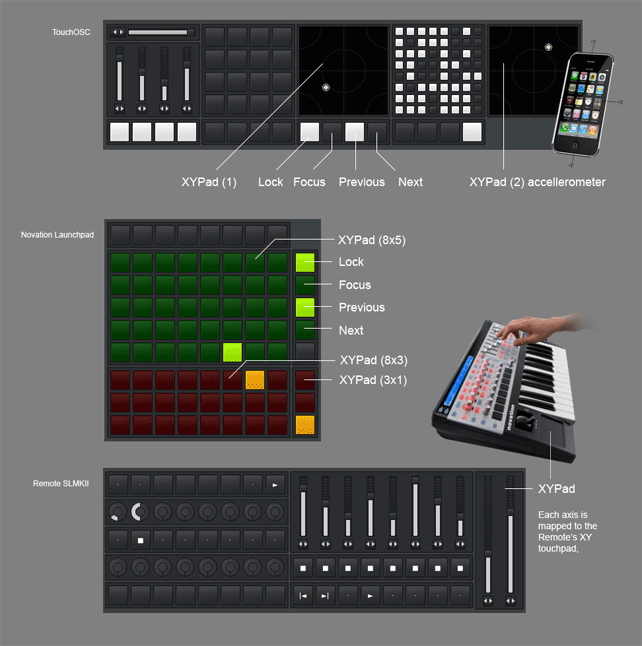
About XYPad
The XYPad application is designed to take over/auto-map any XYPad device in any
Renoise DSP Chain. You can control and record movement on the X/Y axis via
knobs, a MIDI keyboard’s touchpad or an OSC device’s accelerometer
Example song, how to get started
I’ve prepared a demonstration song that show how the XYPad application can be
used for controlling the Repeater device from a Launchpad controller.
The large green grid act as a repeater, and a crossfader between repeated and original sound
The smaller red grid act as a “pure” repeater, controlling division and mode
The three red buttons in the lower right corner are mode switches (basically, to get an OFF)
Detailed instructions:
[Install this tool](/index.php?/topic/27886-duplex-beta-versions/page view findpost p 218954)
Thanks Jonas, and congrats on the new album BTW!! Splendid stuff, really
Sure, question is how to setup such a thing? I’m looking at eight pads, 4x2, and a similar configuration of knobs. How do you want to use them?
I guess the minimum “usable” size for XYPad while running on pads/buttons would be two buttons, but this only provide you with one axis of movement. To be really useful, you need 2x2 (every min/max value covered), or more. Using it to control the repeater is cool, you could even fake the 4x2 pads to appear as if they formed one coherent array of eight pads. Uh, but if we use XYPad to control the repeater, we need a way to stop it as well
Basically, I’m looking for a way to map the lpd’s buttons to the repeater divisor blocks, something which isn’t possible right now.
Maybe using Duplex, be able to have a knob on the lpd determining which part of the repeater-blocks you’re controlling with the pads? So you can scroll though the blocks in steps of 8. But maybe I better wait till Dblue implements the mapping natively as this request doesn’t fit the x/y pad control?
In the example song, I have mapped the ‘pure’ repeater XYPad so that the vertical axis represent even, triplet & dotted notes.
Since this done by adjusting the min/max value of each slider, I guess it would make sense for XYPad to be able to control those values too?
Also, if you prefer some divisor values over others (who wouldn’t), one solution would be to use the LFO device to control the exact mode/divisor values.
So basically, signal flow for each axis could then become XYPad → Custom LFO Envelope → Repeater .
Sorry, but I somehow completely broke monome support on my music-dev machine. Neither serialosc or monomeserial is working ATM. I think I need to reinstall my OS
But yeah, this feature had the monome as inspiration. Now all we need is to support that device
Maybe, can’t add something like a “Just for Repeater” mode??
Today I’ve tried several layout (5 x 5, 5 x 7, 5 x 8…etc), but I cannot find the best one in order to push the aimed button on the Repeater GUI certainly. Sometimes the cursor moves even strangely.
So, it’s good to add the mode which is fixed [3 x 8] buttons layout, and we can surely push the aimed button.
If such optimized mode for 3 x 8 grid buttons will come, I can set it to nanoKONTROL2 too.
Is it hard??
May have to do with this Renoise bug/issue, might already have been solved for the next beta?
IMHO, that’s too specialized. The XYPad is a generic application, running on handheld phones, MIDI knobs and buttons/pads, it’s not a dedicated repeater-control.
But while XYPad will never beat a dedicated repeater application, one or two tweaks could still improve things for this particular purpose. For example, snap-to-center is built-in to the native XYPad device, but not yet supported in this application. But before implementing it, I really needed to get some basic feedback from you guys…
Edit: snap-to-center has been dropped, required features are still missing from the Renoise API.
Ahh, now I notice that I should set Dest. Max value properly like this.
2751
I think it’s enough to use Repeater on 3 x 8 or 5 x 8.
Still “Dotted” row doesn’t move smoothly in beta3 though, we had better wait until beta4 will be released.
This time, XYPad is using “Duplex sliders”, so you’re controlling X and Y independently.
As a bonus, each row can now reach 5 values instead of 4, as they are toggleable.
This is good news for ‘mode’, which has precisely 5 options
Please download this specially-modified version of Duplex, and see how well it’s working?
That version contained a BUG, new version is located here
Of course, the divisor min/max range is essential. This is a DSP Chain I found to work well:
2753 LPD8_DSPChain.xrnt
Luckily it’s just a visual/cosmetic thing that shouldn’t have any affect on the playback
Been a while since I last used Duplex and am having trouble getting my lpd8 set-up atm, nothing is happening not matter what I try on the controller, clicking in the duplex browser does control the track dsp devices, but no bi-directional communication or control from the akai. Going through the manual in a minute, probably something simple…or maybe it doesn’t work through a usb-hub?
Have you downloaded the right preset for the LPD8? It’s located in the (/Presets) folder, but you need to go through the LPD editor to apply it
Also, did you select the right input and output ports in the options dialog?
Defaults are “MIDIIN2 (AkaiLPD8)” but might not be the same on your system
If nothing seems to be received, try enabling the MIDI dump and look in the console. Any communication should be listed there…
I’m a midi noob and never have looked past ctrl+m and midi-learn, indeed had to dl the editor and import the preset then set the device to cc and now it works! Didn’t come across the preset loading thing in the manual btw so thanks for the heads up! Probably should have been obvious by now…
Instead of always defaulting to divisor 1/1, when tapping the top 4 pads on the lpd twice, could it be made so that the first pad selects 1/2 and on the second tap 1/1 (like it is now), the second pad selects 1/8 and on another tap selects 1/4 …fourth pad selects 1/128 & 1/64?
This way all the divisors can be chosen, or maybe I’m missing that it is already possible?
Hmm, I am slightly sorry that we cannot have this function.
So, is it impossible to add such like “momentary mode” currently?? (Repeater works only during a button being pressed, and as soon as a button is released, the mode parameter will be back to “OFF”)
If there is such function, nanoKONTROL2 (3 x 8 buttons) will fit perfectly as a repeater machine…
It’s possible to have OFF mapped, if you get creative with the tool. You already know how important it is that the XYPad min & max values are set to a sensible range?
Well, the launchpad preset/song comes with two XYPads, one is the repeater grid 8x3 and the other is just 1x3, acting as mode toggle, including OFF.
If you have a single button left, or are able to re-arrange your large XYPad to become 3x7 (I would skip the lower part, as I find that the 1/1 notes are less interesting than the rest), it’s doable on the nanoKONTROL too.
The only real drawback is that you can’t record the automation on two XYPads that are automating the same parameter.
PS: The reason that snap-to-center was dropped was, that it’s not possible to obtain the reset values from the native XYPad device.
It would be much more elegant to access those values directly, instead of setting them via the application options…
Yeah, I know what you mean, but the method needs 2 fingers, doesn’t it?? (toggle on, then toggle off action)
If I may say honestly, I want to use this app like KORG’s Kaosspad (momentary action).
Anyway, now I understand why you’ve made such a unique layout for LaunchPad. Indeed, it makes sense.
Even such a momentary action would still not make the XYPad into a perfect application for the repeater device.
When you are using the XYPad, you control a certain range:
← X axis is divisor -------------------------------------->
[1/1] [1/2] [1/4] [1/8] [1/16] [1/32] [1/64] [1/128] Y axis is Mode/even
[1/1T] [1/2T] [1/4T] [1/8T] [1/16T] [1/32T] [1/64T] [1/128T] -//- triplet
[1/1D] [1/2D] [1/4D] [1/8D] [1/16D] [1/32D] [1/64D] [1/128D] -//- dotted
When the Y axis is mapped to a range which spans from even to dotted, we have no way to access “off” within that range.
So it’s not possible to turn off the repeater since the reset is restricted to the same range as the device axes (try it for yourself; add an xy device and enable auto reset)
Anything in that example (well, anything I can think of) that would enable the XYPad to set the “off” state would IMHO be an unclean implementation.
The solution is of course to create a simple, dedicated application for the repeater, not cluttering the XYPad with features it doesn’t really need.





 Didn’t come across the preset loading thing in the manual btw so thanks for the heads up! Probably should have been obvious by now…


 My renoise goes cr cr cr cr ccccccc crazy!!!

