I think using key macros would be the quickest way to do this.
The volume control of a track can be key-bound with Paketti.
Or, I don’t know if it is possible or dough, but you could parse the project file and use a text editor to batch replace or macro the relevant values.
EDIT: Sorry, I misread that.
You were talking about the volume values on the Sampler tab (Sample Properties) or the Plugins tab.
That certainly doesn’t look like it would be easy to do.
It appears that the sample volume adjustment can be key bound in Paketti.
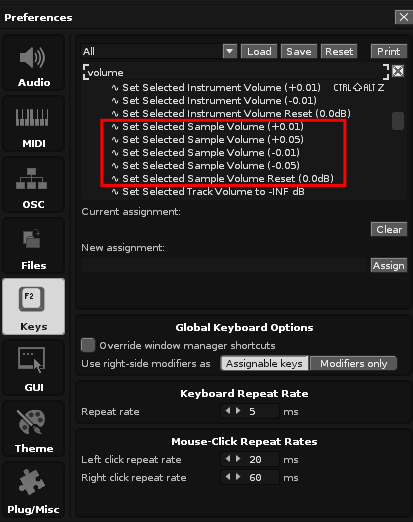
The following methods may be used for plug-in volume.
- Make the mouse click the <> button an arbitrary number of times by making it a macro
- Edit the project file with a macro in a text editor, etc.
- Edit the project file with a macro in a text editor such as vim. vim allows you to subtract 45 from the value at the cursor position by doing
45 Ctrl+X, for example. You can record the process of searching for the corresponding value, moving it, and subtracting it in a key macro such as qq, and then call it with @q and repeat with @@ afterwards.
- Edit the project file with a macro in a text editor such as vim. vim allows you to subtract 45 from the value at the cursor position by doing
- Processing with lua if there is a relevant API