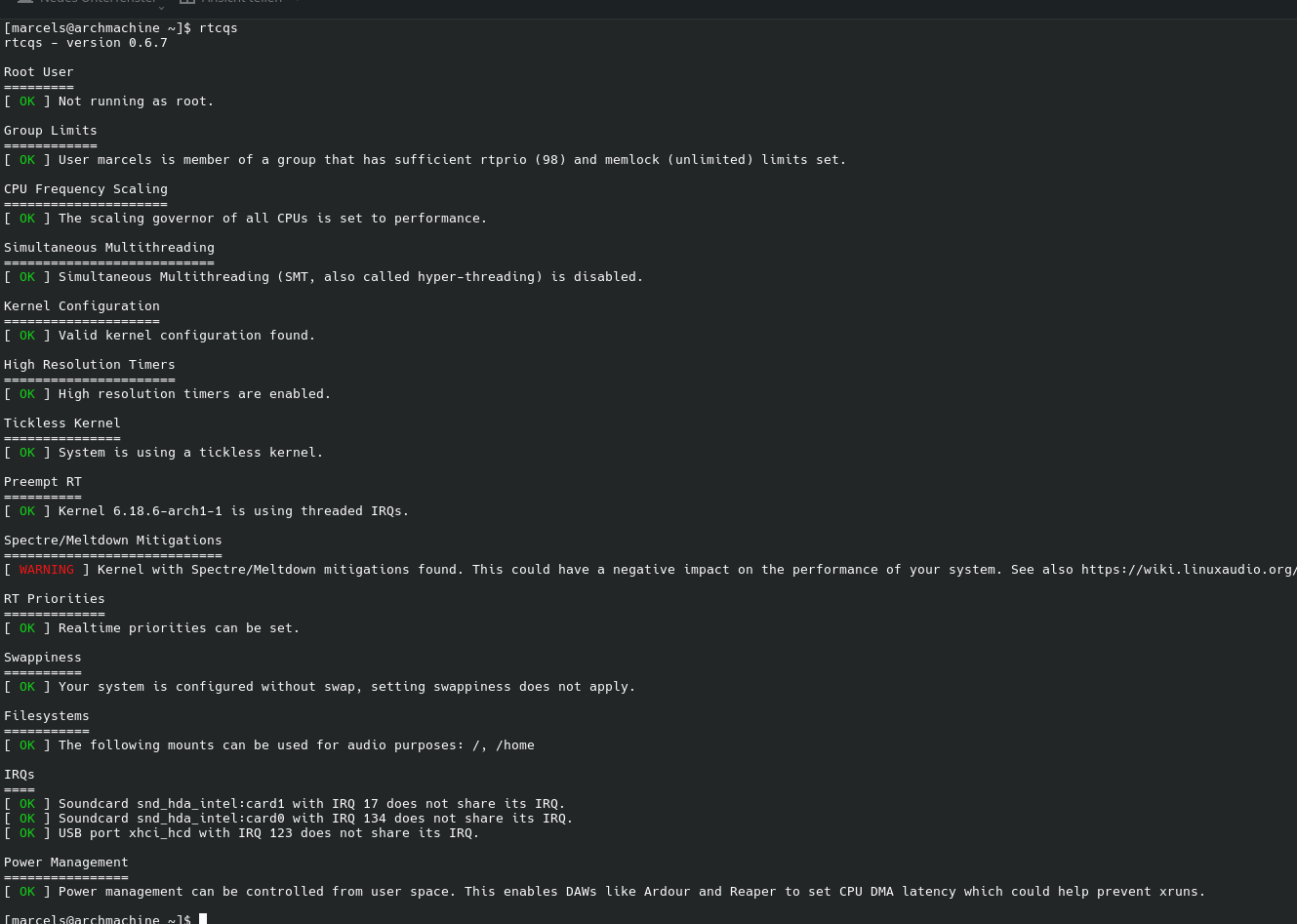
that is each core. it means that it works.
check with
cat /sys/devices/system/cpu/cpu*/cpufreq/scaling_governor
if it shows performace for each core it’s fine
that is each core. it means that it works.
check with
cat /sys/devices/system/cpu/cpu*/cpufreq/scaling_governor
if it shows performace for each core it’s fine
$ cat /sys/devices/system/cpu/cpu*/cpufreq/scaling_governor
performance
now reboot and check?
yes…
but you have to set the governor again to performance after booting
every time?
ah, its because it is not a persistent change?
Yes.
You can set it in grub according to this website:
Kernel Parameter hinzufügen (Beispiel: Grub)
GRUB_CMDLINE_LINUX_DEFAULT=“quiet cpufreq.default_governor=performance”
Not sure if this works on MX Linux. Be careful when editing GRUB, as incorrect configurations can prevent your PC from booting. You can also change the governor via a script that is started via autostart.
is not working still stutter audio:
at first i do:
$ sudo cpupower frequency-set --governor performance
$ renoise
Renoise LOG> ============================================================
Renoise LOG> Version : Renoise V3.4.4 (May 7 2024)
Renoise LOG> Date : 2025-06-05
Renoise LOG> Time : 15:50:54
Renoise LOG> OS : Linux version 6.14.9-1-liquorix-amd64 (stevep@mxlinux.org) (gcc (Debian 12.2.0-14+deb12u1) 12.2.0, GNU ld (GNU Binutils for Debian) 2.40) #1 ZEN SMP PREEMPT_DYNAMIC liquorix 6.14-11~mx23ahs (2025-05-31)
Renoise LOG> ============================================================
Renoise LOG> System: Application path retrieved from /proc/self/exe: ‘/usr/local/bin/renoise-3.4.4’
Renoise LOG> System: Running from ‘/usr/local/bin’…
Renoise LOG> CPU: Found 1 enabled unit(s) with 14 core(s) and 20 logical processor(s) per unit. 14 cores, 20 logical processors are enabled in total.…
Renoise LOG> MIDI-IO: Adding Output device ‘PipeWire-System: input’…
Renoise LOG> MIDI-IO: Adding Output device ‘PipeWire-RT-Event: input’…
Renoise LOG> ALSA: Successfully created an ALSA RT thread
Renoise LOG> ALSA: Up and running…
ALSA
48000Hz
512 ms
What does the rtqs script say?
rtcqs
[ OK ] Not running as root.
[ OK ] User mx is member of a group that has sufficient rtprio (95) and memlock (unlimited) limits set.
[ WARNING ] The scaling governor of one or more CPUs is not set to ‘performance’. You can set the scaling governor to ‘performance’ with ‘cpupower frequency-set -g performance’ or ‘cpufreq-set -r -g performance’ (Debian
/Ubuntu). See also System configuration [Linux-Sound]
[ WARNING ] Simultaneous Multithreading (SMT, also called hyper-threading) is enabled. This can cause spikes in DSP load at higher DSP loads. Consider disabling SMT when experiencing such spikes with ‘echo off | sudo te
e /sys/devices/system/cpu/smt/control’. See also System configuration [Linux-Sound]
[ OK ] Valid kernel configuration found.
[ OK ] High resolution timers are enabled.
[ OK ] System is using a tickless kernel.
[ WARNING ] Kernel 6.14.10-2-liquorix-amd64 without ‘threadirqs’ parameter or real-time capabilities found. See also System configuration [Linux-Sound]
[ WARNING ] Kernel with Spectre/Meltdown mitigations found. This could have a negative impact on the performance of your system. See also System configuration [Linux-Sound]
own_mitigations
[ OK ] Realtime priorities can be set.
[ WARNING ] vm.swappiness is set to 15 which is too high. Set swappiness to a lower value by adding ‘vm.swappiness=10’ to /etc/sysctl.conf and run ‘sysctl --system’. See also wiki:system_conf [Linux-Sound]
iguration#sysctlconf
[ OK ] The following mounts can be used for audio purposes: /
[ OK ] Soundcard snd_hda_intel:card1 with IRQ 17 does not share its IRQ.
[ OK ] Soundcard snd_hda_intel:card0 with IRQ 159 does not share its IRQ.
[ OK ] USB port xhci_hcd with IRQ 143 does not share its IRQ.
[ WARNING ] Power management can’t be controlled from user space, the device node /dev/cpu_dma_latency can’t be accessed by your user. This prohibits DAWs like Ardour and Reaper to set CPU DMA latency which could help p
revent xruns. For enabling access see System configuration [Linux-Sound]
Back in Renoise:
now, i set buffer to 7 and setup in and out Devices to DEFAULT, now it seems running, lets see how long it goes.
Any ideas are highly appreciated.
I guess this could be your problem still.
This is a translation of my blog-article concerning arch/endeavourOS.
Music production on Linux is a story that goes a little beyond what you typically associate with this OS. Linux itself is fantastically optimized, but if you want to do specialized tasks, you can’t get around making some adjustments.
I recently ran into this while making music in Renoise, but everything I’m writing here applies perfectly to Reaper, Bitwig, or any other DAW.
I was struggling massively with Xruns in Renoise. The absurd part? On the exact same machine, everything ran buttery smooth under Windows. Since I know Renoise inside out, I knew immediately: It wasn’t the DAW. The problem is the operating system, or rather, how it handles our resources by default.
But we wouldn’t be Linux users if we couldn’t fix that.
Spoiler: I am now working with a latency of 2.6 ms. I can get a stable 2 ms, and it’s probably possible to go even lower, but I find 2.6 ms to be the best compromise between performance and system load.
Here is my guide for a rock-solid Linux audio setup.
First, we need to teach the system that audio is more important than the background noise of system services. Since I am on an Arch-based system (like many of you probably are), we’ll use yay.
We need to install realtime-privileges and cpupower:
yay -Syu realtime-privileges cpupower
The realtime-privileges package creates a group for users who are allowed to request realtime priorities. We need to be in that group. Replace $USER with your username if the variable isn’t set automatically.
sudo usermod -aG realtime $USER
IMPORTANT: For this to take effect, you must REBOOT. No logging out, no tricks. Reboot. Now.
Modern desktop environments like KDE and Gnome use the power-profiles-daemon to control CPU settings. This is nice for laptops in a café to save battery, but we want raw power. We want control via cpupower.
(Side note: cpupower also helps with gaming. Feral has software called gamemode that sets the CPU to performance during a game and back down afterwards. However, for audio sessions, we want this permanently.)
So, let’s mask the daemon so it doesn’t interfere:
sudo systemctl mask power-profiles-daemon
Now we edit the configuration file for cpupower. We want the CPU to run permanently in performance mode, rather than clocking up only when it’s already too late.
The problem with the standard mode (“Ondemand” or “Schedutil”):
Imagine your track is playing quietly with just a piano sound (low load), and suddenly 30 string tracks and effects kick in. The CPU realizes it needs to clock up, but in the millisecond it takes to do so, the audio buffer has already crackled. We want to prevent that.
Open the file: (edit: it was /etc/default/cpupower, now it’s /etc/default/cpupower-service.conf)
sudo nano /etc/default/cpupower-service.conf
In my Arch version, it’s the third line. Look for governor (remove the comment # if present) and set it to performance:
governor='performance'
Save (CTRL+O) and Exit (CTRL+X). Now enable the service:
sudo systemctl enable --now cpupower.service
To make sure your CPU is actually running at full speed, you can check it with this:
cat /sys/devices/system/cpu/cpu*/cpufreq/scaling_governor
If it says “performance” everywhere, you’ve done it.
Now for the DAW. You can set environment variables directly in your desktop launcher, or start Renoise via the terminal to force PipeWire to use specific buffer sizes.
A good starting value for crisp latency is a 128 buffer at 48kHz:
PIPEWIRE_LATENCY=128/48000 renoise
Renoise will start directly with these settings. Feel free to play with the values—go lower with the buffers (64, 32) if your hardware can handle it. Latencies down to 0.5 ms are technically possible, but I had issues with some VST effects in that range, which is why I went back up to 128.
The 48000 Hz naturally depends on your sound hardware. You can also enter 44100, 96000, or even 192000 Hz if your interface supports it.
If you really want to squeeze out the absolute last bit of latency and don’t care about PipeWire or Jack: Go “Full ALSA”.
The Catch: You won’t have sound from other apps (Browser, Spotify, etc.) while Renoise is running, because it grabs exclusive access to the sound card.
Here you can screw the buffers down until it cracks and pops.
Honestly? I am now perfectly happy with PipeWire/Jack and my solid ~2 ms latency. The system is stable, the Xruns are history, and I can finally concentrate on what matters: making music.
Some additions: You might also want to install threadirqs or even remove CPU-security, but IMHO this is not really necessary.
Thanks for this, I feel like I tried all of it when I spent days troubleshooting CachyOS with my RME interface (except maybe for masking the power daemon, I assumed setting everything to performance was enough) but it’s good to have it all there for my next attempt 
Thinking of just trying a base Arch install rather than CachyOS next time so I’m starting from nothing rather than trying to untangle defaults that have been set by a third party. If nothing else, I should learn a few things along the way.
Warning:
Add parameter to kernel line “mitigations=off” and all will be OK
I’m scared of spectre
if you are using a single user desktop,
installing from the repositories,
I think there is nothing to worry about
If possible, use some tool to park CPU scaling frequency to a fixed value, somewhere between min and max.
To figure out:
$ cat /sys/devices/system/cpu/vulnerabilities/spectre_v1
Mitigation: usercopy/swapgs barriers and __user pointer sanitization
$ cat /sys/devices/system/cpu/vulnerabilities/spectre_v2
Mitigation: Enhanced / Automatic IBRS; IBPB: conditional; PBRSB-eIBRS: SW sequence; BHI: BHI_DIS_S
As we tried to edit the RT thing times (1y) ago, i figured out
that it is going to deep and exausts me.
I reinstalled a newer Version of
it seems there is still no issue without the RT-Thread.
I am not sure if any wants to try?