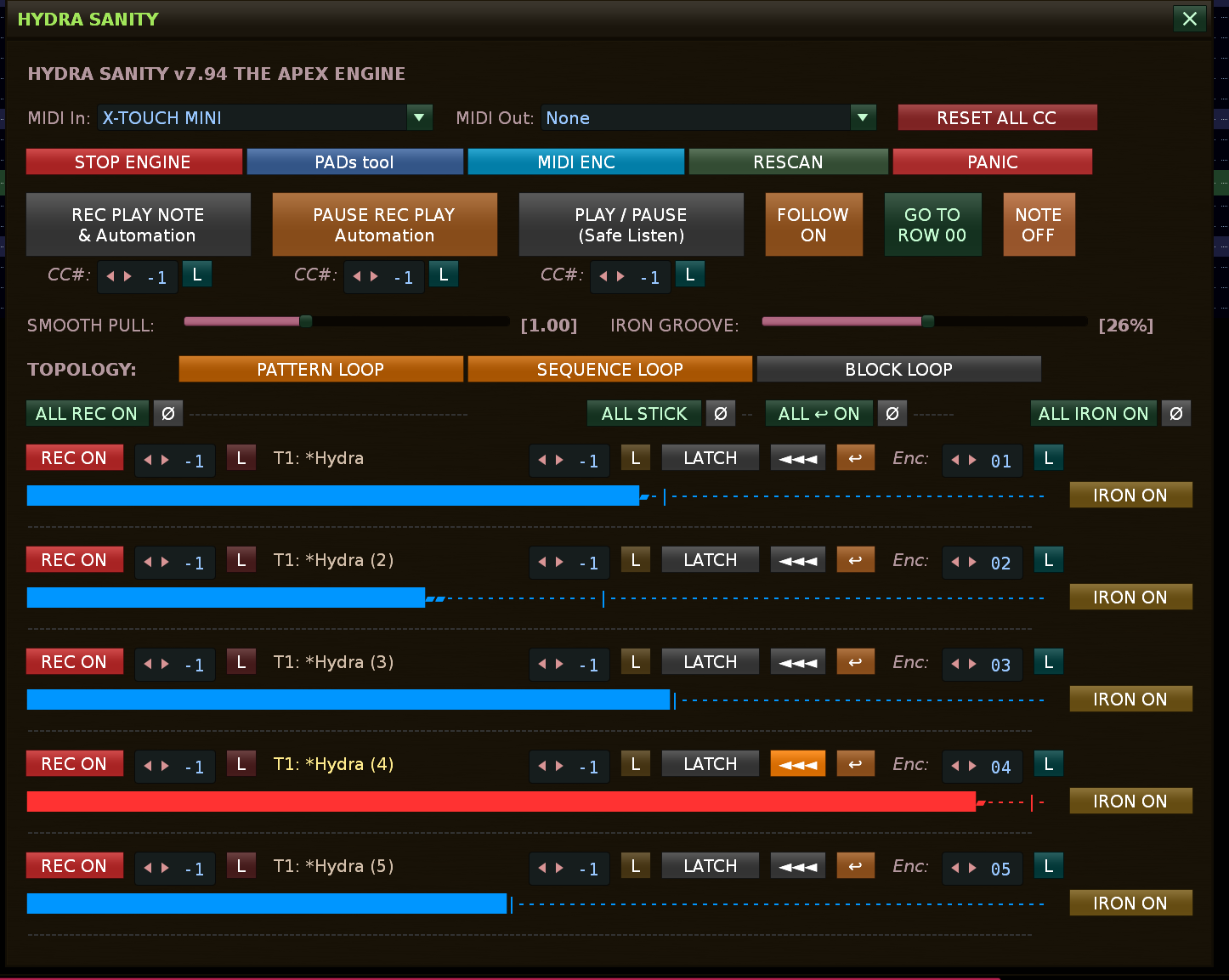
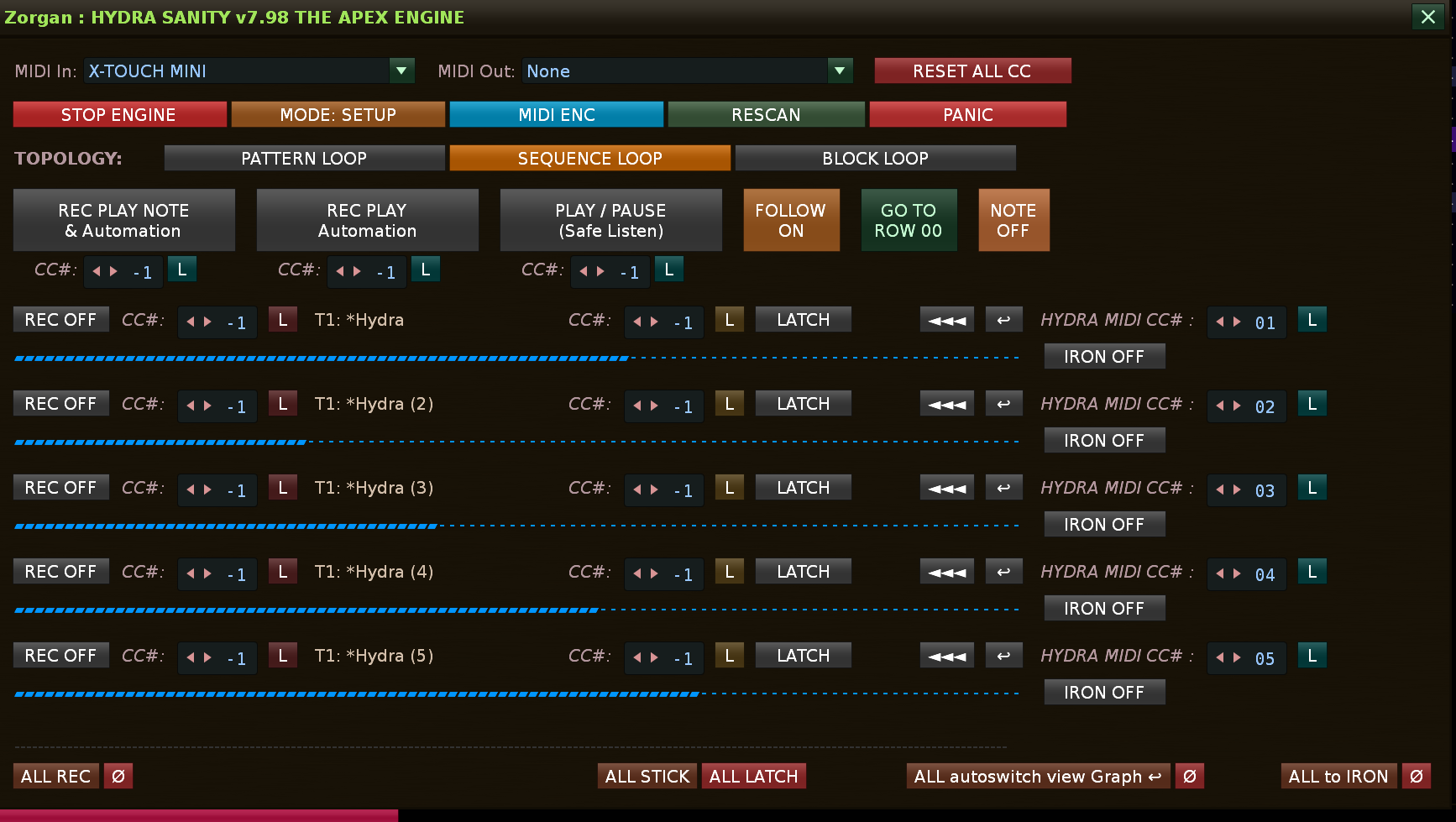
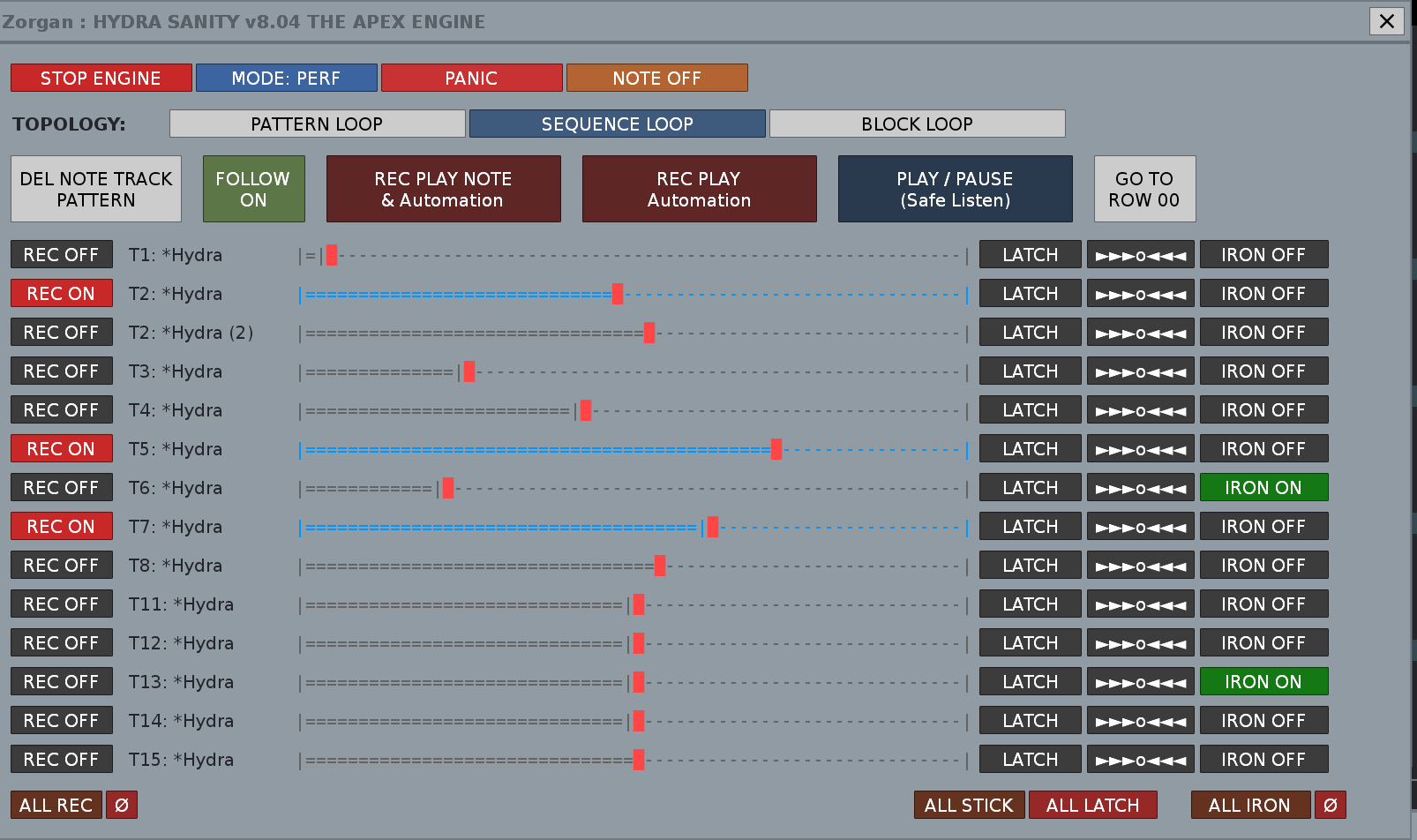
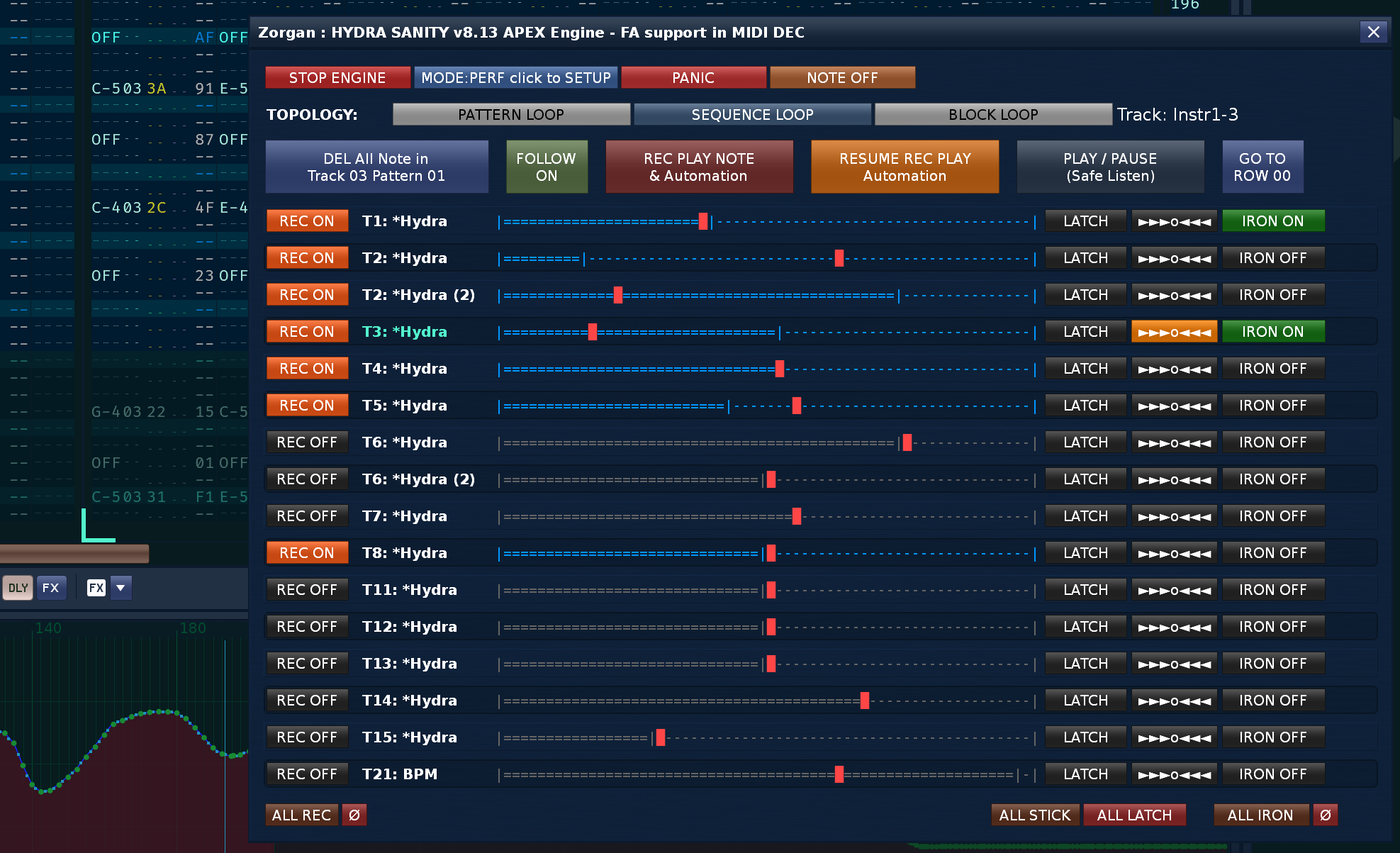
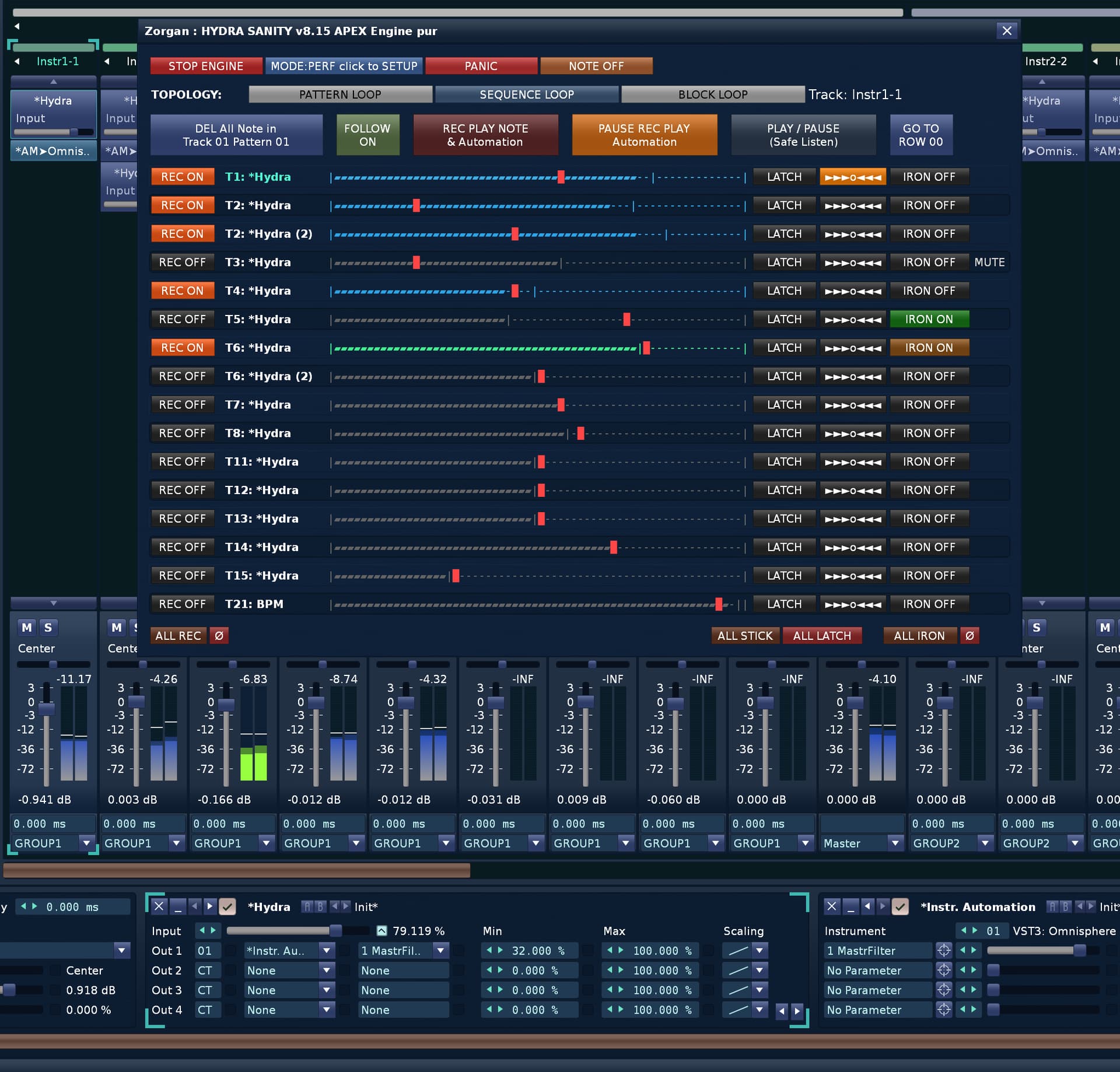
Bulk switches located in the separator bar just above the Hydra list.
[ ALL REC ON ] Set all Hydra rows to REC ON (Armed for recording).
[ Ø ](next to ALL REC ON) Set all Hydra rows to REC OFF.
[ ALL STICK ] Set all Hydra rows to STICKY latch mode.
[ Ø ](next to ALL STICK) Set all Hydra rows to default LATCH mode.
[ ALL ↩ ON ] Enable ‘Auto-show graph on fader move’ for all Hydras.
[ Ø ](next to ALL ON) Disable ‘Auto-show graph’ for all Hydras.
[ ALL IRON ON ] Enable IRON smoothing algorithm for all Hydras.
[ Ø ](next to ALL IRON ON) Disable IRON smoothing algorithm for all Hydras.
Per-Hydra Row Controls
Controls located within each individual discovered Hydra row.
[ REC ON ] / [ REC OFF ] Enable or disable recording for this specific Hydra device.
[ L ] / [ W ](next to each CC box) Learn MIDI CC for REC toggle, LATCH trigger, or main Encoder control.
[ LATCH ] / [ STICKY ] / [ ARM ON ] / [ LEAVE ] Multi-state button showing current recording intent. LATCH: Hold to write, release to return to track automation. STICKY: Punch-in and hold value.
[ ◄◄◄ ] Immediately open and show this Hydra’s automation graph in the pattern editor.
[ ↩ ] / [ ↩ ] Auto-show graph on fader move (ON / OFF toggle).
[ IRON ON ] / [ IRON OFF ] Enable or disable the subframe IRON smoothing algorithm for this Hydra.
Change log to v7.94
8. COMPLETE CHANGELOG
HYDRA SANITY – CHANGELOG v7.94 functional Renoise handler in engine Hydra Sanity , color upgrade for text of HYDRA name and select graph for HYDRA automation HYDRA SANITY – CHANGELOG (v7.84 → v7.93) CORE ENGINE & MODES Introduced ZORGAN REC MODE (zorgan_rec_mode)
enables full REC logic in “REC PLAY Automation” (without edit_mode)
Unified condition:
is_zorgan_rec_play() Fixed transitions between:
REC PLAY NOTE & AUTO
REC PLAY AUTOMATION
SAFE PLAY / PLAY LATCH / STICKY LOGIC (FINALIZED) Fixed intent prioritization (LATCH vs STICKY) Added state:
sticky_release_pending Fixed behavior:
STICKY → click → waits for fader release Eliminated STICKY ↔ ARM ON cycling Correct behavior:
holding fader → LEAVE state
release → LATCH AUTO SHOW GRAPH () New feature:
auto-switch to automation graph on fader movement Anti-spam mechanism:
auto_show_graph_locked FIX:
unlock works in STOP/PAUSE (idle fallback) Stable repeated behavior GRAPH SELECTION SYSTEM
Introduced new state:
selected_graph_dk Arrow buttons (◄◄◄) now follow selection, not MIDI_INC Fixed:
multiple orange arrows issue
only one active Hydra at a time Fader movement can reclaim graph selection GUI & UX Improved HYDRA name readability Active Hydra:
highlighted in light yellow (selected graph) New state:
LEAVE (darker orange) Overall improved visual feedback IRON SYSTEM (SMOOTHING ENGINE)
Added per-Hydra toggle:
iron_enabled[dk] Default:
new Hydras = ON Persisted in song data Active only in:
REC PLAY NOTE & AUTO
REC PLAY AUTOMATION Decoupled from runtime “IRON” state AUTO ENTER () TOGGLE
Per-Hydra toggle:
auto_show_graph_enabled Persistent Works even when REC is OFF ENGINE STABILITY GUI refactor:
resolved Lua 60 upvalues limit
introduced helper functions (clean architecture) Clear separation:
runtime state vs GUI state vs feature flags Stabilized:
MIDI input handling
release detection
idle processing GLOBAL CONTROL BAR (HEADER) Added ALL control blocks:
ALL REC ON / Ø
ALL STICK / Ø
ALL ON / Ø
ALL IRON ON / Ø Hard overwrite for all Hydras Mini buttons Ø = OFF Persistent states preserved outside REC VOLUME METER FIX Red color only during real input activity Fixed:
no longer stuck in STOP/PAUSE Improved link to last_input_time PERFORMANCE & ENGINE Preserved:
micro-buffering
sparse writer
subframe smoothing IRON optimized:
adaptive smoothing
bypass when OFF VERSION STATUS
Stable Consistent UX Clean separation of logic (GUI / ENGINE / STATE) Ready for further expansion
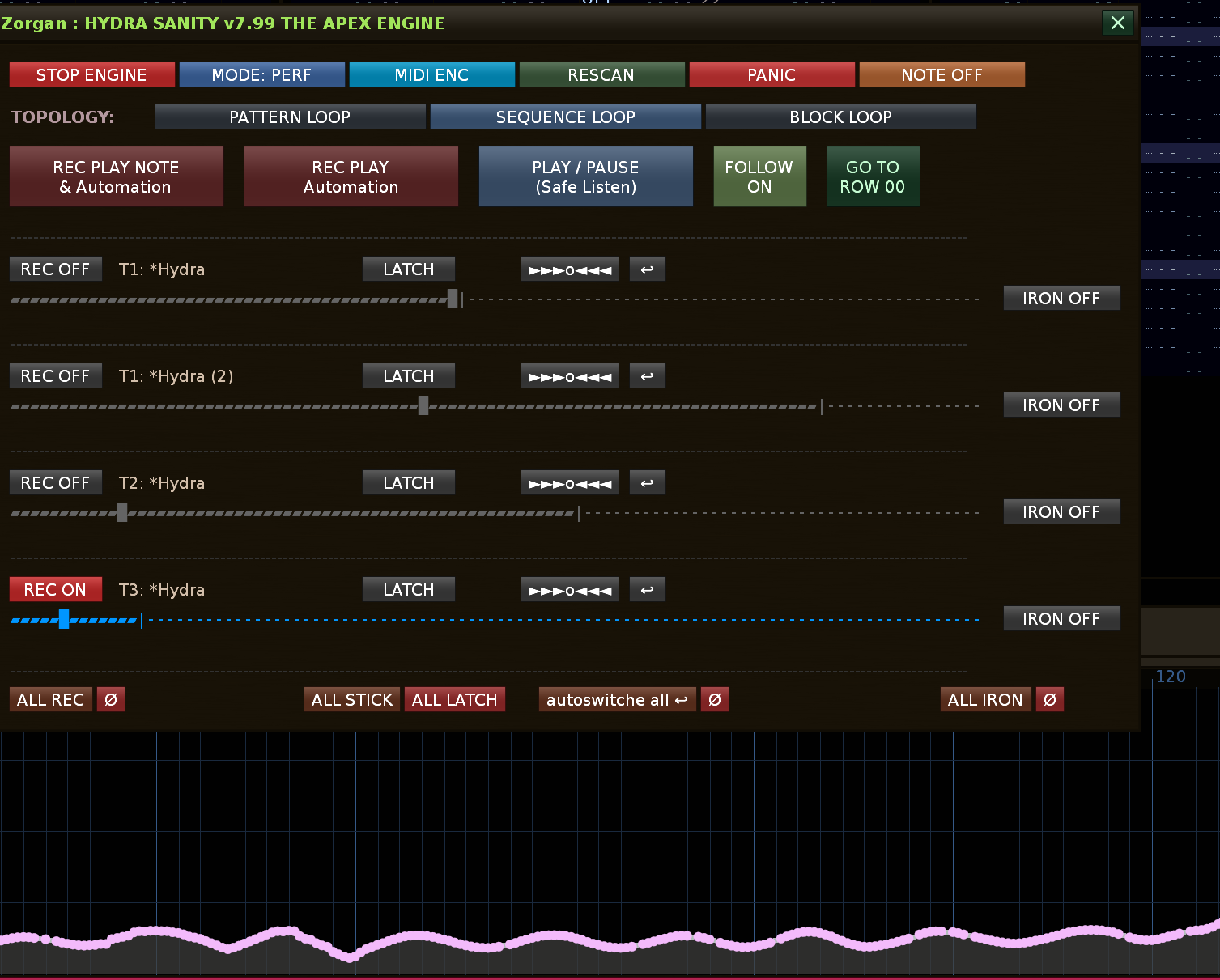
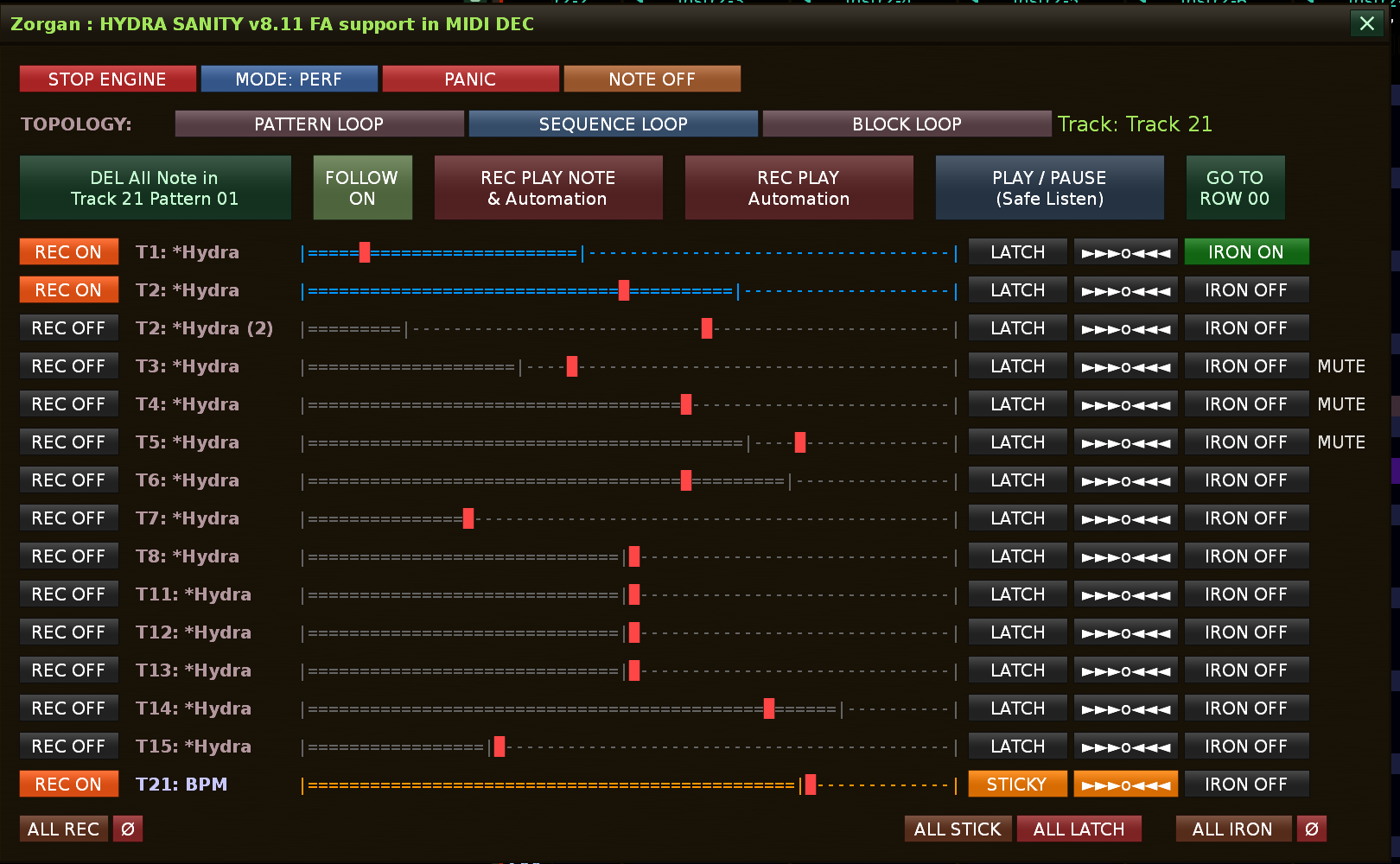
[ MODE: SETUP ] / [ MODE: PERF ]
*Toggle between Setup (MIDI Mapping) and Performance (Clean) UI modes. Hides routing and CC configurations for a cleaner live view.
*
I’m really excited to announce the release of HYDRA SANITY v7.99 (The Apex Engine), which is now available on the Renoise Tools page.
If you use physical MIDI controllers (especially endless relative encoders or fast faders) to write automation, you might have noticed that at higher speeds, native automation can get jagged, cluttered with points, or suffer from harsh jumps when you try to punch-in.
What is Hydra Sanity? Think of it as real-time “middleware” between your MIDI controller and Renoise. It transforms Renoise into a fully-fledged production mixing console. It analyzes your physical movements, calculates momentum, and writes perfectly clean automation curves using sub-frame Bezier smoothing. Most importantly, it introduces professional studio recording behaviors: Touch Punch-In, ARM, LATCH, and STICKY modes. No more destroying existing curves by accident!
What’s New in v7.99 (The UI & Logic Polish Update)? This version heavily focuses on live performance reliability and workflow speed:
PERF / SETUP Modes: A new global toggle lets you switch between a deep MIDI routing setup view and a completely clean, distraction-free “Performance Mode” for when you are playing live.
Smart “ALL STICKY” Logic: Hitting the global ALL STICK button no longer forces everything into record mode immediately. Instead, it intelligently arms all your selected Hydras. They will patiently wait for you to physically touch the fader or start playback before they snap into action.
Color-Coded Topology: The Loop controls (Pattern, Sequence, Block) now feature distinct, highly visible colors (Gold, Blue, Green). It is now impossible to get confused about what loop is active, even in a dark club environment.
Solid Pause States: The UI feedback is now bulletproof. If you arm a track, the indicator blinks during playback, but glows a solid, reassuring color when the transport is stopped so you always know your exact status.
Unified Engine Controls: Emergency buttons like NOTE OFF have been relocated to the top global bar next to PANIC for perfect symmetry and instant access.
Perfected “IRON” Smoothing: The underlying math for ironing/smoothing existing curves has been completely refactored and locked to optimal production values. It just works.
Just a quick personal note: I’ve poured dozens and dozens of hours into developing this tool, and I feel I’ve finally reached a point where the utility is in a truly great, stable state. I believe it’s only common courtesy to keep the community informed about the ongoing development, which is exactly why this thread exists. If this tool isn’t your cup of tea, you can absolutely just skip this post and ignore it. But for those of you who have already tried the tool and are following its journey, this is the exact information that belongs right here.
Mackie Control Universal (MCU) Protocol: Introduced full structural support for the MCU protocol via a dedicated GUI toggle.
Note Message Button Mapping: Transport, Latch, and Rec Toggle buttons can now natively map to Note On/Off messages. The engine dynamically stores the message type (msg_kind), entirely eliminating the historical collision between identical CC and Note values.
Strict Sign-Magnitude Decoder: In MCU Mode, relative V-Pots utilize a mathematically pure Sign-Magnitude decoder, ensuring perfectly smooth and responsive fader movements without jitter.
Dynamic Feedback Routing: MIDI feedback sync no longer forces output on CC channel 1, and instead dynamically utilizes the exact status byte of the incoming device.
UI Reorganization: The MCU MODE and MIDI ENC toggles are now exclusively visible in MODE: SETUP, keeping the MODE: PERF cockpit completely clean and distraction-free.
Added proper MIDI decoder support in MCU mode.
Relative encoder input now works correctly even when MCU mode is enabled, so decoder-driven automation can be used without losing MCU workflow compatibility.
Added new LINKING TO GRAPH button in SETUP mode.
This button is available only when MIDI DEC mode is active.
Implemented graph-linked decoder start behavior.
In MIDI DEC mode, encoder writing now starts from the current automation graph position instead of the last stored fader position.
Added backward graph lookup for missing start points.
If there is no automation point exactly on the current line, the tool now searches backward and uses the last existing graph point as the starting value.
Added safe fallback logic.
If no automation point exists in the graph, the tool falls back to the current encoder position, preventing unwanted jumps or invalid overwrite behavior.
Added persistent storage for the new option.
The LINKING TO GRAPH state is now saved and restored with the song/tool data.
Updated GUI behavior for clarity.
The new button is automatically greyed out and disabled outside of MIDI DEC mode.
Controlling recording and note writing together with HYDRA is more comfortable and intuitive for live production, because the key controls are concentrated in one place and you do not have to constantly split your attention across different parts of the workflow. This makes the creative process faster, clearer, and more natural in the moment. At first glance, the system may seem demanding to control, but that is mostly just a first impression — after a short time, it starts to feel very logical. The application is also being continuously improved.
DEL NOTE TRACK PATTERN documented as a dedicated SETUP MIDI Learn transport control
SETUP readability notes updated with the numeric field width refinements
transport section updated so the learn workflow is described consistently
changelog extended with v8.05 and a brief v8.06 public-facing note
internal/debug graph-fix details were left out as requested
Change log : version raised to v8.07 HYDRA SANIT
* Added a dedicated `ROLE` selector for each `MIDI OUT` slot in `MODE: SETUP`, allowing each output to run as `BOTH`, `THRU`, `FB`, or `OFF`.
* This makes dual-port routing more flexible, especially when one port should be used only for LED/ring feedback while another should carry normal MIDI passthrough.
* Fixed a visual-state bug where `IRON` activity on the first HYDRA row could appear inactive while the row was also the currently selected graph.
* IRON monitor priority is now higher than the selected-graph standby view, so active IRON processing remains visible in `REC ON`.
* Improved IRON button feedback to reflect the real runtime-active IRON state, not only the stored enable flag.
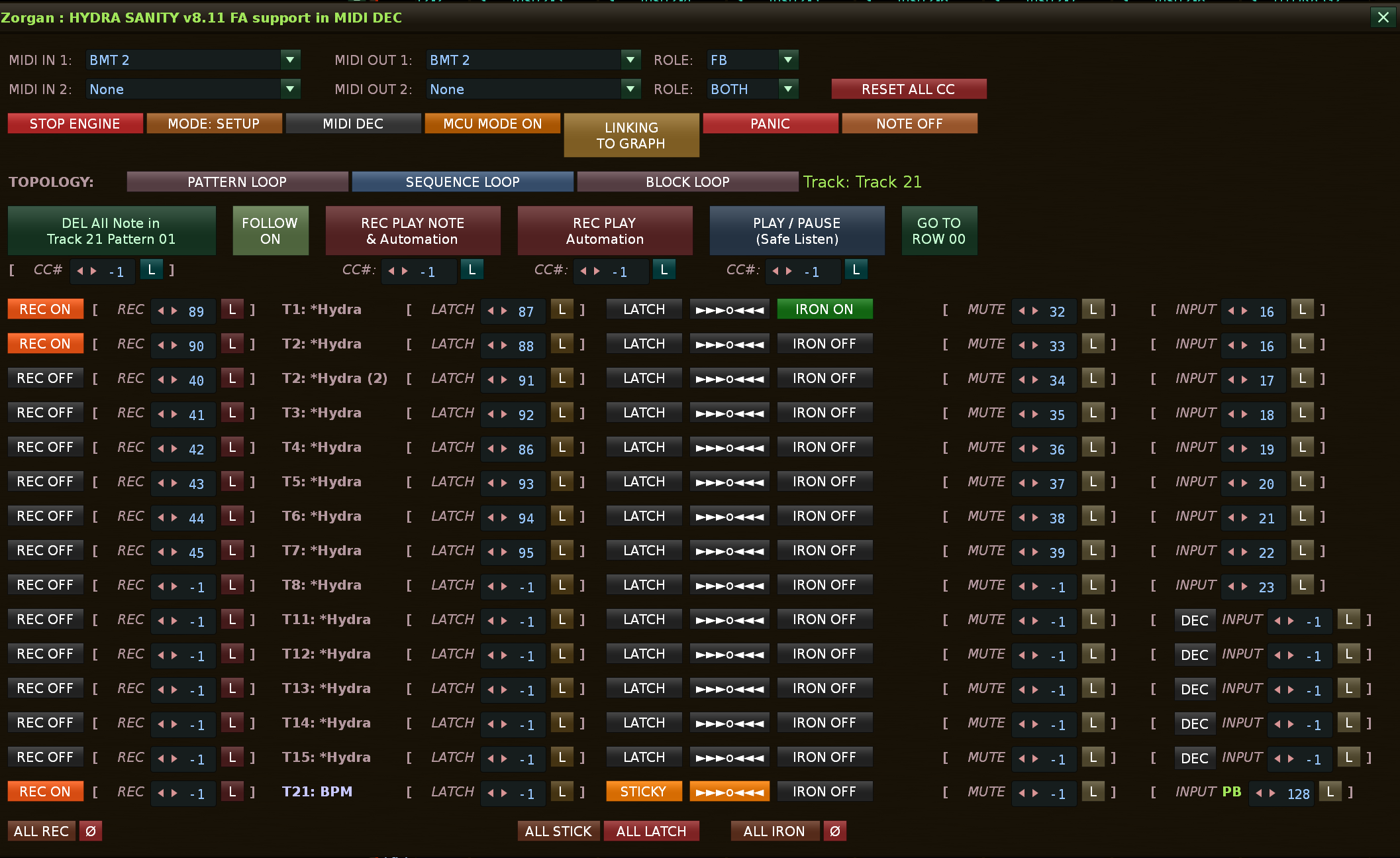
Version 8.11 support Fader Absolut in mode MIDI DECODER + MCU, or only DECODER
Procedure when I want to activate the fader in MIDI DECODER mode:
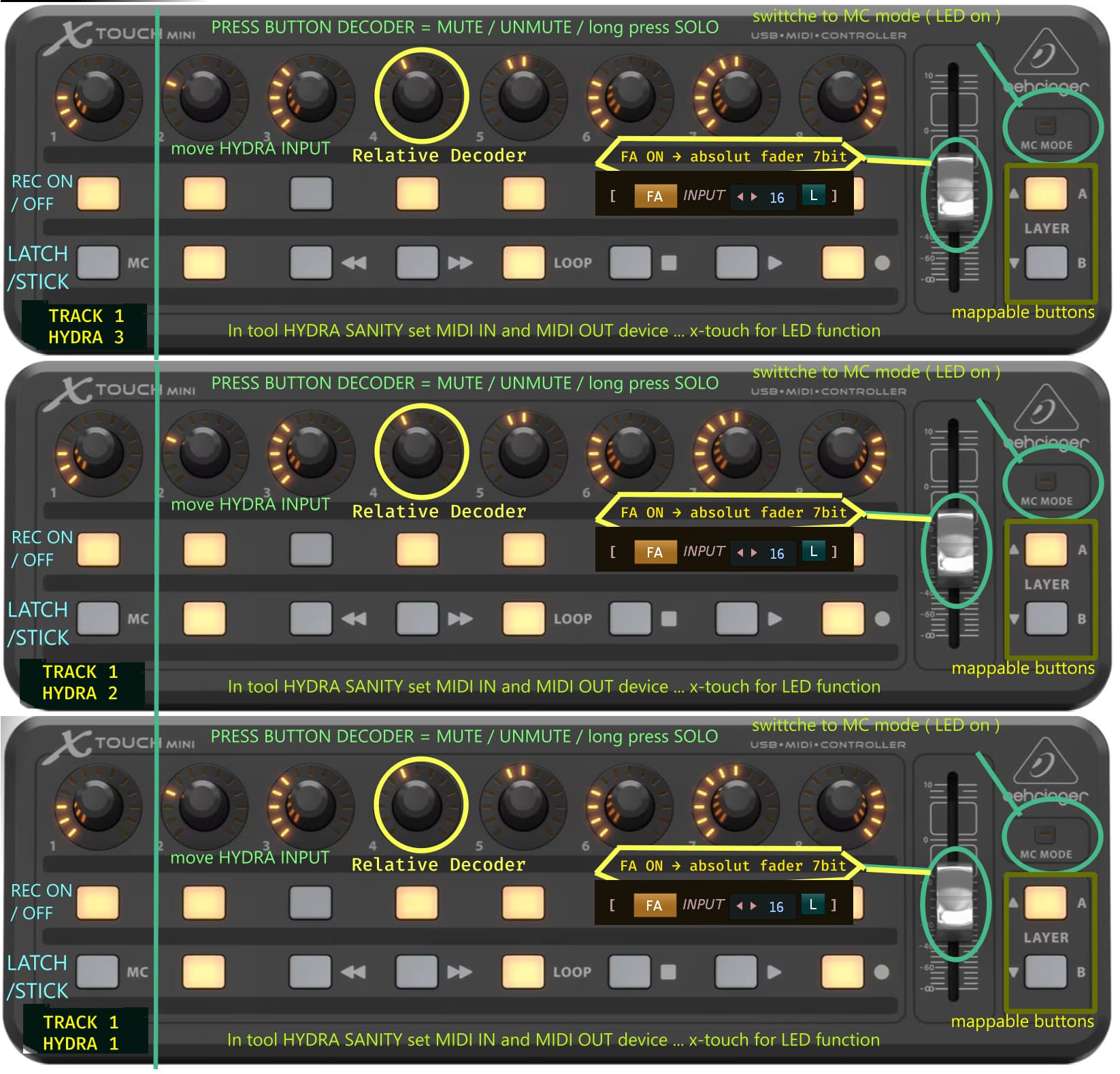
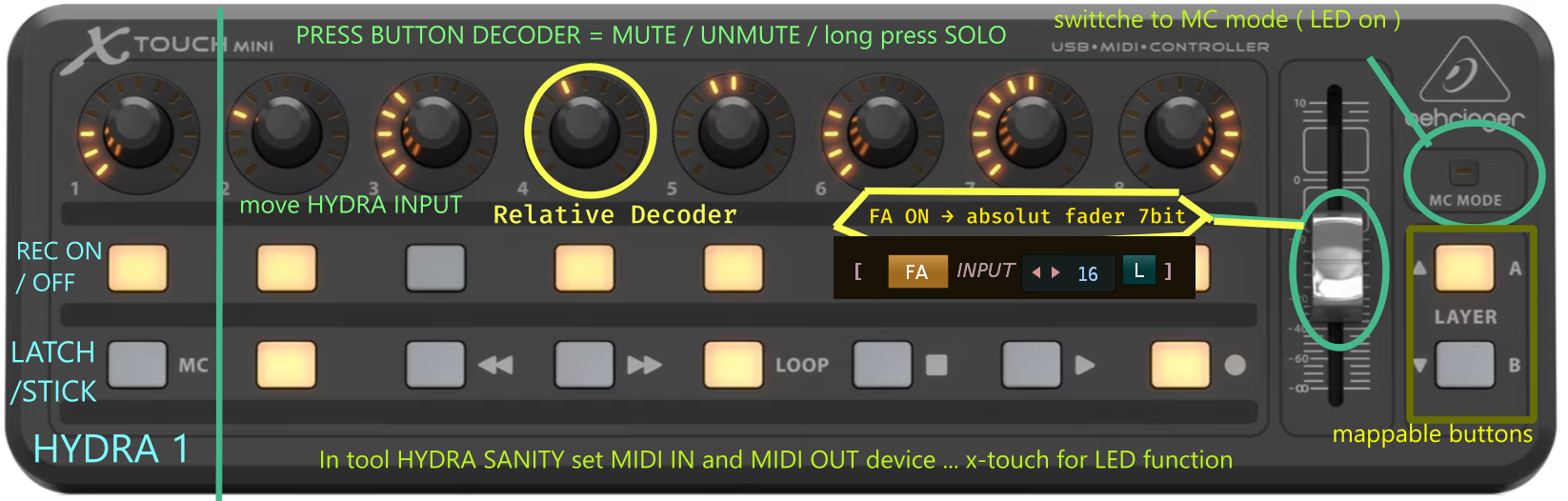
I click on the MODE button: SETUP – it switches to MODE: PERFORMANCE mode:… I use MIDI DECODER and I can have MCU mode turned on because I want the LED indicators to work … I set the same MIDI Controller in MIDI IN and OUT, for example X-TOUCH MINI, for MIDI OUT I set FB = feed back controll (when you hover the mouse over "ROLE: ", a help text always appears. Then I can set for my HYDRA MIDI button to activate REC ON, midi button for MUTE/SOLO / ON, for the INPUT HYDRA button (decoder, fader) …
I continue, I find the HYDRA line where I want to set the FADER … at the end of the line for INPUT MIDI CC# with the value -1 = unset value for the HYDRA INPUT fader … I will see the DEC button (preset for decoder) >> I click on it and it switches to FA = fader absolute … now I can click on L = MIDI LEARN … and move the FADER, its MIDI CC# will be written. <<< you have the absolute fader set in MIDI DECODER mode.
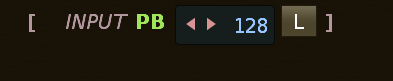
MIDI channel does not need to be set manually anymore, in the new version I have already implemented that when LEARN it will also remember the MIDI channel for each button, encoder, coder, pitchband. Because Behringer X-TOUCH in MCU mode sends decoders to midi channel 1 and sets the fader as pitchband to channel 9 with MIDI CC# 128… HYDRA SANITY takes care of that when setting it up, you don’t have to deal with it.
Important detail:
older mappings without a saved channel remain compatible, but act as wildcardsso if you have the same CC number on multiple channels, it’s better to relearn those older maps once
support too FADER in mode pitchbend
I have integrated full native support for Pitch Bend (14-bit fader resolution)
the result of the correct setting .. if pitch bend fader … clasic fader is without PB.
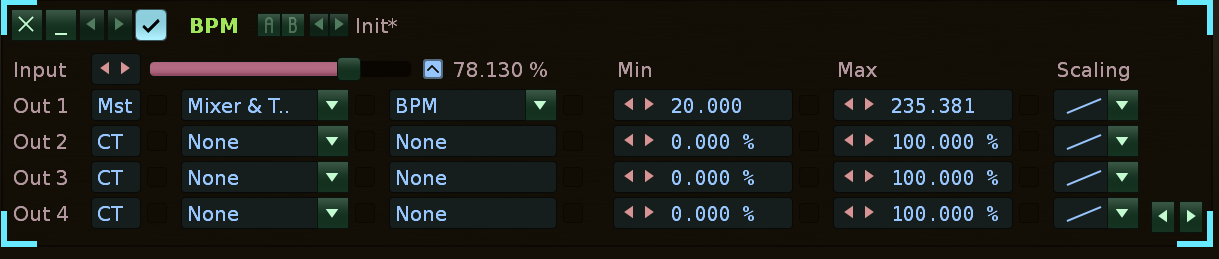
Interesting note: Did you know that Renoise HYDRA can also map BMP from the Master Track… a good recommendation is to map it to the fader of the X-TOUCHE midi controller… you can dynamically change the speed of your song directly from the automation graph… smooth the waveform with IRON.
How it works SAVE preset MIDI Mapping and MIDI device select now in 8.13
In short, you don’t have to worry, each song carries its own preset after saving.
In the code it is divided like this:
global / studio MIDI setup is kept in preferences.xml, not in the song
per-song HYDRA mappings and states are kept in song.tool_data
And when loading a new song, the song-scoped data is first cleaned so that nothing is dragged from the previous song. That is explicitly commented there.
Moreover, during rescan, the current HYDRAs in the new song are found again according to the position T%d_D%d and then save_to_song() is called again. So the state is overwritten according to the currently existing HYDRAs in the currently open song.
What does this mean in practice
If you do:
Song A → has some HYDRAs and their mappings
Song B → has other HYDRAs
then:
Song A carries its HYDRA maps
They are stored in that specific .xrns via song.tool_data.
Song B carries its HYDRA maps separately
When opened, the old song maps are cleared and the maps of the new song are loaded. It is not carried over blindly from the previous song.
But the global MIDI setup remains common
So for example:
MIDI IN/OUT devices
output role
MIDI channels
abs encoder mode
MCU mode
link decoder to graph
this is global for the tool, not for an individual song.
For correct behavior of HYDRA SANITY: The basis is to have tracks, instruments written at least 1 note in the track, so that Renoise maps which track uses which instrument. Then HYDRA SANITY already knows where to switch TRACK when selecting a HYDRA line.
You can then safely record notes, even the automation graph.
in version 8.14 I had to solve the last bug, perhaps with the behavior of function calls during recording. v8.14
Added alternating HYDRA row backgrounds for clearer visual separation in the GUI.
Fixed Sequence Loop wrap behavior in REC PLAY modes.
STICKY now correctly re-arms to ARM ON after loop wrap.
HYDRA SANITI v16
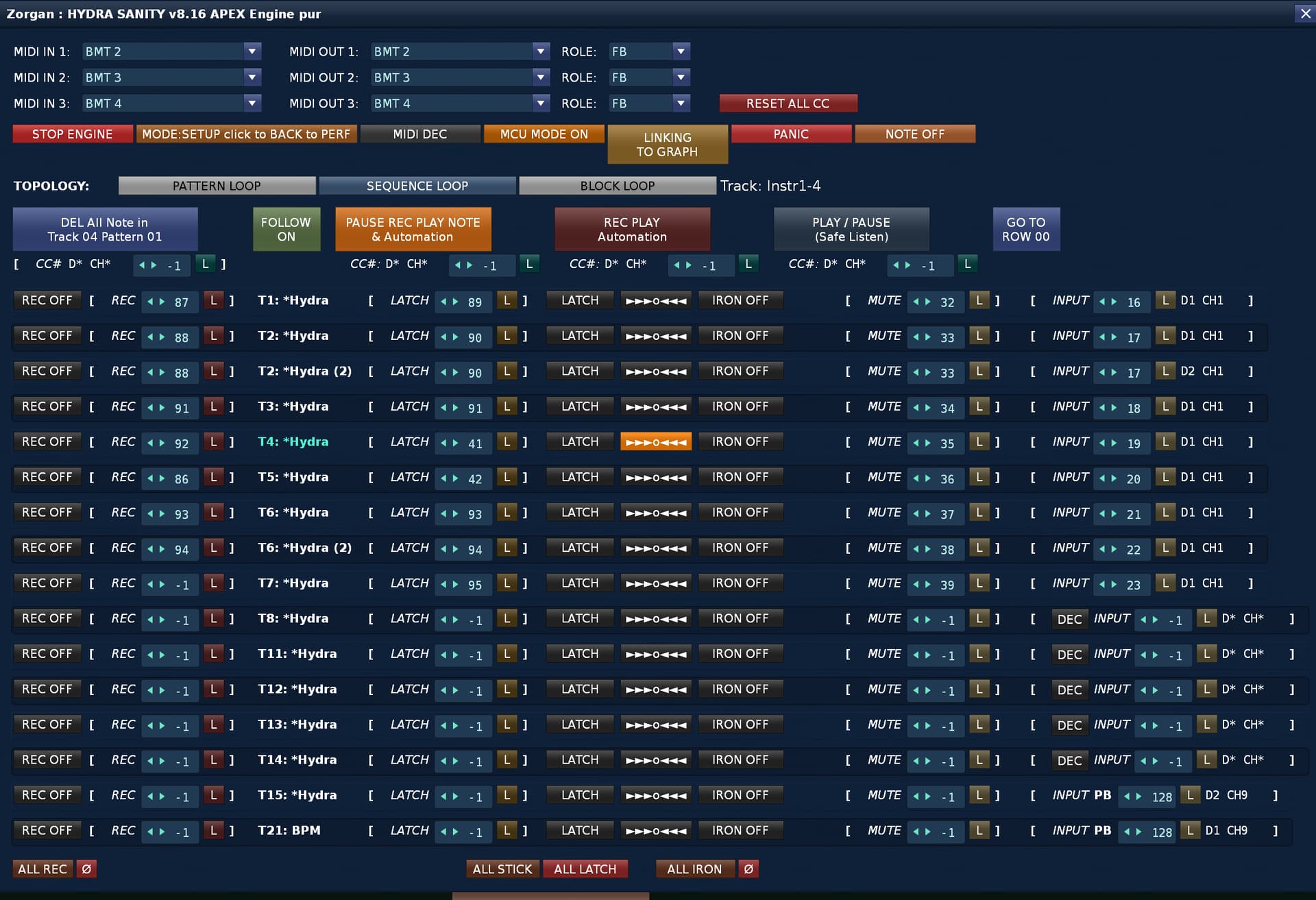
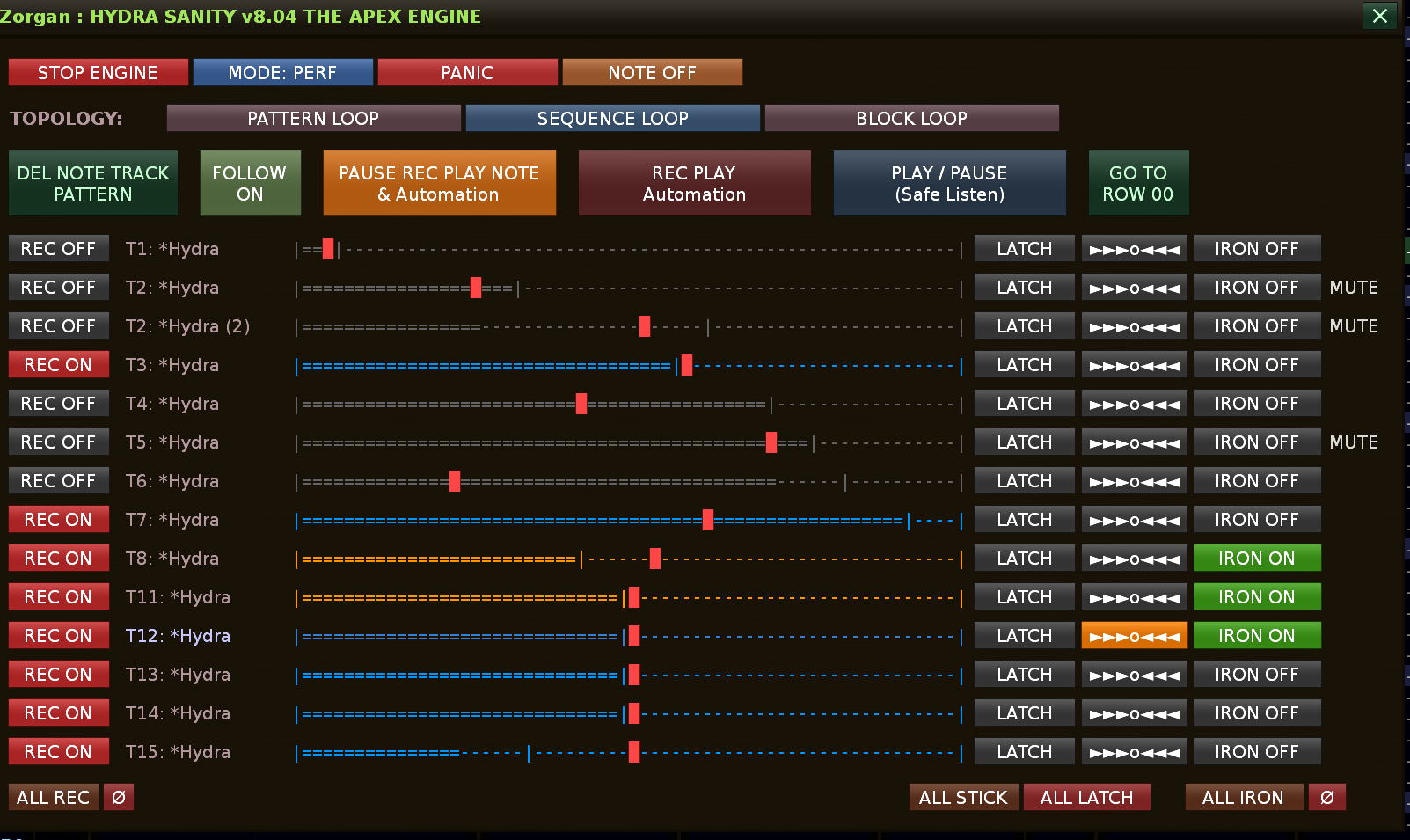
New: Support for 3 MIDI IN - OUT controllers with LED response, MIDI passthrough, support MCU DECODER, Encoder endless, absolute fader
Added full triple direct MIDI I/O in SETUP: MIDI IN 1-3 and MIDI OUT 1-3.
Learn and runtime matching are now device-aware. HYDRA stores the real MIDI input slot together with message type and incoming channel.
Identical controllers with identical CC layouts can now stay separated reliably, as long as Renoise exposes them as distinct MIDI devices or routed ports.
Removed the manual per-device MIDI input channel selector from SETUP. Each MIDI IN slot now listens on all channels, which also keeps MCU Pitch Bend workflows clean.
HYDRA rows now show the learned source path as D# CH#, so device ownership and real incoming channel are visible directly in the row.
Fixed MIDI OUT routing. LED, ring, and state feedback no longer broadcast to every controller. Feedback now goes only to the correct output slot.
Output ROLE routing is now slot-correct: FB stays on the intended feedback device, THRU follows the originating device path, and PANIC still reaches all active output slots except OFF.
This is an example if you don’t have the money to spend on expensive MCU decoders, you buy 3 X-TOUCH MINIs and put them on top of each other, they will present TRACK 1-8 … and for each TRACK in Renoise you have 3 decoders = 3 HYDRA per TRACK …
 Global Settings & Engine Controls


 Transport & Playback Modes

 Topology
 Global Batch Actions (The “ALL” Bar)
 ON)
ON) Per-Hydra Row Controls
 8. COMPLETE CHANGELOG
 HYDRA SANITY – CHANGELOG v7.94 functional Renoise handler in engine Hydra Sanity , color upgrade for text of HYDRA name and select graph for HYDRA automation
 Introduced ZORGAN REC MODE (zorgan_rec_mode)
 GRAPH SELECTION SYSTEM
 GUI & UX
 IRON SYSTEM (SMOOTHING ENGINE)
 AUTO ENTER (
 ENGINE STABILITY
 VOLUME METER FIX
 PERFORMANCE & ENGINE
 VERSION STATUS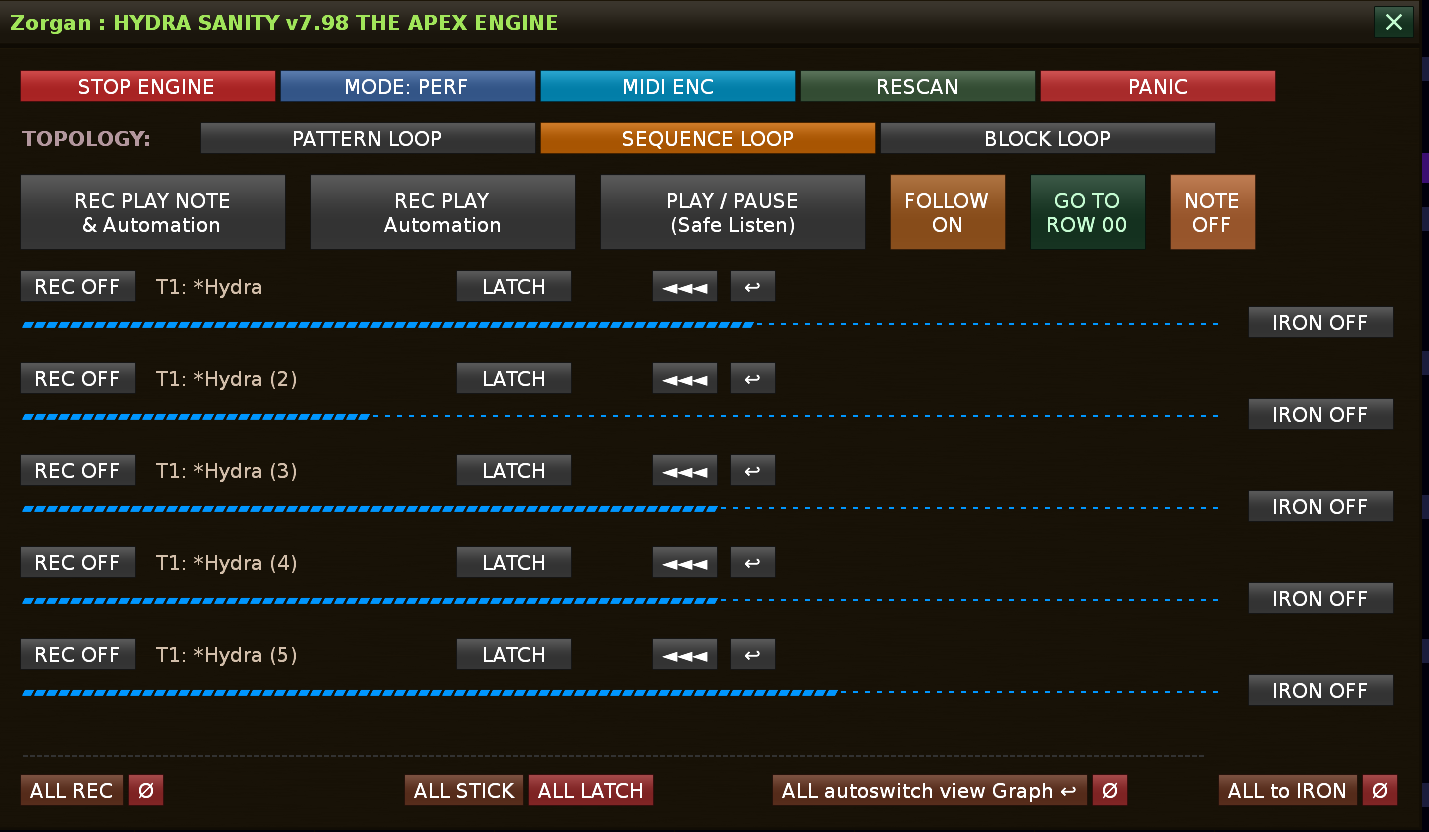



 I just make happy 4x4 house beats like it’s 1997




 Support for 3 MIDI IN - OUT controllers with LED response, MIDI passthrough, support MCU DECODER, Encoder endless, absolute fader