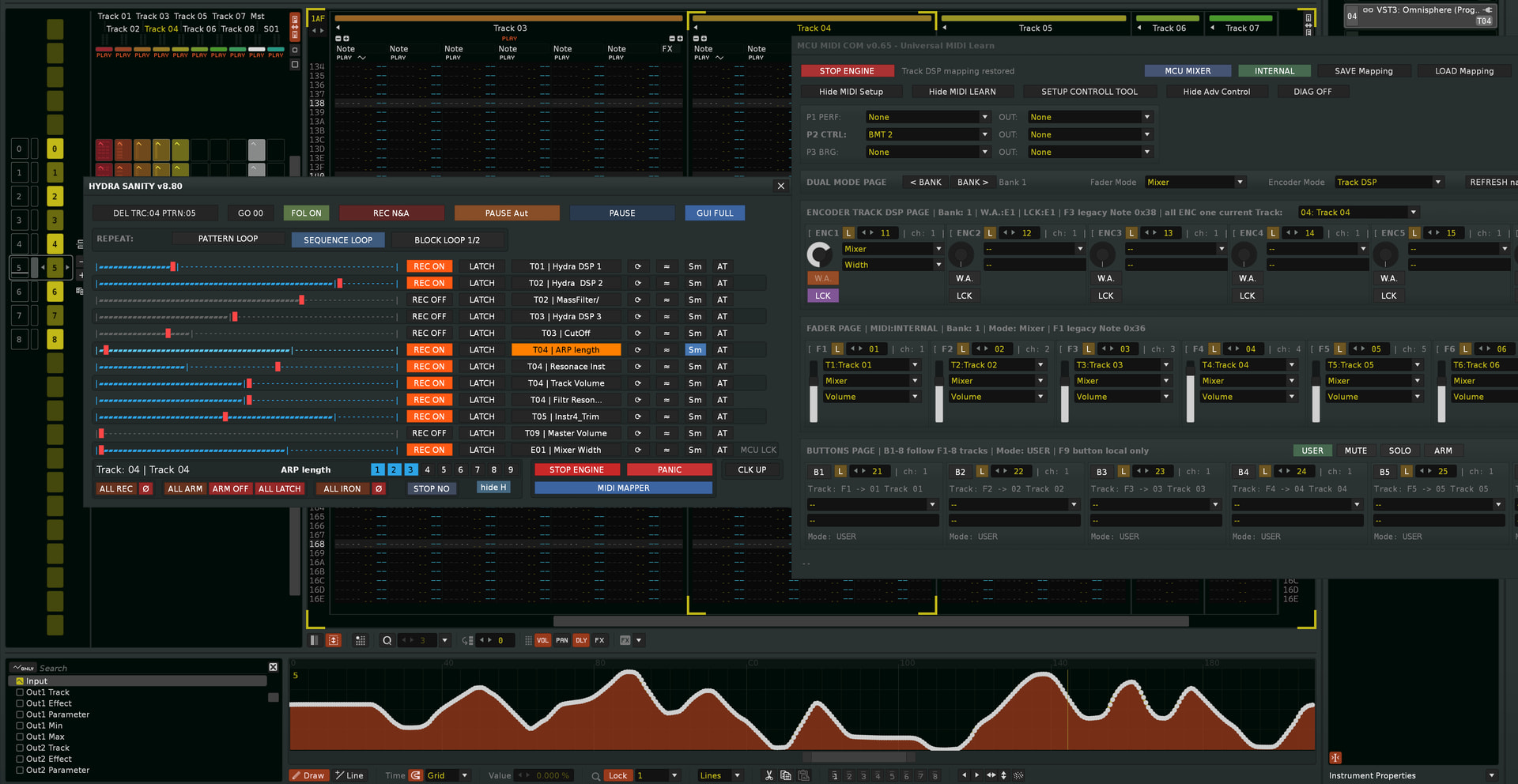
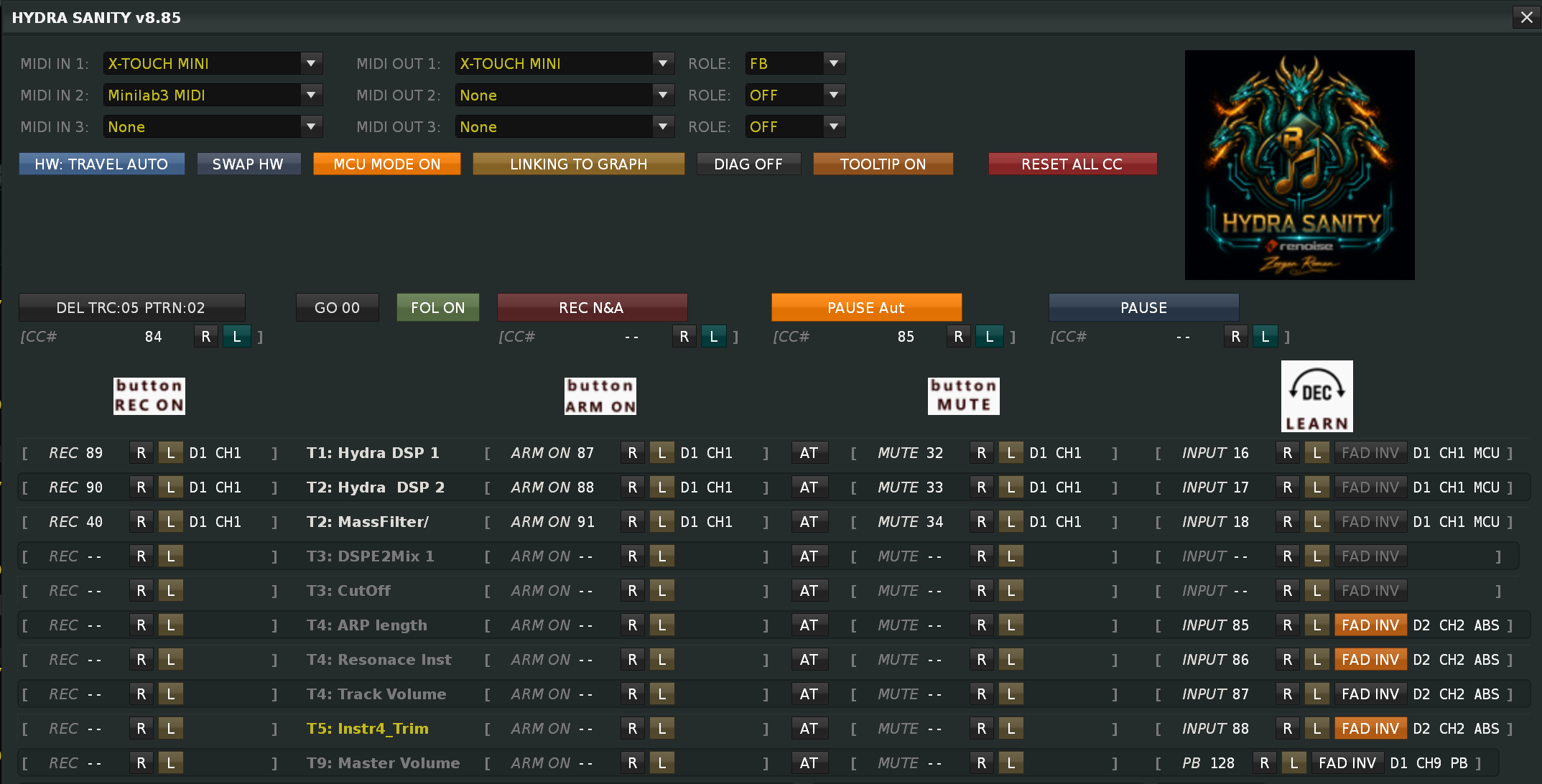
HYDRA SANITY v8.56 -- approved MCU, GUI, Sm and native Renoise Block Loop work & next

HYDRA SANITY v8.71 — Focus Safety Fix Update

Main Fix

1. Renoise DAW Track Focus Safety

Fixed a GUI selection issue that could happen when the user manually switched in Renoise DAW to a track that had no HYDRA DSP and no HYDRA / MCU row assigned to it.

Previously, HYDRA SANITY could keep the last selected HYDRA row internally active even after the DAW focus moved to an unrelated empty track. This could cause later PLAY / PAUSE handling or GUI refresh to restore or refresh the previous HYDRA row track / instrument state.
Now, when the GUI is active and Renoise DAW focus moves to a track without any HYDRA SANITY row ownership, the selected HYDRA / MCU row state is cleared structurally.
The DEL TRACK button also works with Renoise tracks that are not present as HYDRA rows, so normal track-level handling remains available even outside the HYDRA row list.

2. Show GUI MIDI Mapper Safety Fix

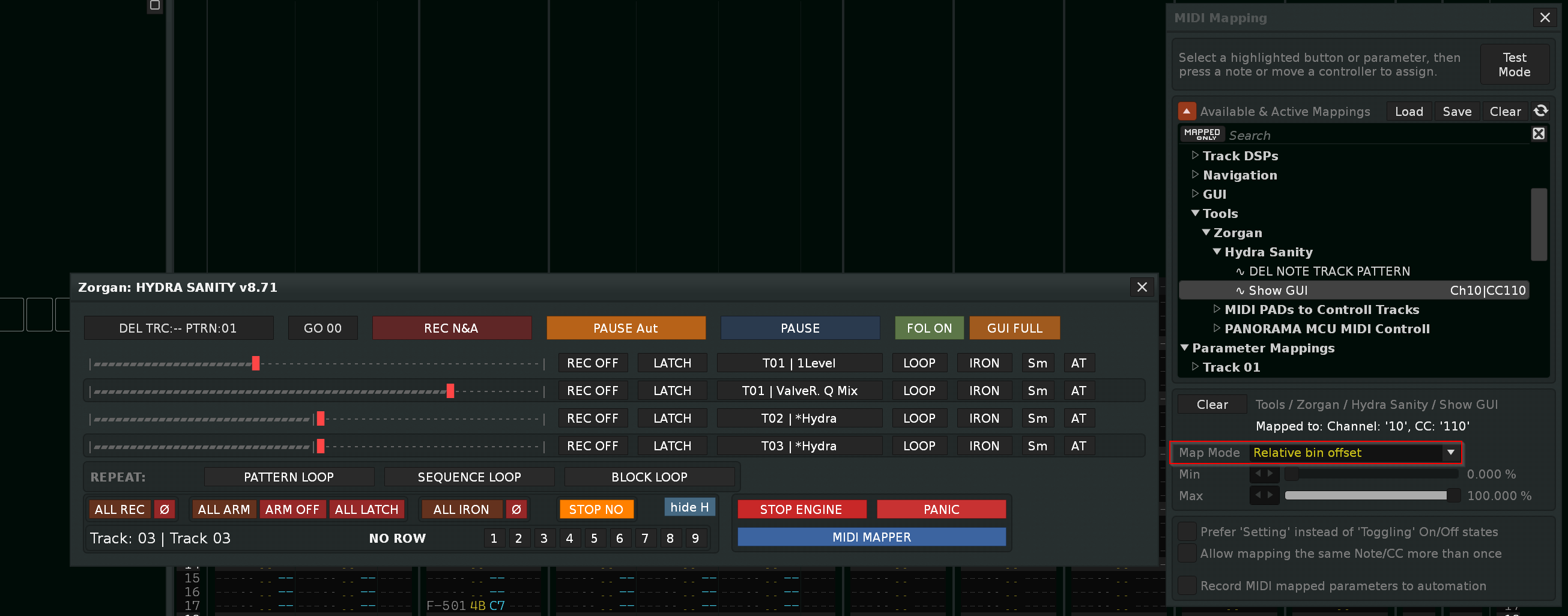
Added protection for the Show / Hide GUI Renoise MIDI Mapper function.

If the user assigns an incorrect MIDI message type in Renoise MIDI Mapper, the Show GUI command could rapidly toggle the HYDRA SANITY GUI on and off.
HYDRA SANITY now detects repeated fast GUI state changes from the MIDI Mapper Show GUI command.
New Behavior: If the Show / Hide GUI state changes 5 times in a rapid burst, HYDRA SANITY automatically removes only this Renoise MIDI mapping:
Tools:Zorgan:Hydra Sanity:Show GUI
This prevents an endless GUI open / close loop caused by a wrong MIDI Mapper setup.
Scope: Only the MIDI Mapper Show GUI path is protected.

Hydra Sanity tool for HYDRA DSP – ZORGAN web ©2019 – 2026©

1 Like

1. BUG FIX — MIDI Learn Persistence / HYDRA Rescan

Problem:
Changing a HYDRA DSP target parameter, adding a new HYDRA DSP, or deleting an existing HYDRA DSP triggered a full runtime rescan. During this rescan, HYDRA SANITY reloaded the older state from song.tool_data and overwrote the current live S.dev configuration. This caused MIDI Learn assignments—typically from Track 03 upward—to be reset.

Fixed:

  • Song persistence is now loaded only once per song session.
  • Runtime rescans preserve the current MIDI Learn configuration in S.dev.
  • Adding, editing, or deleting HYDRA DSP devices no longer resets mappings on other HYDRA rows.
  • New empty HYDRA DSP rows can still appear before their target parameters are configured.
  • Deleted HYDRA DSP states are excluded from the next song save.
  • Ctrl+S correctly stores the current HYDRA SANITY state in song.tool_data.
  • MCU ROW / PANORAMA_E1–E8 configuration remains preserved and compatible with the existing WA/LCK and shadow-row behavior.

2. BUG FIX — Improved ABS / REL MIDI Learn Detection

Problem:
Slow movement of an absolute MIDI fader could pass through value ranges used by relative encoders. MIDI Learn then incorrectly detected the controller as REL1 or REL3 instead of ABS. ( ABS = absolute ENC, FAD )

Fixed:

  • MIDI Learn now evaluates a longer sequence of controller values.
  • Smooth positional movement is correctly recognized as ABS.
  • REL1, REL2, REL3 and MCU modes require a confirmed repeated delta pattern.
  • Ambiguous input remains in Learn mode instead of assigning an incorrect controller type.
  • Slow ABS fader movement no longer triggers false REL1 or REL3 detection.
  • Existing runtime decoding, MCU ROW, MIDI feedback and persistence remain unchanged.

Final verdict HYDRA SANITY 8.72 — new approved baseline now includes

  • fix for MIDI Learn reset when changing HYDRA DSP parameters,
  • preserve mapping when adding or removing HYDRA DSP,
  • correct separation of live S.dev from saved song.tool_data,
  • preserve MCU ROW / PANORAMA_E1–E8,
  • correct saving via Ctrl+S,
  • more accurate resolution of ABS, REL1, REL2, REL3 and MCU,
  • removal of false detection of REL1 and REL3 when moving ABS fader slowly.

AND

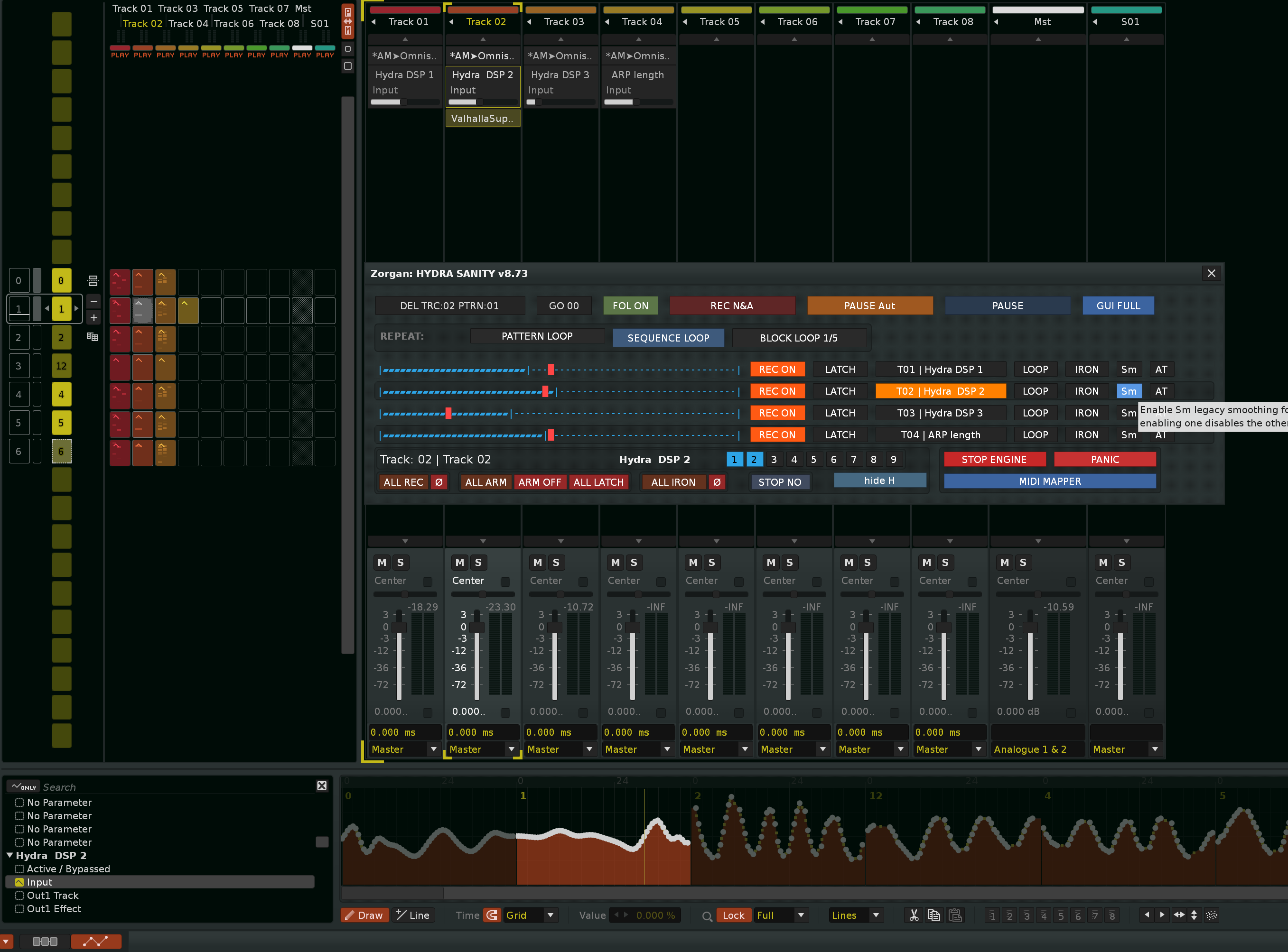
2026-07-12 02_27_16-Zorgan_ HYDRA SANITY v8.71
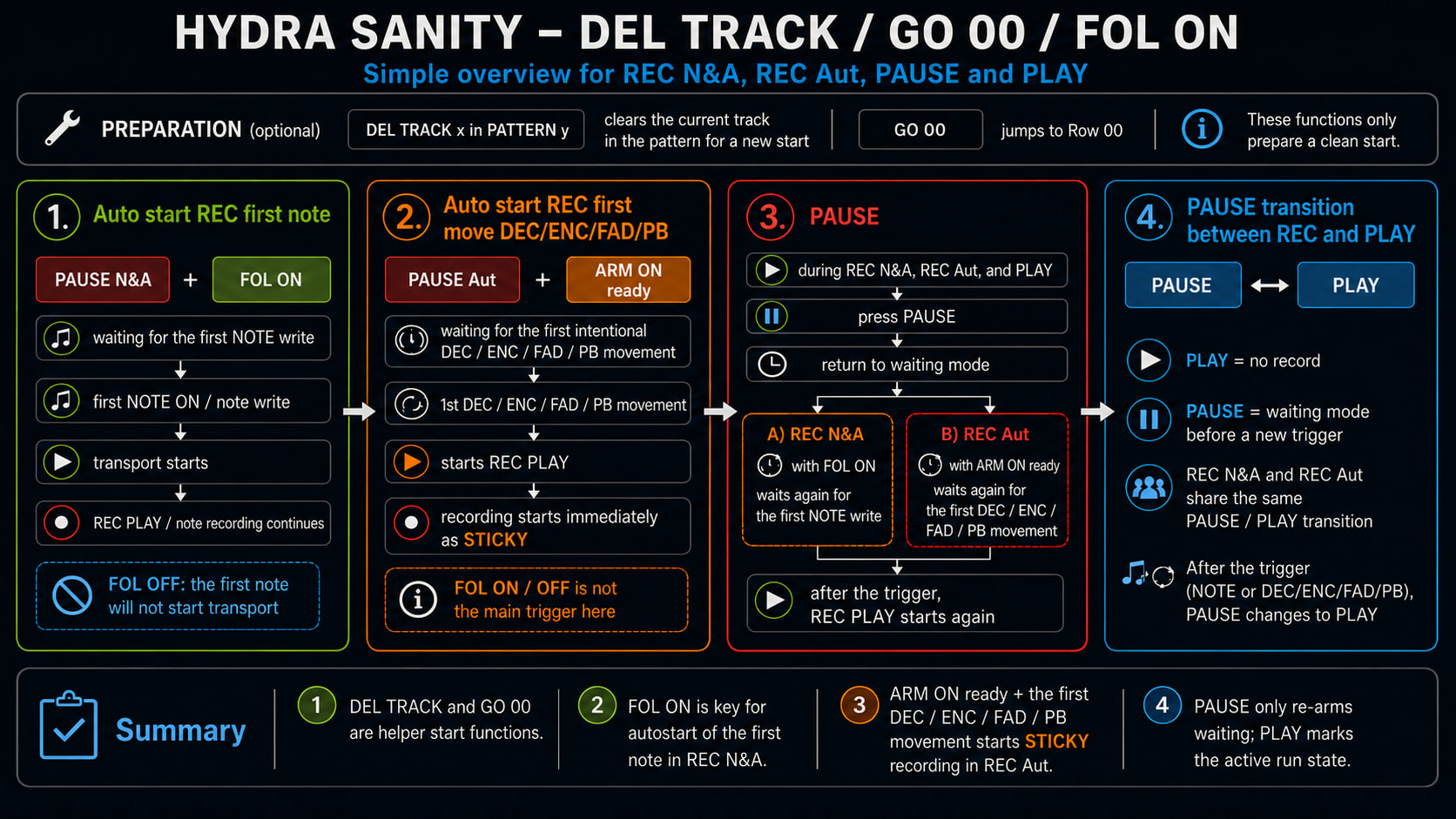
REC N&A = record note and automation graph
PUASE Aut / REC Aut = only record automation graph
PAUSE / PLAY = only PLAY
All 3 buttons are radio type. If I have pause in REC Aut mode, it will transfer to REC N&A pause as well, or to PLAY only.
Conversely, if REC PLAY N&A active, I switch to REC PLAY Aut, it will transfer to PLAY.


ABS fader detection, ENC… works perfectly now.


Button DEL Track :x in Pattern :y with active REC PLAY NOTE&AUTOM. activates PAUSE and waits for the next MIDI NOTE. Production upgrade.


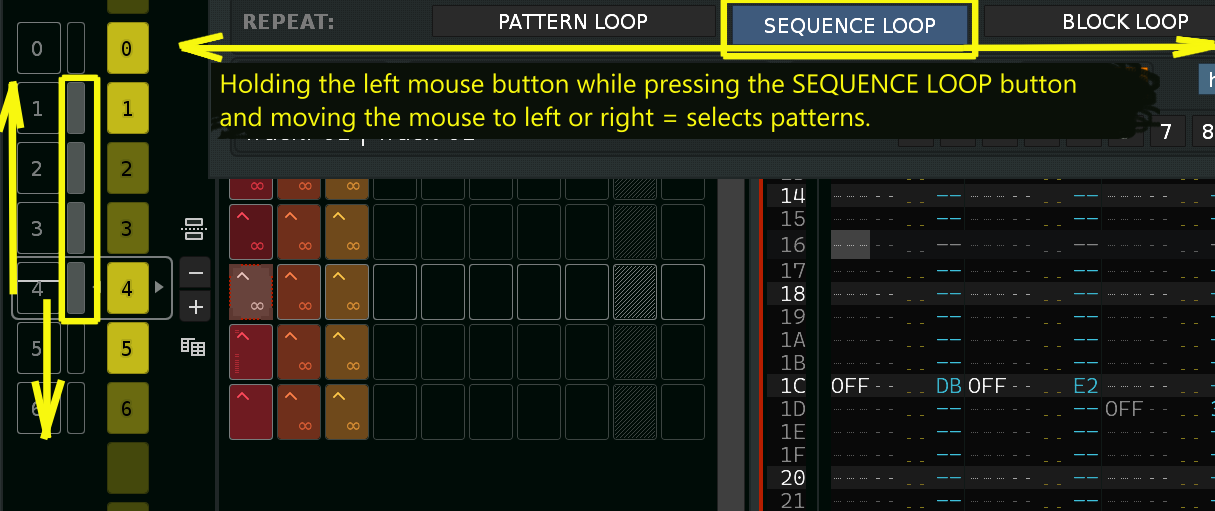
Hold the left mouse button while pressing the SEQUENCE LOOP button and move the mouse left or right to select patterns in the sequence loop.
Always select a lower or higher pattern from the current pattern.

HS_FOL-ON-OFF
Button FOL ON/OFF = follow on / off (Renoise) remains with higher priority setting. Button REC N&A does not activate FOL ON again. More necessary for production than after pausing and reactivating REC N&A before activating FOL ON. Because REC N&A mode is used for writing notes.


The arrangement of buttons in Hydra Sanity’s GUI is once again more productive.

HYDRA SANITY 8.73 — 1 fix bug + new function for button BLOCK LOOP + clean latency engine

Version 8.73 includes:

Fixed bug:

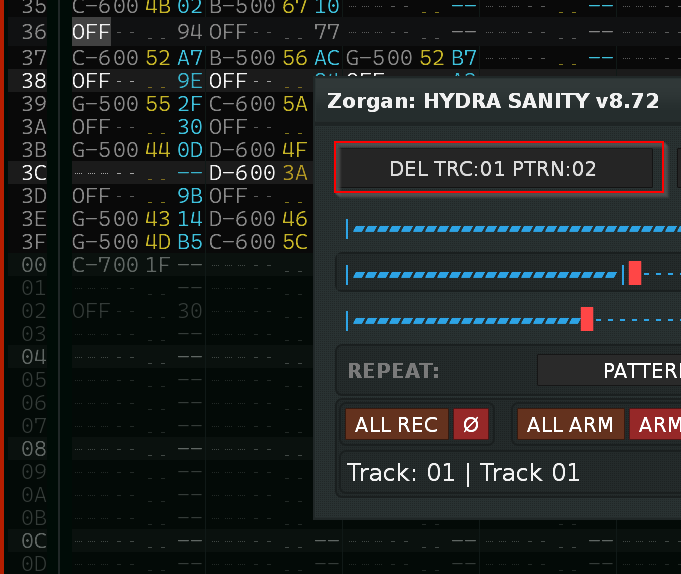
The pattern number display in the DEL TRC x / PTRN y button was originally incorrectly displayed by pattern +1, because 1st pattern = 0 ). The button function worked correctly.

New function for button BLOCK LOOP :

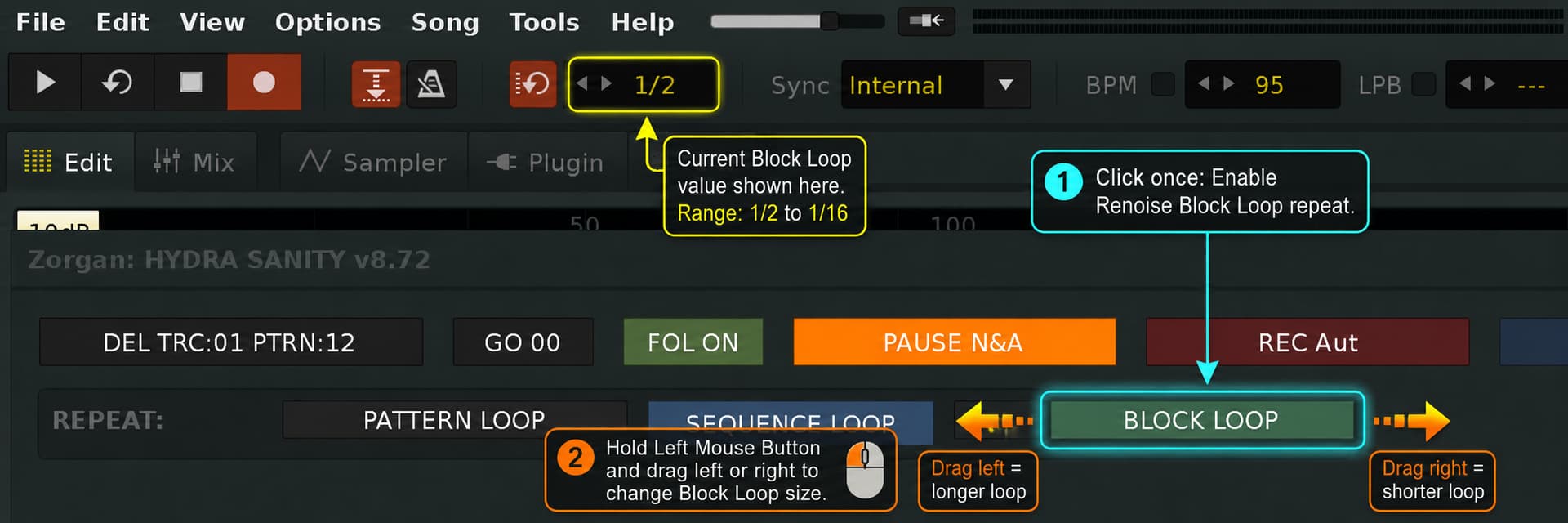
In Hydra Sanity 8.72, the mouse movement was extended to set the selected patterns for SEQUENCE LOOP.
Similarly, in version 8.73, the BLOCK LOOP 1/2 … 1/16 is extended with the same form of control:

  • short click switches ON/OFF
  • holding the left button and moving the mouse changes the range from 1/2 to 1/16
  • each step corresponds to 10 px
  • the initial value is always read directly from Renoise
  • drag Block Loop activates
  • the applied value is back-verified from Renoise
  • the button text is updated according to the actual value


    Version 8.73 better latency and lower CPU usage.
    The Hydra Sanity tool brings further lightweight demands on the engine operation.

HYDRA SANITY v8.73 — Performance & Timing Fixes

  • Improved MIDI and OSC queue stability during long continuous controller sessions.
  • Reduced app_idle workload by skipping empty queues and inactive runtime paths.
  • Optimized MIDI input, MCU/PANORAMA and automation-writer processing to handle only pending data.
  • Reduced repeated HYDRA device and parameter resolution inside realtime processing.
  • Improved timer discipline for button-hold detection and other delayed GUI actions.
  • MIDI and OSC events remain budgeted across idle frames to prevent large input bursts from blocking the engine.
  • Reduced unnecessary GUI refreshes; unchanged controls and rows are no longer redrawn.
  • Preserved responsive MIDI Learn, HYDRA autoswitch, MCU ROW updates and simultaneous automation-graph writing under sustained input.
  • Improved BLOCK LOOP interaction with direct Renoise state readback and mouse-drag loop-size adjustment.
  • Minor GUI layout and control-label refinements.


After much effort and sleepless nights, we managed to achieve a stable automation graph recording while maintaining a clean audio stream signal even when overwriting the original automation graph.
It looks like Hydra Sanity v8.74 has reached the state of a truly tuned engine that doesn’t waste resources unnecessarily.
For Hydra Sanity, BPM higher than 213 and LPB 31 are no longer a problem.

Stable audio stream and simultaneous writing of multiple graphs

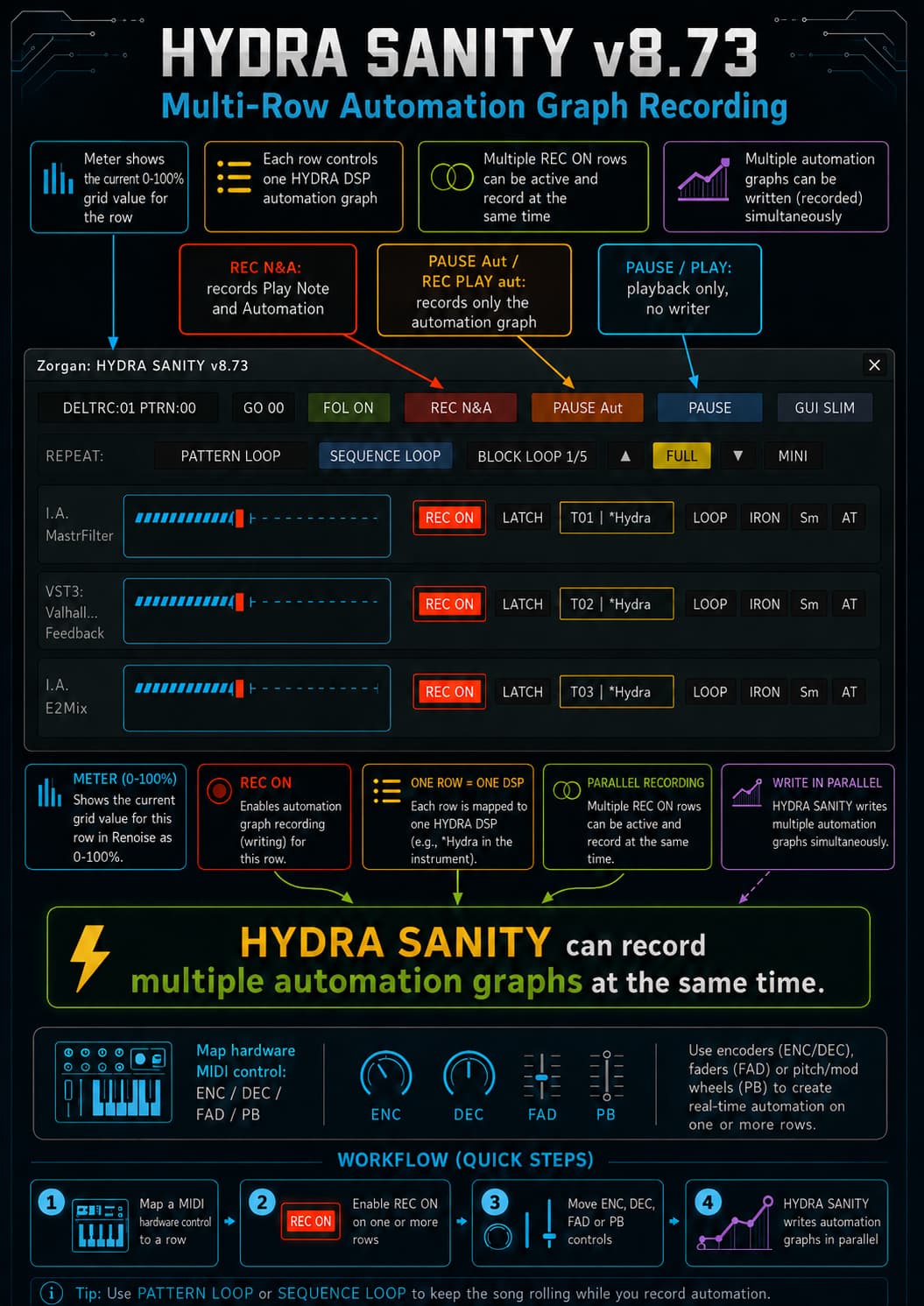
HYDRA SANITY uses a separate, time-controlled writer state for each active automation graph. Incoming MIDI data is first stored in the input shadow buffer, while the writer is the sole owner of the actual parameter value in Renoise. Thanks to this, direct MIDI input does not drag with the automation player and does not cause short jumps or audio glitches. A maximum of one fresh point is written to the graph for each sequence + row, further MIDI values ​​in the same row only smoothly update the live audio parameter. Before the playback position, the writer maintains a dynamic flat guard area between the current point and the future guard, so that Renoise cannot start interpolating to the old point of the graph. Exceeded old points are removed only after a safe confirmation of the new point and shelter. Individual HYDRA rows have their own MIDI input, commit and shelter shadows and are processed via a common budgeted writer queue. This allows you to control and record multiple automation graphs simultaneously, without one parameter blocking the others or a single dense MIDI stream cluttering Renoise with unnecessary points.

cherry New function button ARM ON

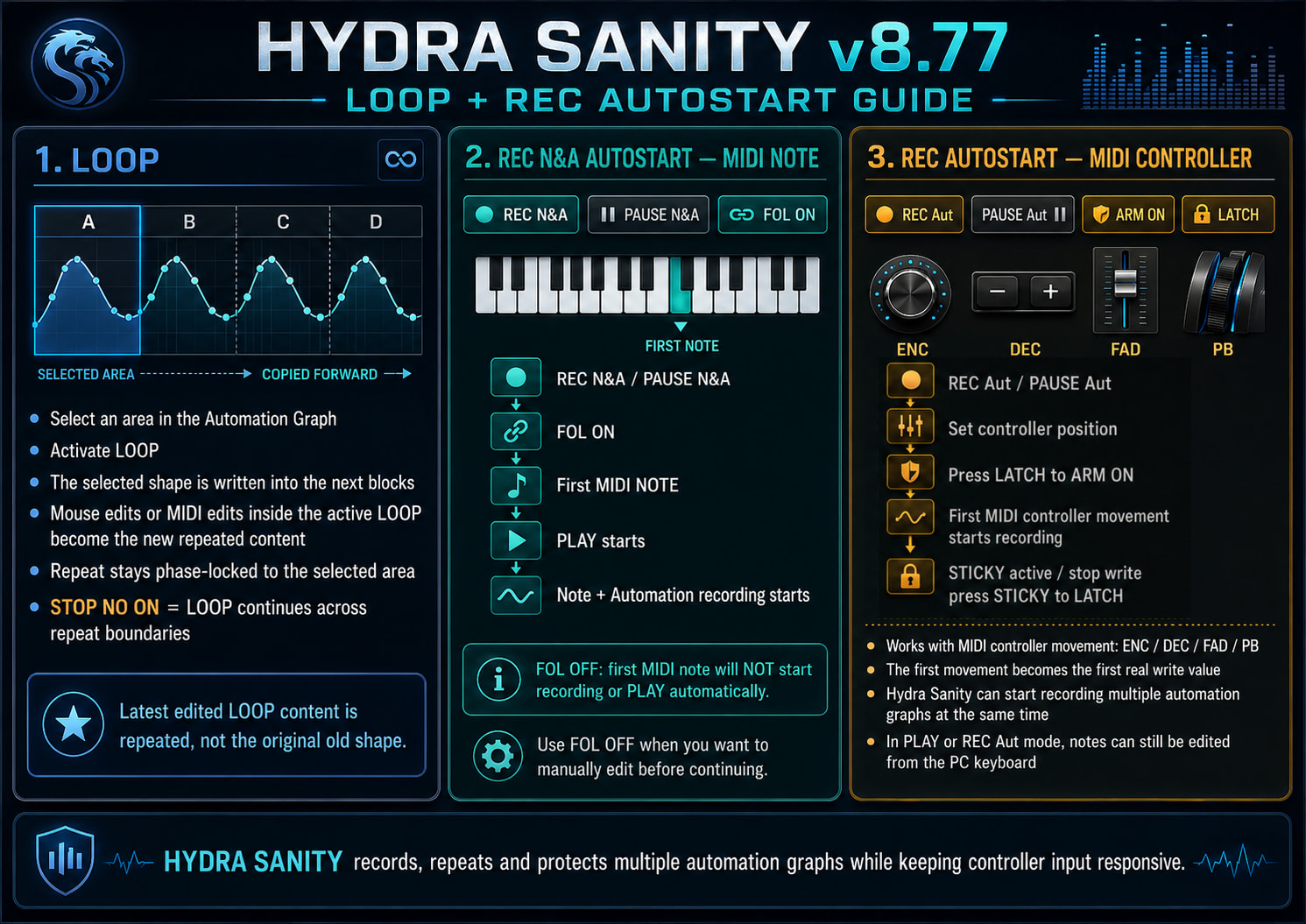
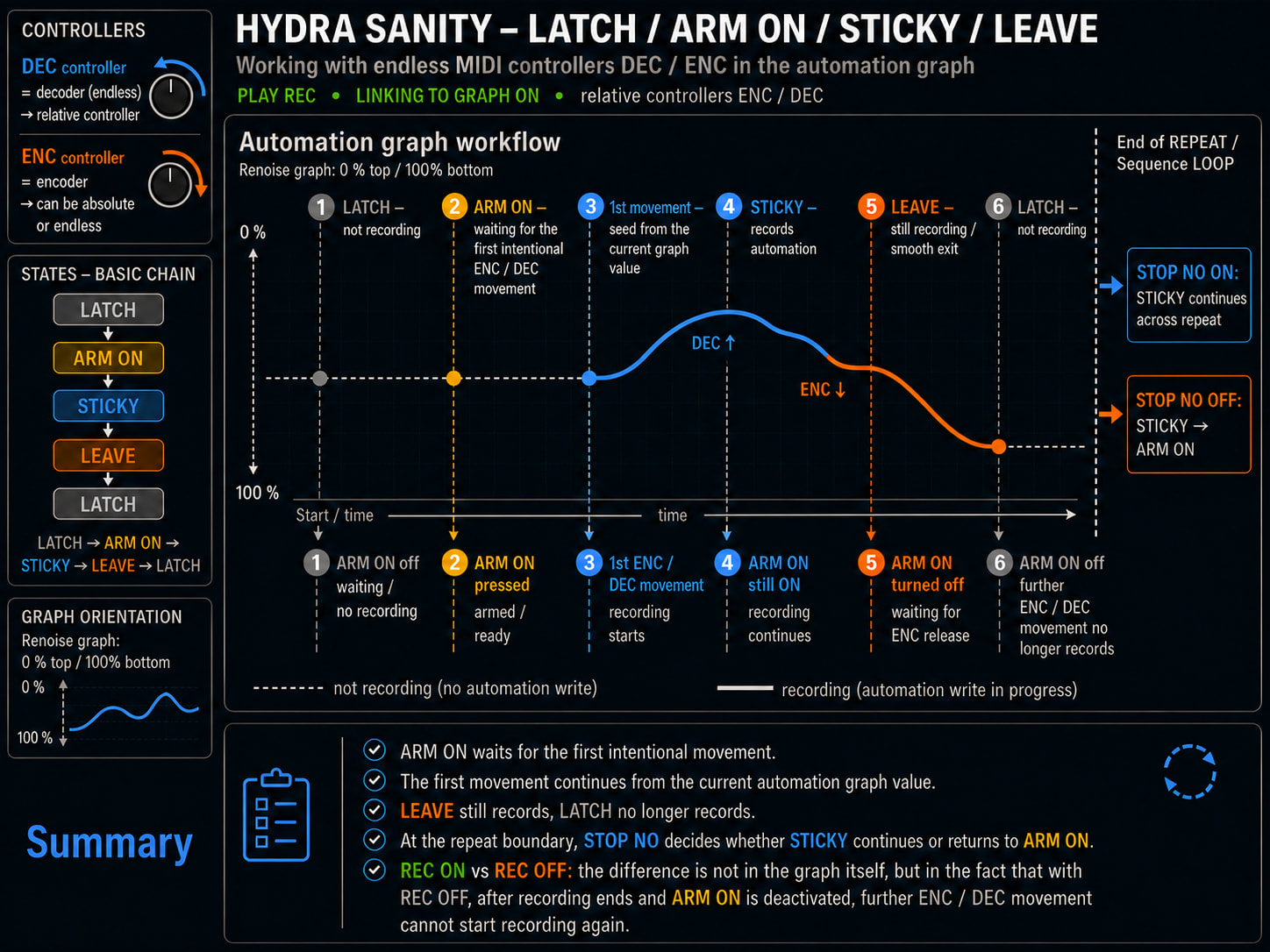
If I want to activate STICKY and I am in PAUSE mode ( N&A (note&automation graph) or only A (automation graph) … ARM ON waits for the first movement of the assigned ENC/DEC/FAD/PB (encoder, decoder, fader, pitchband) … at the first movement it deactivates PAUSE and starts writing to the automation graph.

so the H.S. instrument can start recording from the first played note from PAUSE and at the same time it can also start recording via ARM ON from the first incoming MIDI CC ENC / DEC / FAD / PB.

Example of use:
I have a PAUSE REC Automation graph ( button REC Aut )

  1. I set ENC / DEC / FAD / PB to the value from which I want to start recording to the automation graph.
  2. On the given hydra row I activate ARM ON ( either MIDI button or velocity PAD ).
  3. As soon as I move MIDI ENC / DEC / FAD / PB, PAUSE is deactivated and recording starts.

upgrade function for button STOP NO … (v8.75)

If you deactivate STOP NO after the end of a LOOP pattern, sequence, or block, the STICKY mode ends in ARM ON = it stops writing to the automation graph and waits for the next MIDI DEC, ENC, FAD, PB movement.

1. Original issues that were fixed

At high BPM and LPB, the writer could not return to each Renoise row in time.
Parts of the original automation graph could remain in the fresh MIDI recording.
Old subgrid points and points created by another instrument sometimes got mixed in with the new recording.
Renoise could immediately create unwanted interpolation between the new point and the nearest old future point.
Cleanup only worked between points processed in a single writer pass and did not reliably follow through multiple delayed passes.
A short cleanup for only the current playback row could not clean up the entire section that had been crossed.
Longer gaps between fresh MIDI points could be confirmed as completed even though the old graph was not fully removed.
Synthetic shelter could overlap the original future automation points and change the subsequent release interpolation.
Some older auxiliary writer mechanisms reinserted values ​​from the old graph:
a common high-load delay was incorrectly evaluated as SEEK,
recovery used the values ​​of the original graph,
old point times were overwritten with new values ​​instead of being removed,
LATCH could read the target value directly from a dirty lane,
STICKY used a parallel dense forward repaint,
graph-link could re-read the old lane value into the MIDI runtime.
Rolling shelter could accidentally save its own auxiliary HYDRA points as the original graph and later restore them.
On pattern transitions, the writer runtime would reset unnecessarily.
The first rows of the next pattern could be written simultaneously by both the shelter and the old boundary repaint.
LATCH target contained only the row number without a sequence, so it could be evaluated prematurely across the pattern boundary.
When performing song repeat and transitioning to the next pattern, short spikes or stairs were created at the beginning of the graph.
STICKY and LATCH were not consistent on pattern and sequence boundaries at high BPM/LPB.
On release, teeth or incorrect slope could occur between the last MIDI point and the preserved future graph.

2. Current behavior

Fresh MIDI writing now takes ownership of the entire actually overwritten time slot.
Old, manually created and irregular subgrid points within this slot are physically removed.
Writer connects between multiple idle passes via the last actually committed MIDI graph commit.
Renoise first gets a safe current value and a forward guard plane; destructive cleanup occurs only afterwards.
A dynamic flat shelter corridor is maintained in front of the current playback position:
current anchor and future guard have the same value,
there are no old points left between them,
therefore Renoise interpolates horizontally and cannot approach the old future point prematurely.
The shelter length is automatically adjusted to the BPM and LPB.
Original future points covered by the shelter are safely preserved.
Synthetic guard is never used as the actual endpoint of release interpolation.
After release, the original future graph is restored and the shelter guard is removed.
Release interpolation uses:
the last truly committed MIDI point A,
the closest truly preserved future point B.
LATCH, STICKY and LEAVE use separate MIDI input, confirmed commit and shelter/guard shadows.
Old recovery and parallel repaint paths can no longer re-inject the original graph into fresh writing.
Simple writer delays under heavy load are no longer considered manual SEEKs.
Graph-link cannot load old automation values ​​back into MIDI runtime while writer ownership is active.
Pattern and sequence boundaries now behave as an unbroken continuation of a single writer segment.
MIDI input shadow, confirmed commit shadow and shelter shadow survive normal pattern transitions.
Fresh MIDI samples are not lost during STICKY wraps.
LATCH target is now specified by sequence + row, so it works correctly across pattern boundaries.
Pattern 0 during song repeat and transitions to other patterns are consistent in STICKY and LATCH modes.
Writer remains the sole owner of the runtime parameter during active WRITE.
One graph sample is stored at most once for each sequence + row, while the audio runtime still uses the latest MIDI value.
The original practical limit around BPM 213 / LPB 12 has been exceeded.
The current implementation has been tested to be stable at BPM 213 / LPB 31.

The result is consistent fresh MIDI automation writing without returning to the old graph, without unwanted interpolation to the original points and without breaking continuity at pattern boundaries.

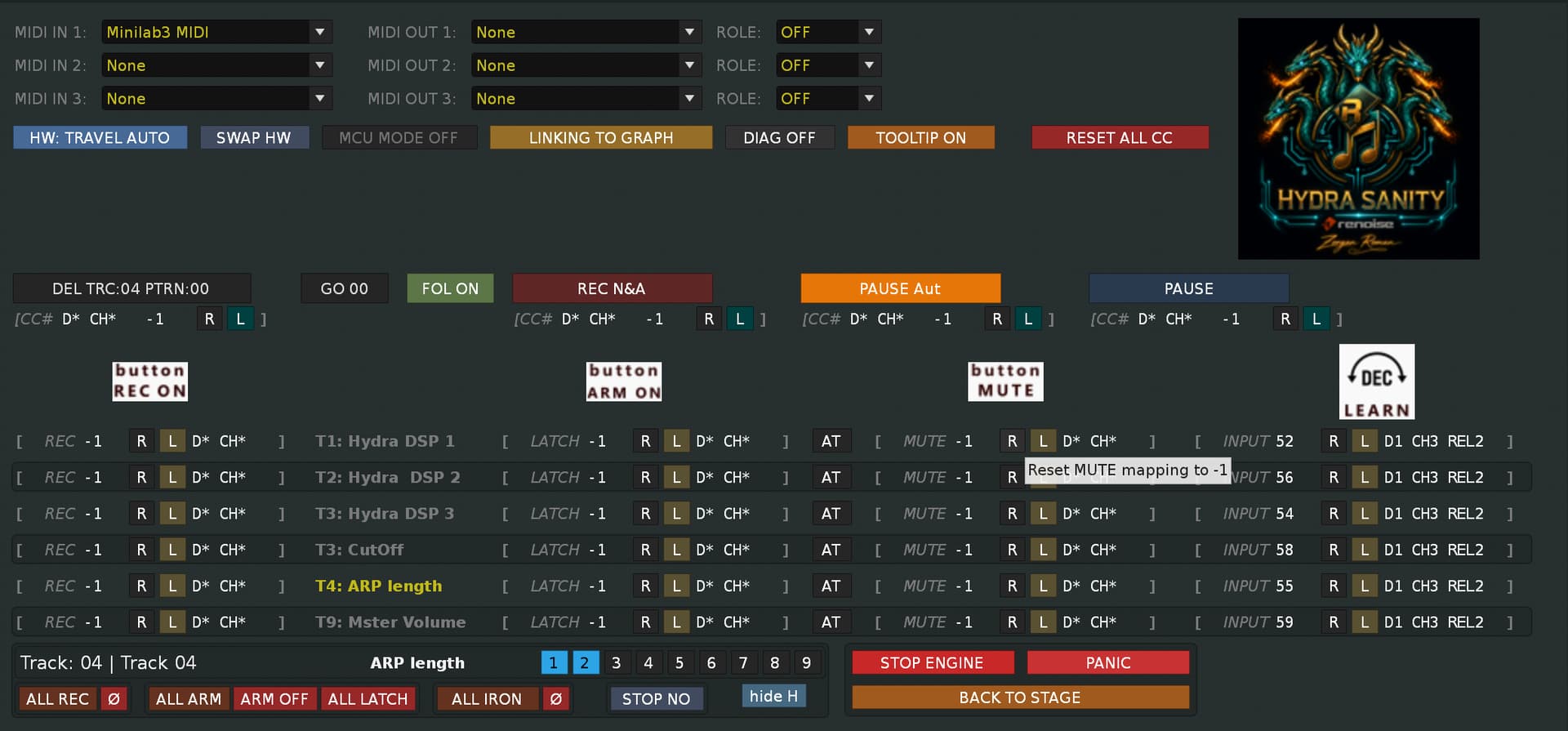
GUI MIDI MAPPER

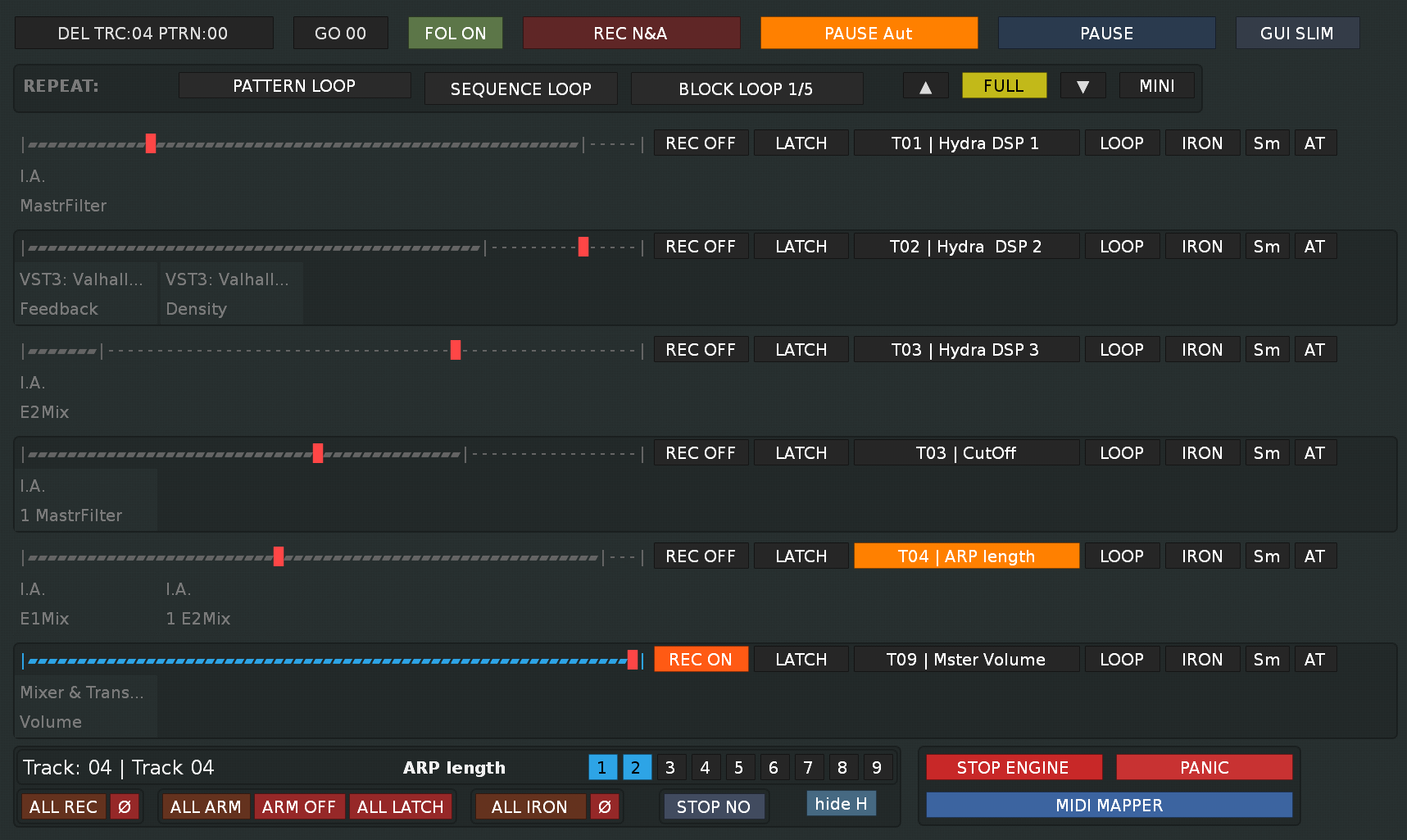
GUI SLIM

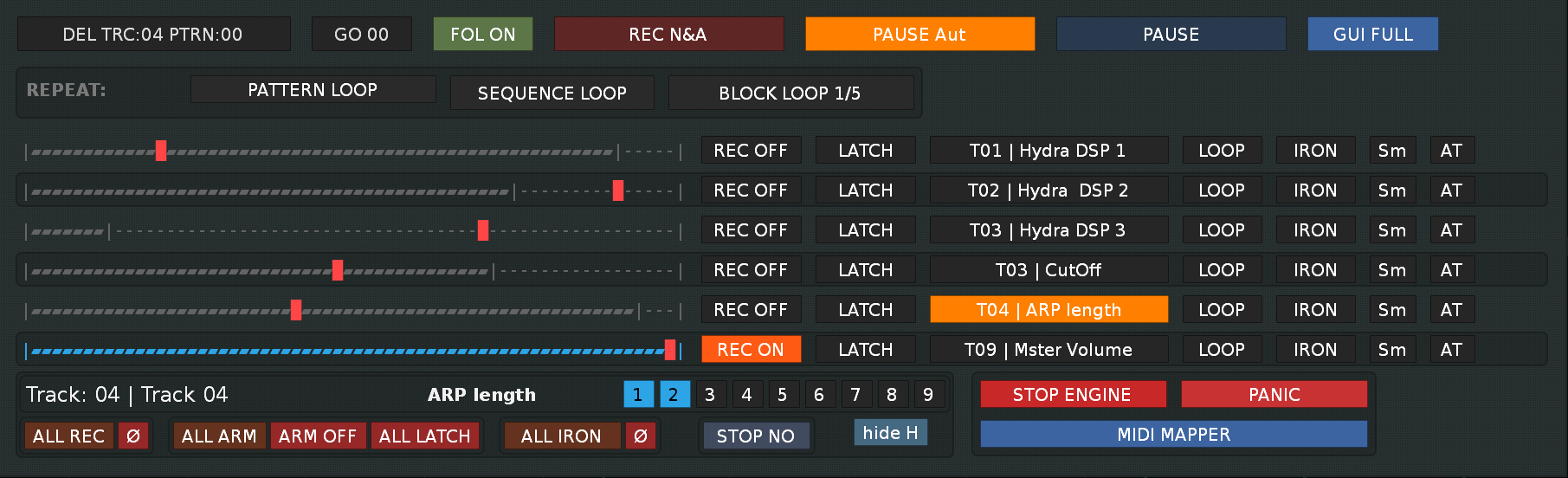
GUI FULL

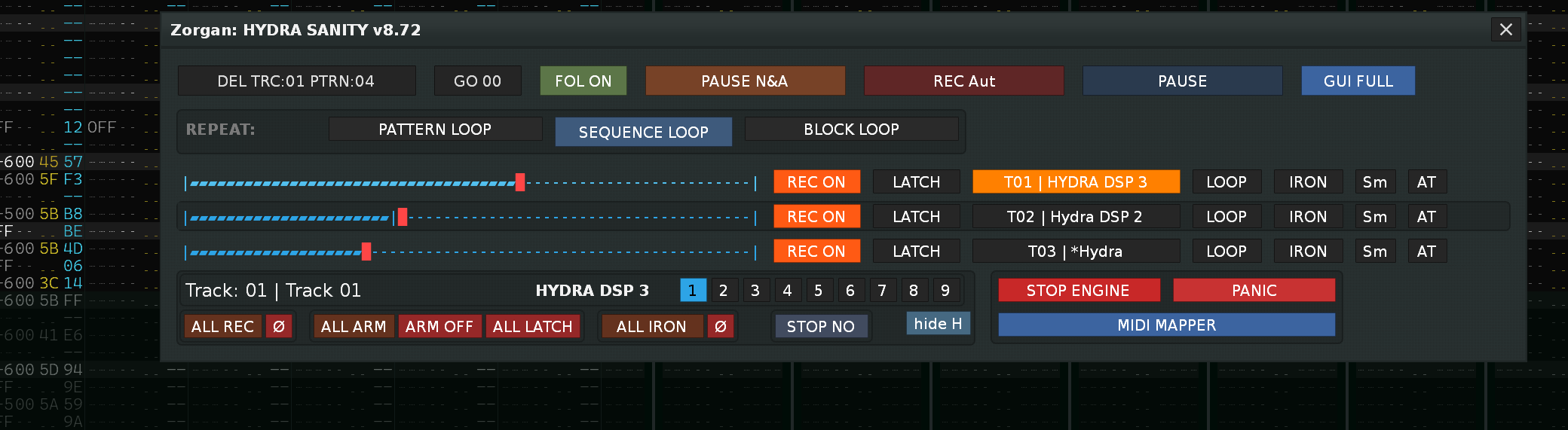
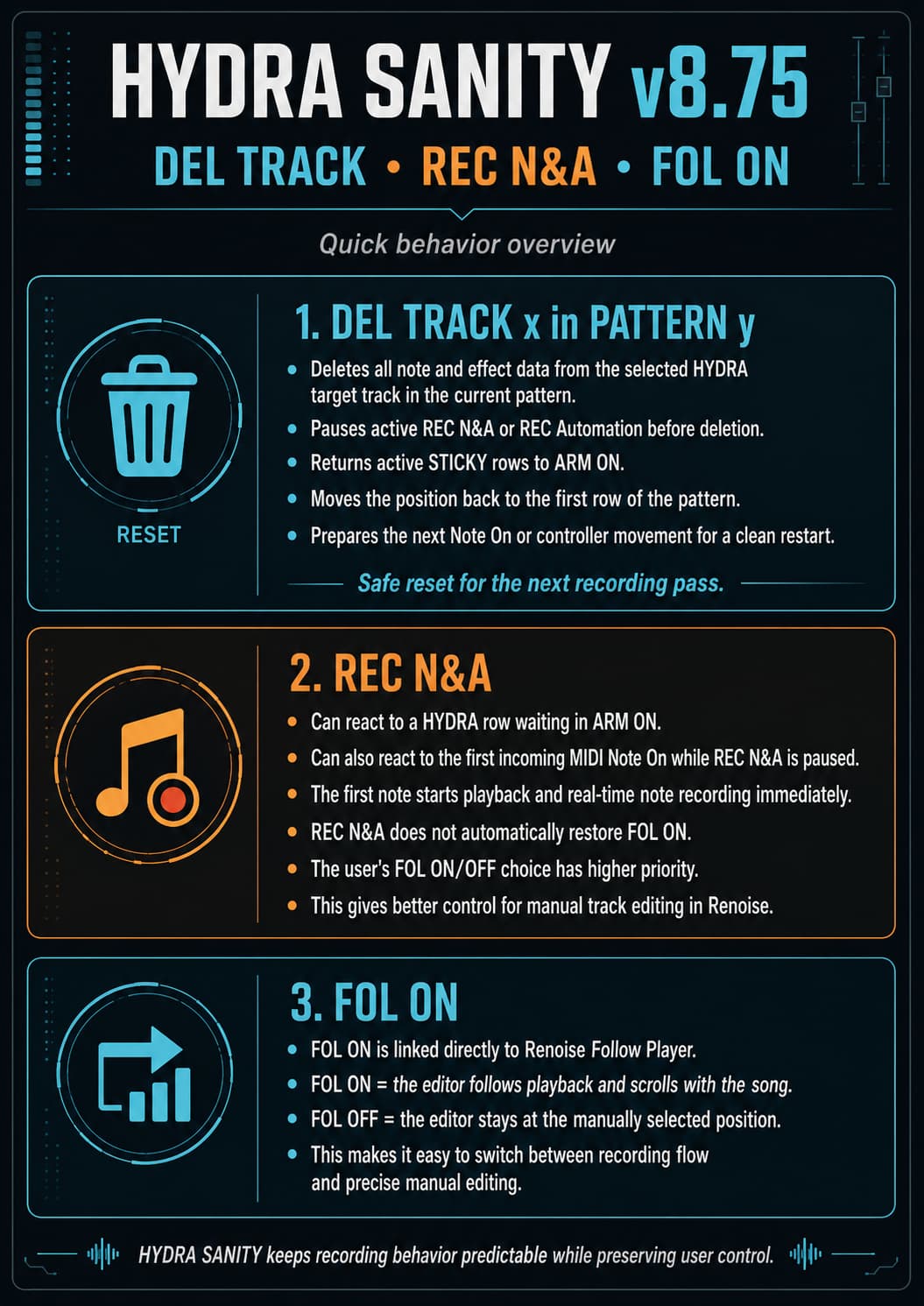
HYDRA SANITY — DEL TRACK / REC N&A / FOL ON

DEL TRACK x in PATTERN y deletes all note and effect data from the selected HYDRA target track in the current pattern.

The operation is handled as a protected recording reset:

  • active REC N&A or REC Automation is paused before deletion,
  • active STICKY rows are returned to ARM ON,
  • the track data is cleared,
  • the position returns to the first row of the pattern,
  • the next Note On or controller movement can safely restart recording.

This prevents the automation writer from continuing during pattern deletion and keeps the next recording pass clean and predictable.

REC N&A can be activated in two ways:

  • by a HYDRA row waiting in ARM ON,
  • by the first incoming MIDI Note On while REC N&A is paused.

The first note starts playback and real-time note recording immediately.

REC N&A intentionally does not force the FOL ON button back on. The user’s FOL ON/OFF setting has higher priority and is preserved. Real-time note recording normally benefits from active Follow Player scrolling, but keeping this choice manual gives better control when editing tracks directly in Renoise.

FOL ON is directly linked to Renoise’s native Follow Player state:

  • FOL ON = Renoise follows and scrolls with the playback position,
  • FOL OFF = the editor remains at the manually selected position.

This makes it possible to record normally with scrolling enabled, or temporarily disable scrolling for precise manual editing without HYDRA SANITY overriding the user’s choice.

New user manual :

:dragon: HYDRA SANITY v8.76 — Ready to Work

HYDRA SANITY is a real-time MIDI control layer for Renoise HYDRA DSP automation.
It records, rewrites, repeats, repairs and protects multiple automation graphs while keeping controller input responsive and avoiding unnecessary automation-point spam.

New in v8.76: DEL TRACK x in PATTERN y is now a protected recording reset. It pauses the active recording workflow before deletion, returns active STICKY rows to ARM ON, clears the current target track, returns to Row 00 and preserves the user’s FOL ON / OFF choice.


Start here — first five minutes

  1. Add a HYDRA DSP device to every Renoise track you want to control.

  2. Route each HYDRA DSP output to the required instrument, mixer, DSP or plugin parameter.

  3. Open:

    Tools > Zorgan > HYDRA SANITY

  4. Enter MIDI MAPPER.

  5. Select the correct MIDI IN device and learn the row INPUT, REC and LATCH controls you need.

  6. Press BACK TO STAGE.

  7. Choose a recording workflow:

    • REC N&A — notes and automation,
    • REC Aut — automation only,
    • PLAY — safe listening.
  8. On each row, use either:

    • REC ON for direct live writing, or
    • ARM ON to wait for the first mapped controller movement.
  9. Move the mapped ENC / DEC / FAD / PB control.

The three rules that matter most

Rule Meaning
REC ON Direct permission for normal live automation writing.
ARM ON Waits for the first valid mapped controller movement, then enters STICKY. A separate REC ON mapping is not required.
FOL ON / OFF Directly controls Renoise Follow Player. HYDRA SANITY preserves the user’s choice and does not force it ON.

1. Quick recording workflows

Notes and automation — REC N&A

Use REC N&A when you want Renoise note recording and HYDRA automation writing in the same pass.

HYDRA SANITY:

  1. resolves the active HYDRA or PANORAMA target row,
  2. selects the matching Renoise track,
  3. opens the Pattern Editor,
  4. enables the note-and-automation recording workflow.

When REC N&A is paused, recording can resume in two ways:

Trigger Result
First incoming MIDI Note On Starts playback and real-time note recording.
First movement on a row waiting in ARM ON Resumes the same REC N&A mode, activates STICKY on that row and uses the same controller value as the first automation write value.

Other rows waiting in ARM ON remain armed until their own mapped controller is moved.

Automation only — REC Aut

Use REC Aut when you want to write automation without recording notes into the Renoise pattern.

From PAUSE Aut, the first valid movement from an ARM ON row:

  1. resumes playback in REC Automation,
  2. changes that row to STICKY,
  3. uses the same decoded MIDI value as the first real graph-write input.

Safe listening — PLAY

Use PLAY / PAUSE Safe Listen when you want to listen without opening a new automation-write pass.

PLAY-only IRON and Sm can still process an existing automation graph while REC ON is disabled.


2. DEL TRACK x in PATTERN y

DEL TRACK x in PATTERN y is a fast retry tool for the current pattern.

What it deletes

It clears:

  • note-column data,
  • effect-column data,

from the selected HYDRA target track in the current pattern.

It does not delete the automation graph and it does not remove the Renoise track itself.

When no HYDRA row owns the current selection, the current Renoise note track can still be used as the target.

Protected reset sequence

A successful DEL action performs this sequence:

  1. Validates that the target is a note-capable Renoise track.
  2. If REC N&A is active, enters PAUSE N&A.
  3. If REC Aut is active, enters PAUSE Aut.
  4. Safely changes all currently active STICKY rows to ARM ON.
  5. Clears note and effect data from the current target track and pattern.
  6. Returns edit and playback position to Row 00.
  7. Re-arms the first-note detector for PAUSE N&A.
  8. Preserves the existing FOL ON / OFF state.
  9. Prepares the next Note On or mapped controller movement for a clean restart.

If the target cannot be cleared, the transport mode and STICKY state are not changed.

Important: DEL TRACK is a performance helper, not a replacement for Renoise Undo.

What happens next

Current pause mode Next input
PAUSE N&A The first MIDI Note On resumes note + automation recording.
PAUSE N&A with an ARM ON row The first mapped controller movement resumes REC N&A and enters STICKY on that row.
PAUSE Aut with an ARM ON row The first mapped controller movement resumes REC Automation and enters STICKY on that row.

3. FOL ON and Renoise Follow Player

FOL ON is directly linked to Renoise Follow Player.

HYDRA state Renoise behavior
FOL ON The Pattern Editor follows playback and scrolls with the current song position.
FOL OFF The editor remains at the manually selected position while playback continues.

Real-time note recording is normally easiest with FOL ON, because the active recording row stays visible.

HYDRA SANITY intentionally does not turn FOL ON automatically when REC N&A starts, pauses or resumes. The user’s FOL setting has higher priority because forced scrolling can interrupt manual editing of tracks, notes and effect columns in Renoise.

The rule is therefore simple:

  • FOL ON remains ON until the user changes it.
  • FOL OFF remains OFF until the user changes it.
  • DEL TRACK preserves the same state.

4. Installation and opening the GUI

Install

  1. Download the .xrnx package.

  2. Drag the .xrnx file into Renoise.

  3. Confirm installation.

  4. Open:

    Tools > Zorgan > HYDRA SANITY

The monitoring engine starts when the GUI is opened.

Recommended keyboard shortcut

Assign:

Preferences > Keys > Global > Hydra Sanity > Show GUI

A keyboard shortcut is the safest way to open and close the tool.

Optional native Renoise MIDI mapping

You can map a real hardware button to:

Tools > Zorgan > Hydra Sanity > Show GUI

This mapping belongs to Renoise native MIDI Mapping, not to the internal HYDRA SANITY MIDI MAPPER.

Do not assign a continuous source such as:

  • Mod Wheel CC1,
  • Pitch Bend,
  • fader movement,
  • encoder movement.

A continuous mapping can repeatedly trigger Show GUI. HYDRA SANITY contains a rapid-toggle suppression guard, but the incorrect native mapping must still be cleared or relearned in Renoise:

Ctrl+M > Tools > Zorgan > Hydra Sanity > Show GUI

RESET ALL CC inside HYDRA SANITY does not clear Renoise native MIDI mappings.


5. Prepare the Renoise song

A clear track structure makes HYDRA SANITY faster to understand and easier to perform with.

Recommended structure

  1. Prepare your instruments.
  2. Assign instruments to their intended Renoise tracks.
  3. Add one or more HYDRA DSP devices to the tracks you want to control.
  4. Route every HYDRA output to the required target:
    • instrument automation,
    • track DSP parameter,
    • mixer parameter,
    • plugin parameter,
    • another supported Renoise automation target.
  5. Use clear track, device and parameter names.

Instrument-per-track example

  • Track 1 = Instrument 1 + HYDRA DSP
  • Track 2 = Instrument 2 + HYDRA DSP
  • Track 3 = Instrument 3 + HYDRA DSP

This structure lets REC N&A select the correct note-record track and lets controller movement focus the matching automation graph.


6. GUI modes

HYDRA SANITY scans the current Renoise song and displays physical HYDRA rows and active PANORAMA W.A. rows.

GUI mode Purpose
MIDI MAPPER MIDI routing, MIDI Learn, hardware profiles and setup.
BACK TO STAGE Returns to the live performance controls.
FULL Extended row and target information.
SLIM Compact performance layout.
MINI Focused one-row workflow that follows the active HYDRA or PANORAMA row.

A row can display:

  • target name and path,
  • current value and meter,
  • REC ON / OFF,
  • LATCH / ARM ON / STICKY / LEAVE,
  • LOOP,
  • IRON,
  • Sm,
  • Aftertouch state,
  • mute or solo state,
  • MIDI mapping,
  • hardware LED or ring feedback,
  • HYDRA DSP OUT helper information.

First click on a HYDRA row selects its automation graph. A second click on the already selected row opens the matching HYDRA DSP device in Renoise.


7. MIDI routing and hardware profiles

HYDRA SANITY provides:

  • three direct MIDI inputs,
  • three direct MIDI outputs.

MIDI output roles

ROLE Meaning
BOTH MIDI thru and hardware feedback
THRU MIDI thru only
FB LED, ring and sync feedback only
OFF Output disabled

Hardware profiles

Profile Use
STUDIO Main studio controller configuration
TRAVEL Mobile or reduced controller configuration

Each profile keeps its own:

  • MIDI IN and OUT ports,
  • output roles,
  • channel routing,
  • HYDRA SANITY MIDI Learn payload.

Use SWAP HW when the stored STUDIO and TRAVEL assignments need to exchange roles while keeping the current physical controller mapping available.


8. MIDI MAPPER and MIDI Learn

HYDRA SANITY MIDI MAPPER is separate from Renoise native MIDI Mapping.

It can learn:

  • row INPUT controls,
  • row REC buttons,
  • row LATCH / ARM ON / STICKY / LEAVE buttons,
  • row MUTE / SOLO,
  • row Aftertouch enable,
  • global REC N&A,
  • global REC Aut,
  • global safe PLAY,
  • global DEL TRACK.

Basic Learn procedure

  1. Enter MIDI MAPPER.
  2. Select the correct MIDI input slot.
  3. Press the required L button.
  4. Move the encoder or fader in both directions, or press and release the button.
  5. Wait for automatic classification.
  6. Return with BACK TO STAGE.

Supported input modes

Display Runtime interpretation
PB 14-bit absolute Pitch Bend
ABS Absolute CC
FA Absolute fader or knob
REL1 Arturia Relative 1 style
REL2 Arturia Relative 2 or two’s-complement
REL2 wide Wide two’s-complement
REL3 Arturia Relative 3 style
MCU MCU or X-Touch sign-magnitude

MIDI Learn evaluates a short value sequence instead of classifying from one isolated movement. This prevents slow absolute faders from being stored incorrectly as REL1 or REL3.

If the movement is ambiguous, Learn stays active instead of saving a wrong mode.

Button patterns

Supported button patterns include:

  • 127 press / 0 release,
  • 0 / 64,
  • 64 / 127,
  • Note On with Note Off or Note On velocity 0.

HYDRA SANITY does not assume that every button ON value must be 127.

RESET ALL CC

RESET ALL CC clears HYDRA SANITY internal mappings and assignments.

It does not clear:

  • Renoise native MIDI mappings,
  • the native Show GUI assignment.

9. Essential controls

Control Function
GO 00 Moves the current pattern position to Row 00.
FOL ON / OFF Controls Renoise Follow Player.
REC N&A Notes + automation workflow. Can resume from first Note On or an ARM ON controller movement.
REC Aut Automation-only workflow.
PLAY Safe listen / pause workflow.
DEL TRACK Protected clear of note and effect data in the current target track and pattern.
STOP NO Defines whether STICKY continues through repeat boundaries or returns to ARM ON.
SWAP HW Exchanges STUDIO and TRAVEL hardware profile contents.
REC ON Direct row-level write permission.
LATCH Writes while the controller is active, then reconnects toward the preserved graph.
ARM ON Waits for the first mapped controller movement.
STICKY Holds the last live value and continues graph ownership.
LEAVE Explicitly ends STICKY and reconnects toward preserved automation.
LOOP Repeats a selected automation graph range.
IRON Repairs spikes and edge artifacts.
Sm Smooths an existing automation curve.

10. REC ON, ARM ON, STICKY and LEAVE

HYDRA SANITY separates transport state from row write state.

REC ON

REC ON is direct permission for ordinary live graph writing.

When REC ON is active:

  • fresh mapped controller movement writes automation,
  • LATCH and Release Bridge are available,
  • STICKY and HOLD can own the graph.

When REC ON is inactive:

  • normal controller movement does not start an ordinary write pass,
  • PLAY-only IRON and Sm can still process an existing graph,
  • ARM ON can still start STICKY without a separate REC ON button.

ARM ON

ARM ON is a one-button punch-in workflow.

The first valid movement from the row’s mapped ENC / DEC / FAD / PB control:

  • enters STICKY during PLAY,
  • or resumes the stored REC mode from PAUSE and then enters STICKY.

The triggering MIDI value is not discarded. It becomes the first real write value.

STICKY

STICKY:

  • holds the last live value,
  • keeps a safe forward graph shelter,
  • remains active after the controller is released.

Controller release alone does not mean STICKY exit.

LEAVE

Use LEAVE when you intentionally want to end STICKY.

HYDRA SANITY then reconnects from the last confirmed MIDI-written point to the nearest preserved future graph point.


11. LOOP and repeat topology

LOOP repeats a selected range from the Renoise Automation Graph during PLAY REC.

Basic use

  1. Select an automation graph range in Renoise.
  2. Activate LOOP on the HYDRA row.
  3. Start a REC workflow.
  4. HYDRA writes the selected map forward in the active repeat area.

Empty source rows clear the corresponding repeated target rows, preventing stale points from remaining behind.

Supported repeat topology

  • Pattern Loop
  • Sequence Loop
  • Block Loop

The topology buttons reflect the real Renoise transport state.

Sequence Loop gesture

Action Result
Short click Toggles the current sequence slot.
Hold and drag right Extends into following sequence slots.
Hold and drag left Extends toward previous sequence slots.
Drag back Reduces the temporary range.
Release Keeps the last visible range.

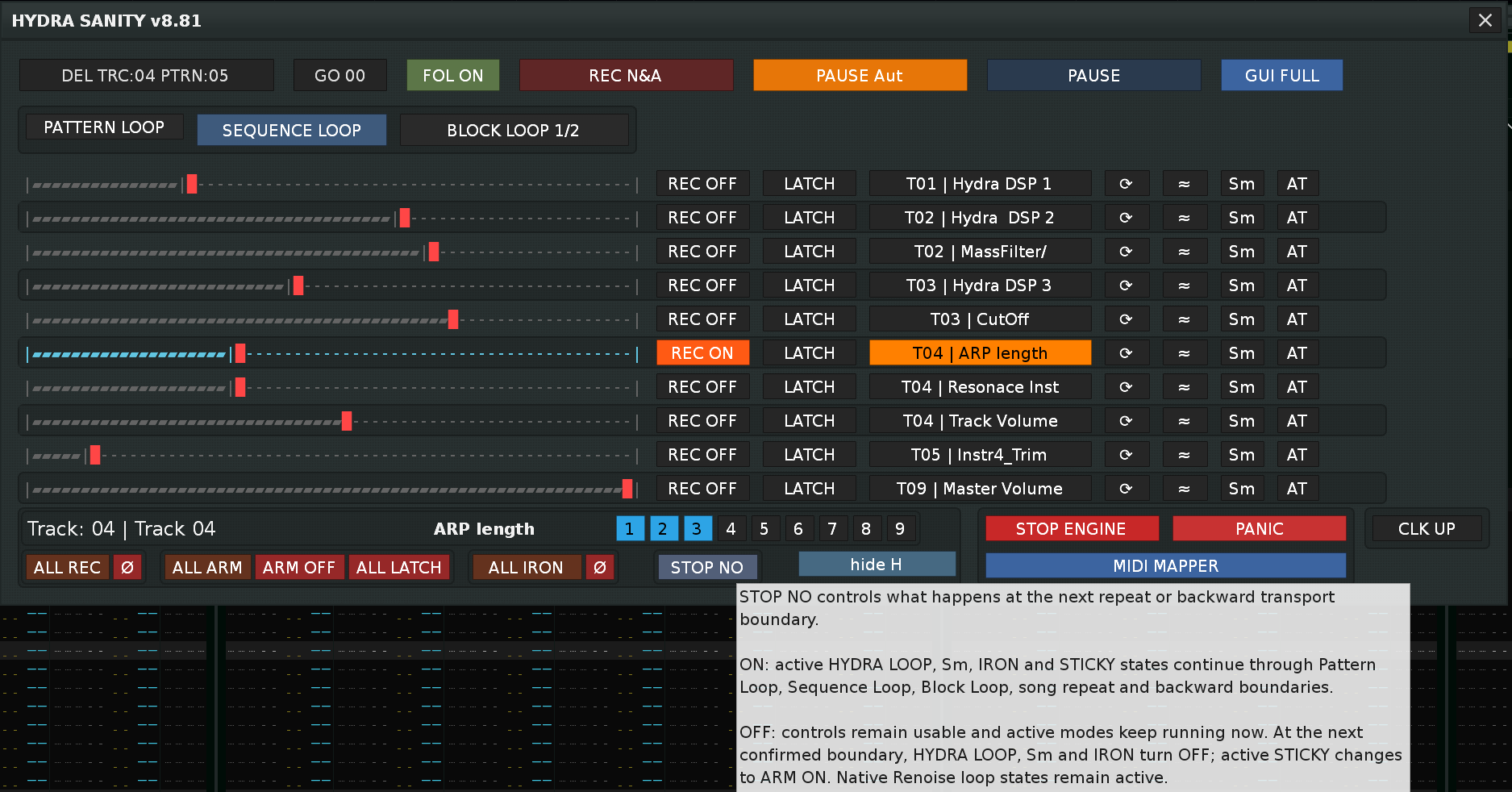
STOP NO

State STICKY boundary behavior
STOP NO ON STICKY continues through Pattern Loop, Sequence Loop, Block Loop and song repeat boundaries.
STOP NO OFF STICKY changes safely to ARM ON at the next supported boundary.

In both states:

  • playback continues,
  • Renoise loop topology remains active,
  • HYDRA row LOOP remains active.

Only STICKY boundary ownership changes.

LOOP cannot run at the same time as STICKY or Sm. A conflicting ownership mode disables LOOP safely.


12. Renoise focus and track synchronization

HYDRA SANITY can follow Renoise and Renoise can follow HYDRA.

HYDRA to Renoise

Mapped controller movement can:

  • select the matching HYDRA row,
  • select the matching track,
  • open the matching automation graph.

Renoise to HYDRA

Selecting a known track, DSP device, parameter or automation target in Renoise can activate the matching HYDRA or PANORAMA row.

When Renoise moves to a track that has no HYDRA DSP and no HYDRA or MCU row assignment, stale selected-row ownership is cleared structurally.

HYDRA DSP topology changes

  • Adding a HYDRA DSP during PLAY uses a lightweight structural rescan.
  • Deleting or reordering HYDRA DSP devices is treated as scan, rebuild and purge work.
  • Passive MCU or PANORAMA row refresh is not treated as a physical HYDRA topology change.
  • In PAUSE, a valid manually selected HYDRA row is protected from passive focus stealing.

Shared MIDI input warning

If the same physical MIDI input is active in both Renoise and HYDRA SANITY, Renoise may write controller messages into pattern effect columns.

Disable:

Renoise Preferences > MIDI > Record & Play Filter > Pitchbend & Controllers

for the shared input.


13. Write-To-Graph behavior

HYDRA SANITY writes useful automation points while protecting the live audio value.

Multi-graph writing

Each HYDRA row has independent:

  • MIDI input state,
  • confirmed graph-commit state,
  • shelter and guard state,
  • writer runtime.

Several mapped controllers can therefore write several automation graphs in the same recording pass.

Fresh sample policy

  • The live audio runtime uses the newest valid MIDI value.
  • The automation graph stores at most one fresh sample for each sequence + row.
  • Same-row controller traffic does not flood Renoise with unnecessary points.

Flat interpolation shelter

Before stale graph points are removed, Renoise receives:

  1. a safe current anchor,
  2. a forward guard with the same value.

This creates a horizontal shelter corridor and prevents Renoise from interpolating prematurely toward old future graph data.

Release Bridge

Release interpolation uses:

  • A — the last MIDI value confirmed in the automation lane,
  • B — the nearest preserved future graph point.

Original future points are restored after release. A synthetic shelter guard is never used as the real release endpoint.

Lane resurrection

If a user manually deletes the Renoise automation lane, HYDRA SANITY invalidates the stale lane reference and creates a new lane on the next valid write.

Tested writer load

The v8.74 writer foundation exceeded the earlier practical BPM 213 / LPB 12 boundary and was runtime-tested at BPM 213 / LPB 31.


14. IRON and Sm

Tool Use
IRON Repairs spikes, cliffs, edge artifacts and short graph shots while preserving the intended movement.
Sm Makes the whole curve softer and less stepped.

PLAY-only safety

With REC ON disabled, IRON and Sm can process an existing graph during playback.

They do not:

  • start WRITE IN,
  • start LATCH, STICKY or HOLD,
  • run Release Bridge,
  • create a new automation lane.

15. Aftertouch

The global AT path supports:

  • Channel Pressure,
  • Poly Pressure.

Aftertouch is normalized to 0..1 and routed only to rows where AT is enabled.

The AT tap is separate from ordinary MIDI slots and ignores notes, normal CC and Pitch Bend. When several inputs arrive in the same pending window, Aftertouch has the highest input priority.


16. MCU_COM and PANORAMA OSC bridge

This section applies when the separate MCU_COM / Panorama tool is running.

HYDRA SANITY remains the automation engine. MCU_COM owns the controller ports, displays, buttons, faders and LEDs. The realtime bridge is OSC-only.

Supported behavior includes:

  • PANORAMA_E1 ... PANORAMA_E8,
  • W.A. encoder capture,
  • LCK protection,
  • graph absolute return,
  • Panorama ARM support,
  • OSC-only runtime IPC.

Duplicate-target shadowing

If a PANORAMA W.A. row targets the same Renoise parameter as a physical HYDRA row:

  • the PANORAMA row becomes the active owner,
  • the duplicate HYDRA row is shadowed,
  • the hidden HYDRA row is blocked from MIDI and writer input,
  • WA_OFF releases the PANORAMA owner and allows the HYDRA row to return.

LCK is a lock modifier; it is not required for duplicate-target detection.


17. Feedback and HYDRA DSP OUT helper

Feedback can include:

  • REC, ARM, STICKY and transport LEDs,
  • MCU encoder rings,
  • mute state,
  • graph-following values,
  • IRON heartbeat,
  • Sm pulse,
  • selected-row feedback.

Select a valid MIDI OUT slot and use output role BOTH or FB.

HYDRA DSP OUT helper

The current GUI implementation exposes HYDRA DSP OUT helper selectors 1-9.

The helper can show:

  • OUT number,
  • track,
  • target device,
  • target parameter,
  • assignment state.

18. Troubleshooting

Symptom Check or fix
Mod Wheel or encoder repeatedly opens the GUI Remove the continuous native Renoise mapping from Tools > Zorgan > Hydra Sanity > Show GUI. Use a real button or keyboard shortcut.
Encoder data appears in pattern effect columns Disable Renoise Record & Play Filter > Pitchbend & Controllers for the shared MIDI input.
LED or ring feedback is missing Check MIDI OUT, output ROLE, learned slot/channel and controller feedback support.
Relative encoder starts from the wrong value Use LINKING TO GRAPH only for REL1, REL2, REL3 or MCU. ABS and PB already send an absolute value.
Automation lane was deleted manually Move the mapped controller again; HYDRA SANITY recreates the lane on the next valid write.
Releasing the controller does not leave STICKY Correct behavior. STICKY remains in HOLD. Press LEAVE to reconnect to the old graph.
IRON or Sm does not create a graph with REC OFF Correct behavior. PLAY-only repair processes an existing lane and does not create a new one.
REC ON appears disabled during MUTE or SOLO The row’s armed state is remembered but temporarily suppressed. It returns when the track becomes active.
PANORAMA W.A. hides a HYDRA row The two rows target the same parameter. PANORAMA owns it until WA_OFF.
LOOP seems shifted Check LPB and pattern length. Ensure the final beat or bar is complete.
Topology button color is delayed HYDRA SANITY performs a slower Renoise API fallback refresh. Wait briefly, then reopen the GUI only if the state remains wrong.
Notes are not recorded Use REC N&A, not automation-only REC.
DEL TRACK does nothing Confirm that the target is a note-capable Renoise track. The operation is rejected before transport changes when the target is invalid.

19. Practical checklist

First setup

  • Install the .xrnx.
  • Add HYDRA DSP devices.
  • Route HYDRA outputs.
  • Select MIDI IN and MIDI OUT.
  • Learn row INPUT controls.
  • Learn required row and global buttons.
  • Return to STAGE.

Before recording

  • Choose REC N&A or REC Aut.
  • Decide whether FOL should be ON or OFF.
  • Activate REC ON or prepare ARM ON.
  • Confirm the correct HYDRA row and Renoise track.
  • Move the controller or play the first note.

Retry the current pattern

  • Press DEL TRACK.
  • Confirm Row 00.
  • Confirm the previous FOL state is preserved.
  • Play the first note or move the required ARM ON controller.
Comprehensive documentation for the Hydra Sanity tool.

Change Log — HYDRA SANITY Engine v8.77

  • Added stable HYDRA LOOP continuation across Pattern, Sequence, Block and song repeats.
  • LOOP now preserves the latest MIDI and mouse-edited Automation Graph content instead of restoring the original selected area.
  • Fixed cumulative LOOP phase drift and incorrect graph content at repeat boundaries.
  • Added local LOOP repeat epoch independent of the global transport repeat counter.
  • Unified Automation Graph selection handling for PLAY and PAUSE.
  • Clearing the selected graph area now fully deactivates LOOP and immediately restores normal ENC/FAD/PB graph writing.
  • Fixed Renoise Song.__eq runtime error in repeat detection.
  • REC ON no longer switches between Automation Graph and HYDRA DSP when the same HYDRA row is already selected.
  • Added correct MUTE/SOLO-MUTE status hydration when starting the engine.
  • MUTE tracks now disable both REC and LOOP controls.
  • MUTE status is preserved when REC or LOOP activation is blocked.
  • UNMUTE restores REC according to its previous state and re-enables the LOOP button without automatically activating LOOP.
  • FOL OFF with REC PLAY N&A in PAUSE : The MIDI note can still control the instrument normally in Renoise, but HYDRA cannot use it as a transport start trigger.
  • STOP NO button : sets the rules for the active repeat mode: PATTERN LOOP, SEQUENCE LOOP, BLOCK LOOP, for Sm - smooth, IRON, i LOOP button, i STICKY mode.
    If STOP NO is not turned on, when repeat is active, STICKY switches to ARM ON at the beginning of the repeat block. Sm and IRON are turned off, LOOP does not continue to redraw the automation graph.

Hydra Sanity can:

automatically start recording to multiple automation graphs at the same time connected to Hydra DSP.
Procedure:
I want to record only the automation graph: select “REC Aut” / “PAUSE Aut” set the MIDI ENC / DEC / FAD / PB position in the given hydra line activate “ARM ON”: click “LATCH”. ARM ON is ready for the first MIDI ENC movement, which will start recording.

Hydra Sanity can:

automatically start recording to the track at the first incoming MIDI note, if “FOL ON” is active (follow ON is linked to the Renoise button follow the player’s position)
Procedure:
I want to start playing on the midi keyboard and start recording at the moment of the first incoming MIDI note: select “REC N&A” (record note and automation graph) / “PAUSE N&A”, activate “FOL ON”, press the first MIDI note and recording will start.
If I need to manually edit what I recorded, I turn “FOL ON” to “FOL OFF” (I can do it in Renoise too), the first incoming MIDI note will not automatically start recording the note, play.

In “PLAY” or “REC Aut” mode, I can edit the notes via the PC keyboard.

addition to " " in this text : the name marked in " " refers to the button name.

Another example of use: If I have a MIDI controller mapping set in Hydra Sanity and active “REC ON” in hydra row, i can play notes and control ENC / DEC / FAD / PB parameters even in PAUSE mode.
Active MIDI ENC / DEC / FAD / PB also selects the track and the paired instrument in Renoise for the given track.

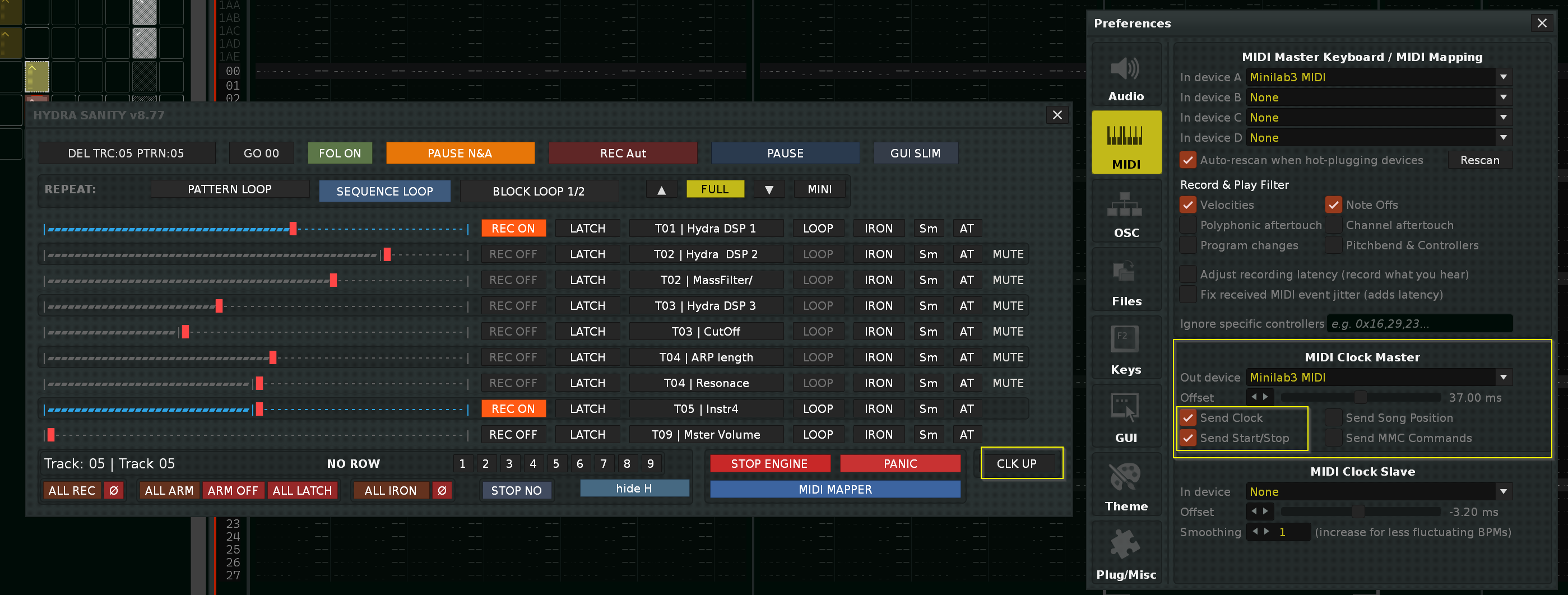
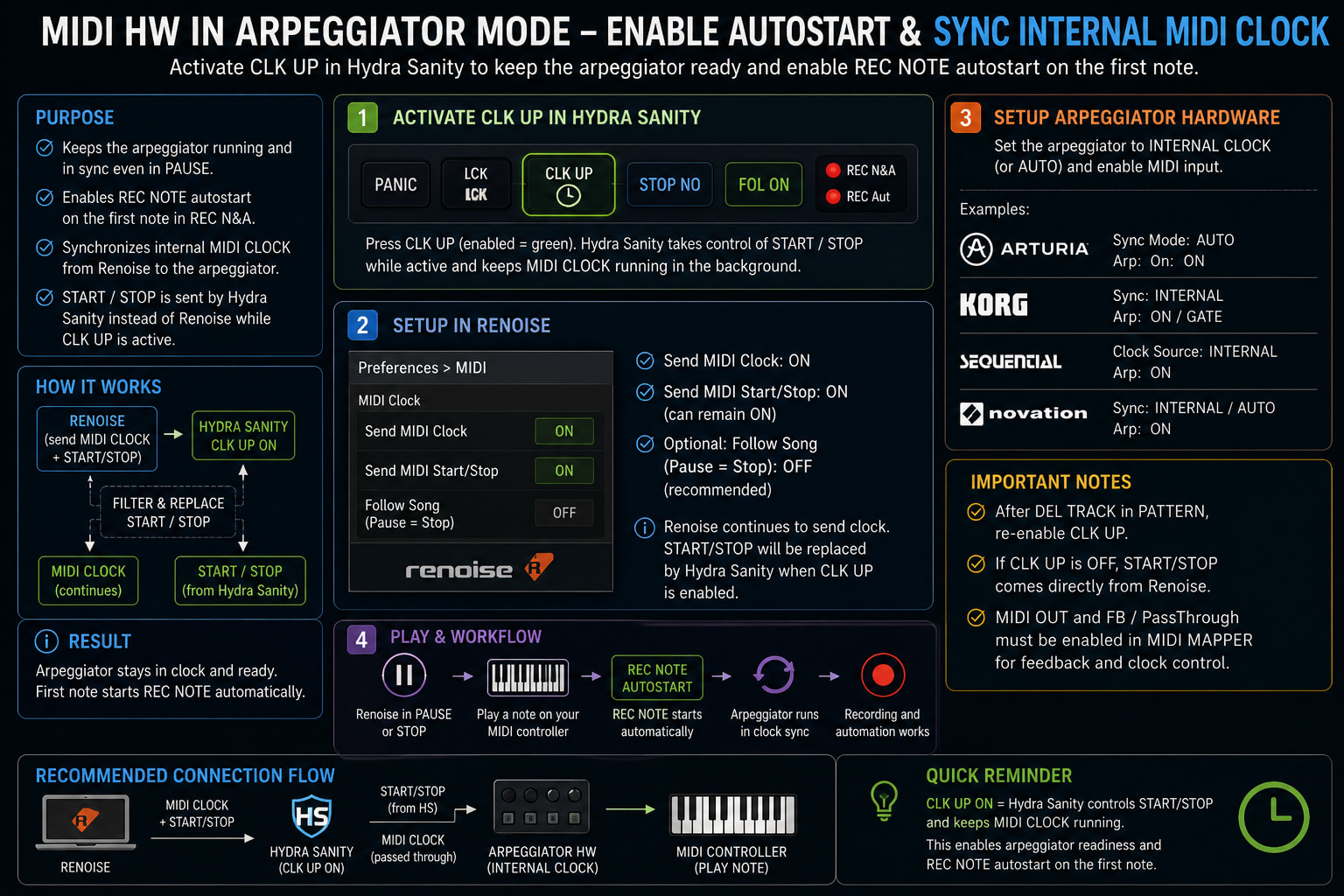
HYDRA SANITY v8.78 — CLK UP for external MIDI arpeggiators

CLK UP is designed for MIDI keyboards and hardware controllers that use
Renoise as an external MIDI Clock source.

Some hardware arpeggiators require both:

  • continuous MIDI Clock pulses from Renoise, and
  • a MIDI Start message to enter the active transport state.

When Renoise enters PAUSE, it may send a MIDI Stop message even though MIDI
Clock pulses continue. The hardware arpeggiator then remains stopped and cannot
generate the first Note On required by HYDRA SANITY’s paused REC N&A
autostart.

When CLK UP is enabled, HYDRA SANITY restores the MIDI Start state after a
HYDRA-owned PAUSE. The external arpeggiator remains ready, so pressing the first
key or chord can generate an arpeggiated Note On and resume the waiting
PAUSE N&A recording mode.

HYDRA SANITY does not generate MIDI Clock. Renoise remains the only MIDI Clock
source.

Required setup

In Renoise:

  • select the hardware MIDI device as the MIDI Clock Master output,
  • enable Send Clock,
  • Send Start/Stop may remain enabled.

On the MIDI keyboard or hardware controller:

  • enable external MIDI Clock synchronization,
  • enable the arpeggiator or other clock-synchronized function.

In HYDRA SANITY:

  • configure the same hardware device in a MIDI OUT slot,
  • set the MIDI OUT role to FB or BOTH,
  • enable CLK UP,
  • enable FOL ON when the first incoming Note On should resume paused
    REC N&A.

CLK UP sends MIDI Start/Stop transport messages only. BPM and MIDI Clock timing
remain controlled by Renoise.

In Hydra Sanity, the HW device must also have MIDI OUT and FB or BOTH set.

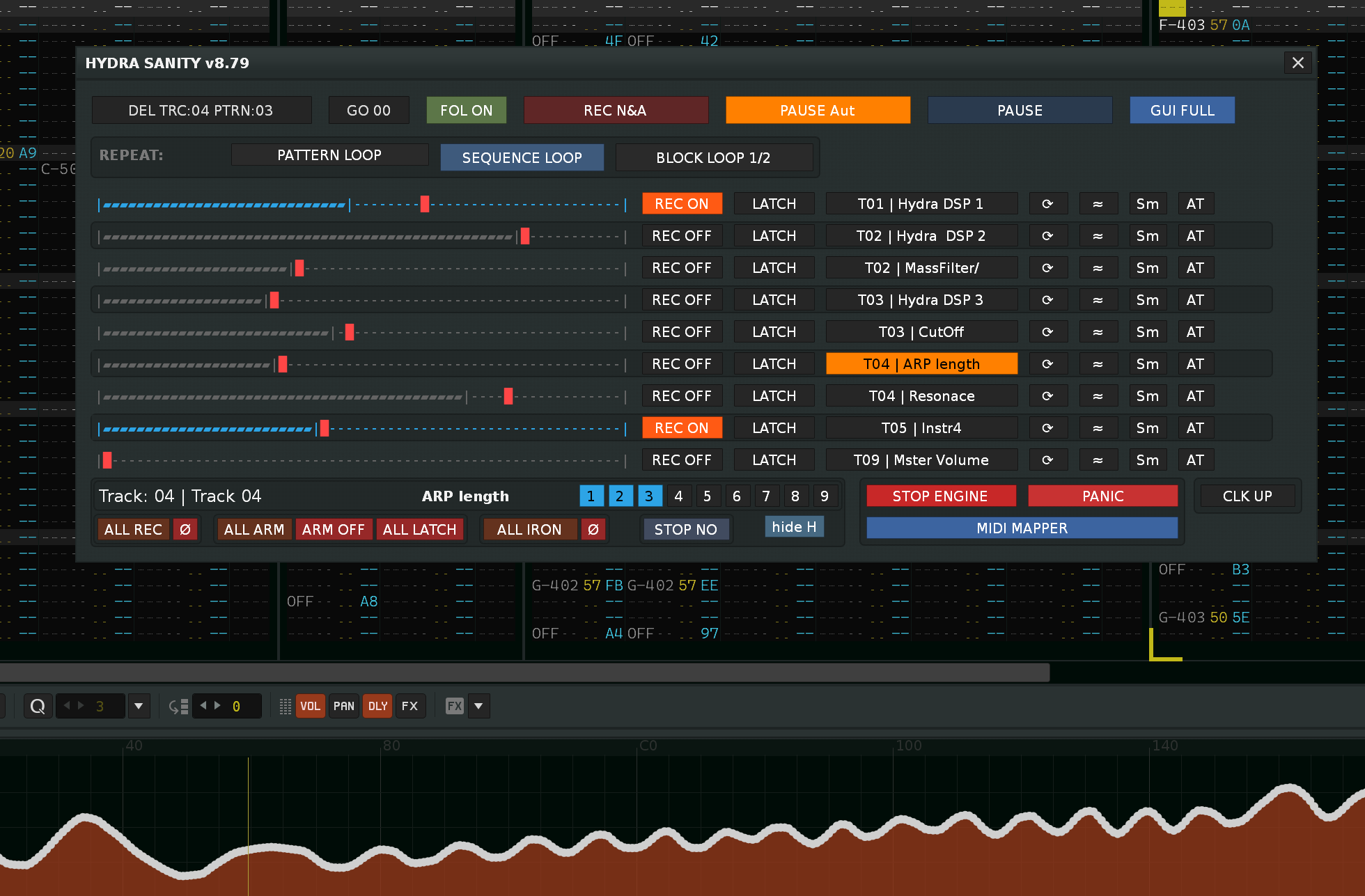
HYDRA SANITY v8.79 - new design button IRON, LOOP + fix function LOOP in next pattern write

After a long time of work on the Hydra Sanity tool, I am moving on to improving the user manual both on the Hydra Sanity web page and in the tooltip …
Hydra Sanity uses a tooltip when hovering over a button, here you can also use the tooltip display. The tooltip can be turned off / on in the MIDI MAPPER GUI …

HYDRA SANITY v8.80 FINAL — User Changelog

What Was Expected from Version 8.80

The goal of HYDRA SANITY v8.80 was to comprehensively refine the tool’s internal architecture without changing its established workflow.

The main priorities were:

  • Reduce the workload of the idle loop, MIDI input path, GUI and automation writer.

  • Remove dead code, obsolete fallbacks and duplicated runtime states.

  • Consolidate the ownership of runtime states, queues and transport data.

  • Prevent unnecessary GUI rebuilds and updates of hidden HYDRA Rows.

  • Preserve stable automation writing at high BPM and LPB settings.

  • Resolve the remaining user-visible issues affecting LOOP, LINKING TO GRAPH, SELECT ROW, HYDRA DSP focus and MCU integration.

Version 8.80 is therefore primarily a stability, optimization and architectural consolidation release.

What the v8.80 Update Brings to Users

Correct LOOP Handoff Between Patterns

  • Fixed LOOP area handoff between patterns during Sequence Repeat.

  • Prepared LOOP content for the next pattern is no longer mistaken for a new manual selection.

  • Entering a new pattern no longer automatically selects the entire automation graph.

  • Removed the subsequent constant-value overwrite of the automation graph.

  • Prevented the major engine slowdown and playback stuttering caused by an invalid full-pattern selection.

  • LOOP now preserves the correct source area, playback phase and prepared content during pattern handoff.

Faster and More Accurate FULL, SLIM and MINI GUIs

  • SLIM → FULL switching and FULL/MINI navigation now use a fast cached-layout path when the actual row topology has not changed.

  • Hidden HYDRA Rows are no longer updated unnecessarily because of meter activity, REC status, IRON/Smooth pulses or HYDRA DSP OUT details.

  • A structural GUI rebuild is now reserved for actual changes to devices, HYDRA Rows or MCU/PANORAMA Rows.

  • FULL → SLIM now performs one targeted rebuild and immediately creates the correct compact SLIM geometry.

  • Row height no longer depends on a secondary refresh triggered by disabling MCU W.A. or LCK.

  • HYDRA and MCU/PANORAMA Rows now use consistent vertical spacing.

  • SLIM Rows have been reduced by approximately 2 px per row—about 20 px of total height when ten rows are displayed.

  • Buttons, labels, meters and their clickable areas remain unchanged.

ARM ON Now Respects LINKING TO GRAPH During PLAY REC

  • Fixed endless ENC/DEC operation when ARM ON is active, REC is OFF and LINKING TO GRAPH is enabled.

  • The correction works during both PLAY REC N&A and PLAY REC Automation.

  • The first movement of a relative encoder now reads the automation value from the current playback position.

  • The standard ARM runtime reset is performed before the graph value is loaded.

  • The graph value is loaded before STICKY/LIVE writer activation, so it is no longer rejected as a late seed.

  • The first ENC/DEC movement continues smoothly from the current graph value instead of an obsolete internal controller position.

  • PAUSE behavior remains unchanged.

  • Absolute encoders, faders, Pitch Bend, LINK OFF and the standard REC ON workflow also remain unchanged.

SELECT ROW Remains Active After Renaming a HYDRA DSP

  • Renaming a HYDRA DSP no longer clears the active SELECT ROW.

  • Selection is also preserved when the device display_name or parameter count changes.

  • Row identity is no longer determined by the device name. It is based on the actual Renoise HYDRA DSP object and its structural position.

  • A different HYDRA DSP moved to the same device index cannot be mistaken for the previously selected device.

  • Actual removal or replacement of a HYDRA DSP still correctly clears an invalid selection.

Newly Created HYDRA DSPs Remain Open in the Track DSP Panel

  • A newly created HYDRA DSP automatically activates its corresponding HYDRA SANITY Row.

  • Renoise keeps the new HYDRA DSP open in the Track DSP panel.

  • The automatic graph-heal process no longer overrides this action by opening the Automation Graph panel.

  • Graph healing is now performed only when the Automation panel is actually active.

  • Manual SELECT ROW switching also remains stable:

    • The first click opens the Automation Graph.

    • The second click opens the corresponding HYDRA DSP.

Reliable HYDRA DSP Autoswitch with Active MCU Rows

  • Clicking a non-shadowed HYDRA DSP now always selects its corresponding HYDRA Row, even when MCU Rows are active.

  • An explicit HYDRA DSP click takes priority over the general PAUSE MCU focus protection.

  • The MCU duplicate-target rule remains fully preserved.

  • If an MCU Row already owns the same automation target, the duplicate HYDRA Row remains hidden.

  • Clicking the physical HYDRA DSP in this situation selects the owning MCU Row instead of activating the hidden HYDRA Row.

  • The hidden HYDRA Row is not exposed as a parallel SELECT target.

  • Renoise remains in the Track DSP panel and does not automatically switch to the Automation Graph.

  • After W.A. is disabled, the HYDRA Row becomes available again and standard DSP autoswitch behavior is restored.

  • Autoswitch now validates the actual Renoise device object instead of relying only on the track and device indices.

  • A different device placed at the same index cannot inherit the previous HYDRA DSP identity.

  • Clicks received inside the 0.30-second synchronization interval are deferred and processed once instead of being lost.

  • Passive MCU metadata or target refreshes continue to leave the current selection unchanged.

More Stable MIDI and MCU Feedback Under Heavy Activity

  • MIDI ring LED and button LED feedback now use the unified controlled FIFO queue.

  • Repeated feedback messages for the same control are coalesced, preventing obsolete values from filling the queue.

  • MIDI input and feedback queues now have controlled maximum sizes.

  • CC messages are matched and processed in a single pass instead of repeatedly scanning all HYDRA Rows.

  • The same reduction in repeated searches applies to NOTE control mapping and MIDI slot resolution.

  • The result is more stable MIDI Learn, automation writing, MCU feedback and HYDRA autoswitch behavior during dense MIDI input.

Smoother Operation with Large Automation Graphs

  • Automation graphs containing large numbers of points are now cleaned using range operations instead of deleting points individually.

  • Range occupancy checks no longer create complete temporary point lists when only the presence of a point needs to be determined.

  • Preserved points inside protected automation windows remain unchanged.

  • This reduces Lua operations and temporary allocations during long or intensive automation recording.

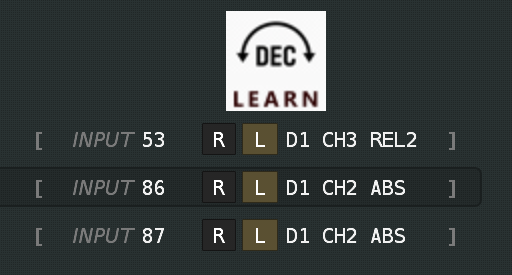
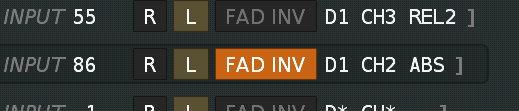
  • Absolute FAD (fader, pitchband) invert direction movement. New option in MIDI MAPPER Hydra Sanity you can invert the movement of the fader, pitchband. invert the direction up, down. For this purpose, the new INV button is used, which is activated when absolute FAD, PB is detected.

What v8.80 Brings to the HYDRA SANITY Engine

One Authoritative Runtime State

  • S.dev is now the single authority for HYDRA Row configuration and MIDI mappings.

  • Graph, PANORAMA, GUI, transport and cache data use clearly separated S.* domains.

  • Parallel legacy configuration and MIDI mapping tables have been removed.

  • Old scalar and cache aliases that mirrored the same state in multiple places have been removed.

  • Import compatibility for older song data remains available, but it no longer creates a second runtime authority.

Unified Queue Management

  • MIDI feedback has been moved into the standard HYDRA_QUEUE FIFO system.

  • The separate legacy feedback queue has been removed.

  • Unused coalesced and ordered queue APIs have been removed.

  • FIFO state is authoritatively managed through head, tail and count.

  • The canonical fast path no longer repeatedly normalizes an already valid queue.

  • Empty FIFO queues now return to one unambiguous clean state.

Optimized MIDI Hot Path

  • MIDI CC, NOTE and device-slot matching now run in a single pass.

  • The matched HYDRA Row is passed directly into subsequent processing.

  • Frequently used MIDI mapping role lists are declared only once.

  • Unnecessary temporary tables and repeated searches for the same target have been removed.

Lighter Idle Loop

  • Mandatory modular APIs are validated once during idle-system configuration.

  • The hot path then uses direct references without repeating type(...) == "function" checks.

  • An empty runtime heartbeat that no longer performed useful work has been removed.

  • Idle tasks use prepared runner functions and a shared traceback handler instead of creating new anonymous functions during every pass.

  • The internal audit can track task execution counts, last execution time, maximum execution time, total execution time and Lua heap size.

More Efficient GUI and Meter Engine

  • The visible meter-row list is built during GUI creation or layout changes instead of every meter refresh.

  • The meter cache no longer constructs textual signatures using repeated table.concat() and tostring() operations.

  • It now directly compares stored text, marker positions and color values.

  • Repeated GUI dirty requests for the same row are coalesced.

  • A full refresh request correctly takes priority over a light refresh.

  • The pending table is cleared and reused instead of being repeatedly recreated.

More Efficient Writer and Topology Scanner

  • Large automation areas are cleaned using clear_range().

  • Boolean point checks stop at the first matching point instead of constructing a complete list.

  • The combined HYDRA/PANORAMA topology scan now returns both the complete signature and the HYDRA-only signature.

  • The previous second scan of the same topology has been removed.

  • Transport monitoring has been consolidated under the single S.transport authority.

  • The former parallel global transport structure has been removed.

Removed Legacy and Audit Code

  • The unused emergency helper force_clear_sticky_after_song_wrap() has been removed.

  • The single valid preserve_sticky_across_sequence_boundary() path remains.

  • Dead compatibility mirrors, runtime scalar aliases, unused queue APIs and empty state domains have been removed.

  • The former separate architectural audit layer has been replaced by the unified HYDRA.audit().

  • No parallel writer, MIDI dispatcher, feedback queue or transport authority remains in the engine.

  • No new runtime timer, Renoise observable, OSC protocol or parallel state system was introduced.

About HYDRA SANITY

HYDRA SANITY is an independent real-time MIDI mapping and automation control layer for Renoise DAW, built around Renoise HYDRA DSP devices.

It allows multiple independent HYDRA Rows to be controlled from MIDI hardware, records and repeats automation graphs, links endless ENC/DEC controls to the current graph value, protects future automation points and provides the LATCH, ARM ON, STICKY and LEAVE workflow.

It also includes LOOP, IRON, Smooth, Aftertouch, MUTE/SOLO protection, MIDI feedback and MCU/PANORAMA integration.

Version 8.80 does not introduce another parallel mechanism. It consolidates and optimizes the existing engine, removes the remaining legacy paths and resolves specific conditions that could interfere with LOOP, row selection, DSP focus, graph-value pickup or MCU/HYDRA DSP autoswitching.

The result is a more compact GUI, more predictable control behavior, fewer unnecessary Lua operations and more stable response during simultaneous MIDI input, GUI feedback and multi-graph automation writing.

HYDRA SANITY v8.80 is the final runtime-tested and approved release and is now the authoritative baseline for future development.

++ update help web page for hydra sanitation

HYDRA SANITY v8.80 - Core Engine & Latency Overhaul

A major structural update focused on zero-latency processing, strictly deterministic memory management, and flawless integration with the MCU MIDI COM tool.

  • :high_voltage: Engine & Latency Optimization:

    • Pre-compiled Idle Loop: Anonymous function creation in idle tasks has been entirely eliminated. The engine now uses prepared, static hydra_idle_make_runner pointers, dramatically reducing Lua garbage collection spikes.

    • Single-Pass MIDI Hot Path: CC, NOTE, and device-slot target mapping are now executed in a single highly optimized pass.

    • Direct UI Rendering: Meter caches now perform direct comparative logic instead of relying on expensive string concatenation (table.concat()).

  • :brain: Architecture & Memory:

    • Unified Fader Memory: Hardware mute/solo states have been structurally consolidated into a single deterministic state (mute_solo_hold_state), completely replacing legacy fragmented registries.

    • Queue Management: Complete integration of MIDI feedback into the canonical HYDRA_QUEUE FIFO system. Legacy redundant feedback pipelines and alias mirrors have been permanently purged.

  • :electric_plug: MCU & Hardware Integration:

    • Enhanced handshake and continuous signal buffering (CSB) for panorama and external controllers.

    • Strict structural separation between MCU rows update, shadow ownership, and persistence policies. Missing DSP states now trigger immediate structural rebuilds without text-refresh masking.

Track-Aware Instrument Auto-Switch

HYDRA SANITY v8.81 introduces automatic instrument selection based on the currently selected track.

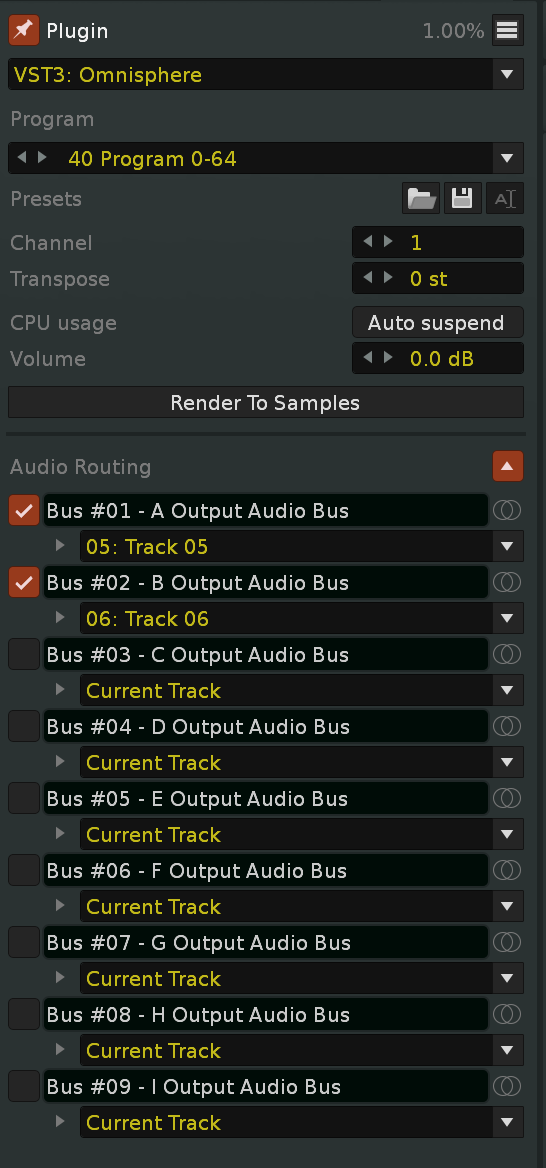
This update was not designed to replace or override Renoise behavior. Instead, it works as an additional compatibility layer that follows the routing and instrument relationships already defined in the song. It respects fixed MIDI Input Assigned Track settings, Plugin Instrument Audio Routing for individual BUS outputs, and instruments already used in the pattern. When Renoise selects the correct instrument on its own, HYDRA SANITY keeps that selection unchanged.

The feature is especially useful when working in a new or empty pattern. In this situation, Renoise may stop switching instruments automatically when the user changes tracks because the current pattern does not yet contain any notes that identify the required instrument. HYDRA SANITY can restore the appropriate instrument automatically and reduce the need for manual instrument selection.

Instrument detection follows a clear priority order:

  1. Saved Plugin Audio Routing from BUS outputs to tracks
  2. Fixed MIDI Input Assigned Track settings
  3. Renoise’s native instrument detection from notes in the current pattern
  4. The last instrument confirmed as used on the selected track

Multi-timbral plugin workflows are also supported. A single instrument can be connected to several tracks through multiple audio BUS outputs. For example, Omnisphere BUS 1–3 can be routed to Tracks 05–07. Selecting any of these tracks will automatically select the same Omnisphere instrument.

HYDRA SANITY v8.81 — GUI Hotfix
Fixed FULL / MINI navigation controls remaining visible after returning from MIDI MAPPER to GUI SLIM, especially after changing TOOLTIP settings.
Removed the redundant REPEAT: label from the loop-control row in all GUI modes.
Reduced the PATTERN LOOP button width for a cleaner, more compact layout.

HYDRA SANITY v8.81 — Notifier Cleanup Microfix
Replaced dynamically allocated anonymous closures in native Renoise notifier cleanup with one reusable protected helper.
Preserved individual pcall protection and exact callback identity for every notifier.
Reduced temporary allocations during tool reload and unload without changing runtime behavior.

HYDRA SANITY v8.82 — ARM ON Boundary Fix

  • Fixed boundary ARM ON requiring two button presses to return to LATCH after a repeat with STOP NO disabled.
  • Corrected REC OFF → ARM ON → STICKY punch-in behavior so it returns to REC OFF + LATCH at the repeat boundary.
  • Preserved the existing REC ON + STICKY → ARM ON transition and DEL TRACK re-arming behavior.

HYDRA SANITY v8.83 — ARM ON Workflow Fixes

ARM ON with LINKING TO GRAPH & STOP NO fix & next …
The cruel tax for optimization forced me to completely redo the ARM ON logic, which goes into the STICKY state and leaves STICKY via LEAVE back to LATCH. Associated with another button LINK to GRAPH, STOP NO and endless ENC,DEC. Moreover, in another layer with REPEAT pattern, Sequence LOOP, Block LOOP.
Fixed and everything runs fine.

  • Fixed ARM ON @ REC ON incorrectly enabling the real REC ON state after a repeat. With STOP NO disabled, it now returns correctly to REC OFF + LATCH. *ARM ON @ REC ON = ARM ON activated without REC ON active
  • Fixed ARM ON transitions after GO 00, DEL TRACK, PAUSE resume and pattern repeats, preventing stale writer positions, duplicate runtime processing and incorrect first-write rows.
  • Corrected the first ARM ON write so PAUSE workflows start from the controller’s actual endless ENC/DEC value, while active PLAY REC with LINKING TO GRAPH starts from the interpolated Automation Graph value at the current playback row.
  • Extended graph pickup to both normal REC ON + ARM ON and ARM ON @ REC ON.
  • Fixed stale graph-link seed and interpolation-shelter state between consecutive ARM ON / STICKY activations, preventing previously written automation grids from being restored or overwritten.
  • Corrected STOP NO repeat handling across multiple active HYDRA Rows.
  • Reduced redundant ARM promotion, reset and boundary processing that could contribute to Renoise playback stuttering.


Hydra Sanity is a sophisticated and feature-rich tool for integrating MIDI controllers with Renoise. It provides advanced automation writing, MCU emulation, OSC interoperability, flexible MIDI mapping, and a custom “Panorama” line model. The code is well-structured, richly commented, and makes extensive use of modern Lua patterns (observers, event dispatchers, queues). However, its sheer complexity brings with it several areas that require attention:

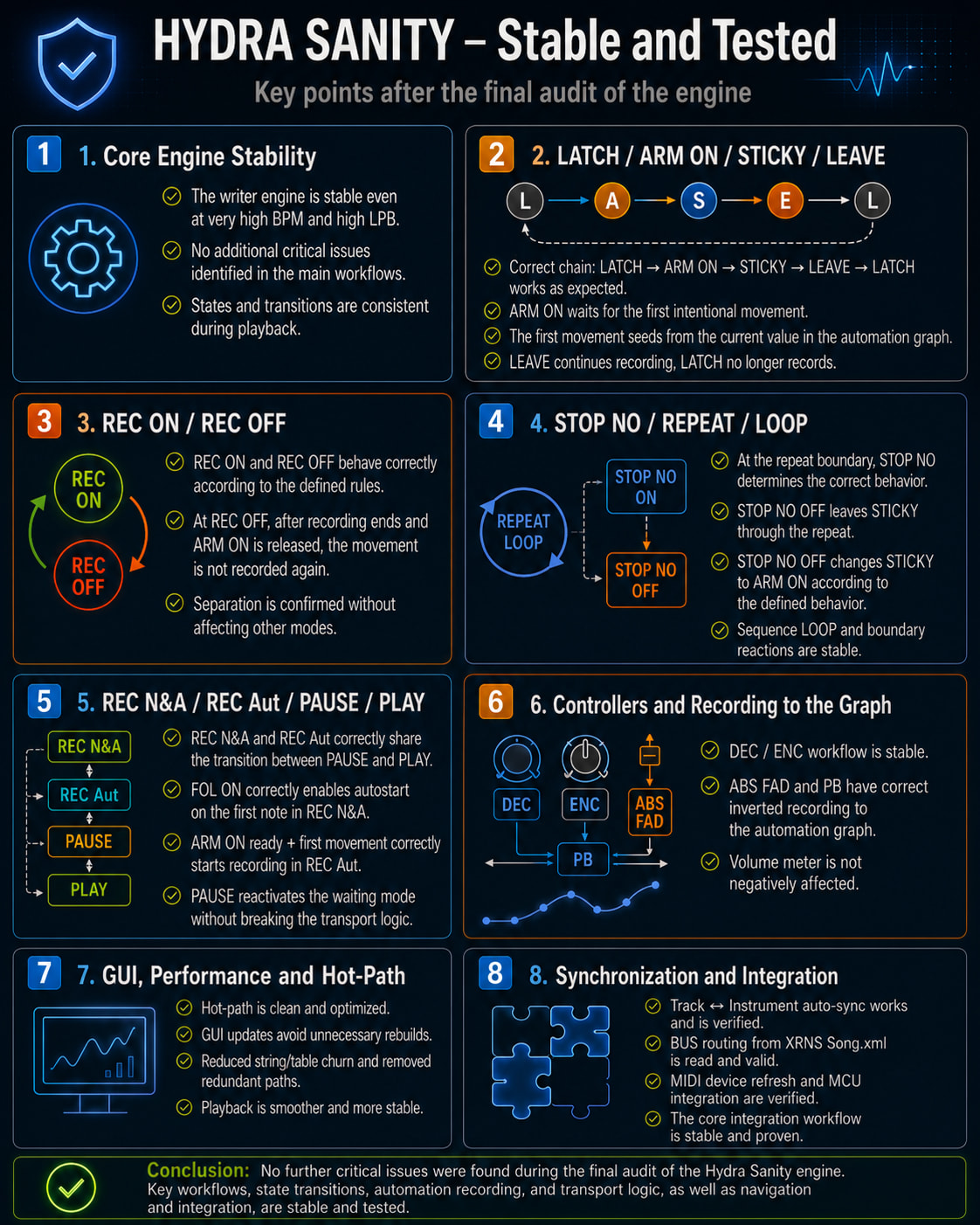
HYDRA SANITY v8.84 Audit, tool test passed successfully.

& LED and ring LED are off when tool is STOP.

A complete audit of the entire HYDRA SANITY instrument has been performed. The check of runtime states, writer engine, MIDI communication, persistence, observables and internal queues was successfully completed without critical errors.
When terminating the instrument using STOP H.S., final MIDI messages are now sent correctly — the button LEDs and encoder ring LEDs on the connected MCU controller go out before closing MIDI OUT.
After restarting the instrument, old LED OFF messages can no longer be played or a short flash of an incorrect state can occur.
Internal Runtime Audit diagnostics have been expanded for easier checking of MIDI queues, writers, persistence, XRNS routing, Panorama states and idle task performance.
Improved protection of MIDI feedback communication under high load. After a possible queue overflow, the correct state of the LEDs and rings is automatically restored.
Reliability of ARM ON, STICKY, LEAVE, STOP NO, saving states and reloading a song has been verified.
Successfully tested simultaneous automation writing of multiple HYDRA lines without conflicts, held writes or lost MIDI messages.
Automated Layer A tests were completed with a result of 11/11 PASS.

HYDRA SANITY v8.85 FINAL

Did you know: in PAUSE mode with REC ON active in hydra row, you can change the parameter value which is reflected in the audio stream.

Final release status

HYDRA SANITY v8.85 is the final accepted release built on the runtime-approved v8.84 reliability baseline and the subsequent approved MCU, GUI, Sm and native Renoise Block Loop work.

Changes completed for v8.85

MCU ROW integration

  • Incoming accepted MCU encoder writes can auto-select the resolved HYDRA or MCU row without changing REC, ARM, STICKY, LOOP or writer ownership.
  • MCU ROW supports the established LINKING TO GRAPH workflow and uses the existing HYDRA writer authority.
  • OSC input accepted from MCU MIDI COM can trigger the same row autoswitch behavior.
  • HYDRA rows moved to shadow by an active MCU row remain available in MIDI MAPPER and return correctly with BACK TO STAGE.
  • W.A., W.A.LCK and MCU COM state display remains suppressed where it does not belong in MIDI MAPPER.

MIDI MAPPER cleanup

  • Invalid MIDI mappings with CC# = -1 no longer display misleading D* and CH* information.
  • Existing valid MIDI assignments and routing displays remain unchanged.
  • Improved visual style in MIDI MAPPER GUI for better clarity. Colored lines that are mapped. Colored MIDI buttons that are mapped.

Adaptive Sm writer

  • Adaptive Sm uses one immutable source snapshot on the physical linear song axis.
  • Segment size is severity-controlled from 4 to 24 grids.
  • Sm performs 1–3 internal passes according to severity.
  • Sm is not restricted by Sequence Loop bounds and continues to use real graph points on the physical song axis.
  • Sm correctly connects to the previous and future pattern, in BLOCK LOOP it can correctly connect before and after the area loop.
  • The approved writer baseline for this work is 08_writer_core_engine.lua v2.56.

Native Renoise Block Loop

  • Native Block Loop start is read directly from transport.loop_block_start_pos instead of being inferred from the current playback row.
  • Pattern Loop, Sequence Loop, song repeat and Block Loop use one global physical automation-graph principle.
  • Loop regions define playback wrap geometry only; they do not truncate Sm, Shelter or release interpolation.
  • REC ON release and REC OFF → ARM ON → STICKY release can interpolate beyond Block Loop start/end toward the nearest real graph points.
  • The only forbidden interpolation is across the transport jump from Block Loop end back to Block Loop start.
  • Per-row MIDI samples, lane binding, commit shadow, Shelter escrow and writer state remain independent for every HYDRA row.
  • Additional HYDRA rows can begin writing during an active Block Loop without reallocating or invalidating another row’s cache.
  • Block-specific modulo Shelter geometry, special release branches and duplicate Block Loop helpers were removed.
  • The final writer is 08_writer_core_engine.lua v2.58.

Architecture result

  • One physical automation graph axis remains the single value authority.
  • One shared loop-region resolver defines kind, abs_start and exclusive abs_end.
  • Existing per-d_key runtime state remains the only row-specific writer authority.
  • No new observable, timer, queue, persistent Block Loop graph cache or lane-owner subsystem was added.
  • The Block Loop redesign reduced the writer by 6,972 bytes and 122 lines compared with v2.56.

Final module versions changed by this release

  • 08_writer_core_engine.lua — v2.58
  • 10_gui_idle_loop.lua — v2.50
  • 11_renoise_registration_boot.lua — v1.30

Runtime acceptance

The final Block Loop implementation was runtime-tested and approved on 2026-08-04. HYDRA SANITY v8.85 is therefore marked FINAL.

Sm when working with automation graph

  • You can use Sm simultaneously on all Hydra rows.

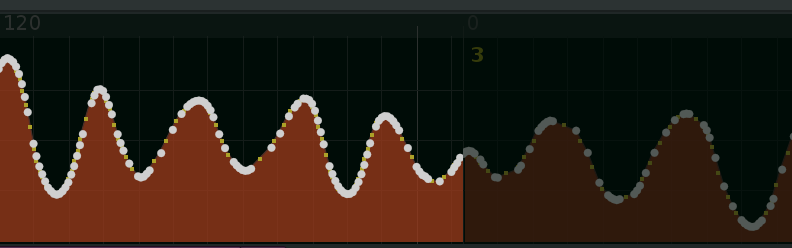
Even if you are working on an automation graph with active REC ON RAW recording of a MIDI controller for one pattern (Sequence loop, repeat pattern), in the end, just one swipe with the Sm function during PLAYBACK will draw the connection to neighboring patterns.

original RAW recording with MIDI controller ENC, FAD, DEC, PB

Sm applied without STOP NO only at the first playback entry.

  • Sm is disconnected at the end of the pattern. With STOP NO on, the Sm function will smooth the automation graph at each repeat.

New Approach to the Block Loop Area

Block Loop is no longer handled as a separate circular automation space. The entire automation graph remains on one physical linear song axis, while Block Loop only defines the transport return point. Sm, Shelter, and release interpolation can therefore work correctly with real points before and after the Block Loop and continue smoothly across its boundaries. The only prohibited connection is the artificial interpolation across the playback jump block_end → block_start.

Lower Latency and More Accurate Engine Timing

Latency was improved by removing the parallel Block Loop modulo geometry, duplicate helpers, and repeated calculations of the same region. The writer now uses a single immutable snapshot of the physical graph together with a transaction-local cache that reuses already resolved song geometry, row projections, and lane data within the current pass. After a write, only the affected graph data is invalidated.

The result is:

  • fewer API reads and repeated calculations;

  • shorter and more predictable writer passes;

  • more accurate Block Loop wrap handling;

  • safe simultaneous writing from multiple HYDRA Rows;

  • removal of almost 7 kB of redundant logic without reducing functionality.

Hydra Sanity 8.86 fix for low BPM a LPB &

  • Fixed automation graph protection when an uninterrupted WRITE IN / REC ON exceeds the song length.
  • Sm fixes a less aggressive adjustment of the automation graph at low BPM and LPB.

MIDI MAPPER - BACK TO STAGE

MIDI MAPPER support absolute FAD with Invert value