Not here I am afraid (MacOS). Right clicking does nothing.
Removing notes works fine for me on macOS. I’m using a Logitech mouse. The important thing is that you’re in Pen Mode, hold down the right mouse button, and move over the notes. The cursor should change when you do that. You can see pretty clearly how fast you can remove notes here: https://www.youtube.com/watch?v=cw2Mbst8Hgc&t=46s
As for shortcuts and stuff, a lot of it’s covered in the README: https://github.com/ryrun/com.dufte.SimplePianoroll.xrnx/blob/master/readme.md
You’ll also find details there about the analyzer shortcuts and which VSTs are supported. I don’t really use those anymore since I switched to MiniMeters. I originally added that feature for myself.
The “Show optional editing tools” option includes features that aren’t directly related to the piano roll, but I use them a lot, so I integrated them there. I made a video back then showing what they do: https://www.youtube.com/watch?v=TYaiSegnP9A
If you enable the option, you’ll need to restart Renoise once. It’ll then add some new menu items in various context menus.
1 Like
Thanks for the reply. Ah I see, I have to right-drag over it basically, not just click. That does indeed work (but is a bit awkward on a touchpad).
1 Like
Ah okay, yeah, that must feel kinda weird with touch. I could maybe change it so it reacts right when you click. Right now, you have to move it first. Are you using a Magic Mouse or just a MacBook?
Just a normal MacBook touchpad indeed. Changing it to work with just right-clicking would work, so would using a modifier key I guess.
Hello,
I noticed that there aren’t many submissions on Github, so I’m writing it here.
When setting the note properties, the values in the valueboxes are set to high values.
Only the Delays are correct.
Also, the response if the values change too quickly is different in the track
compared to what is set in the gui.
Got a lot going on right now, so not much time for coding. I’m not quite sure I understand your issue, do you have a specific example?
here
I know that FX orders can also be entered this way, but that would be impractical 
Interesting, I’ll check this. I’ll let you know.
Edit: Btw. it’s intentional that FX command values can also be entered through the input fields, and I actually use that a lot myself. Otherwise, you wouldn’t be able to assign them directly in the piano roll. I personally like using Cut FX (Cx) there. The fact that the values in the Tracker View and Piano Roll start to diverge after a while is unusual, I really hope it’s not an API limitation, but rather just a bug in my code.
When moving notes around, you can either work with 1 line or 1/16 line increments, right? No way to go below 1/16 and move notes in even shorter steps?
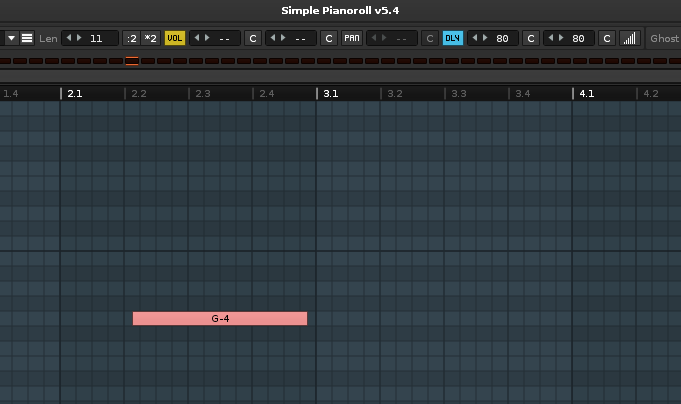
If you hold Alt/Option while moving notes, the Delay column is used to nudge notes off the grid. Just make sure the option is turned on so the Delay column is automatically enabled when needed, or you can manually enable the Delay column in the track beforehand.
1 Like
Yeah, thanks. When moving notes with Alt pressed, the movement is in 1/16 line (=+/-10 delay values) here. I cannot adjust the increments, e.g. go below 1/16 line (=+/-10 delay values)?
I think I originally set the delay to 10-step increments because smaller steps just weren’t visually possible back then. Now that you can zoom in, I could probably remove that limit. I’ll add it to my to-do list. With version 5.4, 1-step delay increments aren’t possible now.
In the future, it could also be possible to set Renoise LPB to a value that 1 line equals 1/32 or 1/64. Then, when you zoom out, the grid could automatically switch to a coarser resolution like 1/16 or 1/8. That’s also on my to-do list.
1 Like
Fantastic. Your tool is great as is, but that would be a wonderful addition since fineadjusting note placements in Renoise’s own interface is pretty cumbersome.
Also sounds great.
1 Like
But hey, wow. It already kind of works that way. If I zoom in max, the movement is in 1/64 line = 4 delay column values. That’s pretty finegrained.
1 Like
Ah, okay. So it actually already depends on the zoom level  Funny, it looks like it turned into a new feature as a side effect when I implemented the zoom. For 1-step moves, I’d probably need to allow zooming in even further. Should be easy to fix.
1 Like