default main.lua
More or less my default starting main.lua file for a new tool. The gui building is more complicated than it needs to be but demonstrates a way of looping to create content:
Includes (* means commented out):
- settable constant for tool name
- ‘require’ command for other files *
- shortcut and menu setup
- preferences file setup
- some basic colors to use
- color flags so you can read colors from gui elements such as buttons
- global gui variables [renoise.ViewBuilder()]
- toggle functions so shortcuts and menus will toggle the gui open/closed
- status function that pre-pends the tool name
- main function to build the gui
- add timer setup*
- closer function that closes gui on new song
- timer function*
Click Here
TOOL_NAME = "Name Of Tool Here"

--extra lua files (like c++ include)
------------------
--require "general_functions"

--Renoise Keybinds and menus
-------------------------------
renoise.tool():add_keybinding {
  name = "Global:Tools:"..TOOL_NAME,
  invoke = function()main_toggle()end
}

renoise.tool():add_menu_entry {
  name = "Main Menu:Tools:"..TOOL_NAME,
  invoke = function()main_start()end
}

--[[
------------------------------------------
--Set up Preferences file
------------------------------------------
--create xml
local options = renoise.Document.create {
  value_a = false,
  value_b = 10,
}
 --assign options-object to .preferences so renoise knows to load and update it with the tool
renoise.tool().preferences = options
------------------------------------------
------------------------------------------
--variable syntax
--options.value_a.value
--]]

--------------------------------------------------------------------------------
--some basic colors for gui elements
--------------------------------------------------------------------------------
--e.g. For changing vb.views["sample present colour 2"].color when states change
COLOR_GREY = {0x30,0x42,0x42}
COLOR_ORANGE ={0xFF,0x66,0x00}
COLOR_YELLOW = {0xE0,0xE0,0x00}
COLOR_BLUE = {0x50,0x40,0xE0}
COLOR_RED = {0xEE,0x10,0x10}
COLOR_GREEN = {0x20,0x99,0x20}
COLOR_RED_MILD = {0x90,0x10,0x10}

--Constants holding first index of color-code: Used to identify color in vb.views table i.e.
--if vb.views["button"].color[1] == COLOR_ORANGE_FLAG then --etc
COLOR_GREY_FLAG = COLOR_GREY[1]
COLOR_ORANGE_FLAG = COLOR_ORANGE[1]
COLOR_YELLOW_FLAG = COLOR_YELLOW[1]
COLOR_BLUE_FLAG = COLOR_BLUE[1]
COLOR_RED_FLAG = COLOR_RED[1]
COLOR_GREEN_FLAG = COLOR_GREEN[1]
COLOR_RED_MILD_FLAG = COLOR_RED_MILD[1]


LUA_COUNTS_FROM_1 = 1

--global variables for gui
local my_dialog = nil
local vb = nil


--toggle the tool open and closed (keyboard shortcut start-up)
-------------------------------------------------------------
function main_toggle()
----------------------
 --close dialog if it is open
  if (my_dialog and my_dialog.visible) then
    my_dialog:close()
    --reset global my_dialog
     my_dialog = nil
  else --run main
    main()
  end
end

--always open/ restart tool (menu entry start-up)
-------------------------------------------------
function main_start()
---------------------
  if (my_dialog and my_dialog.visible) then
    my_dialog:close()
    --reset global my_dialog
     my_dialog = nil
  end
  --run main
  main()
end
----------------------------------------------------------


--------------------------------------------------------------------------------
--helper function : custom status message --prefixes tool name and adds brackets
--------------------------------------------------------------------------------
local function status(message)
  renoise.app():show_status(TOOL_NAME.." Tool: ("..message..")")
end


------------------------------------
------------------------------------
function main()
------------------------------------
------------------------------------


  --toggle dialog so if its already open then close it.  The timer will catch
  --that it is closed and do the housekeeping like removing notifiers (and timer itself)
  if (my_dialog and my_dialog.visible) then
    my_dialog:close()
    return
  end

  --renoise song object
  local song = renoise.song()

  --set globals
  -------------
  --assign global vb to viewbuilder
  vb = renoise.ViewBuilder()

  ----------------------------------------------
  --GUI
  ----------------------------------------------

  --variables that will be added to
  --dialog_content:add_child(send_row)
  local my_first_row = vb:row {margin = 10}
  -------------------------------
  local my_first_element = nil

  --DUMMY CONTENT
  ----------------
  --loop to create buttons and add them to my_first_row
  for button = 1, 2 do
    --1 button
    my_first_element = vb:button {
                        width = 80,
                        text = TOOL_NAME
                        }

    --add each iteration into my_first_row
    my_first_row:add_child(my_first_element)

  end --end loop

  --------------------------------------------------------
  --------------------------------------------------------
  --dialog content will contain all of gui; passed to renoise.app():show_custom_dialog()
  local dialog_content = vb:column{}
  dialog_content:add_child(my_first_row)


  --------------
  --key Handler
  --------------
  local function my_keyhandler_func(dialog,key)
     --toggle lock focus hack, allows pattern ed to get key input
     renoise.app().window.lock_keyboard_focus = not renoise.app().window.lock_keyboard_focus
     renoise.app().window.lock_keyboard_focus = not renoise.app().window.lock_keyboard_focus
    -- rprint(key)

     return key

  end


  ------------------------------------------------------------------------------------------
  ------------------------------------------------------------------------------------------
  --Script dialog
  my_dialog = renoise.app():show_custom_dialog(
      TOOL_NAME, dialog_content,my_keyhandler_func)

 --[[
  --add timer to fire once every 50ms
  if not renoise.tool():has_timer(timer) then
    renoise.tool():add_timer(timer,80)
  end
  --]]

  --------------------------------------------
  --close dialog function ON NEW SONG
  --------------------------------------------
  local function closer(d)
    --close dialog if exists and is open
    if (d ~= nil) and (d.visible == true) then
      d:close()
     -- remove_notifiers()
    end
    --reset global my_dialog
     my_dialog = nil
  end
  -- notifier to close dialog on load new song
  renoise.tool().app_release_document_observable:add_notifier(closer,my_dialog)
  -------------------------------------------------------------------------------

  --first run of timer
  -- timer()
end

--[[
----------------
--timer function
----------------
function timer()

  --do stuff

  --remove timer when GUI is closed
  if(my_dialog == nil) or (my_dialog.visible == false) then
    if renoise.tool():has_timer(timer) then
      renoise.tool():remove_timer(timer)
    end
  end
end
--]]
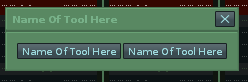
default gui it creates - title and button names default to the TOOL_NAME constant set at the beggining of the file: