Advanced Edit functions in Phrase

Thought I’d ask first, but is there a tool that performs the same operations in phrases as Advanced Edit does in the main pattern?

So that it can be done in situ, rather than having to copy/paste into the parent pattern, make the edits and paste back into the phrase?

Specifically its the Vol/Pan/Delay/Box I’m referring to, but equally the other operations might be useful
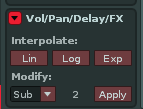
Any tips?

Cheers

you might check out travel through phrases
which at least streamlines the copy and paste (among many other functions)

it would be great to have full advanced editor functionality in the phrase editor though. I don’t know of a tool that does this, but perhaps someone could code or vibe code one

I did just that…

Maybe the start of something? (modelled on the native Advanced Edit panel)

com.boonier.PhraseAdvancedEditor.xrnx (4.5 KB)

Dope! I’m curious to check it out when I get a minute

Ah, nice. this is cool. Would be great to have some of the other options available as well. i.e. cut/copy/paste and notes menus included as well. I could see having an option for column in pattern (phrase) being useful too. nicely done!

This is what’s coming soon…

Renoise_2026-08-28_20-12-58 (2)

If an existing range of FX values is selected, the tool reads it upon launching and tries to reconstruct an approximation as a curve. Clicking the Capture button, you can make another selection of FX values.

In Phrase editor, you need to use Alt+click and drag to select only the FX values without the note.

Loop playback of the selection is not supported in Phrase editor.

Renoise_p4KsnBeLrE

mg.super.interpolator_BETA1.xrnx (254.0 KB)