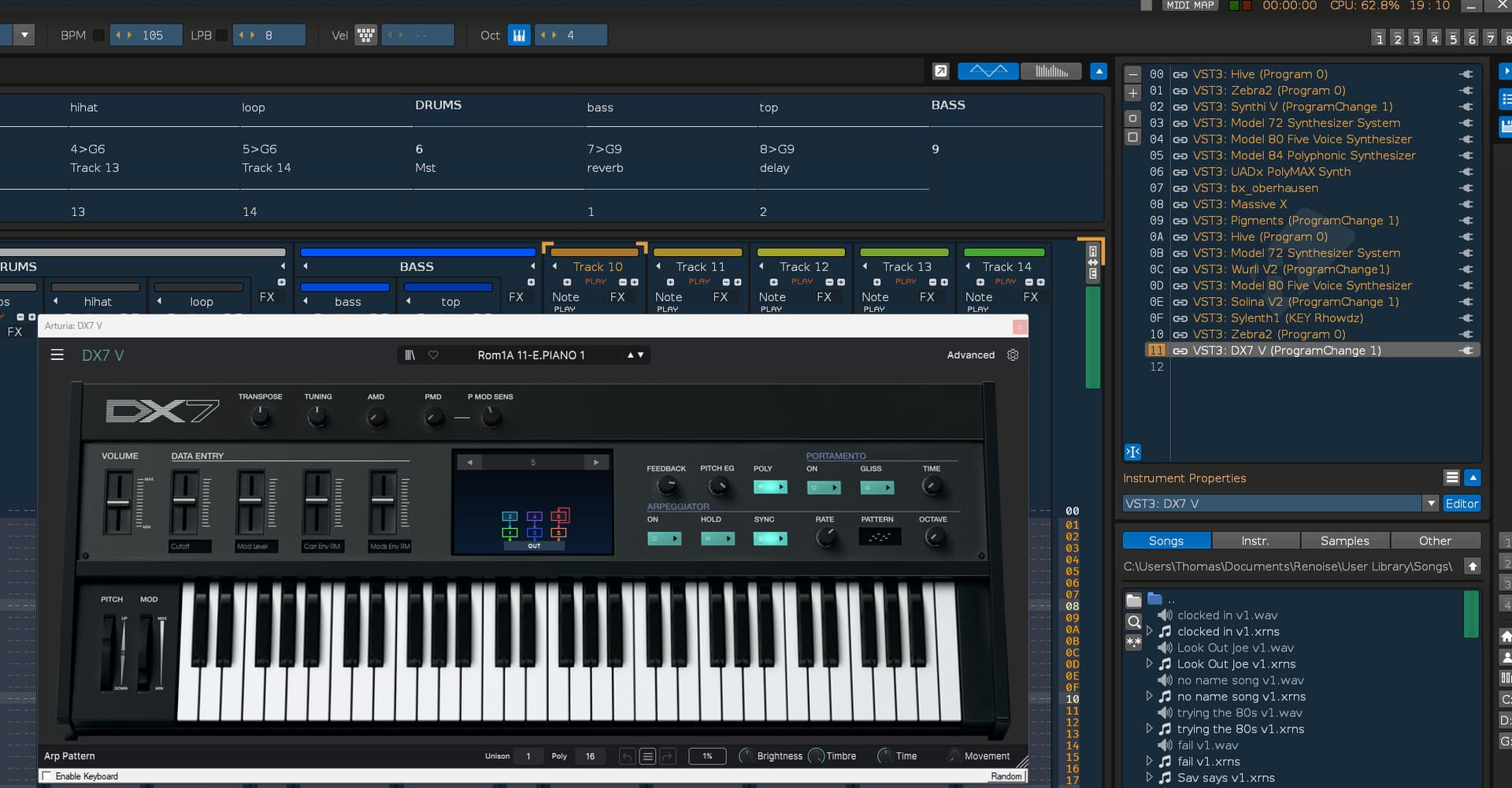
EDIT: First I thought it was because of duplicate plugins. But several tests (and posts) later I made an update. Renoise crashes when user adds more than 10 plugins one by one.
Renoise crashes while duplicating plugin.
Way to reproduce:
Open plugin, select preset
Duplicate plugin
Select another preset in duplicated plugin
Duplicate plugin
Select another preset in duplicated plugin
repeat several times and Renoise will crash.
I tested it on Synthmaster 3 Player and then on Diva.
VST3, Windows 11 23H2.
I tested it on Renoise 3.5.2 and Renoise 3.4 - only in 3.5.2 it crashes. Renoise 3.4 seems to work ok.
MORE DETAILS: every time I duplicate plugin, I change preset AND play a sound, then duplicate, change preset, play sound (using computer keyboard) etc. Like in my video.
Without playing a sound it just works ok.
Additional info - I also tested it on VM so it’s not just one config with one operating system. Effect is the same - always when it reaches 0A instrument, it crashes. And always when I play a sound every preset change.
lol returning to Renoise and trying to trigger an instance of surge, it did crash! At first no sound was heard, so I tried switching between duplications and all of a sudden there is a crash save. From the log;
Vst3Plugs: Instantiating: C:\Program Files\Common Files\VST3\Surge Synth Team\Surge XT.vst3\Contents\x86_64-win\Surge XT.vst3…
Vst3Plugs: Failed to apply initial component state to controller (not critical)
Vst3Plugs: Failed to suggest speaker arrangement (not critical)
I think it’s related to playing a sound somehow. As I said - without playing a sound it works (but playing sounds is normal if you want to choose different presets).
VERY IMPORTANT UPDATE:
It crashes even if I am adding plugins one by one, different plugins.
So method to reproduce is:
Add any VST3 plugin (I am not sure if it’s VST3 related or just any plugin, but I tested on VST3)
Select preset
Play a sound
Add another VST3 plugin…
And after you add 11th plugin - Renoise crashes.
So it’s no longer minor problem with duplicate. It’s serious problem with adding instruments.
I tried to replicate it with the JV-880 emulator and noticed that it gets activated even when another instrument is played. I can see that, because the CPU usage suddenly jumps up to almost 30% when playing an XRNI in another slot. The high CPU usage is plugin related and also uses that much in MuLab10, but the issue might be that 10 instances of an plugin get activated at once and suspended and then renoise croaks. Just a guess.
Is somehow important to change preset and play. Simly adding instruments one by one without changing preset and play do not causes crash (or is not as predictable).
I’ve just got it to crash again. I inserted about 20 instruments without changing presets or playing between inserting , then I quickly played them one by one and it crashed leading me to believe it spikes the CPU somehow?
Some plugins also have problems and can crash themselves or the DAW when a DAW switches them to suspend mode (like the plugin suspend mode in Renoise). Try to disable suspend mode for these plugins. Maybe this can solve the issue.
Thanks. Can replicate this now as well. Happens when playing a lot of different plugin instruments (more instruments than there are tracks) at the same time on a single track. So the duplicate command isn’t the problem and after all this is unlikely to happen - but will happen. Will be fixed…
Thank You. Yes, I noticed that it’s not about duplicate after all so I changed main post title. Good luck with update! I hope routing will be fixed as well.
I can confirm that this happens to me too on Renoise 3.5.2.
I opened multiple VST-instruments on different VST-plugins and one VST-effect on track01. Played them one by one on track01 (My song had 4 tracks created) and program announced that it is terminating.
Log shows this:
"
VstPlugs: Trying to instantiate C:\VST\MeldaProduction\Filter\MVocoder.dll
VstPlugs: Analyzing VST plugin ‘MeldaProduction: MVocoder’, Unique ID:1297510243, Version:2400
VstPlugs: Instantiate OK
TLDR: It’s not bad plugins or using 2 much cpu; it happens with “stop” but not “panic”
I’ve always had my method of stopping playback to use the “Panic” command bound to F8, though I think the default is “Stop”, applied to the spacebar.
Some rework of my Lua API Tools after installing 3.5.2 led to my stop command changing back to “Stop” in the keybindings.
I rarely use VST instruments, only VST effect plugins, but for a new project I started using some of my Plogue, Fors, Arturia and some other freebie VST instrument plugins.
Renoise would randomly crash with what I assumed was a CPU overload issue:
Application: Caught an unhandled fatal exception (Thread: AUDIO)!
Then I realized the crash seemed to be tied to when I stopped playback in Renoise, not while starting or playing.
Some further inspection and testing led to this:
It seems to only occur when the total number of tracks+master+sends is less than the total number of VST instruments. (My default template starts with four tracks and one send.)
The crash is reproducible on multiple systems (Windows 11)
It occurs with ASIO, WASAPI and DirectSound
The VST instrument plugins can be all the same or a mix
It occurs without even any notes playing; new song, blank pattern
Sandboxing settings have no effect
Plugin options > Audio compatibility options have no effect
The crash occurs when the “Stop” command is used, but not the “Panic” command
To test yourself:
Start a blank Renoise song
Lower the number of tracks+master+send to fewer than seven; ex: set the number of normal tracks to four.
Load seven low-cpu VST instrument plugins into slots 0-6 (or just more than the total number of tracks you are testing)
Map the “Panic” command to your favorite key
Start and stop Renoise playback
Map the “Stop” command to your favorite key
Start and stop Renoise playback
Watch what happens
Repeat these steps with the tracks+master+sends totaling more than the number of VST inst.
One of the examples from the CrashLog. The first line is always the same.
I followed your steps and can confirm there’s something going wrong. I got no crashes, but Renoise starts freezing here on Windows 11 Pro and a high end Ryzen CPU and i have to kill the Renoise task in the task manager.