Log.txt (1.0 MB)
I had a similar problem but on Linux.
It might be a completely different problem, but for me:
First I deleted the caches (the .db files, including the one mentioned in the error) and let Renoise rescan my plugins, which led me into finding out there was a specific plugin (Addictive Drums 2) causing issues on scanning and not letting it complete fully. After removing the plugin, I deleted the caches again, did another rescan and voila…
1 Like
didn’t do anything , just happened out of the blue
And now again
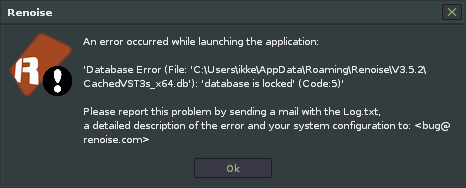
This is what Gemini ai says; What Does “Database Locked (Code 5)” Mean?
The error indicates a concurrency issue where one process or thread is trying to access (usually write to) the database file, but another process or thread already has an active lock on it.
-
SQLite is File-Based: Unlike heavy-duty database systems, SQLite manages its database as a single file on your hard drive (in the case of Renoise, a file like CachedVSTs_x64.db).
-
It Allows Only One Writer: To prevent corruption, SQLite only allows one process to be writing to the database at any given time. It can handle many programs reading simultaneously, but when a write operation starts, it places a lock on the entire database file.
-
The Conflict: “Code 5” means the operation you initiated (e.g., Renoise trying to update the VST cache) could not complete because it tried to access the database while another process already held the necessary lock.
What Causes This in Renoise?
In the context of Renoise 3.5.2 and the VST3 cache file, the cause is almost always one of the following scenarios:
1. Multiple Instances of Renoise
This is the most frequent cause. If you accidentally double-click Renoise and start a second instance, both copies will try to access and potentially write to the VST cache file at the same time. The first instance gets the lock, and the second one throws the “database is locked” error.
2. Improper Shutdown or Crash
If Renoise or a plugin crashed, or if your computer shut down unexpectedly, the database file might have been left in a locked state or still contains an active journal file that signals a transaction is incomplete. When you restart Renoise, it tries to access the cache but sees the old lock is still active.
3. Background/Antivirus Scanning
Less common, but possible: An antivirus program or a disk indexing service (like Windows Search) could be briefly scanning or holding a lock on the database file while Renoise is trying to update it.
How to Fix It
Since the problem is likely related to a stale lock or two programs fighting over the file, the fix is usually straightforward:
1. The Simple Fix: Check for Duplicate Instances
-
Check the Task Manager (Ctrl + Shift + Esc on Windows): Look in the “Processes” tab for more than one instance of Renoise.exe. If you find one, end the extra process and try launching Renoise again.
-
Restart your Computer: A full restart will clear all locks and running processes, ensuring only one instance of Renoise starts clean.
2. The Cache Reset (Most Effective Fix)
If the lock is “stuck” due to a previous crash, you need to manually delete the cache files so Renoise is forced to rebuild them.
-
Close Renoise completely. Make absolutely sure it’s not running (check Task Manager if you’re unsure).
-
Open the Renoise Preferences Folder: In Renoise, you can find this location by going to Help > Show Preferences Folder.
-
Locate the Cache Files: In that folder, you will see files related to the VST cache. Look for files like:
-
CachedVSTs_x64.db (or similar)
-
CachedFailedVSTs_x64.db (or similar)
-
Any other file that ends with .db and references VST or VST3.
-
-
Delete (or Move) the Files: Select and delete these VST cache database files. If you are nervous, you can just move them to a temporary folder instead.
-
Restart Renoise: Renoise will restart, and since the cache files are missing, it will automatically perform a full VST/VST3 rescan and create fresh, unlocked cache files.““
Renoise not closing properly has been an ongoing issue for years , but this was not the case since I sired it up for the first time .
Could indeed well be an erroneous double click .
I don’t worry too much since all plugins behave correctly