Hi all !
I found some time to work on my music after quite some time not doing it, and realized I didn’t find a perfect way yet to monitor db output of a track, when I treat it in parallel with one or more Sends.
Not really a blocking issue since I tend to mix with my ears more than eyes, but tried out looking into it a bit more recently. I was wondering how, people do it on their side ?
Personally, I have a VuMeter on my Master and solo the track+sends and check this master meter, but it sometimes becomes tedious when I want to compare with another one (I have to do this step for each track+sends)
Also, do people have an easy way to control the “overall” gain ? (reducing track gain will make the send more “important” so needs to also reduce the send amount)
Unchecking “Apply post FX…” seems to do the trick sometimes but not completely sure.
(Didn’t put this really in the Help section since I’m mostly curious as how people do it than looking for answers, sounds like tips to me.)
What do you mean by “important” and why do you think you need to reduce the amount (send) too? If you’re reducing track gain for whatsoever, the signal that’s about to be send to another track gets softer at the same time too, right? So if you’re reducing track gain by 2 dB and you’re also reducing the amount (send) by 2 dB, you’re sending a signal that is reduced by 4 dB, right?
Nevertheless it’s not important to monitor dB output of a single track, that’s why I barely do it. It’s important that nothing’s distorted and how everything comes together in the mix. So just like you I’m relying on my ears when it comes to balance and I’ll check the loudness meter when it comes to achieving the desired values in terms of loudness.
I currently use VennAudio VUMeter that also have LUFs but sometimes find it a tad limited, might have a try at youlean! (Also use SPAN but that’s not exactly the same goal from what I see about youlean)
To be honest, I don’t even know why I never tried YouLean, that’s not the first time I see it somewhere.
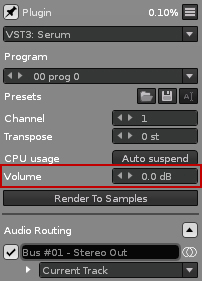
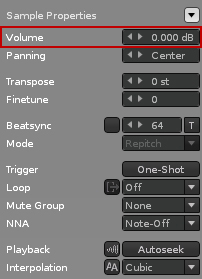
For some reason I almost never tweak volumes on the instruments directly and always work at track level ! Great idea!
To be honest, you’re right. It just feels like when changing the track-level volume, since the fader is at the end of the chain it’s applied afterwards.
Exactly, it’s one of the first time I do it to be honest, and that may be the reason those questions didn’t cross my mind before today after a few years using Renoise now
Yes, mixing and mastering isn’t as complicated as many think. Forget about all those single values, trust your ears instead. Mix in mono in order to be able to hear what instruments are too dominant and what instruments need to be brought more to the forefront. It’s all about the balance in the mix.
That’s right, Youlean is a loudness meter and SPAN a spectrum analyzer. Which means Youlean is about the loudness and SPAN about the frequencies. Personally I only use SPAN in mode “Average” in order to check the average balance of frequencies of the song. The goal is to achieve a slight “smiley curve”, but even this isn’t mandatory. It depends.
I sometimes use SPAN when I’m making a song in a genre I’m not accustomed to, and I try to compare briefly with a reference track in that genre
But again, I’m not fan of all of those reference tracks things lol
The further I go with reference tracks usually is just listen to a few tracks in the genre I’m making, for 10 mins before jumping in my mixing sessions, to kind of reset my ears.
I love SPAN to check mid/side frequencies though, when playing with stereo effects it’s pretty useful to see where to cut a bit of side frequencies that mess up everything, but again, not cutting because they are here, more using it to focus on something and decide with my ears
As long as you’re generally filtering properly, there’s not much that possibly needs to be cut in terms of the sides imho. Personally I slightly expand the side signal only of high frequencies in order to gain some “air”. But it’s VERY subtle and I’m not even sure if it’s audible in the mix or just an imagination. When it comes to reference tracks you already know that I never adjust measured values like frequencies according to a reference track. But a track that has a great mix can be used as a rough orientation where to go when it comes to mixing by ears.