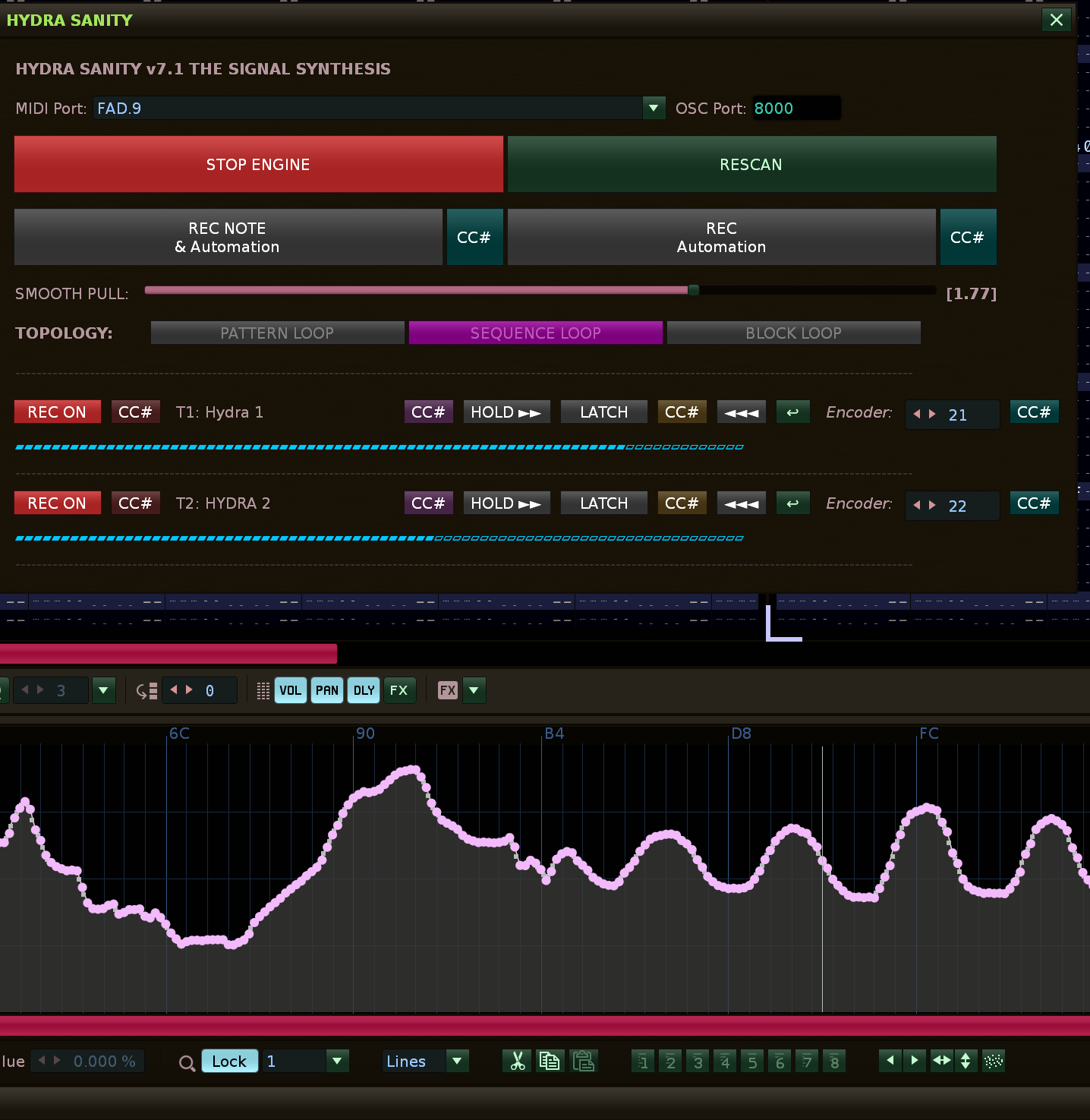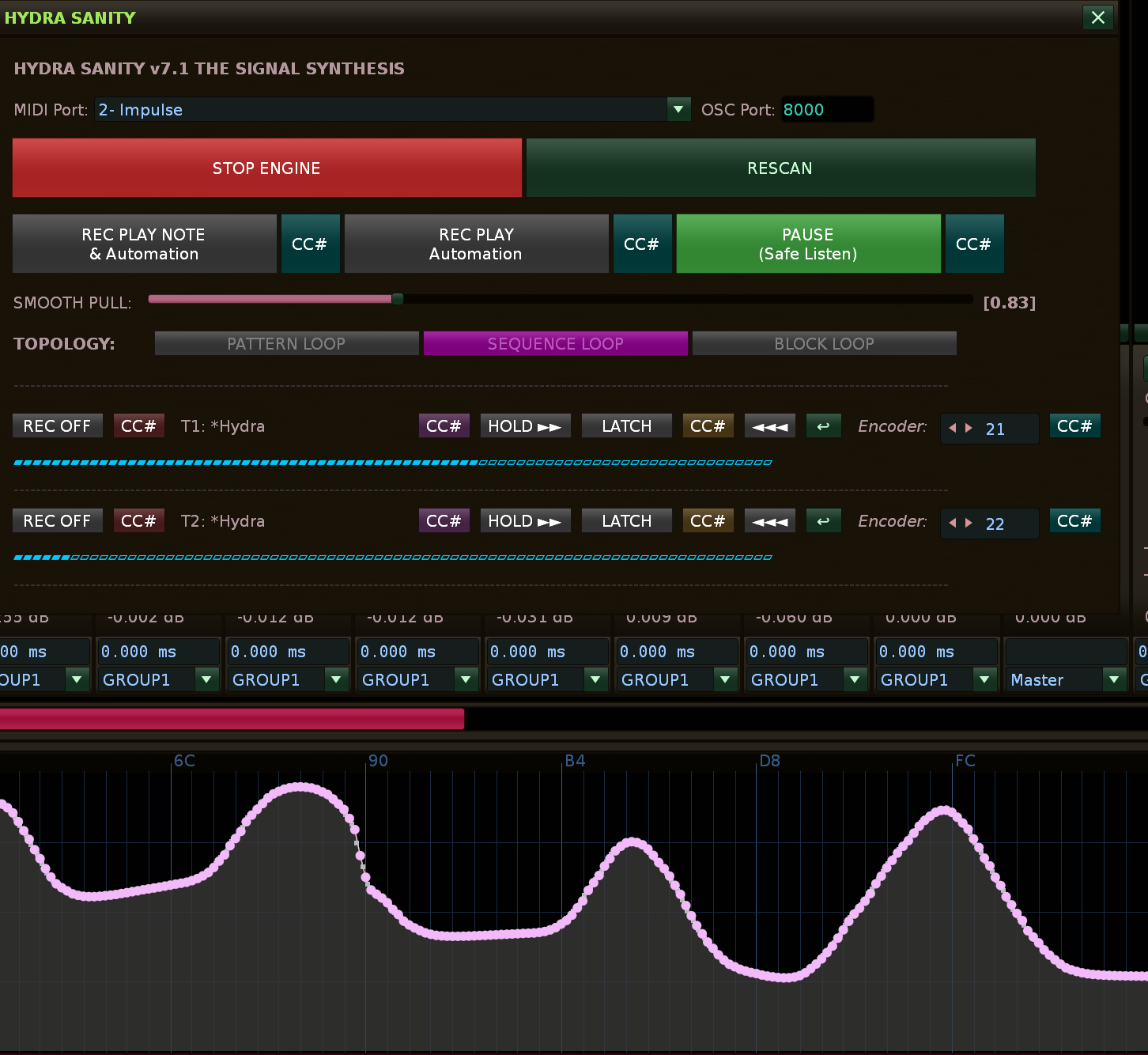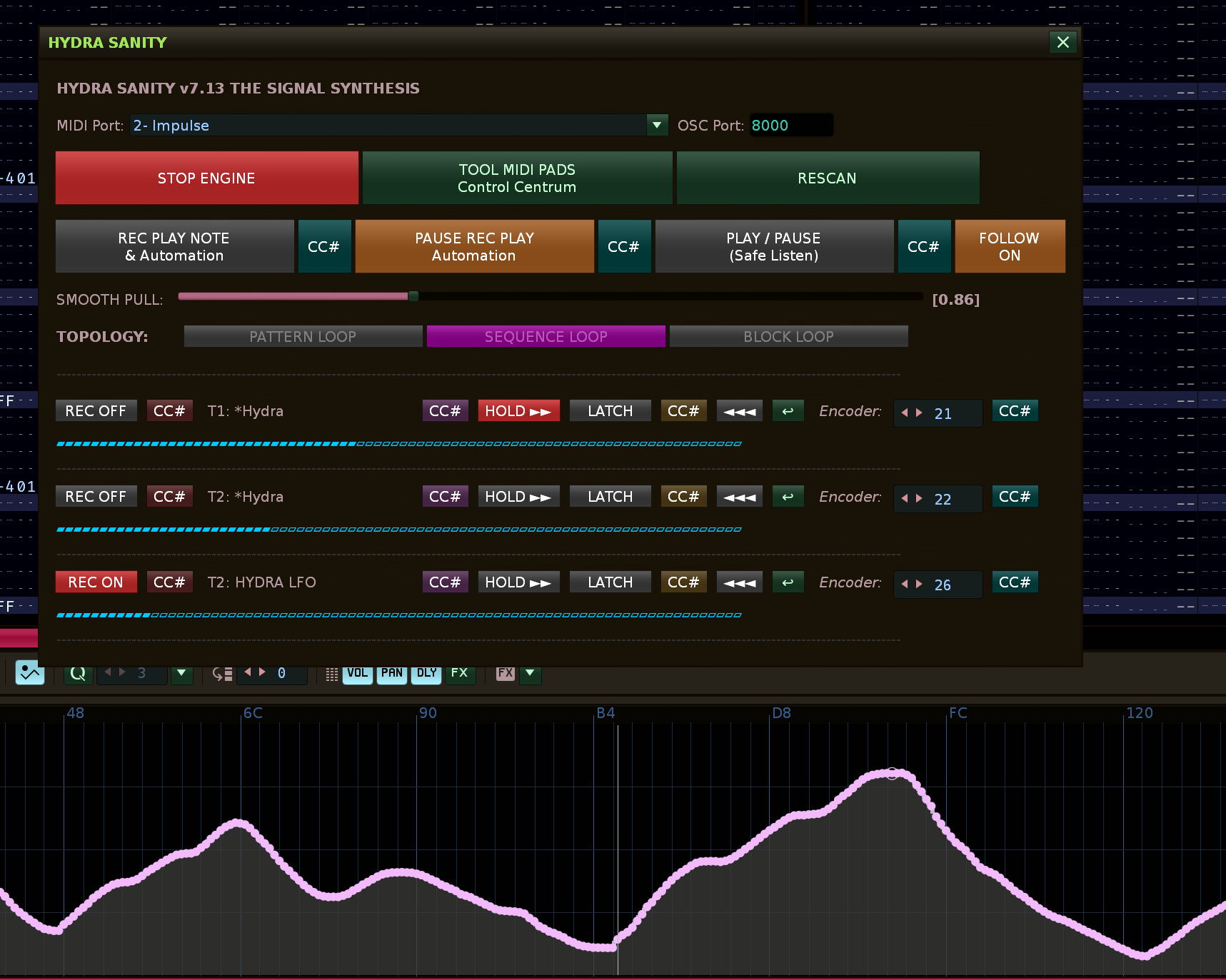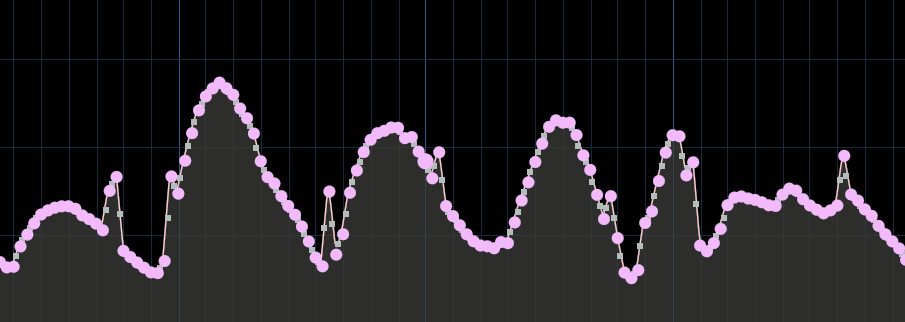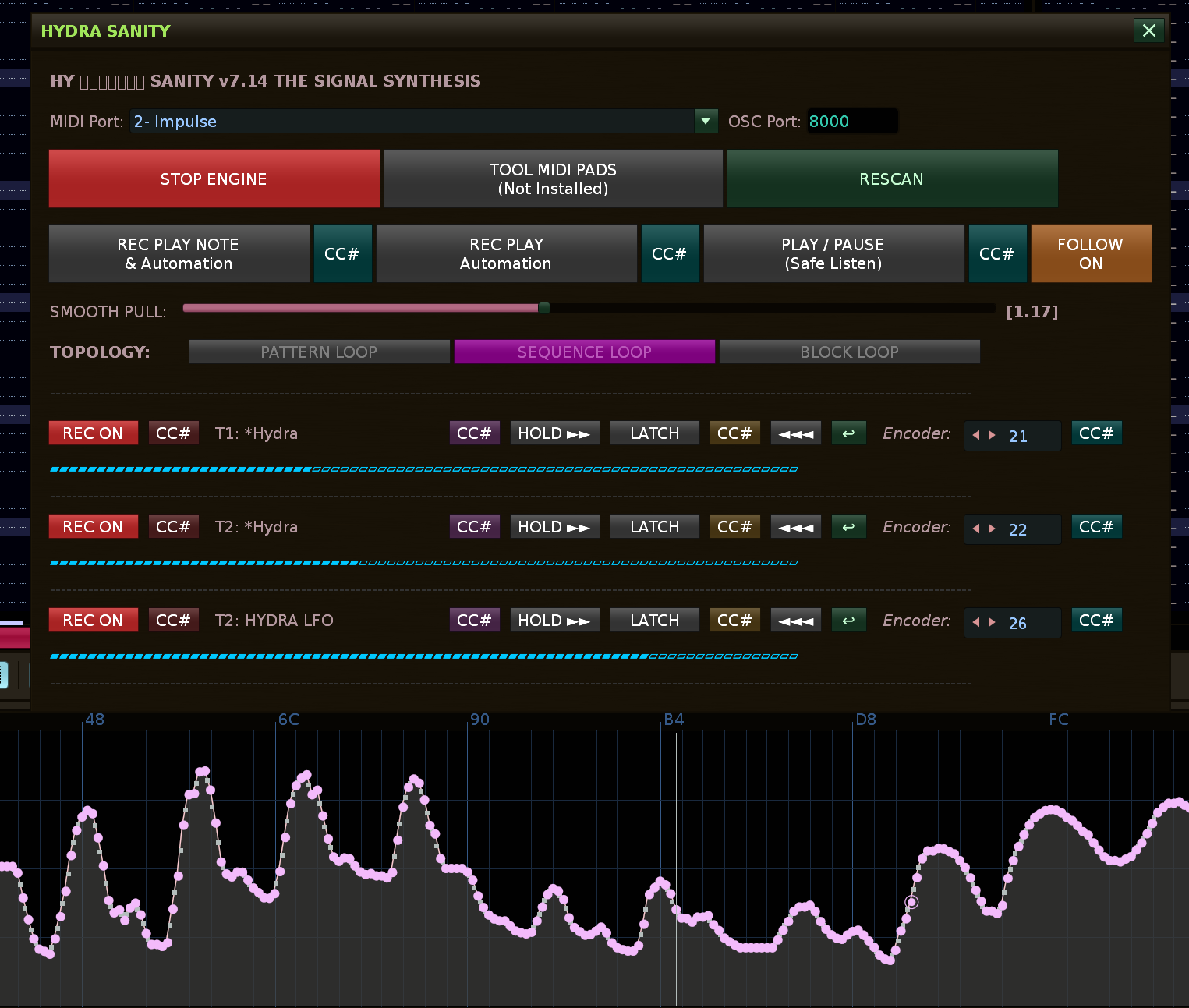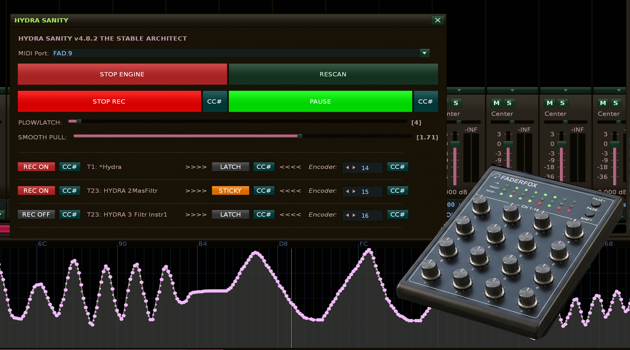
HYDRA AUTOMATION GRAPH SANITY ... Active multi GRAPH recording with own MIDI mapping system ... is OUT and Ready for use!

HYDRA SANITY (v4.82 THE STABLE ARCHITECT)

:rocket: Úvod / Introduction

CZ: HYDRA SANITY je špičkový automatizační nástroj pro DAW Renoise, který definuje nový standard pro real-time zápis a vyhlazování křivek. Verze 4.8.2, přezdívaná „THE STABLE ARCHITECT“, přetváří původní tool v komplexní velitelské centrum. Odstraňuje veškeré konflikty mezi přehrávacím enginem a lidskou rukou díky přímému odposlechu MIDI portů a inteligentnímu systému 4 stavů. Tento nástroj vznikl unikátní kolaborací mezi autorem (Zorgan) a umělou inteligencí Gemini Pro.

EN: HYDRA SANITY is a high-end automation tool for the Renoise DAW, defining a new standard for real-time recording and curve smoothing. Version 4.8.2, nicknamed “THE STABLE ARCHITECT,” transforms the original tool into a comprehensive command center. It eliminates all conflicts between the Renoise playback engine and the human hand through direct MIDI port interception and an intelligent 4-state system. This tool is the result of a unique collaboration between the author (Zorgan) and the AI Gemini Pro.


:warning: Nezávislé MIDI mapování / Independent MIDI Mapping

CZ: KRITICKÉ: Tento nástroj disponuje vlastním, na Renoise nezávislým systémem MIDI mapování. Pro správnou funkčnost je nezbytné, aby MIDI kontrolér nebo konkrétní CC kanály namapované v toolu nebyly současně namapovány v nativním systému Renoise (Ctrl+M). Tool přebírá plnou kontrolu nad signálem z HW portu pro aplikaci čistících a vyhlazovacích algoritmů.

EN: CRITICAL: This tool features its own MIDI mapping system, entirely independent of Renoise. To ensure proper functionality, any MIDI controller or specific CC channels mapped within the tool must not be mapped simultaneously in the native Renoise system (Ctrl+M). The tool takes full control of the signal from the HW port to apply advanced cleaning and smoothing algorithms.


:gem_stone: Paralelní Multi-Grafové Mistrovství / Multi-Graph Parallel Mastery

CZ: HYDRA SANITY není omezena na jeden kanál. Díky nezávislému stavovému automatu pro každé zařízení můžete ovládat celou flotilu Hyder současně.

  • Simultánní záznam: Pokud váš kontrolér disponuje více fadery, můžete nahrávat pohyb do několika grafů najednou bez jakéhokoliv zpoždění.
  • Nezávislá kontrola: Nahrávání v jedné stopě nikdy neovlivní plynulost nebo stav ostatních zařízení v projektu. Každá Hydra má svůj vlastní „mozek“.

EN: HYDRA SANITY is not limited to a single channel. Thanks to independent state machines for every device, you can command an entire fleet of Hydras simultaneously.

  • Simultaneous Recording: If your controller features multiple faders, you can record movements into several graphs at once with zero latency.
  • Autonomous Control: Recording in one track never compromises the purity or state of other devices in the project. Every Hydra possesses its own “brain.”

:video_game: Velitelské centrum Transportu / Transport Command Center

CZ: Tool obsahuje integrovaná tlačítka pro ovládání chodu Renoise přímo z rozhraní nebo namapovaného hardwaru.

  • PLAY RECORD & PLAY: Funkce typu Toggle (první stisk spustí, druhý aktivuje PAUSE).
  • CC# Mapping: Každá transportní funkce má vlastní učící tlačítko pro dálkové ovládání.
  • Vizuální odezva: Tlačítka mění barvu (červená/zelená) podle reálného stavu DAW.

EN: The tool features integrated buttons to control Renoise playback directly from the interface or mapped hardware.

  • PLAY RECORD & PLAY: Toggle functions (first press starts, second press activates PAUSE).
  • CC# Mapping: Every transport function has its own learn button for remote control.
  • Visual Feedback: Buttons change color (Red/Green) based on the actual DAW state.

:gem_stone: Logika 4 stavů / The Quad: 4-State Logic

  1. MIDI_INC: Aktivní nahrávání, které čistí prostor před i za přehrávací hlavou. / Active recording that clears space both in front of and behind the playhead.
  2. LATCH: Maticový můstek vytvořený v milisekundě po puštění faderu pro dokonalý spoj křivek. / A millisecond-calculated matrix bridge for a perfect bond after releasing the fader.
  3. STICKY HOLD: Nekonečný statický zápis poslední hodnoty. Hydra se „zakousne“ do grafu a drží hodnotu, dokud nepohnete faderem. / Infinite static writing. Hydra “bites” into the graph and holds the value until the fader is moved.
  4. IRON (Vision Kernel): Domovský stav využívající 3-bodový klouzavý průměr pro elastickou plynulost křivek. / Default idle state using 3-point moving average for elastic curve fluidity.

:shield: Bezpečnostní systémy / Safety Systems

  • Safety Interlock: Pokud vypnete hlavní nahrávání (REC OFF), automaticky se deaktivuje i STICKY mód. To brání nechtěnému statickému přepisu grafu na pozadí.
  • Auto-Yield: Jakmile v režimu Sticky pohnete faderem, Hydra okamžitě uvolní sevření a plynule přejde do nahrávání (MIDI_INC).
  • Escape-to-Cancel: Pokud omylem aktivujete učení MIDI (WAIT), stisknutím klávesy Esc režim okamžitě zrušíte.

:brain: THE BRAIN: Perzistentní paměť / Persistent Memory

CZ: Skript automaticky ukládá veškerou konfiguraci (porty, CC, stavy REC, transportní mapování) přímo do souboru skladby (.xrns). Při opětovném otevření projektu se celá vaše konzole automaticky nastaví do původního stavu.

EN: The script automatically saves all configurations (ports, CCs, REC states, transport mappings) directly into the song file (.xrns). Upon reopening the project, your entire console restores to its previous state automatically.


:artist_palette: Design a Ergonomie / Precision Design

  • Encoder Label: Jasné označení pro hardware mapování v pravé části. / Clear labeling for hardware mapping on the right side.
  • Notebook Lines: Každá Hydra je oddělena jemnou linkou pro maximální přehlednost (styl linkovaného sešitu). / Every Hydra is separated by a fine line for maximum clarity (ledger style).
  • Grid Alignment: Matematicky přesné rozložení prvků na šířku 660px. / Mathematically precise element layout at 660px width.

:magnifying_glass_tilted_left: Technické specifikace / Technical Specifications

  • Direct MIDI Interception: Přímá komunikace s HW portem. / Direct communication with the HW port.
  • Custom Interpolator: Algoritmus pro záchranu zraku a čistotu automatizace. / Proprietary algorithm for visual clarity and automation purity.
  • Song Data Persistence: Ukládání skrze renoise.song().tool_data. / Storage via renoise.song().tool_data.

:glowing_star: Instalace / Installation

  1. Zkopírujte kód do souboru main.lua ve vaší Renoise Tool složce. / Copy the code into a main.lua file within your Renoise Tool folder.
  2. Spusťte přes menu: Tools -> Zorgan -> HYDRA SANITY. / Launch via the menu: Tools -> Zorgan -> HYDRA SANITY.

Created with a passion for sound and precision.
Zorgan & Gemini Pro


Contact: zorgan@email.cz | Web: zorgan.cz
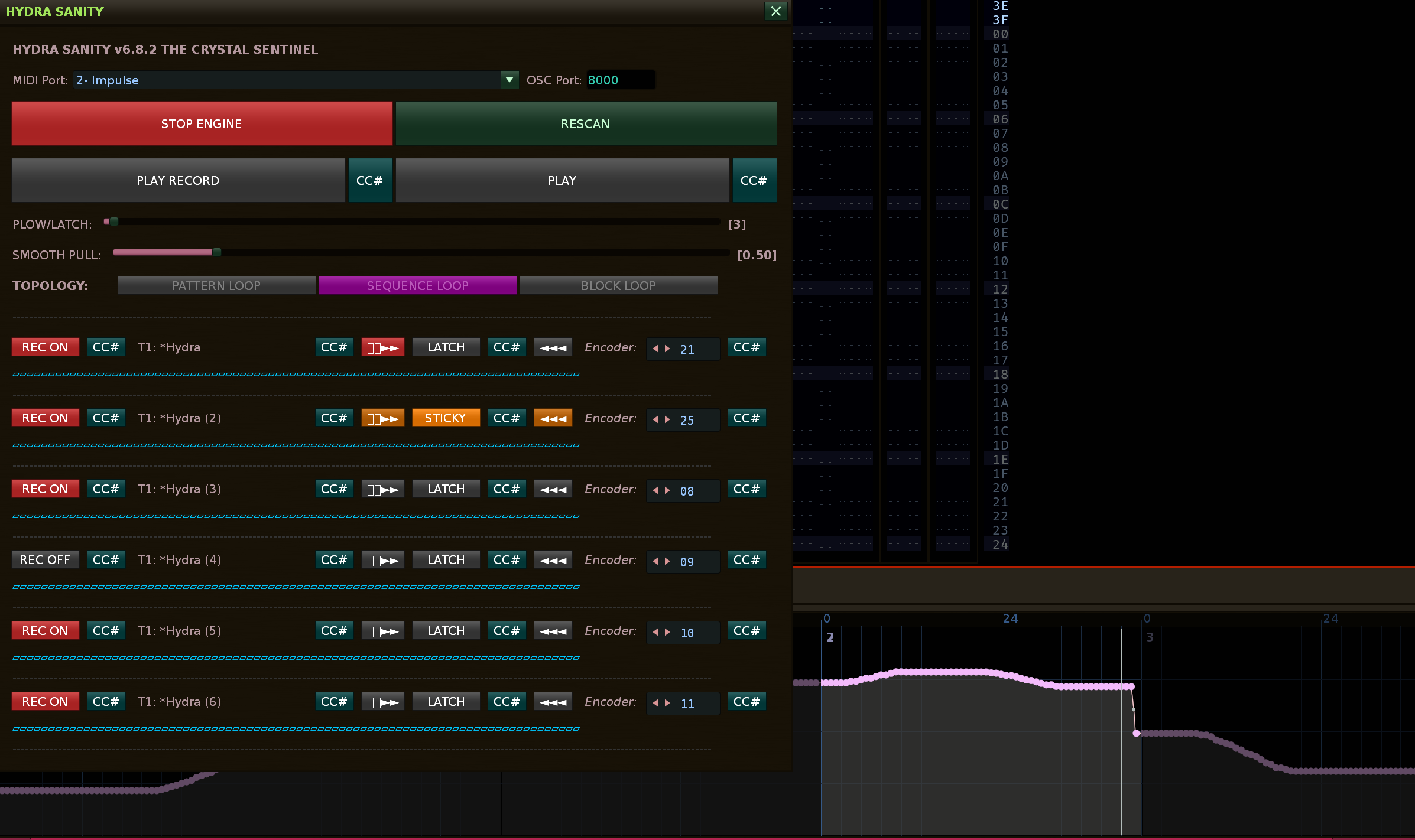
I’m working on a better logic for the whole engine now and there will be improved controls… for releasing the fader you can have the fader level written to it by pressing the LATCH button, when you use the fader it will remember that it should write the same level at the end for the next use of the fader. Implementation of using OSC server, client so that MIDI keys can also be used = midi controller for the hydra sanity engine and MIDI NOTE keys for Renoise. Implementation of cache for less engine load, etc. In the future, pad control for switching track - instrument, solo/mute and more will be added.

1 Like

:package: HYDRA SANITY v6.8.2 – THE CRYSTAL SENTINEL

:dna: 0. SYSTEM PHILOSOPHY

HYDRA SANITY is not an automation recorder.
It is a deterministic real-time signal processor for human input
.
:open_book: HYDRA SANITY: The Crystal Sentinel (User Manual)
Welcome to the Hydra Sanity engine. This tool is not just a simple automation writer—it is an intelligent, kinematic predictive system that analyzes your hand’s speed, smooths out digital “jitter,” and fully understands the structure of your song.

:warning: IMPORTANT: The Golden Rule of MIDI Mapping
Do not map your hardware MIDI controller natively via CTRL+M directly in Renoise! If you do, Renoise will “steal” the MIDI port for itself, and our engine will lose access to it.
Perform all your mapping (faders, knobs, and buttons) exclusively via the CC# buttons located directly inside the Hydra Sanity window. The engine will intercept the MIDI data in the background and safely, smoothly write it into Renoise.
:rocket: How to Launch & Activate the Tool
Locate the Tool in Renoise: To open the interface, go to the top menu bar in Renoise and navigate to Tools > Zorgan > HYDRA SANITY.

Start the Engine: Simply opening the window is not enough! For the tool to actually listen to your MIDI controller and write automation, you must click the “START ENGINE” button located in the top section of the window.

When activated, the button will turn red and change its text to “STOP ENGINE”. Once it’s red, the Crystal Sentinel is online, monitoring your playhead, and ready to record!

:control_knobs: 1. Global Settings (Top Panel)
MIDI Port: Select your hardware controller here.

OSC Port: The port used for the engine’s internal communication with Renoise (default is 8000). Do not change this unless you are resolving network conflicts.

START / STOP ENGINE: The main power switch. If it’s not glowing red, the engine is not listening to MIDI messages.

RESCAN: If you add a new Hydra device instance to your project, click here so the engine discovers it and adds it to the list.

PLAY RECORD / PLAY: Buttons to control the Renoise transport. The adjacent CC# buttons are used to map these functions to physical buttons on your controller. Click CC# (it will change to WAIT) and press a button on your MIDI gear.

:ocean: 2. Curve Behavior (The Kinematic Engine)
These two sliders define how the recorded automation curve will behave:

PLOW / LATCH: Determines how many lines ahead the engine “clears” the path (PLOW) and how long of a rescue bridge it builds when you let go of the fader (LATCH). A higher value (e.g., 4–8) provides safer, longer transitions, while a lower value (2–3) reacts more sharply.

SMOOTH PULL: Sets the strength of the smoothing algorithm (elasticity). The curve is constantly recalculating and stretching toward existing points. A value of 1.0 is neutral. Increasing it will result in extremely smooth, drawn-out transitions.

:brain: 3. Intelligent Topology (TOPOLOGY)
This panel is not meant to be clicked; it is a live signal board. The engine constantly monitors where the playhead is within the song. This prevents errors and automation glitches at loop boundaries.

:yellow_circle: PATTERN LOOP: The playhead is looping inside a single pattern.

:purple_circle: SEQUENCE LOOP: The playhead is jumping across multiple patterns (e.g., 1 ➔ 2 ➔ 1 ➔ 2). The engine recognizes this even if you trigger the patterns live and manually!

:green_circle: BLOCK LOOP: A small fractional loop is active (Numpad Enter). Fader writing in this mode is specially protected so it doesn’t “spill” outside the block.

:level_slider: 4. The Hydra Module (Device List)
Every device named Hydra in your project gets its own dedicated row.

REC ON/OFF: Arms or disarms the automation writing for this specific Hydra.

T: Name: Shows which track the device is located on.

CC# (far left): MIDI mapping for quickly toggling the REC ON/OFF state from your controller.

CC# (next to the lock): MIDI mapping for the hardware Lock feature.

:locked:►► (Lock Sticky): A brilliant feature for live performance. If the lock is glowing red, the engine knows that when you let go of the fader, it should not merge back into the existing automation. Instead, it will instantly “hold a straight line” at the exact value where you left the fader, until you either turn the lock off or move the fader again.
LATCH / STICKY: A manual toggle button to force the Sticky Hold function temporarily.

Encoder (0-127): This is where you assign the MIDI CC number that your physical fader/knob transmits. You can type the number manually, or (better yet) click the rightmost CC# button and simply move your fader—the engine will assign it automatically.

Blue LCD Bar: Visual feedback showing the current value of the parameter exactly as the engine sees it.

I appreciate the feedback… try turning on the engine… turn on loop pattern 1,2,3,4… set up more HYDRA with automation, start LIVE PLAYBACK RECORD and try the faders, encoders as it gives… I put a lot of effort into this to move the work with Renoise in automation to a higher level LIVE recording in automation… so far it is a Level 2 Engine…

Thank you all for your patience. My zeal to bring this engine for HYDRA automation to the light of day kept me going. And finally I released version 7.0… which is now the final clean version, no scratches, no other playback issues, it’s definitely native playback, ultimate clean.

1 Like

:memo: CHANGELOG

v7.1 - The UI & Workflow Integration Update

  • Feature: Auto-start! The monitoring engine now automatically starts the moment the GUI is invoked.
  • Feature: Added global Keybinding and MIDI mapping support for toggling the GUI window.
  • Feature: Added ◄◄◄ focus button to instantly jump to a specific Hydra’s automation lane in the Renoise lower frame.
  • Feature: Added Quick Return button to instantly restore the previous track/device selection after editing curves.
  • UI/UX: Overhauled transport buttons (REC NOTE & Automation and REC Automation) to explicitly manage Renoise Edit Mode and prevent accidental pattern overwriting.
  • UI/UX: Implemented semantic color-coding for CC# learn buttons (Red, Purple, Orange, Teal).
  • UI/UX: Renamed the hardware lock icon to HOLD ►► for clean cross-platform ASCII rendering.

v7.0 - The Signal Synthesis (Paradigm Shift)

  • Architecture: Introduced the Continuous Signal Buffer (CSB).
  • Fix: Completely removed the destructive clear_range method. Future points are no longer constantly overwritten, eliminating all zipper noise.
  • Logic: Re-engineered Release logic. Velocity vectors instantly zero out upon fader release for perfect flat-line holds.

v7.11 - The Safe Listen & Transport Update

  • Feature: Introduced “Safe Listen” (PLAY / PAUSE) transport mode. This temporarily disables all active Hydra REC states to safely preview your track without writing automation, and instantly restores your armed states when playback is paused.
  • Feature: Added dedicated MIDI CC mapping support for the new Safe Listen function.
  • UI/UX: Renamed primary transport buttons to “REC PLAY NOTE & Automation” and “REC PLAY Automation” for better clarity.
  • UI/UX: Adjusted active colors for the transport buttons to provide a softer, more intuitive visual feedback during automation recording and safe playback.

v7.12 - The Seamless Transport Update

  • Feature: Seamless “on-the-fly” switching between all transport modes (“REC PLAY NOTE & Automation”, “REC PLAY Automation”, and “Safe Listen”) during playback.
  • Logic: Switching to a different transport mode while the song is playing no longer triggers a pause. The engine now dynamically transitions to the new mode, instantly saving or restoring “REC ON” armed states as needed.
  • Logic: Playback will now only pause if you trigger the explicitly currently active transport mode.
  • Scope: Smooth transport transitions are fully supported via both GUI buttons and external MIDI controller triggers.

Change Log
v7.13 - The Pattern Focus & UI Polish Update

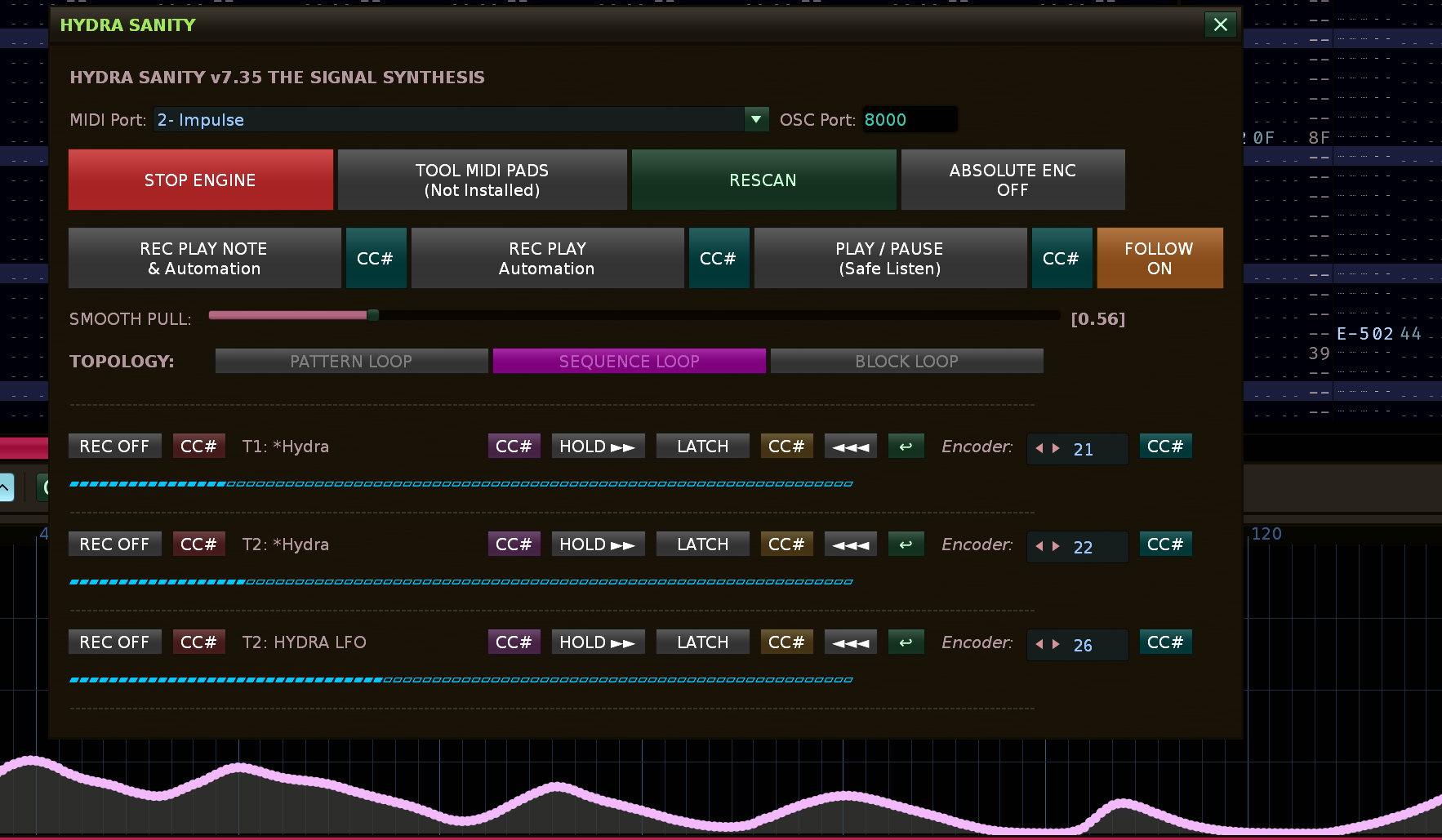
  • Feature: Added an interactive “FOLLOW ON / OFF” button to the main GUI to easily toggle Renoise’s native “Follow Song Position”.

  • Feature: Bi-directional visual sync. The new Follow button automatically updates its state even if toggled externally (e.g., via the Scroll Lock key in Renoise).

  • Logic: Activating the “REC PLAY NOTE & Automation” mode (via GUI or MIDI) now automatically enables the Follow player, ensuring you always see the active pattern line you are recording into.

  • UI/UX: Adjusted the active/paused colors for the transport buttons (“REC PLAY Automation”, “Safe Listen”) and the new “FOLLOW” button. They now use a neutral, comfortable dark orange, significantly reducing eye strain in dark DAW environments.

:memo: CHANGELOG

v7.15 – The Crystal Continuity Update**

  • Fix (Ghost Points): Implemented a just_restored guard mechanism that definitively eliminates stray points and unwanted spikes in the automation graph when switching between transport modes.

  • Hard Reset Logic: The restore_armed_states function now performs a deep reset of all runtime registers (MIDI history, buffer, and prediction), ensuring that any new recording starts from an absolutely clean state.
    *First-Frame Protection: Introduced a safety delay that automatically bypasses the first computational frame after a state restore. This allows internal registers to synchronize with the current Renoise parameters before any new automation points are written.

  • Logic Continuity:The protection mechanism has been integrated into the recover_state function to maintain mathematical curve integrity even during critical mode transitions.
    BEFORE:

now when switching from PLAY safe mode to PLAY REC … the GRAPH is clean without glitch

What is another LEVEL of editing in this HYDRA SANITY engine … is that you can safely draw a graph with a fader, a coder and next to it you can correct what you want to change with a pencil. This should speed up the processing of the automation line …
I would be happy to respond… I would be happy to answer any further questions…

v7.35 – The Signal Synthesis (Update)

  • Smart Echo Cancellation: Replaced the legacy “blind” message blocking with a precise, content-aware filter. The engine now intelligently compares incoming MIDI against the last_sent_value within a 30ms window, preventing the accidental dropping of real physical fader movements during bi-directional synchronization.

  • Boundary Transparency: Absolute edge values (0 and 127) now bypass all jitter and echo filters. This ensures immediate delivery of boundary data to the engine and instant stabilization of Bezier prediction, permanently eliminating “bounces” or curve hallucinations at fader extremes.

  • Auto-Kill HOLD on Record: Improved user workflow (Quality of Life). Activating the record state (switching from REC OFF to REC ON) now automatically and safely terminates any active HOLD state. This protects the user from forgotten static automation blocking new live data input.

v7.31 – The Signal Synthesis

  • Quadratic Bezier Smoothing: Replaced linear extrapolation with a Quadratic Bezier sampling engine for organic, fluid automation curves that respect motion momentum.

  • Signal-Driven Rendering: Transitioned from input-driven to continuous signal-driven processing, eliminating “zipper noise” and oscillations near the playhead caused by irregular MIDI data flow.

  • Adaptive Confidence Blending: Implemented an intelligent trust model that dynamically blends between physical MIDI input and the predictive buffer based on movement speed, ensuring micro-jitter stability.

  • Anti-Averaging Logic: Eliminated the MIDI accumulator bug; the engine now registers the absolute latest physical hardware position with zero latency, preserving high-speed transients and sharp peaks.

  • Smart Hold Tolerance: Introduced time-based hysteresis for fader activity, providing a massive 1.5s hold window at edge values (0/127) to prevent accidental release while maintaining precise 0.6s responsiveness during active movement.

  • Edge Stability Guard: Implemented a residual motion “kill-switch” at automation boundaries to prevent the predictive engine from pulling the signal back from absolute minimum or maximum values.

  • Mutual Mode Exclusion: Hardcoded logic to prevent UI conflicts by ensuring HOLD and LATCH modes are mutually exclusive, maintaining a clean and predictable state machine.

  • Absolute Encoder Sync: Added a dedicated “Absolute Encoder Sync” (MIDI Feedback) handshake to synchronize hardware controllers with current automation values upon engagement.

    Hydra Sanity allows you to instantly toggle (show/hide) its main interface using your computer keyboard or a dedicated button on your MIDI controller. Because the engine automatically starts monitoring when the GUI opens, this is the fastest way to drop into a live recording session.

The engine HYDRA SANITY in version 7.36 is optimized for the fastest possible response using a new Dynamic Time-Aware architecture. To conquer the hardware limits of the DAW’s GUI thread at extreme tempos (e.g., 180+ BPM / 8+ LPB), we introduced O(1) Lane Caching, which eliminates thousands of redundant API queries per second. The engine now dynamically calculates the real-world time per line (compensating for current BPM and LPB) to adaptively scale its Bezier prediction lookahead, ensuring a rock-solid 150ms safety buffer regardless of playback speed.

Furthermore, a new CSB Gap Filler automatically detects and mathematically patches any skipped automation lines caused by graphical thread lag, while Single Batch pcall execution drastically reduces computational overhead. This guarantees perfect, uninterrupted signal rendering and zero-latency input translation even under the most demanding live performance conditions.

I didn’t believe I would be able to do it, to make a nimble fast engine that would have crystal logic and very good latency … And here it is … Tested at BPM 130 and LPB 8 … it handles it easily …
Which is a big leap compared to how I started with the design. I’ve been at it for 4 days now and I have to say that it has trained me in an incredible way. From understanding the Renoise API to C++ programming algorithms… An incredible amount of work behind me, by the way, you can also find the log in README.md. I’m trying to keep the descriptions of individual functions and logic in main.lua. It works … Writing, ironing automation HYDRA graphs in real time all at once … other amazing things are already working nimble!

:rocket: HYDRA SANITY v7.49 - The Perfect Snap Engine (Complete Changelog)

  1. O(N²) Performance Death Spiral & API Overload (v7.36 - v7.41)

Problem: At high BPM and LPB the engine froze massively. Linear iteration through thousands of points and constant rewriting of the same values ​​to the Renoise C++ API was killing the performance of the entire DAW.

Solution: Deployed lightning fast O(log N) Binary Search for reading curves. Implemented safe_write with O(1) Integer-based Dedup Cache (smart memory for deduplication with zero load on the Garbage Collector), which completely prevented API spamming. Added Adaptive Load Scaling (reducing write density under extreme load) and Sliding Automation Window, which dynamically deletes old points far from the playhead.

  1. Sparse Automation & Point-Preserving Modifiers (v7.44)

Problem: Modifiers (HOLD, LATCH, IRON) behaved like generators – they constantly created new points and irreversibly destroyed the structure and topology of the original graph (Dense Overwrite).

Solution: Fundamental transition to Sparse Writer Logic. The engine stopped recording the passing time and started recording only signal changes (change of direction, exceeding threshold limits). Modifiers became “Point-Preserving” – instead of overwriting reality, they only modify the height (Y-axis) of existing nodes in the grid.

  1. Continuous Float Time & The Sweep Override (v7.46 - v7.47)

Problem: Renoise automation runs in continuous time (float), not exactly on whole lines. Our grid-based writing missed old float points (e.g. 23.42), which left “teeth” and residual noise in the graph.

Solution: Range-Based Engine with Epsilon tolerance (EPS = 0.01) is used. WRITE mode (physical touch of the fader) has received God Mode Sweep (clear_range) – it works like a bulldozer that completely cleans its surroundings [line - 0.5, line + 1.5] before writing a new clean point, making the track absolutely dominant.

  1. Residual Velocity Tail & The Snap Release (v7.48)

Problem: When releasing the fader, the running CSB inertia generated a small, unwanted ramp-up arc before the curve finally settled to a flat plane.

Solution: Implementation of Hard Stop Velocity. When releasing the fader, the inertia is immediately reset to zero, the value is frozen and the engine performs an Ultra Clean Release – it instantly erases all predicted lookahead artifacts up to 8 lines into the future.

  1. The Geometric Trap & Pure Curve Smoothing (v7.49)

Problem: The Iron (IRON) would sometimes drop to 0.5 on startup and draw a dead straight line. It was accidentally averaging the live curve values ​​with the physical fader still.

Solution: Perfect decoupling of the IRON mode from the physical fader. The Iron now works as a pure Moving Average Filter directly on the curve – it takes the previous and future real point from the graph, finds their geometric center and elastically pulls the nodes towards it. Zero jumps, pure DAW surgery.