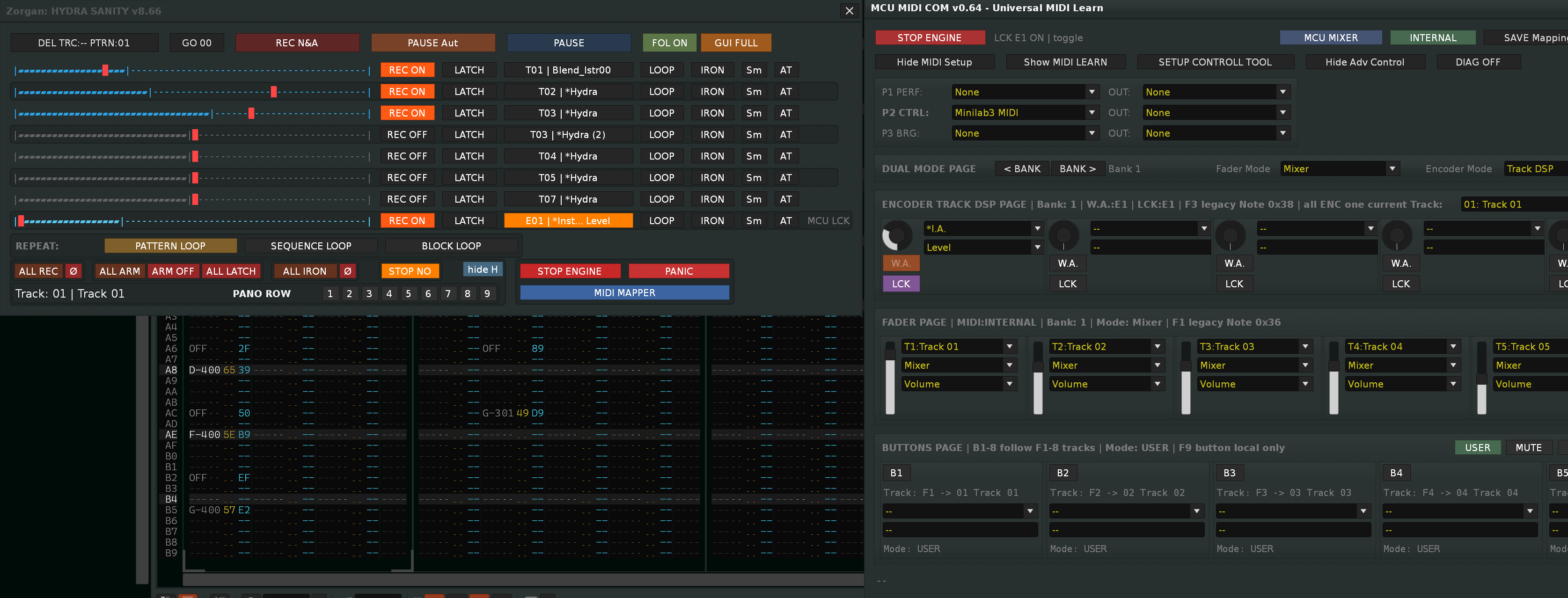
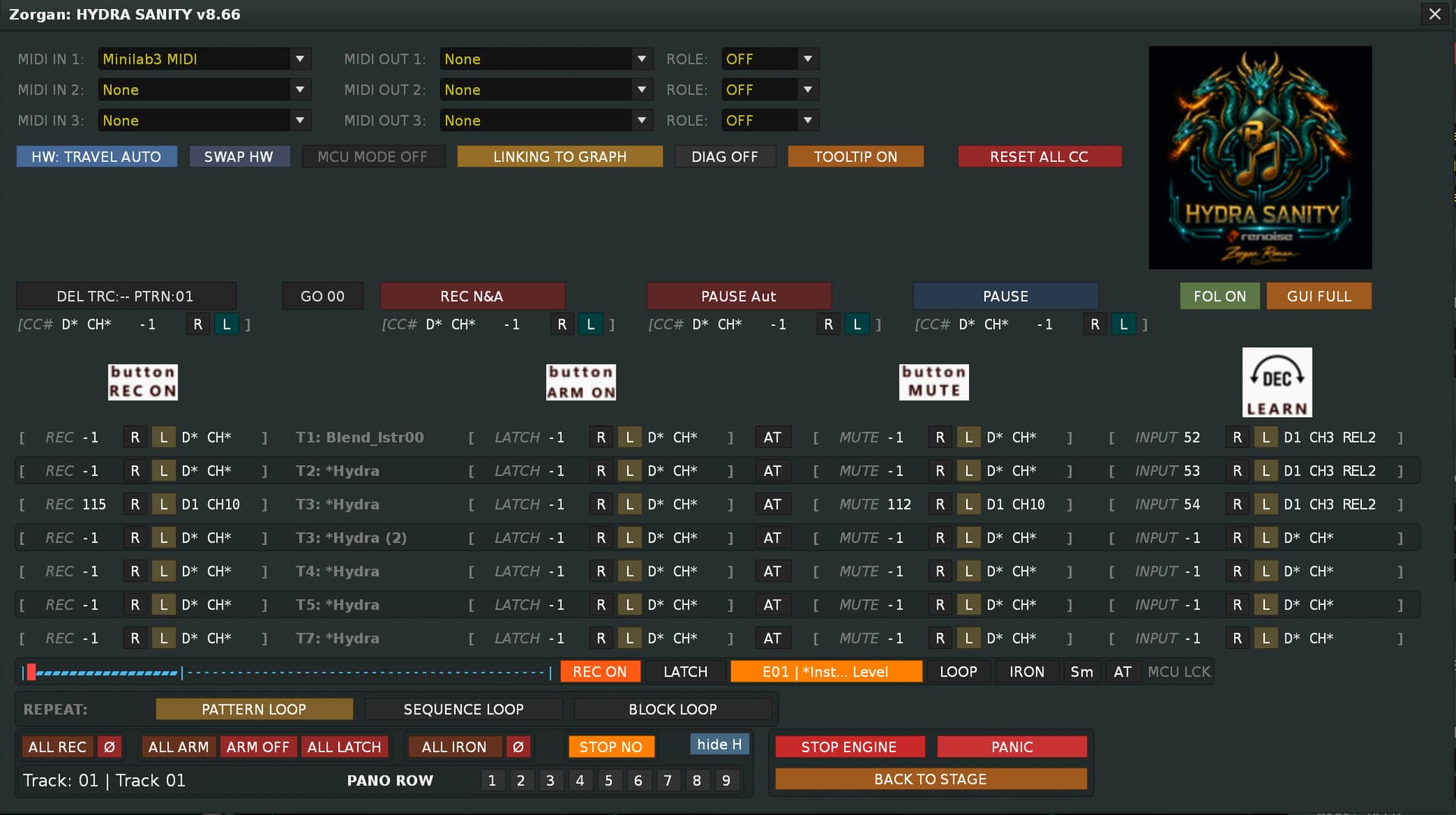
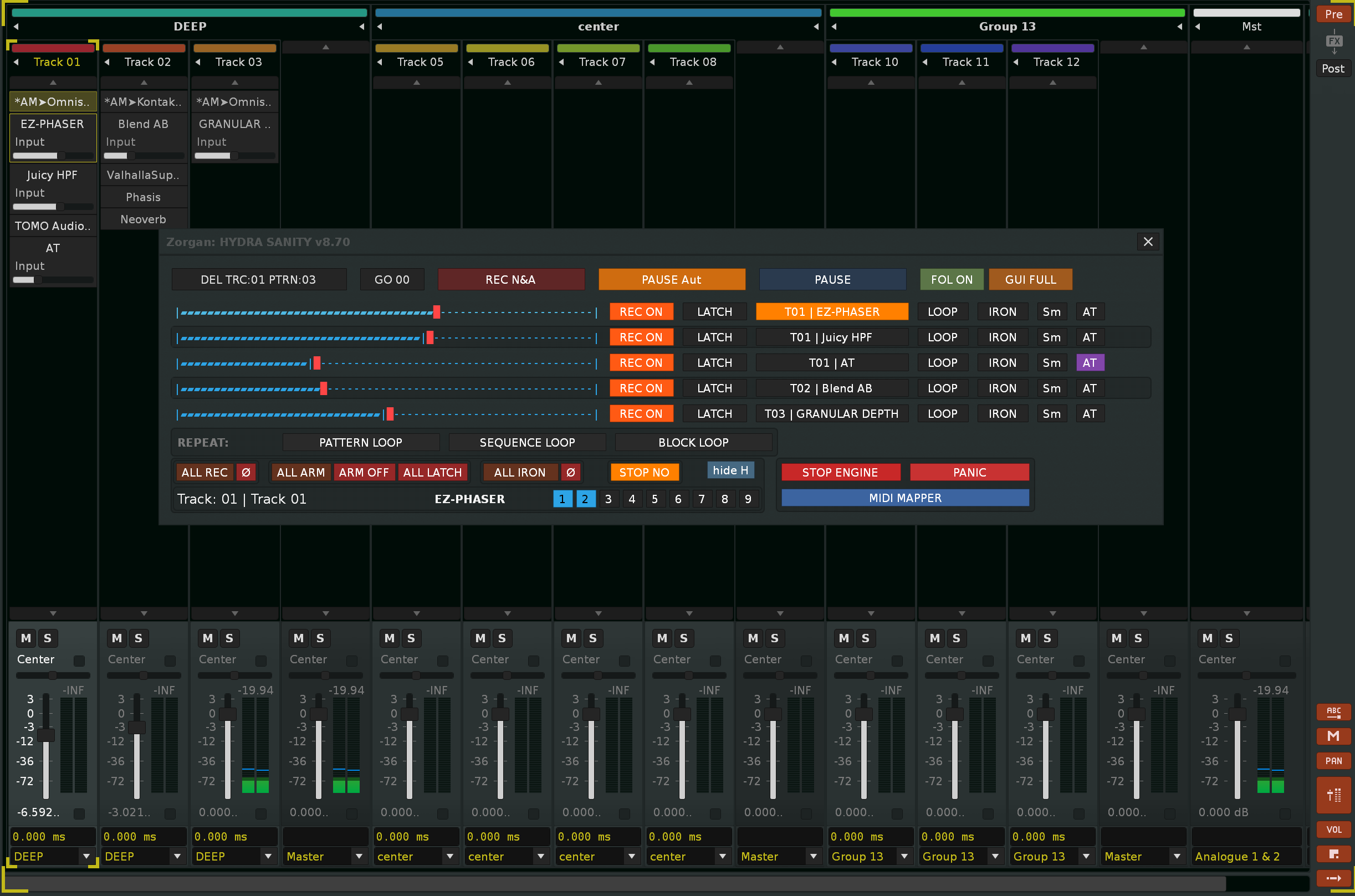
HYDRA SANITY version 8.87 released + quick help

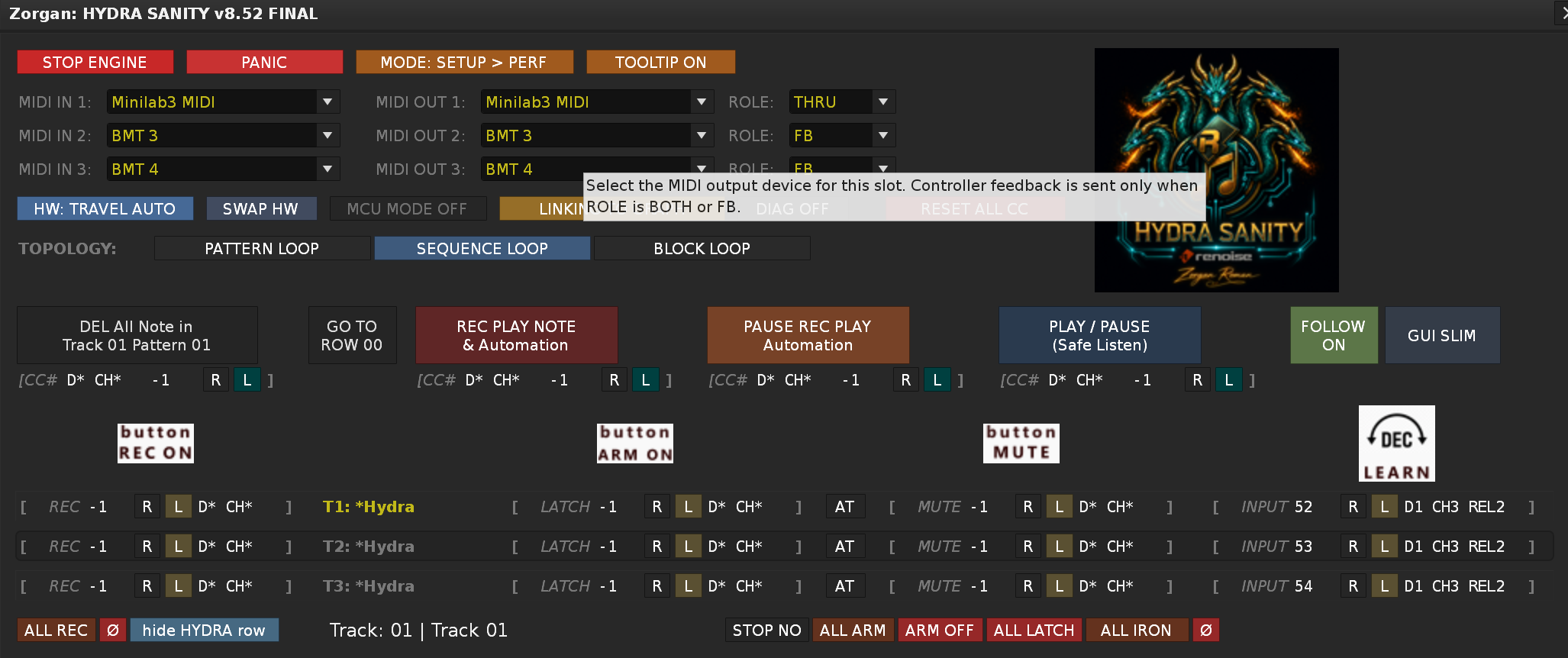
HYDRA SANITY v8.52 FINAL — HW Profile Auto-Select / SWAP HW
This update adds a new hardware-profile workflow for users who use the same Renoise song with different MIDI controller setups.

What is new:

  • Added HW Profile STUDIO / TRAVEL.
  • Added a manual HW: STUDIO / HW: TRAVEL button in SETUP.
  • Added HW Profile Auto-Select. HYDRA compares available Renoise MIDI input devices with the stored profile devices and can automatically select the matching profile during safe startup/setup points.
  • Added profile-scoped MIDI routing: each profile can keep its own MIDI IN 1–3, MIDI OUT 1–3, output ROLE and routing/channel preferences.
  • Added profile-scoped MIDI Learn persistence through HS_HW_PROFILE_V1, so one song can keep separate mappings for the main studio controller and a compact travel/mobile controller.
  • Added SWAP HW. This button swaps the stored STUDIO and TRAVEL hardware-profile contents when Auto-Select found the right connected device but the user wants it assigned to the opposite role.
  • SWAP HW swaps MIDI devices, output roles, routing/channel preferences and profile MIDI Learn payloads, then switches the active profile to the opposite key so the current physical mapping stays alive.

Practical example:
You can use one song in the studio with a larger controller setup, then open the same song on a mobile setup with another MIDI controller. HYDRA can select the matching profile automatically, while the other profile mapping stays preserved.

In short:
v8.52 FINAL makes HYDRA SANITY much more comfortable for users who move between a fixed studio hardware rig and a smaller travel/mobile controller setup, while preserving the existing stable MIDI Learn architecture.

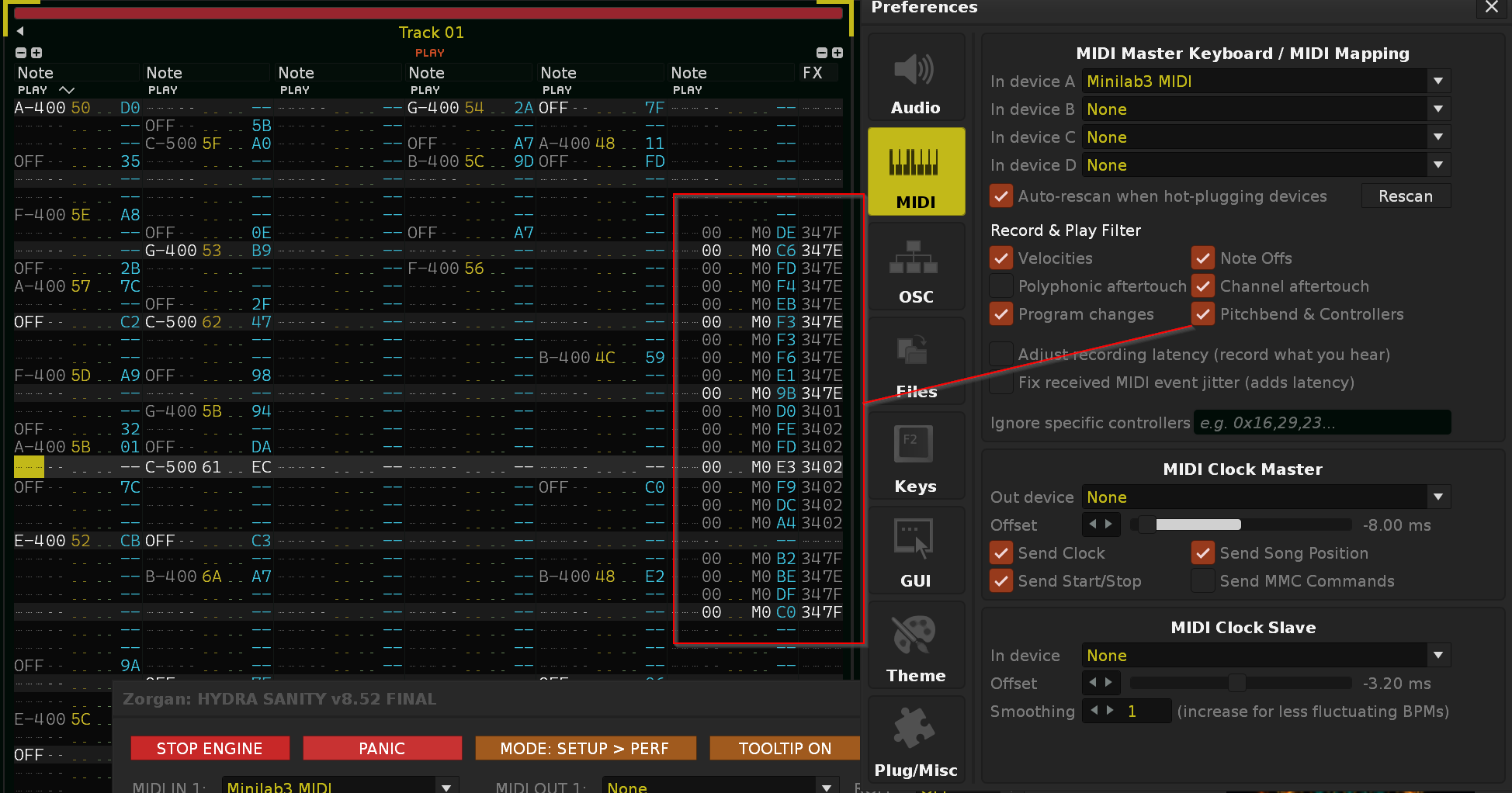
A small note on setting the MIDI IN device in Renoise DAW… If you are using the same MIDI IN Device in Renoise DAW and in HYDRA SANITY tool, turn off the Record & Play Filter > Pitchband & Controller. This will prevent the stream data from being written to the Renoise row under the FX column.

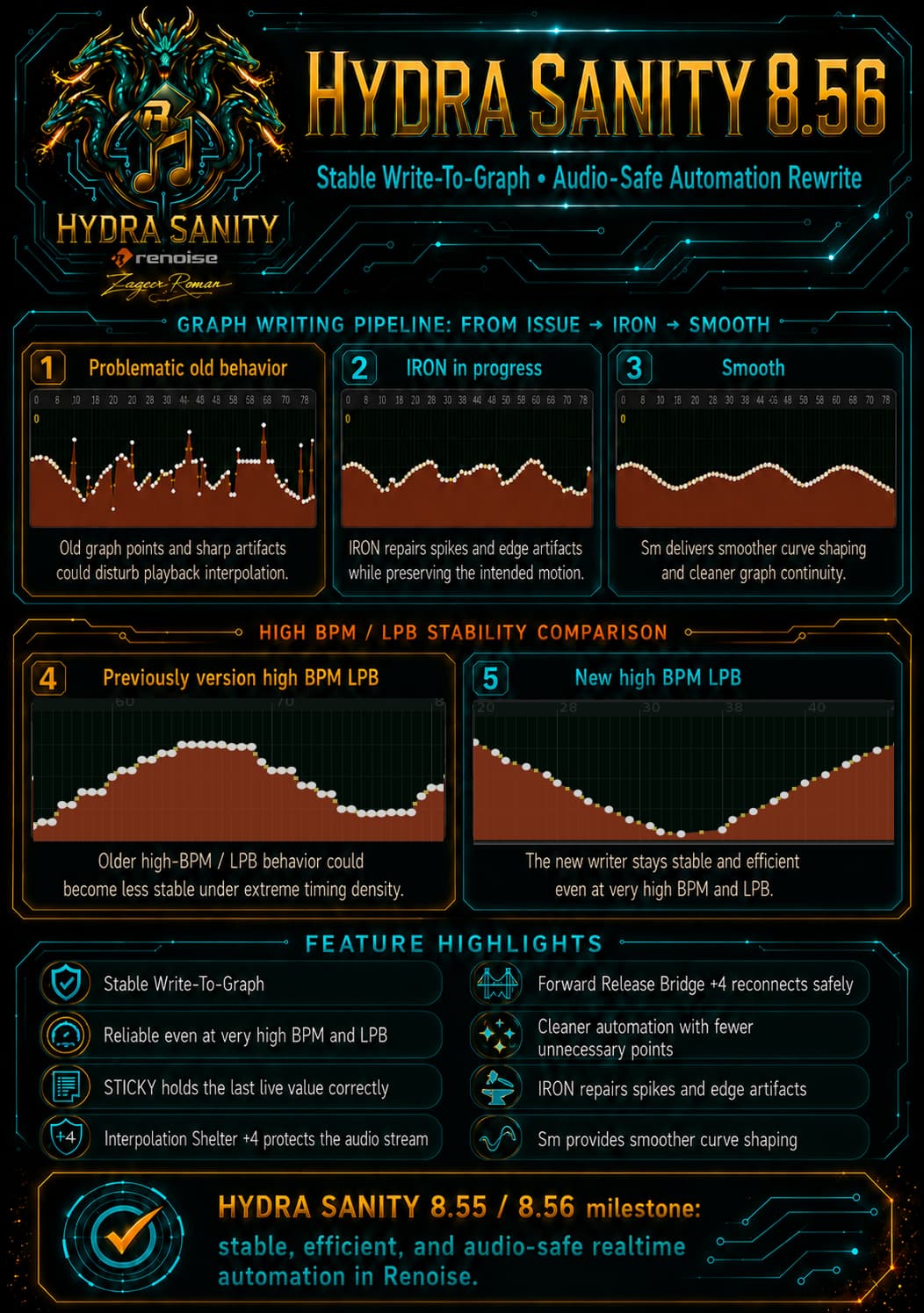
HYDRA SANITY v8.55 / v8.56 FINAL – Main Improvements

HYDRA SANITY v8.55 FINAL

Milestone: stable automation graph writing even at very high BPM and LPB.

Version 8.55 brings a major stabilization of the Write-To-Graph engine. HYDRA SANITY can now write fresh MIDI/encoder input reliably even at very high tempo, high LPB settings, and with throttle protection active.

Main improvements:

  • significantly more stable Write-To-Graph engine

  • reliable fresh MIDI/encoder writing even at very high BPM and LPB

  • fixed cases where old graph points could remain after fast encoder movement

  • STICKY mode now correctly holds the last live/ENC value as a valid hold anchor

  • STICKY can now handle long passages without new fresh MIDI input

  • old automation graph points are cleaned more accurately and safely

  • the core HYDRA SANITY philosophy is preserved: avoid unnecessary dense automation points and write only what is needed

  • improved write continuity across pattern boundaries

  • more stable live automation graph behavior during playback

Version 8.55 closes the main “stable graph writing” stage. HYDRA SANITY can now write automation data accurately, efficiently, and reliably even in demanding realtime situations.


HYDRA SANITY v8.56 FINAL

Milestone: audio-stream protection against Renoise automation interpolation while rewriting old graph data.

Version 8.56 builds directly on the stable 8.55 Write-To-Graph engine and solves a deeper realtime problem: Renoise interpolates between automation graph points during playback. When HYDRA SANITY rewrites an existing old graph live, the nearest old point can still pull the audio stream before the graph is safely rewritten.

Version 8.56 adds a new protection layer:

Interpolation Shelter

During active WRITE/STICKY operation, HYDRA SANITY creates a short protected zone ahead of the playback position:

  • nearby stale graph points that could disturb Renoise interpolation are removed

  • a same-value guard anchor is placed at the end of the shelter

  • Renoise sees a stable value during playback instead of being pulled sharply toward old graph data

Result: a cleaner audio stream while rewriting automation live.

Release Bridge

When the encoder is released, or when STICKY mode is left, HYDRA SANITY no longer tries to draw the bridge backward into an already consumed shelter area. Instead, it creates a new safe forward bridge from the current playback-safe position.

This means:

  • no late bridge drawing into the area Renoise is already playing

  • smoother return from the new live value back toward the preserved old graph

  • old graph data is preserved beyond the safe bridge region

  • much more stable audio behavior even over existing automation curves

Final v8.56 behavior:

  • ACTIVE WRITE/STICKY: +4 flat interpolation shelter

  • RELEASE WRITE/STICKY: +4 forward release bridge


Summary

HYDRA SANITY v8.55 and v8.56 together move the tool to a new level of realtime automation control in Renoise.

Version 8.55 stabilizes the actual automation graph writing, even at very high BPM and LPB.

Version 8.56 adds audio-stream protection against unwanted Renoise interpolation behavior while rewriting old automation graph data live.

The result is a cleaner, more stable, and more professional live automation workflow:

  • accurate graph writing

  • fewer unnecessary automation points

  • stable STICKY behavior

  • safer rewriting of existing graph data

  • cleaner audio stream during playback

  • no new timer

  • no new observable

  • no new OSC route

  • no parallel writer engine

HYDRA SANITY now reaches another important milestone: stable, efficient, and audio-safe realtime automation graph writing in Renoise.

IRON / Sm Mode Upgrade

The automation cleanup system has also been improved with a clearer two-mode behavior:

IRON Mode

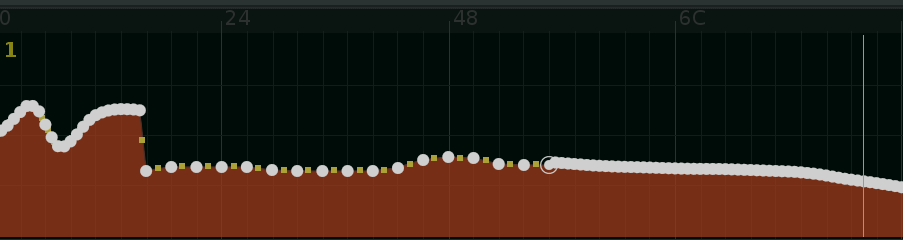
IRON is now focused on repairing sharp unwanted graph spikes and edge artifacts without destroying the intended automation shape.

Instead of aggressively smoothing the whole curve, IRON now preserves the original graph character much better and only corrects problematic “shots”, sudden jumps, cliffs, or unwanted edge damage created during realtime writing.

This makes IRON useful when the automation curve is already musically correct, but contains short unstable graph artifacts that need to be repaired safely.

In practice, IRON now means:

  • spike and edge repair

  • protection against unwanted graph cliffs

  • preservation of the original automation shape

  • no destructive full-curve smoothing

  • safer cleanup after live graph writing

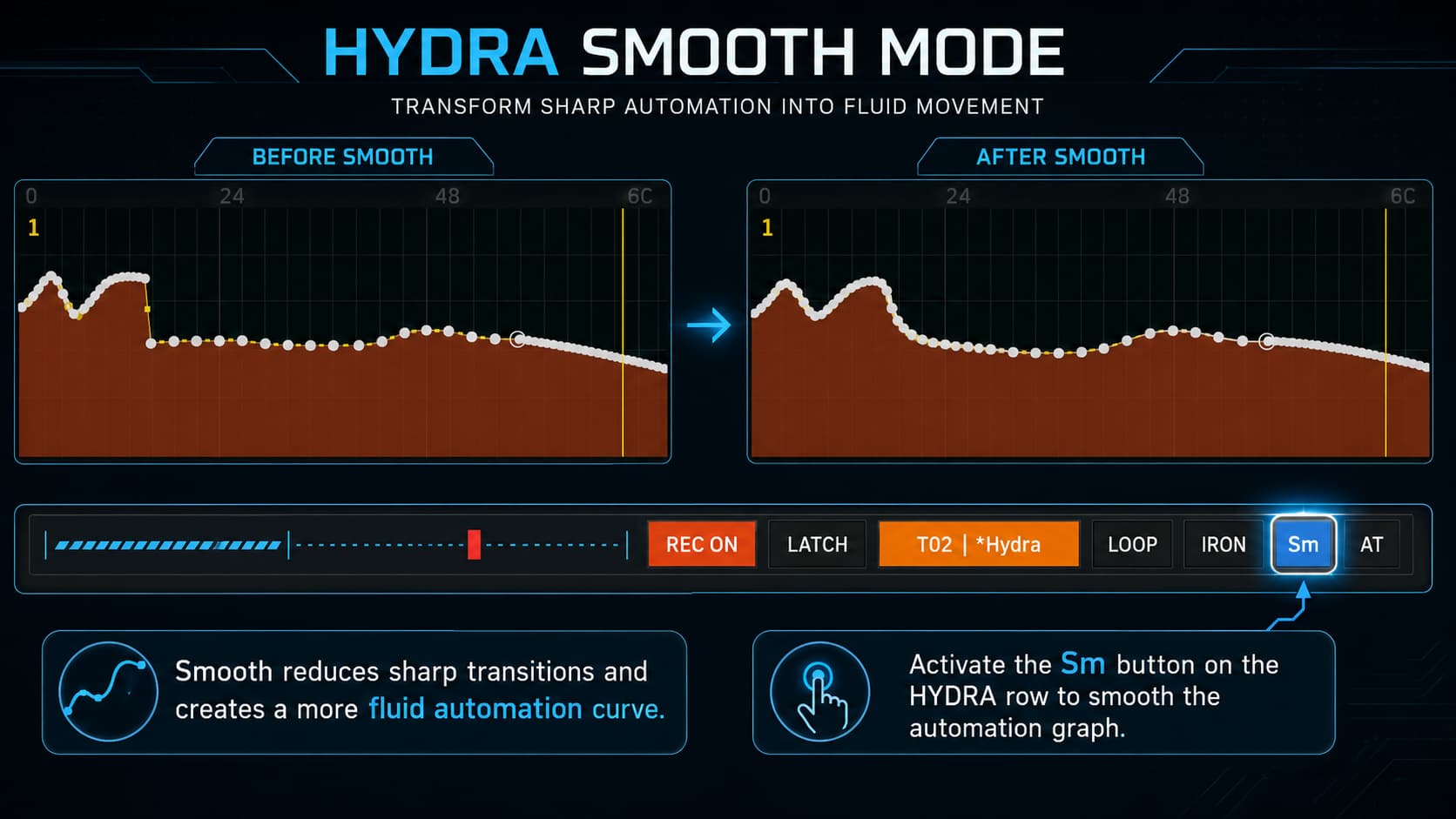
Sm – Smooth Mode

Sm mode remains the dedicated smoothing option.

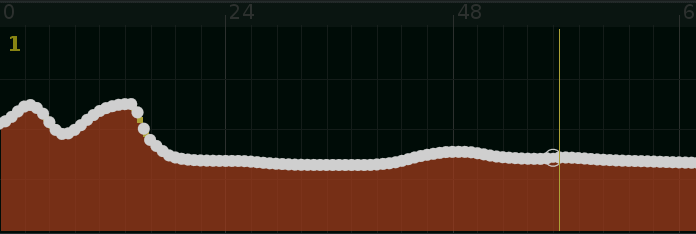
It is intended for cases where the user wants a softer, more rounded automation curve, with stronger smoothing behavior than IRON.

In practice, Sm means:

  • smoother automation transitions

  • more rounded graph movement

  • softer curve shaping

  • stronger smoothing character than IRON

  • useful when the automation should feel less stepped or less sharp

Practical Difference

IRON is now the safer repair mode.

Sm is the smoother curve-shaping mode.

This makes the workflow clearer:

  • use IRON when the graph shape is good but contains spikes or edge artifacts

  • use Sm when the whole movement should become smoother and more rounded

Together with the improved Write-To-Graph engine, this gives HYDRA SANITY a better balance between precision, graph repair, and musical smoothing.

Again, I spent many hours working with HYDRA SANITY and it made sense, the graph recording became flawless and the audio stream is perfect for live production, even when controlled by a real-time MIDI controller and overwriting the old automation graph.

in the heat of battle I forgot about the midi buttons…
Change log HYDRA SANITY v8.57 FINAL fix MIDI LEARN Buttons
Button LEARN fix:

  • Fixed NOTE-based Button LEARN detection.
  • Button LEARN and learned NOTE button mappings now have priority before non-MCU note passthrough.
  • This resolves the issue where ENC/DEC Learn worked correctly, but button Learn did not react to NOTE-based controller buttons.

Runtime behavior:

  • Learned NOTE buttons now trigger their assigned HYDRA SANITY functions correctly.
  • Normal note passthrough remains intact when the incoming NOTE event is not used by Button LEARN or an already learned button mapping.

Unchanged:

  • ENC/DEC detection and classifier logic are unchanged.
  • No new observable.
  • No new timer.
  • No new OSC route.
  • No parallel fallback button engine.
  • No writer-engine changes.

in the heat of battle I forgot about the midi buttons…

Change log HYDRA SANITY v8.57 FINAL fix MIDI LEARN Buttons
Button LEARN fix:

  • Fixed NOTE-based Button LEARN detection.

  • Button LEARN and learned NOTE button mappings now have priority before non-MCU note passthrough.

  • This resolves the issue where ENC/DEC Learn worked correctly, but button Learn did not react to NOTE-based controller buttons.

Runtime behavior:

  • Learned NOTE buttons now trigger their assigned HYDRA SANITY functions correctly.

  • Normal note passthrough remains intact when the incoming NOTE event is not used by Button LEARN or an already learned button mapping.

Unchanged:

  • ENC/DEC detection and classifier logic are unchanged.

  • No new observable.

  • No new timer.

  • No new OSC route.

  • No parallel fallback button engine.

  • No writer-engine changes.


addition to ring LED feedback :
If button in SETUP “Linking to Graph” is active : Ring follows the state in automation graph.
If Linking to Graph is disabled : LED ring shows absolute ENC,FAD value.

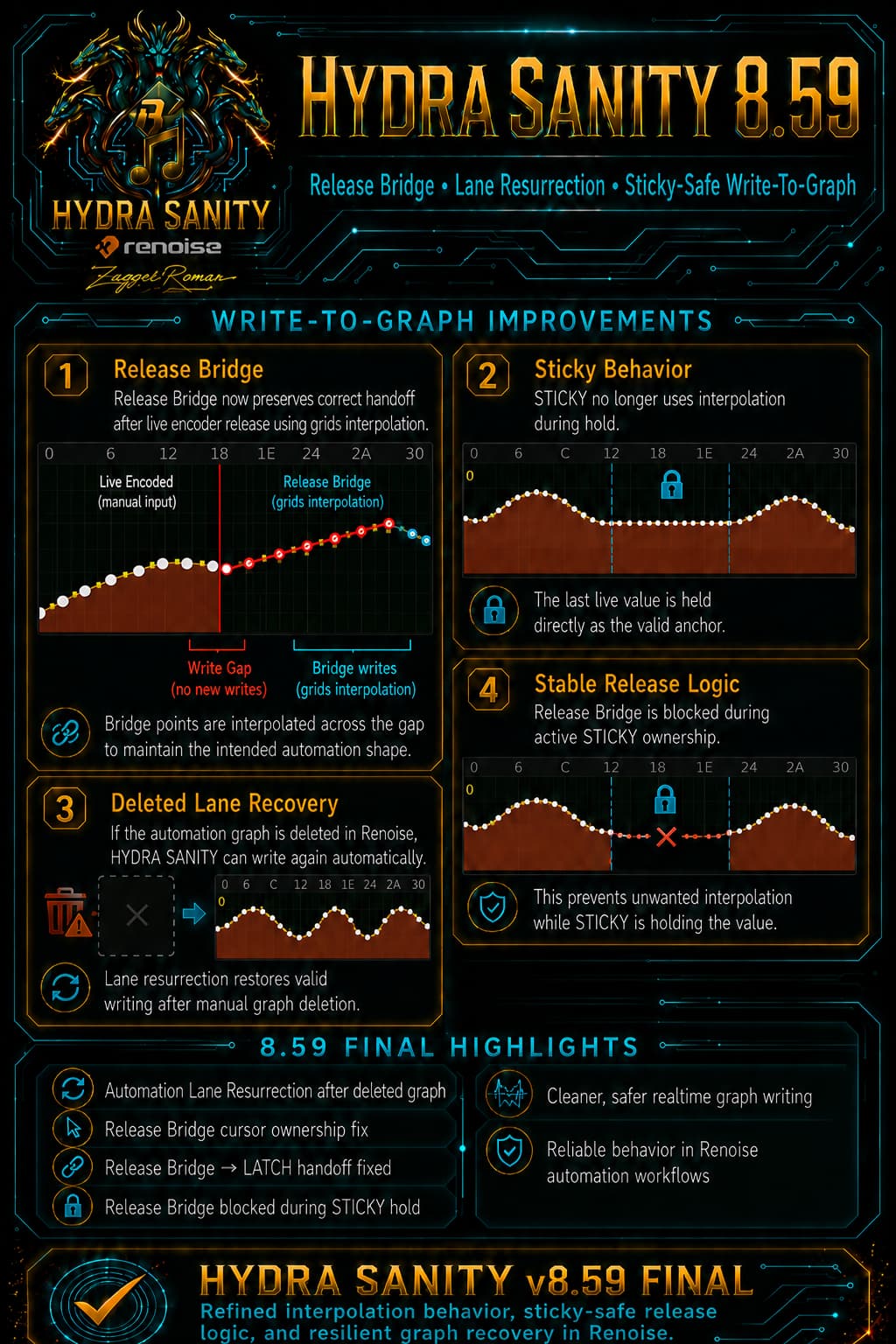
The current version 8.59 is aimed at removing some shortcomings of writing grid interpolation to the automation graph. This has also improved the audio stream, it is perfectly clean even when overwriting the automation graph and handles higher BPM speeds (tested at 270 BPB, and LPB 8). In STICKY mode ( ARM ON ), the write bridge - interpolation is no longer activated.
The problem with writing to a deleted automation graph has been resolved. Writing continues even if you delete the automation graph in Renoise DAW.

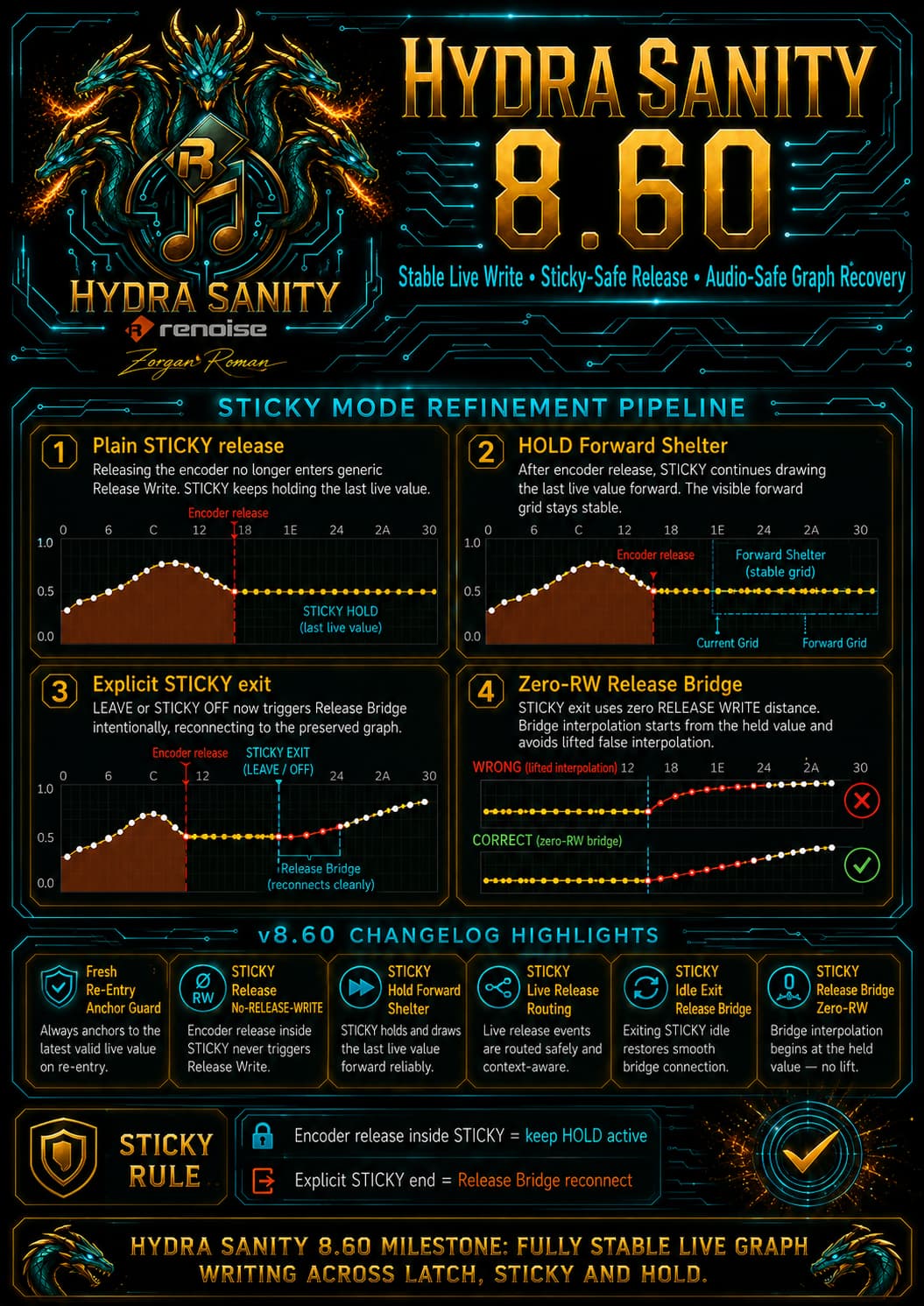
Version 8.60 resolved the issue with redrawing the graph in STICKY mode when leaving the mode to the original automation graph.

HYDRA SANITY for Renoise — v8.62 FINAL

v8.62 addresses a small internal kernel fix

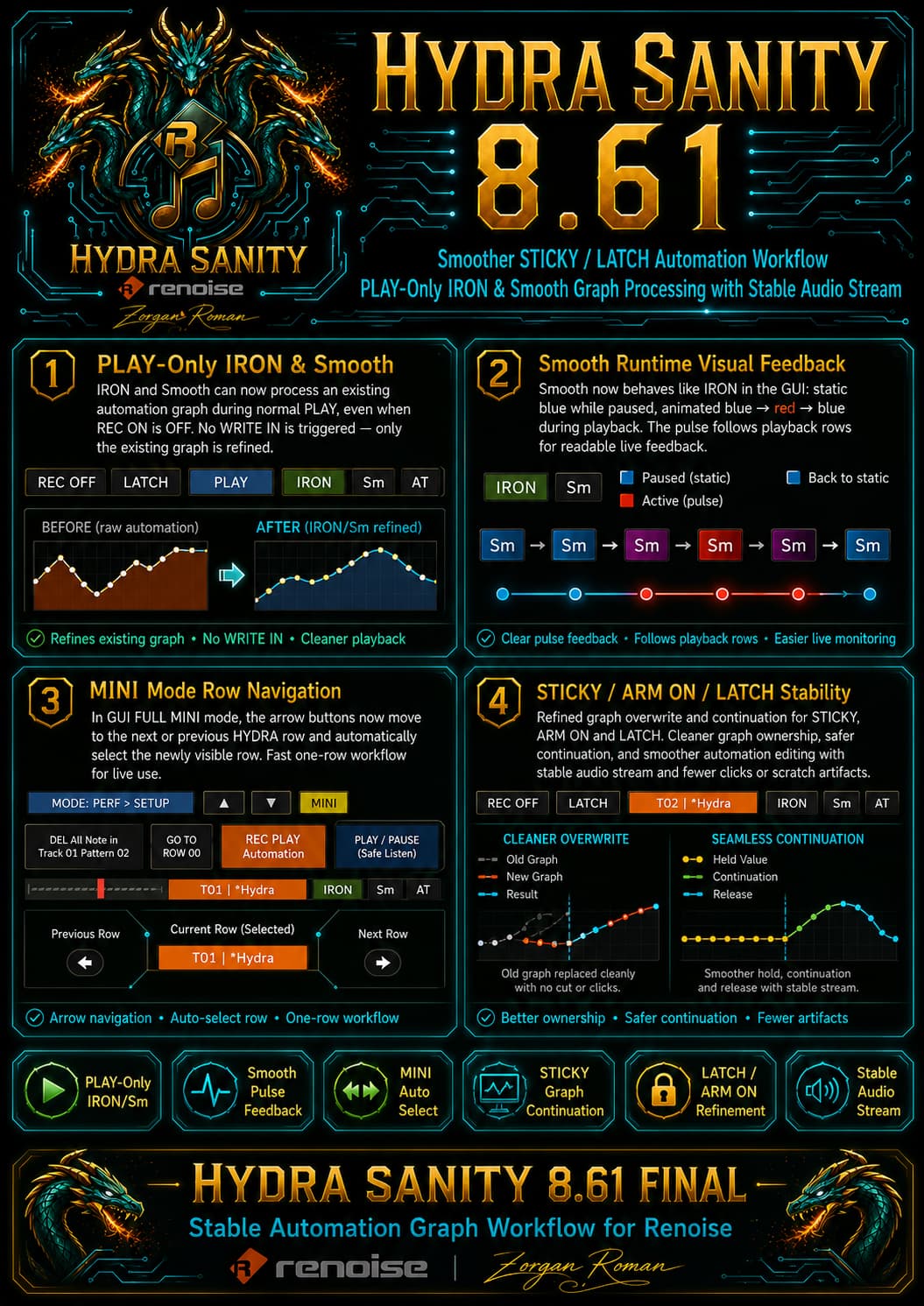
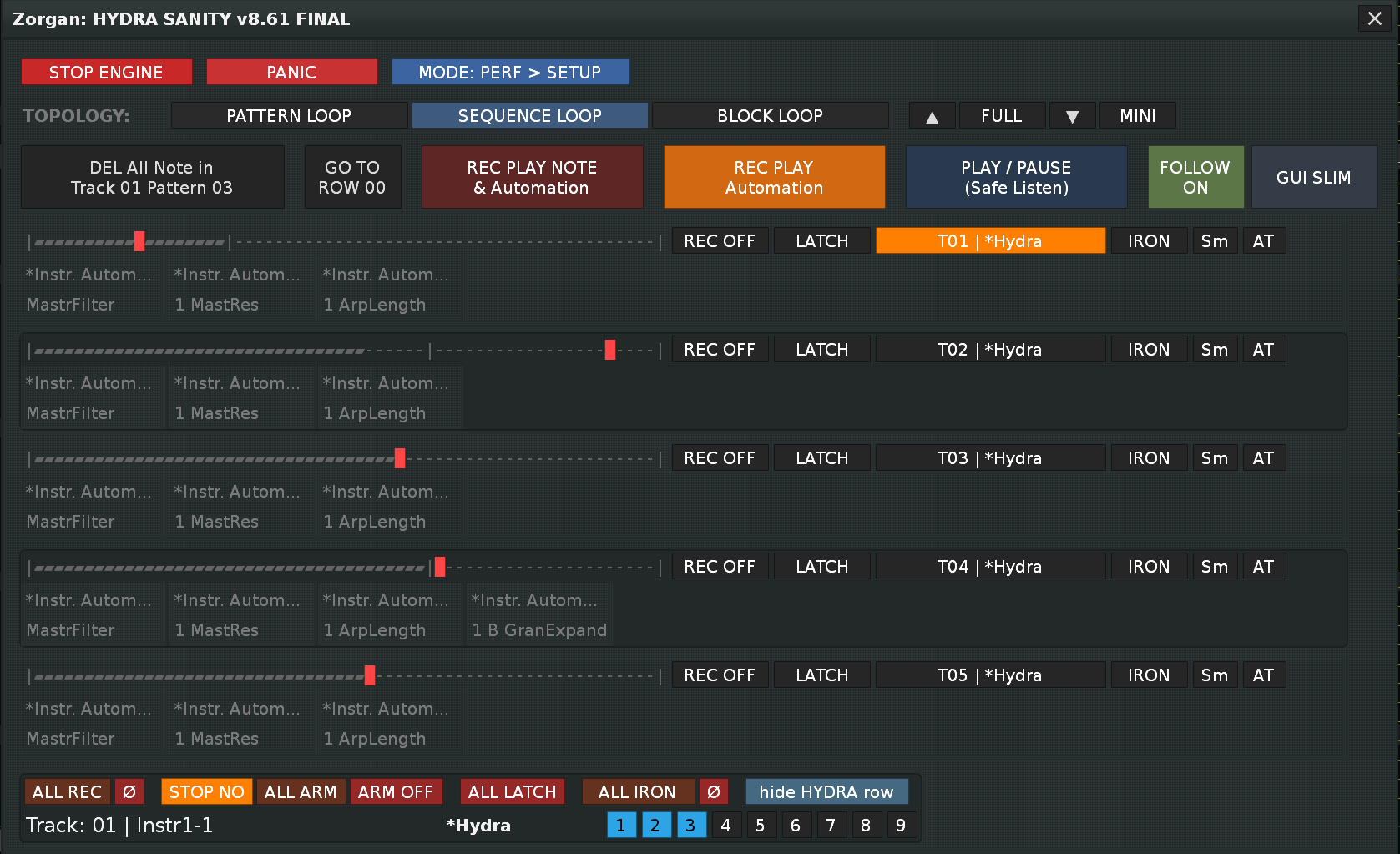
HYDRA SANITY v8.61 FINAL is a workflow, graph-writing and GUI refinement update focused on smoother automation editing, better live control feedback, and more flexible IRON / Smooth graph processing.

This version continues the main goal of HYDRA SANITY:
to make automation graph writing in Renoise more playable, more controlled, and more musical.


IRON and Smooth can now work without REC ON

IRON and Smooth can now process an existing automation graph during normal playback, even when REC ON is not active.

This means you can use them as dedicated graph processors without entering full write mode.

When REC ON is disabled:

  • no WRITE IN is triggered

  • no STICKY / LATCH / HOLD write path is triggered

  • no Release Bridge / release rewrite path is triggered

  • no new automation lane is created

  • only an existing automation graph can be processed by IRON or Smooth

When REC ON is enabled, the full write-to-graph workflow remains unchanged.

This gives two practical workflows:

  • REC ON active → write automation and optionally process it with IRON or Smooth

  • REC ON inactive → refine an existing graph with IRON or Smooth during playback


STICKY, ARM ON and LATCH workflow improvements

HYDRA SANITY’s STICKY, ARM ON and LATCH behavior is now much more reliable for real automation work.

The workflow is designed for situations where you want to touch a parameter, hold its value, overwrite part of an existing graph, and then let the graph continue naturally.

The important practical result:

  • STICKY can hold the last active value more safely

  • ARM ON can prepare a row for controlled writing

  • LATCH can continue from the written value without breaking the graph flow

  • graph overwrite is cleaner and more predictable

  • existing automation is preserved where it should be preserved

  • old graph data is cleaned only where the new write action owns the range

This makes it easier to perform live automation edits without destroying the surrounding automation graph.


Smoother graph rewriting and graph continuation

A major part of the recent HYDRA SANITY work was focused on making automation graph rewriting more stable.

The tool now handles graph rewriting and graph continuation more carefully:

  • fresh controller movement writes clean automation points

  • held values do not keep flooding the graph with unnecessary points

  • STICKY can maintain a valid hold value across longer passages

  • graph data can continue across pattern boundaries more naturally

  • release behavior is safer when the user stops moving the controller

  • existing graph curves are not randomly flattened or broken

The result is a more natural automation graph, especially during live playback and parameter rewriting.


Audio-stream protection

HYDRA SANITY v8.61 keeps the improved audio-stream protection from the recent write-to-graph updates.

The write engine is designed to avoid sudden graph discontinuities that can create audible clicks, scratches, or small playback glitches when automation is being rewritten during playback.

The practical goal is simple:

  • smoother automation transitions

  • fewer abrupt jumps in the graph

  • safer overwrite behavior while Renoise is playing

  • more stable audio output during live automation work

This is especially important when automating sensitive parameters such as filter cutoff, resonance, volume, send levels, or plugin parameters that react strongly to sudden value jumps.


Improved Smooth button behavior

The Smooth button now has clearer visual feedback, similar to the IRON button workflow.

  • Smooth ON while stopped or paused: static active blue color

  • Smooth ON during playback: animated blue → red → blue feedback

  • the animation follows playback row movement

  • no extra fast timer was added

  • Smooth state is preserved correctly when switching between GUI FULL and GUI SLIM

This makes it easier to see when Smooth is active and when it is actively processing during playback.


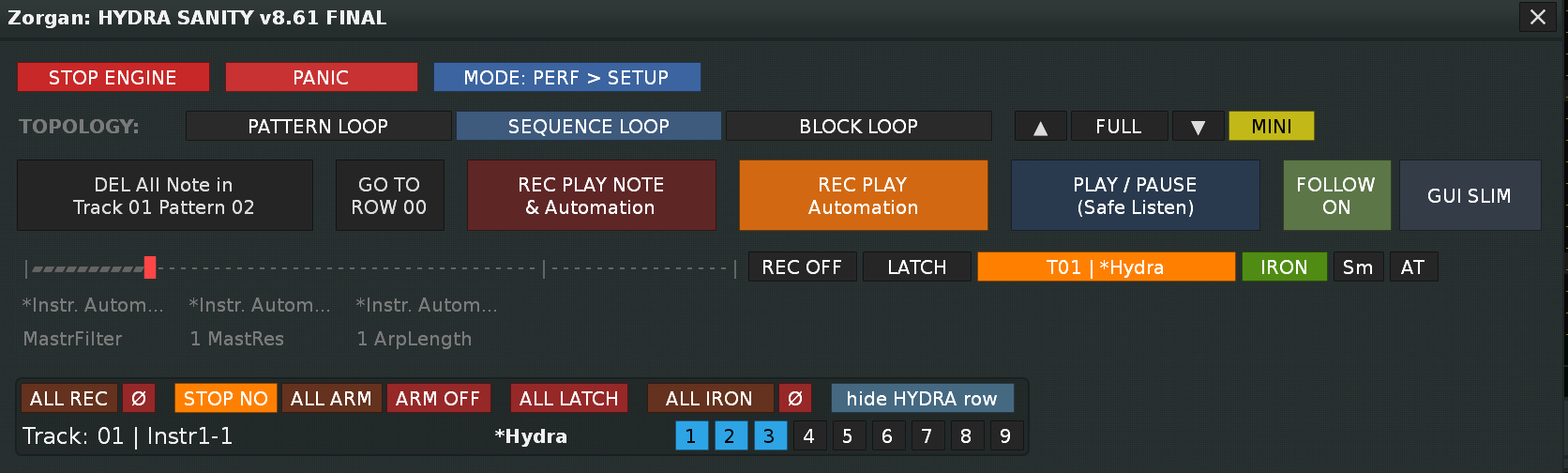
Better GUI FULL MINI workflow

GUI FULL MINI mode is intended for focused one-row operation.

In MINI mode, the ▲ / ▼ buttons now do more than just move the visible row:

  • they move to the previous or next HYDRA row

  • the newly visible row is also selected automatically

  • automation graph focus follows the visible HYDRA row

This makes MINI mode much more practical for live use, because the visible row and the active row are now always aligned.

The regular compact 13-row GUI FULL mode keeps the previous behavior: ▲ / ▼ only scroll the viewport.


Cleaner visual feedback

v8.61 also improves visual feedback for active graph-processing modes:

  • IRON keeps its active and playback-aware color behavior

  • Smooth now has its own playback-aware color behavior

  • MINI mode button state is clearer

  • GUI FULL / GUI SLIM state switching is more consistent

  • row focus is easier to follow during live work

The goal is to make the tool easier to read during playback without adding visual noise.


Stability and architecture notes

This update does not add a second writer engine.

HYDRA SANITY v8.61 reuses the existing graph-processing and write-to-graph architecture and extends it carefully where needed.

No new Renoise observables were added.
No new runtime timer was added.
No new OSC route was added.
The existing REC / WRITE / STICKY / LATCH logic remains structurally intact.


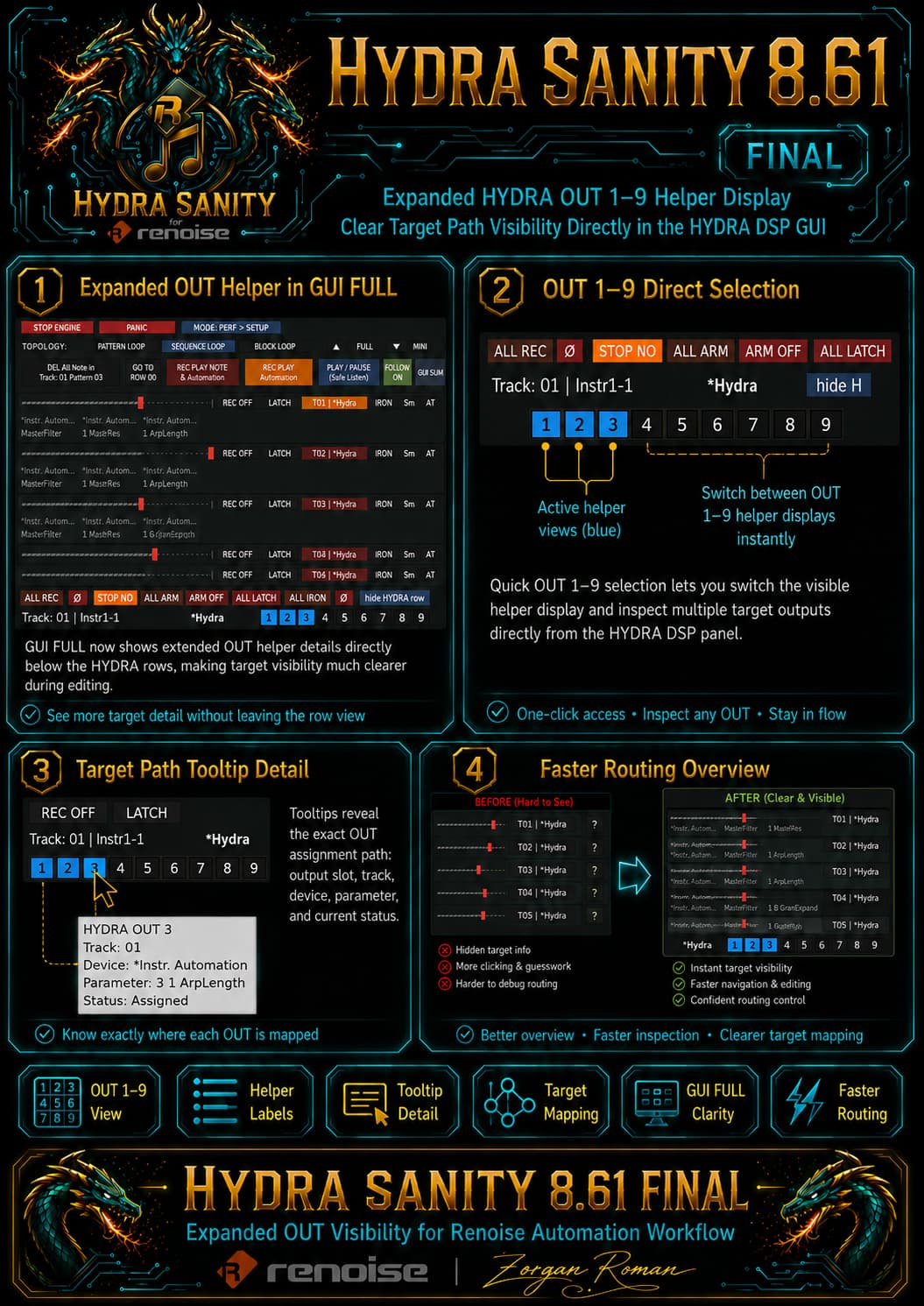
Expanded HYDRA DSP OUT 1–9 helper display

v8.61 also improves target visibility directly inside the HYDRA DSP GUI.

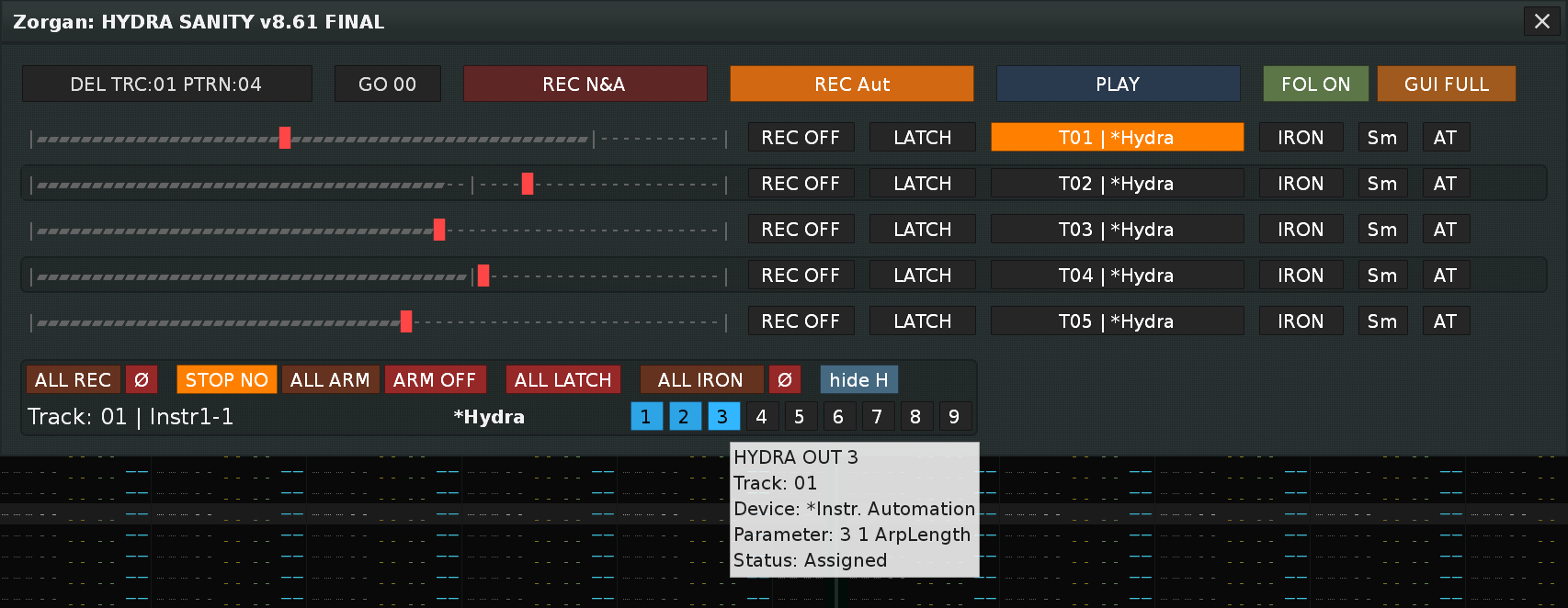
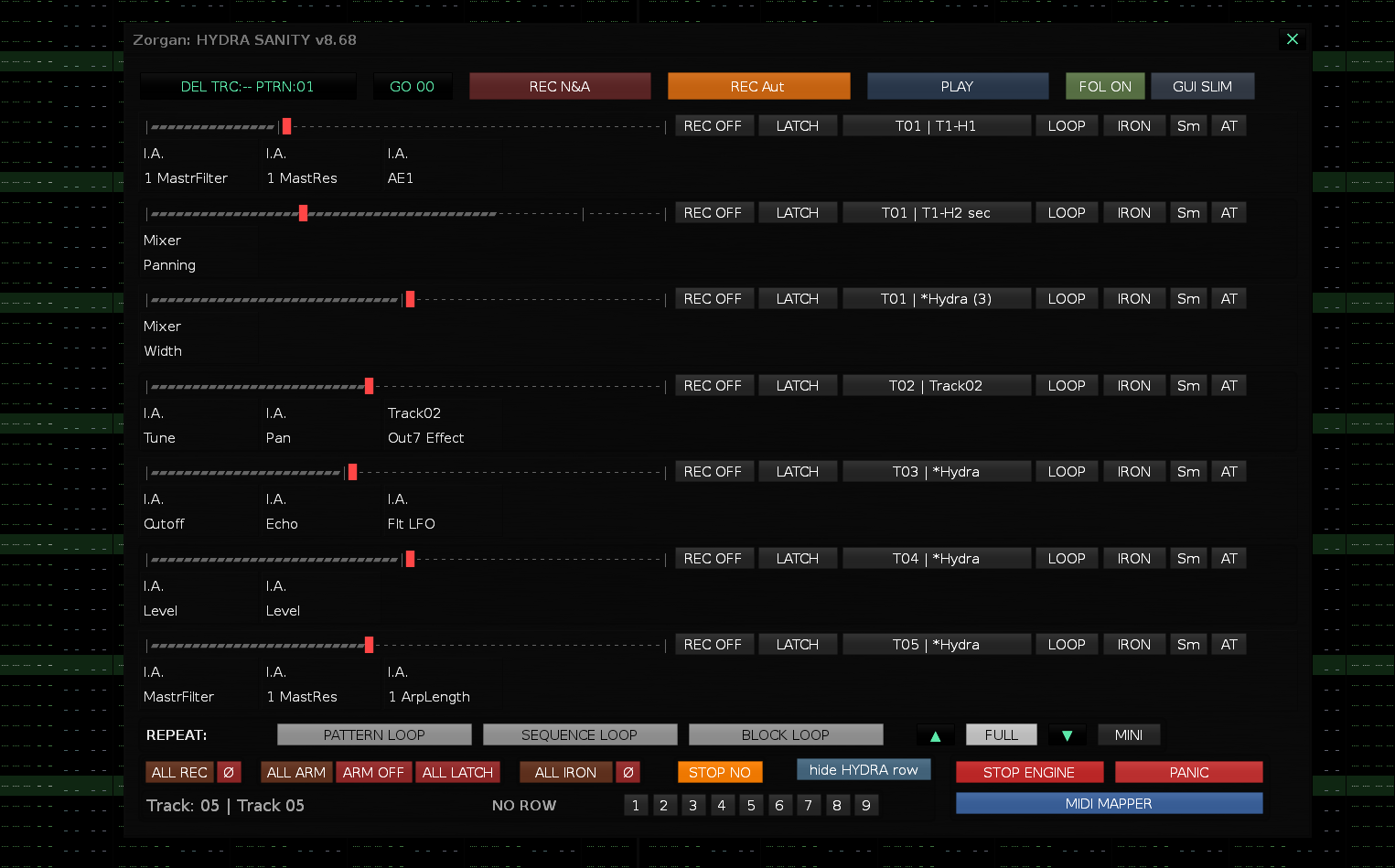
In GUI FULL mode, HYDRA SANITY can now show extended OUT helper information for the HYDRA DSP outputs 1–9 directly below the visible HYDRA rows. This makes it much easier to see where each HYDRA row is currently routed without opening extra dialogs or guessing from the row name alone.

The OUT 1–9 buttons act as quick helper-view selectors. You can switch between the available HYDRA OUT views and inspect different target assignments directly from the main GUI. Active helper views are clearly highlighted, so it is easier to understand which OUT group is currently being displayed.

The helper text shows the important target path in a compact form, such as the assigned device and parameter name. Tooltips can provide more detailed information, including the HYDRA OUT number, track, device, parameter and assignment status.

This is especially useful when working with multiple automation targets, several HYDRA rows, or complex instrument / DSP routing. The goal is simple: better target overview, faster routing inspection and less guesswork during live automation editing.

In GUI SLIM mode, the workflow remains compact, but the same OUT 1–9 selection logic is available from the lower HYDRA DSP helper area. This keeps SLIM mode clean while still giving access to the expanded OUT visibility when needed.

Summary

HYDRA SANITY v8.61 FINAL improves the practical automation workflow in Renoise:

  • IRON and Smooth can process existing graphs during normal PLAY

  • full WRITE IN behavior still works as before when REC ON is active

  • STICKY / ARM ON / LATCH workflow is smoother and more predictable

  • graph rewriting and graph continuation are more reliable

  • audio-stream behavior is smoother during live automation edits

  • Smooth button feedback is clearer

  • GUI FULL MINI navigation is faster and more useful

  • Expanded HYDRA DSP OUT 1–9 helper display

This version is promoted from the tested v8.61 development branch and is now the current stable HYDRA SANITY baseline.

New in v8.63 FINAL - Fast GUI working ready

  • Big chalange with adjusting tool performance , major cleanup to speed up GUI work.
  • Completed improvements for fast GUI rendering without unnecessary refreshes of parts that are not needed, fine-tuning of idle processes and function timing.

AND new button REC PLAY Note & Automation property

  • REC PLAY NOTE & Automation now prepares the correct Renoise note-record context

    • When REC N&A is started, HYDRA SANITY switches Renoise to the active HYDRA target track before recording.

    • Renoise is also brought back to the Pattern Editor view, so note recording starts in the expected track context.

    • This is useful when working from Mixer view, Plugin view, or another Renoise panel.

  • Better live workflow for instrument-per-track setups

    • If your project uses prepared instruments, HYDRA DSP targets and automation targets per track, REC N&A now helps keep note recording aligned with the currently active HYDRA row.
  • README.md was restructured

    • Installation is now the first section.

    • Renoise preparation is explained more clearly.

    • GUI launch, MIDI Learn, REC/PLAY workflow and HYDRA row behavior are easier to follow.

    • Added a warning about Renoise native MIDI Mapping for Tools > Zorgan > Hydra Sanity > Show GUI, including the possible ModWheel / CC1 accidental mapping issue.

    • Changelog remains at the end of the document.

      • Ready to working

H.S. is no longer just an experimental Lua tool, but a real usable Renoise automation control layer:

stable GUI without unnecessary rebuilds,
fast button control without disappearing states,
REC / PLAY / PAUSE behavior now holds logic,
HYDRA row SELECT is finally protected against idle overwrite,
IRON / Sm feedback is back, but only targeted,
REC ON in PLAY mode will no longer be visually confusing,
README is aligned to a more practical structure,
and v8.63 READY TO WORK now really makes sense as a working release.

1 Like

A video demonstration would be cool.

I definitely promise it will be… I’ve been overwhelmed with a ton of work around the Hydra Sanity tool to get it where it is, it’s been 2 months of hard work… but it’s definitely time to make a video…

1 Like

Notes on the Hydra Sanity tool features

Idle status running?
GUI open & engine running yes full background processing
GUI closed & engine running yes tool still running in background
GUI open & engine not running no without app_idle
After song-load suspend no engine intentionally does not restart itself
First open GUI HS yes engine stratup

That happens when you write an automation graph?

  1. ACTIVE WRITE = writing during ENC movement
  2. RELEASE WRITE = state after movement is finished
  3. RELEASE BRIDGE = drawn line section of points after movement is finished
  4. FORWARD BRIDGE = technical name for the direction of the bridge forward

Internal HYDRA_IDLE intervals
It runs approximately like 60 Hz logic:

Task Interval
transport_profile 16 ms
pending_ccs 16 ms
pending_writers 16 ms
gui_dirty_flush 16 ms
monitor_frame 16 ms

Medium priority

Task Interval
feedback_flush 33 ms
meter_refresh 50 ms
osc_queue 50 ms
graph_focus_requests 50 ms
auto_show_locks 80 ms
mute_solo_holds 80 ms

Low priority

Task Interval
deferred_persist 200 ms
rescan 500 ms
graph_heal 500 ms
gui_labels 500 ms
runtime_heartbeat 500 ms
stopped_hydra_topology 700 ms

HYDRA DSP rescan logic

if the notifier correctly detects a new DSP, the rescan should not be immediate, but after about 250 ms, and in reality, the rescan will be performed every 500 ms according to the low idle task.
Fallback topology scanner
If the notifier does not detect a change, there is a fallback:
stopped_hydra_topology = 0.700
Every 700 ms when STOP, it compares the topology via:
build_hydra_topology_signature(song)
When it detects a change, it calls:
hydra_rescan.schedule(false)
Then it waits for the debounce + rescan task. The real fallback can be about 0.95 to 1.45 s.
The brake for PLAY, REC, rescan is intentionally delayed.
If you add a new HYDRA DSP during playback, the tool intentionally does not perform scan_and_arm() immediately.

IDLE topology monitor
→ compare structural signature
→ if signature changed
→ hydra_rescan.request(“row_topology_changed”)
→ scan_and_arm()
→ one queued GUI full_rebuild

What is considered a change for H.S. ?

  • Change Will trigger a structural request?
  • added HYDRA DSP
  • removed HYDRA DSP
  • moved HYDRA DSP / changed device index
  • changed HYDRA DSP OUT target / parameter
  • created PANORAMA row
  • disappeared PANORAMA row
  • changed PANORAMA target track/device/parameter

Extended signature of a single row topology signature.

At the same time, I am aiming for version 8.64 when the request for rebuilding HYDRA rows in the GUI tool HS will work. So that you don’t have to wait for newly added or removed hydra rows to be drawn despite activating buttons.

HYDRA SANITY v8.64 STABLE – Fix Rebuild GUI

This release fixes GUI rebuild and row refresh issues introduced around v8.63 during the larger internal restructuring of idle processes, GUI refresh timing, and performance optimizations.

First of all: sorry for the inconvenience in v8.63.
The problems were caused by deeper internal cleanup work focused on reducing GUI load, improving timer behavior, and making the tool lighter during playback. Most of the restructuring was useful, but a few structural GUI rebuild cases were handled too lightly.

Fixed in v8.64:

  • Fixed HYDRA DSP row removal after deleting a HYDRA DSP device in Renoise.
  • Fixed cases where a deleted HYDRA DSP row could temporarily remain in the GUI with the fallback name “HYDRA”.
  • Fixed PANORAMA row removal after W.A. OFF.
  • Fixed PANORAMA target add/change GUI rebuild handling.
  • Fixed deferred OSC GUI rebuild so structural row changes are no longer downgraded to a light row refresh.
  • Added protection against nested GUI rebuild during list refresh.
  • Kept the lighter GUI/idle architecture from v8.63, but restored correct structural rebuild behavior.

This version should behave correctly when adding, deleting, or changing HYDRA DSP and PANORAMA rows while keeping the GUI lighter and more stable during playback.

Recommended update for all v8.63 users.**

Main FIX v 8.64 fix rebuild and refresh GUI for stability change parameter hydra dsp, panorama row and delete hydra dsp from Renoise DAW**
I think I’ve solved the hardest part, I already thought I had everything stable and solved …
Luckily, after many more hours I’ve completed GUI refresh vs Rebuild rows for HYDRA DSP and PANORAMA ROW …
Safely add hydra dsp and panorama during PLAY, PLAY REC with HYDRA SANITY realtime update. It works great.
Hopefully I won’t encounter anything else.
This was the price for improving idle processes, timing again and trying to minimize helpers and tasks performed for individual purposes.

HYDRA SANITY v8.65 — GUI Stability & Panorama Row Integration Update

HYDRA SANITY v8.65 is focused on GUI stability, safer row handling, and cleaner integration between HYDRA rows and PANORAMA W.A. rows.

This update does not introduce a new writer engine. Instead, it cleans and stabilizes the connection between GUI state, MIDI control buttons, PANORAMA W.A. rows, and automation graph writing.


Main improvements

Safer HYDRA / PANORAMA row handling

HYDRA SANITY now handles renamed HYDRA DSP devices and PANORAMA rows more safely.

Rows are no longer based on unsafe live GUI references. HYDRA GUI labels now use safe snapshot strings, while PANORAMA targets are resolved from the current Renoise song structure. This prevents stale device references when a HYDRA DSP is renamed, removed, or replaced.

Better PANORAMA W.A. row behavior

PANORAMA W.A. rows now stay visible and stable during encoder movement.

W.A. rows also correctly detect when they target the same DSP parameter as an existing HYDRA row. In that case, the duplicate HYDRA row is moved into shadow state, so only the active PANORAMA row controls the parameter.

This avoids duplicate control rows fighting over the same automation target.

Stable GUI rebuild and row refresh

Several GUI refresh paths were cleaned so row changes are handled structurally instead of being masked by fallback labels.

This improves cases where rows are added, removed, renamed, or shadowed by PANORAMA W.A. control.

MIDI control button routing

The MIDI button logic was improved to better separate:

  • encoder / decoder movement,

  • REC / LATCH / STICKY buttons,

  • MUTE / SOLO buttons,

  • PANORAMA row control.

This prevents controller button functions from being mixed up when multiple mappings share similar MIDI message types.

REC suppression visual state

When MUTE or SOLO temporarily suppresses an active REC row, the GUI now shows this more clearly.

Instead of looking like a normal REC OFF state, the button can show REC ON in a disabled visual state. This means the REC state is remembered and will return when the MUTE / SOLO suppression is removed.

ARM ON to STICKY behavior

The ARM ON workflow has been refined.

When ARM ON is waiting for encoder movement, the first real ENC / DEC input correctly promotes the row into STICKY writing. The GUI now follows the real runtime state, so STICKY remains visually correct while automation is being written.

STICKY GUI visual refresh

The STICKY visual effect now refreshes continuously like IRON and Sm.

The GUI no longer waits for another row activation before updating the STICKY color animation.


Practical result

HYDRA SANITY v8.65 should feel more stable when working with:

  • renamed HYDRA DSP devices,

  • multiple HYDRA DSP devices on the same track,

  • PANORAMA W.A. row assignment,

  • duplicate HYDRA / PANORAMA automation targets,

  • MUTE / SOLO interaction with active REC rows,

  • ARM ON → STICKY live automation workflow,

  • GUI FULL / SLIM row refresh and visual state updates.

This version mainly strengthens the internal GUI and row-state logic, making HYDRA SANITY more reliable during live automation work in Renoise.

:snake: HYDRA SANITY v8.66

:green_circle: New LOOP function · Repeat TOPOLOGY support · DAW feedback update

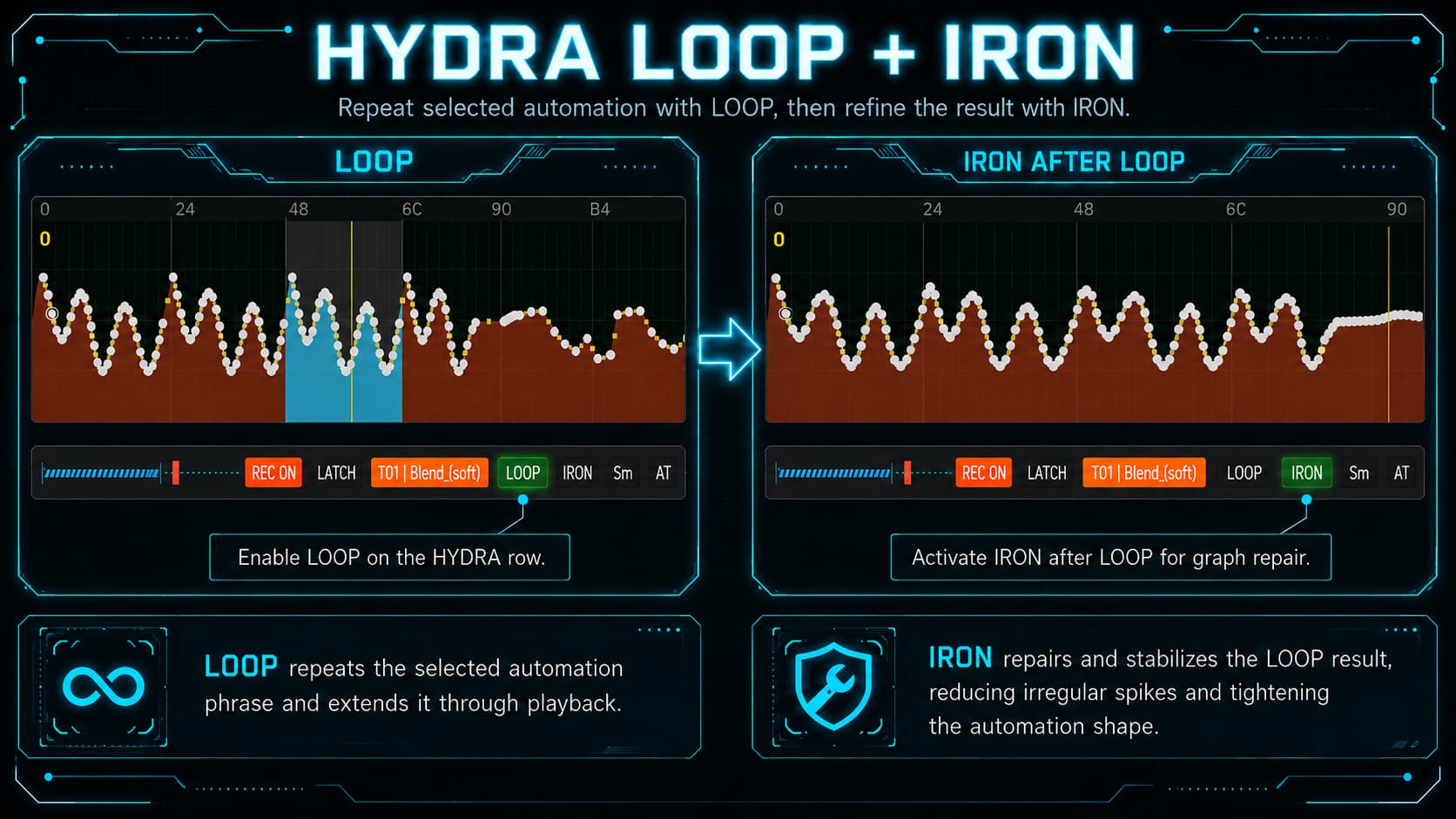
after IRON

and Sm / Smooth

Detail origin automation graph & after Smooth

after Smooth


:green_circle: New function: LOOP

HYDRA SANITY v8.66 introduces a new LOOP function for automation work inside Renoise DAW.

LOOP is a memory-based automation copy system for selected automation grid groups in the Renoise Automation Graph.

Basic workflow

  1. Select a group of automation grids in Renoise DAW

  2. Press LOOP in the HYDRA row

  3. Start PLAY REC

  4. HYDRA SANITY writes the selected automation map forward

  5. LOOP continues while PLAY REC is running

The selected automation map is written up to the current row position in the pattern and then continues during PLAY REC.

This is useful for:

  • repeated automation movement

  • live automation recording

  • pattern-based sound design

  • fast modulation building

  • automation phrase repetition inside Renoise


:repeat_button: LOOP supports Repeat TOPOLOGY

HYDRA SANITY v8.66 supports Renoise repeat topology for LOOP operation:

TOPOLOGY mode LOOP behavior
:orange_circle: PATTERN LOOP LOOP follows the repeated pattern area
:blue_circle: SEQUENCE LOOP LOOP follows the active sequence loop range
:purple_circle: BLOCK LOOP LOOP works with Renoise block repeat behavior

HYDRA SANITY keeps the LOOP map aligned with the currently active repeated playback area.

This allows the selected automation group to continue correctly through repeated pattern and sequence playback.


:orange_circle: STOP NO integration

The existing STOP NO button also controls LOOP behavior at wrap and repeat boundaries.

STOP NO ON

  • active STICKY rows are protected at wrap, jump, and loop boundaries

  • active LOOP keeps running through pattern, sequence, and song loops

STOP NO OFF

  • native Renoise loop or wrap boundaries turn LOOP off automatically

This gives clear and predictable live behavior during playback.


:blue_circle: TOPOLOGY button feedback

The TOPOLOGY buttons in HYDRA SANITY now work with independent boolean logic:

  • PATTERN LOOP

  • SEQUENCE LOOP

  • BLOCK LOOP

Each button reflects its own Renoise transport state.

HYDRA SANITY also includes a slow Renoise API fallback check for these buttons.

Every 700 ms, HYDRA SANITY verifies the real Renoise transport loop state and updates the TOPOLOGY button colors if needed.

This keeps the TOPOLOGY buttons visually correct even when loop modes are changed directly inside Renoise DAW.


:purple_circle: Renoise DAW selection feedback

HYDRA SANITY v8.66 improves feedback between Renoise DAW selection and the active HYDRA row.

When you select the matching track, device, or automation target in Renoise DAW, HYDRA SANITY can activate the corresponding HYDRA row in the GUI.

This helps when working with:

  • multiple HYDRA rows

  • Automation Graph editing

  • fast parameter targeting

  • live automation workflow

  • direct track/device/parameter navigation

Practical workflow

  1. Select or touch the automation target in Renoise

  2. HYDRA SANITY follows the DAW focus

  3. The matching HYDRA row becomes active


:shield: LOOP runtime protection

The new LOOP function includes runtime protection against conflicting automation ownership modes.

LOOP cannot be active together with:

  • STICKY

  • Sm

If one of these incompatible modes becomes active, LOOP is safely disabled.

This helps keep automation writing stable and avoids graph ownership conflicts.


:broom: Empty grid handling

LOOP also handles empty automation grid positions correctly.

If the selected source range contains rows without automation points, HYDRA SANITY transfers that empty state by clearing the corresponding target row.

This keeps the repeated automation map clean and prevents unwanted old automation points from remaining in the target area.


:white_check_mark: Practical result in v8.66

HYDRA SANITY v8.66 adds a new automation workflow for Renoise:

  • :green_circle: new LOOP function

  • :repeat_button: support for Pattern Loop, Sequence Loop, and Block Loop

  • :orange_circle: STOP NO integration for LOOP continuity

  • :blue_circle: TOPOLOGY button feedback with Renoise API fallback

  • :purple_circle: Renoise DAW selection feedback that activates the matching HYDRA row

  • :shield: safe runtime protection for stable automation writing

  • :broom: correct handling of empty automation grid positions

HYDRA SANITY v8.66 makes automation work more direct, more musical, and more practical for repeated automation design and live recording inside Renoise DAW.


:snake: HYDRA SANITY v8.66 summary

New LOOP function.
Repeat TOPOLOGY support.
Better DAW feedback.
**More stable live automation workflow.
**
HYDRA SANITY has moved mainly in the following directions:

safer observer lifecycle
more robust MIDI raw queue
writer lock protection against stale lock
LOOP protection against song structure changes
rollback persistence on song.tool_data save
Aftertouch delta gate against writer overload
OSC MCU client backoff
guarded Renoise graph-focus API assignments
reset FULL viewport when changing song
cleaner tooltip handling

HYDRA SANITY v8.66 — detail on Stability & Safety Fix Update

:snake: HYDRA SANITY v8.66

Stability & Safety Fix Update for Renoise DAW


:brain: Focus of this update

HYDRA SANITY v8.66 is a stability, safety, and runtime cleanup update.

This release keeps the existing workflow intact, but strengthens many internal safety points that matter during:

  • live automation writing

  • dense MIDI input

  • OSC communication with MCU_COM / Panorama

  • GUI switching

  • Panorama W.A. target changes

  • LOOP operation

  • song saving

  • pattern and sequence changes

  • engine restarts


:shield: Main Stability Fixes


:link: Safer Observer Lifecycle

Improved Renoise notifier / observer cleanup.

HYDRA SANITY now handles observer removal more defensively, including edge cases where notifier registration or has_notifier() can fail.

This reduces the risk of stale callbacks surviving after reloads or tool restarts.


:musical_keyboard: Stronger MIDI Raw Queue Handling

Improved raw MIDI callback handling for dense MIDI streams.

Raw MIDI input continues to be moved into the idle-owned queue path, but the default raw MIDI queue capacity and processing budget were increased for safer handling of:

  • pitchbend streams

  • high-resolution encoders

  • fast controller movement

  • dense MIDI input bursts

This helps HYDRA SANITY stay responsive during heavy controller use.


:writing_hand: Safer Automation Writer Lock Handling

Improved internal writer protection.

The automation writer now has stronger protection against stale internal write locks. If a runtime error happens inside a locked writer path, HYDRA SANITY releases the row lock safely before the error leaves the writer section.

This prevents a row from silently staying locked after an unexpected runtime failure.


:repeat_button: LOOP Structure Safety

Improved LOOP buffer validation.

LOOP buffers now keep their original sequence signature from the moment of capture. If the song structure changes during LOOP work, such as sequence changes or pattern length changes, the LOOP buffer is invalidated safely instead of continuing with stale absolute positions.

LOOP capture is also stricter and now requires a real usable grid selection with at least two grid points.


:floppy_disk: Safer Persistence During Song Save

Improved song.tool_data persistence safety.

Before writing HYDRA SANITY state into song.tool_data, the current tool data is backed up locally. If payload construction or writing fails, HYDRA SANITY restores the previous data block safely.

The existing save revision guard remains unchanged.


:level_slider: Aftertouch Noise Gate

Improved global Aftertouch handling.

Aftertouch can affect multiple HYDRA / Panorama rows when enabled. A lightweight per-row delta filter now prevents repeated tiny Aftertouch changes from unnecessarily feeding the writer path.

This reduces noise and unnecessary writer pressure during high-frequency Aftertouch input.


:satellite_antenna: OSC MCU Client Backoff

Improved MCU_COM OSC client stability.

The MCU_COM OSC client is still reused as a singleton and can reopen after send errors. A small reopen backoff was added to prevent rapid open-close loops when repeated OSC send errors occur.

This keeps OSC communication safer during temporary port or socket problems.


:compass: Safer Renoise Graph Focus

Improved protection around Renoise graph-focus API calls.

HYDRA graph focus and graph nudge operations now use guarded assignments for Renoise selection and window fields. This reduces the risk of GUI graph focus crashes when a target becomes stale or a Renoise API object is no longer valid.


:desktop_computer: GUI FULL Viewport Reset on Song Change

Improved GUI viewport behavior when changing songs.

The FULL row viewport state now resets cleanly on new song load, including:

  • manual scroll state

  • MINI state

  • first visible row position

  • FULL viewport offset

Other GUI state remains untouched.


:speech_balloon: Tooltip Safety

Improved disabled-tooltip handling.

When tooltips are disabled, hydra_tooltip() now returns nil instead of an empty string.

This is safer for ViewBuilder wrappers and custom GUI helpers while preserving the same visible behavior.


:broom: Additional Runtime Cleanup

HYDRA SANITY v8.66 also improves several internal cleanup paths:

  • cleaner GUI dirty refresh targeting

  • safer targetless refresh requests

  • reduced unnecessary GUI rebuild pressure

  • safer scan-time cleanup of stale Renoise object references

  • improved Automation Lane validity checks

  • safer pattern / sequence access checks

  • more reliable Panorama W.A. target handling

  • improved row-model handling for Panorama add / remove / WA_OFF operations

  • cleaner handling of invalid, stale, or missing states without masking them as valid-looking names


:control_knobs: MCU_COM / Panorama Integration

MCU_COM / Panorama integration remains focused on deterministic row behavior and stable target ownership.

This update improves safety around:

  • Panorama W.A. shadow handling

  • OSC communication

  • stale target cleanup

  • row-model refresh behavior

  • MCU / Panorama row identification

Panorama-related row model changes are treated structurally, not as simple text refreshes.


:artist_palette: GUI Improvements

The GUI refresh path remains lightweight where possible.

Small row changes stay on row-level refresh paths, while structural changes such as target removal, Panorama row changes, or HYDRA DSP deletion continue to use scan / rebuild / purge behavior.

The GUI layout around REPEAT controls and the lower stage section remains compact and cleaner.

Panorama row status text is clearer for MCU_COM usage.


:white_check_mark: Summary

HYDRA SANITY v8.66 is a stability and safety update.

The goal is to keep HYDRA SANITY stable, predictable, and responsive inside Renoise while reducing hidden stale-state problems during live work, GUI switching, Panorama W.A. target changes, pattern changes, OSC communication, dense MIDI input, song saving, and engine restarts.

It keeps the existing workflow, but makes the internal runtime more defensive, cleaner, and safer for live automation work inside Renoise.


:snake: HYDRA SANITY

Automation writing companion for Renoise DAW

HYDRA SANITY v8.67 — Change Update, Fix Bug

1. MIDI MAPPER stability fix

Fixed a crash that could happen when opening MIDI MAPPER with tooltips disabled.

HYDRA SANITY now keeps tooltip handling safe even when tooltip preference is missing or turned off. This prevents Renoise GUI overload errors during MIDI MAPPER activation.

2. MCU LED feedback restored

Fixed MCU feedback mode where LED feedback could stop working when another encoder mode flag was active.

MCU ON mode now correctly keeps sending button LED feedback again, including transport / REC / LATCH / STICKY related LED states.

3. REC PLAY NOTE & AUTOMATION — native Renoise MIDI note detection

– > Improved PAUSE NOTE and AUTOMATION REC PLAY workflow for detect push Note with Renoise MIDI HW device ( H.S. HW device before working )

HYDRA SANITY can now resume from PAUSE not only when the first MIDI note comes through the HYDRA SANITY mapped MIDI input, but also when a note is written by a hardware MIDI device used directly through Renoise native MIDI input.

This makes REC PLAY NOTE & AUTOMATION more flexible for setups where the keyboard or controller is assigned only inside Renoise DAW.
Internal cleanup : The new detector uses the existing REC PLAY resume logic and does not add a new transport mode, timer, MIDI router, OSC route, or GUI rebuild path.

The implementation stays lightweight and only checks for the required PAUSE N&A condition.

H.S. 8.67 Current final version
The old version already had HYDRA OUT helper, but the output was less precise:

OUT slot → raw selector values ​​/ inaccurate labels / sometimes Track 01 fallback

Typical problems:

numeric selector 4 / 9 could remain as a number
CT could end up as Track 01
VST/VST3 selector might not be translated correctly to device name
Instrument Automation was displayed in a long or ambiguous way
OUT triplet parser could misalign Track / Device / Parameter

  1. What was improved in FULL GUI HYDRA ROW

OUT triplet parser could misalign values ​​looking for valid Track + Device + Parameter triplet
CT / Current Track could fall on Track 01 resolve according to visible HYDRA row track
VST/VST3 target often numeric/raw selector real device name in row helper
Mixer target less readable recognized Mixer target
Instrument Automation long / attempt at dangerous number resolving compact I.A. in visible cell, full name in tooltip
Parameter label raw numbers or index prefix more real parameter name, index prefix is ​​cleaned
Wrong Track 01 leak possible with numeric selector removed by row-scoped resolver
Tooltip basic state detailed resolved target info remains available
Performance simpler, but less accurate more accurate display, no song-wide I.A. scans after cleanup

Current version 8.68 already uses more precise layers:

strict OUT triplet parser
visible row authority
CT resolver according to actual visible HYDRA row
numeric selector → track device resolver
VST/VST3 / Mixer / Hydra / I.A. display resolver
parameter display resolver

The result is user-friendly especially in GUI FULL HYDRA row:

user sees where HYDRA OUT actually goes
not only that OUT exists

GUI FULL HYDRA ROW is no longer just a technical OUT monitor.
It is a readable target monitor:
where OUT is going, to which device, to which parameter, and in the correct row/track context.

upcoming update 8.69 will include:

  • adjustable GUI volume meter for ENC / DEC acceleration with coefficient 1.0 … 1.5 … 2.0 for H.S. MIDI DEVICE HW 1 - 3
  • repair refresh advanced info in hydra row in GUI MINI
  • fix bug with activate MCU row and MCU COM tool fix ENC mode TRACK DSP (in version update v0.65)

At the same time a new version of the tool is being prepared, the Hy.Sa engine. 8.69 I am solving incompletely finished and fine-tuned parts of the script, areas of functionality of the tool that have now appeared, version 8.69 advances the tuning of stability,
GUI display and all branches, from cache, shadow, , state_accessors_comit_transport.lua and others … they had very strict foundations so far, which we have fine-tuned well.¨
The main shift is not just a “latency fix”, but a straightening of the process model.

HYDRA SANITY v8.69 — Stability & MCU ROW Bug Fix Update

This update focuses on stability fixes discovered during deeper debugging of HYDRA SANITY and MCU_COM interaction, especially in the Panorama / MCU ROW workflow, Track DSP mode, GUI row selection, and runtime persistence behavior.

1. MCU ROW display name cleanup — Instrument Automation

Improved the way Instrument Automation targets are shown in MCU ROW labels.
Before this fix, MCU ROW could display inconsistent names such as:

*Instr. Automation
*I.A.

Now the GUI display uses the clean user-facing form:

I.A.

The real/raw target name is still preserved internally for matching, cache validation, duplicate detection, and target-control logic.
This prevents GUI naming changes from interfering with internal DSP/parameter identification.

2. MCU_COM → HYDRA SANITY I.A. name sync

MCU_COM now sends a consistent Instrument Automation display name across W.A. and LCK target updates.
Previously, W.A. and LCK could send slightly different display labels for the same Instrument Automation target. This could cause unnecessary name refreshes and unstable GUI feedback.
Now MCU_COM normalizes these forms consistently:

*Instr. Automation
*Instrument Automation
*I.A.
Instr. Automation
Instrument Automation

to:

I.A.

Raw target information remains available separately for internal checks.

3. MCU ROW add/remove behavior during PLAY and PLAY REC

Fixed a bug where MCU ROW removal worked during playback, but adding a new MCU ROW while PLAY or PLAY REC was active could fail to appear in the GUI.
The tested behavior now supports:

W.A. / LCK ON  → MCU ROW appears
W.A. / LCK OFF → MCU ROW is removed

while transport is running.
This improves live use with MCU_COM Track DSP control and reduces the need to manually switch GUI modes just to refresh the row list.

4. Selected HYDRA ROW protection during MCU_COM Track DSP refresh

Fixed a selection conflict where selecting a HYDRA ROW could trigger a Track DSP refresh from MCU_COM, and that refresh could incorrectly disable or hide the selected HYDRA ROW.

The problem occurred when:

HYDRA ROW selected
→ selected track changed
→ MCU_COM Track DSP updated its encoder target
→ MCU ROW refreshed its DSP/parameter name
→ selected HYDRA ROW could lose selection

The refresh is now treated as a passive target update, not as an ownership command.
Result:

MCU ROW may refresh its DSP/parameter name,
but it must not steal selection from the manually selected HYDRA ROW.

5. MCU_COM Track DSP W.A. / LCK state per track

Improved MCU_COM Track DSP behavior so W.A. and LCK states can be assigned per track instead of globally per encoder slot.
Example:

Track 01 / ENC2 = W.A. ON + LCK ON
Track 02 / ENC2 = W.A. OFF

This is important because in Track DSP mode, the same encoder can control different DSP/parameter targets depending on the currently selected Renoise track.
This prevents W.A. / LCK states from leaking between tracks.

6. Runtime freeze diagnosis — persistence bottleneck found

A terminal debug pass identified the exact source of GUI/DAW freeze after row-button clicks such as:

IRON
Sm
REC ON
AT
ALL REC

The button callbacks and GUI refresh were fast. The freeze was caused by runtime persistence:

HYDRA_PERSIST.save_song_state()

which could take around one second when triggered after row-button changes.
The intended v8.69 direction is:

Do not perform heavy song.tool_data persistence after normal row-button clicks.
Persist full state only on manual Save Song or STOP ENGINE.
Do not save on START ENGINE.

This separates live performance interaction from heavy state persistence.

7. Better separation of live GUI state and persistent HW profile data

The debugging clarified that live row state, MCU ROW runtime state, and HW profile payload must remain separate.

HYDRA SANITY now treats these as separate concerns:

Live row interaction      = fast runtime state
MCU ROW / Panorama state  = live control bridge state
HW profile payload        = persistent configuration

This avoids unnecessary full-profile work during ordinary GUI interaction and keeps live control responsive.

8. Safer debugging direction for future fixes

The v8.69 debug pass also established an important development rule:

Do not treat MCU ROW refresh, shadow ownership, GUI row rebuild, and persistence as one combined problem.

They are separate layers and must be tested separately:

OSC / IPC communication
WA/LCK row-model state
GUI MCU ROW materialization
HYDRA ROW selection ownership
song.tool_data persistence

This reduces regressions and keeps future HYDRA SANITY updates more controlled.

9. Cleanup of the “dirty” GUI pipeline

Status: RESOLVED
The GUI update model has been cleaned up so that full rebuilds are done in a single controlled path.
Full rebuilds are still allowed for real structural changes:
Removing HYDRA DSP
Creating/removing ROW MCUs
Cleaning up stale rows
Rebuilding the row model

but they are now queued via the existing “dirty idle” GUI cadence instead of being triggered directly from the button callback path.

This improves latency, prevents repeated row rebuilds, and keeps the Renoise GUI thread more stable.

10. Debug passport v8.69 introduced,

separate layers, tested separately:
OSC/IPC communication
W.A. row model state / LCK
MCU GUI Row Materialization
HYDRA Row Selection Ownership
GUI dirty/rebuild Cadence
Song.tool_data persistence
This reduces regressions and keeps future HYDRA SANITY updates under more control.

11. new rules for autoselect row and button REC ON binding

ENC/DEC auto-select:
REC state nesmí blokovat výběr HYDRA/MCU row.

Automation write:
REC ON zůstává jediný gate pro zápis do graphu.

REC button selection:
OFF → ON vybere row.
ON → OFF row násilně nevybírá.

Summary

HYDRA SANITY v8.69 focuses on:

MCU ROW stability
Track DSP W.A./LCK behavior
clean I.A. display names
HYDRA ROW selection protection
PLAY / PLAY REC MCU ROW updates
runtime freeze diagnosis
safer persistence strategy

This update is mainly a stability and reliability pass for users working with MCU_COM, Panorama / MCU ROW control, and live HYDRA automation workflows in Renoise.

Of course, there will also be a new update v0.65 of the Renoise DAW tool
MCU MIDI COM Mapping tool for PANORAMA T and P series.
At the same time, the foundation for the universal Multi-tracks MIDI Mapping Device tool is laid. When changing a track in Renoise DAW, ENC/DEC 1-8 are remapped to specific instrument controls in track x.
More about the tool here:
Completed work version 8.69 ready

The last final fixes and tweaks for version 8.69 are over… the hard part, where Hydra Sanity gets more stable behavior and a solid foundation again. More user-friendly.

1. PAUSE topology fix

  • HYDRA DSP topology change triggers scan_and_arm().
  • MCU/PANORAMA row refresh does not trigger scan_and_arm().

2. Selected ownership fixes

  • PAUSE selected HYDRA row is protected from passive takeover.
  • MCU row creation does not auto-select MCU row.
  • ENC/DEC value path remains active.

3. Cleanup

  • selected guard consolidation
  • event bridge no-op cleanup
  • middle-frame API cache
  • MUTE/SOLO hold state consolidation

The biggest value of the version:
H.S. no longer blurs the distinction between:

  • HYDRA DSP topology,
  • MCU row target refresh,
  • selected row ownership,
  • shadow ownership,
  • GUI row rebuild.
    This has significantly strengthened the PAUSE workflow, MCU row integration, and overall predictability of GUI/engine state.

Internal quality improvements:
Cleanup and latency
selected guard consolidation
event bridge no-op cleanup
middle-frame cache for graph-focus policy
MUTE/SOLO hold state unified into one structure
removal of duplicate no-op calls
English comments and cleanup of historical comments
This is not cosmetic. It helps keep the engine cleaner and reduce unnecessary work in idle/hot-path branches.

v8.69 just ensures that shadow / MCU refresh will not erroneously trigger topology rescan or passive selected takeover.

Selected row ownership is better protected.
Guards have been added to H.S. to protect valid selected HYDRA rows in PAUSE from passive takeover.

MCU rows are better separated from HYDRA DSP rows.

PAUSE mode is more stable.
In v8.69 the root cause is removed in the right place: a clean MCU row update no longer triggers a HYDRA topology rescan.

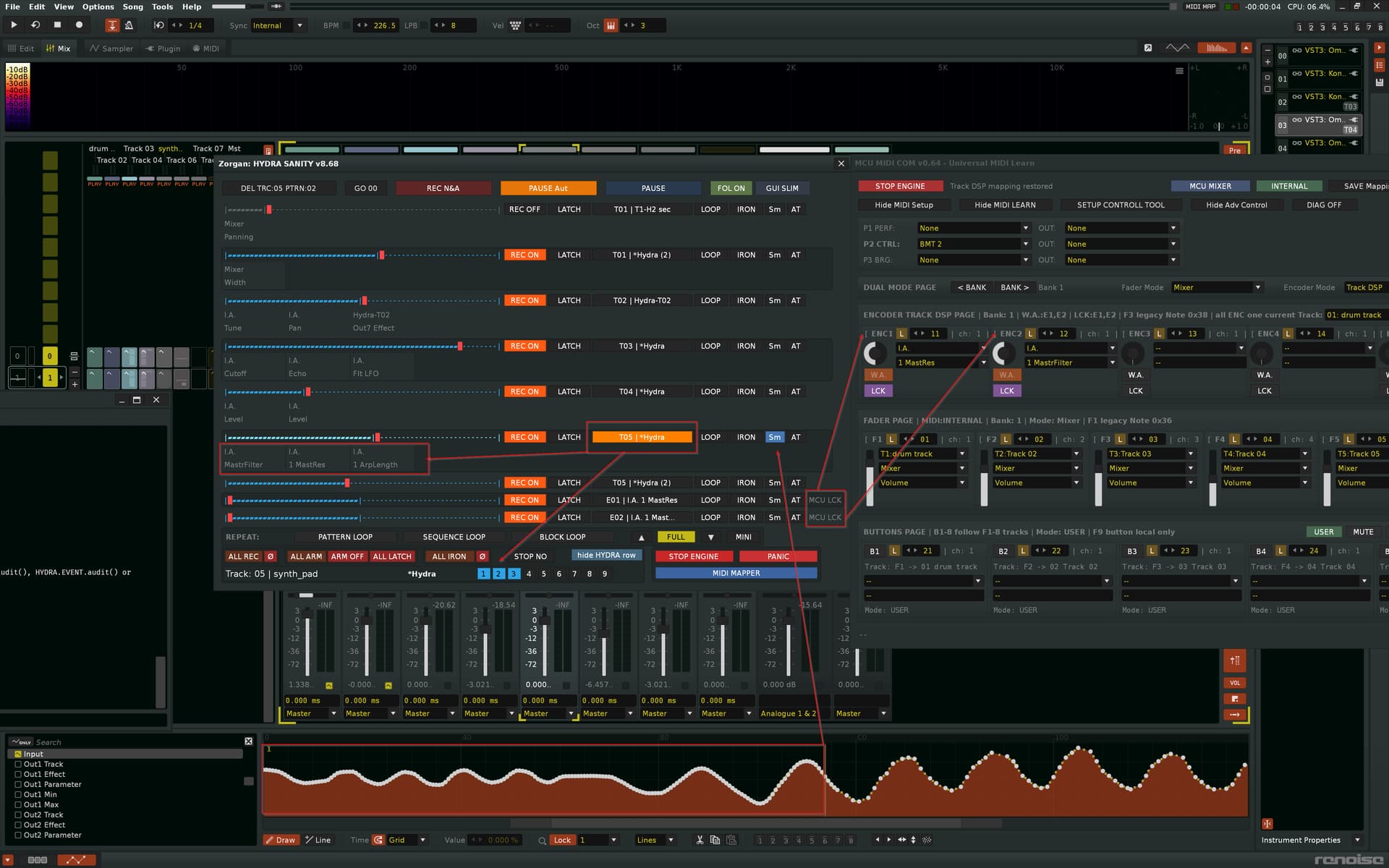
Renoise DAW Focus Feedback — HYDRA rows and MCU rows

HYDRA SANITY v8.69 also improves and documents how the tool can react to direct movement inside Renoise DAW.

This means that HYDRA SANITY is not only controlled from its own GUI or from mapped MIDI hardware. It can also follow meaningful selection changes directly inside Renoise.

HYDRA parameter focus

When you click an automation graph or a parameter in Renoise, HYDRA SANITY can compare the current Renoise target with known HYDRA rows.

If the selected Renoise parameter belongs to a HYDRA row, HYDRA SANITY can highlight that matching HYDRA row in the GUI.

Typical workflow:

Click automation graph / parameter in Renoise
→ HYDRA SANITY finds the HYDRA row controlling that parameter
→ the matching HYDRA row becomes highlighted

This is useful when editing automation directly in Renoise and then returning to the HYDRA SANITY workflow without manually searching for the correct row.

Panorama / MCU DAW-focus feedback

The same idea also applies to active MCU rows.

If an MCU row controls a DSP parameter, and you click the same automation target in Renoise, HYDRA SANITY can recognize that the Renoise target belongs to the MCU row.

Typical workflow:

MCU row controls a DSP parameter
→ click the same automation target in Renoise
→ HYDRA SANITY recognizes the matching MCU row
→ the MCU row becomes highlighted

This makes the MCU row workflow easier to understand, especially when working with MCU-MIDI-COM, TRACK DSP mode, and dynamic encoder target changes.

PAUSE-mode ownership safety

A key internal fix in v8.69 is that MCU-MIDI-COM TRACK DSP refresh is now treated as an MCU row-model update, not as a HYDRA DSP topology change.

In practical terms:

MCU-MIDI-COM TRACK DSP refresh
= update MCU rows and their targets

HYDRA DSP add / delete / structural change
= scan and rebuild HYDRA topology

This separation makes PAUSE-mode workflow more stable. MCU rows can refresh when the active track changes, while a manually selected HYDRA row is no longer disturbed by an unnecessary HYDRA topology rescan.

The result is a cleaner and more predictable workflow between Renoise DAW focus, HYDRA rows, MCU rows, and automation graph selection.

Included in v8.70

1. ARM ON rainbow fix
PLAY / REC PLAY uses a uniform smooth COLOR_PULSE_ARM_ON[pulse_idx]
instead of fast text flashing for some rows.

2. HYDRA DSP add during PLAY
The newly added HYDRA DSP creates an active row for ENC/DEC/buttons.

3. No unwanted graph focus after HYDRA DSP add
Adding HYDRA DSP no longer automatically switches to the automation graph.

4. SELECT second click behavior
A second click on the same selected HYDRA row switches Renoise DAW to the corresponding HYDRA DSP device.

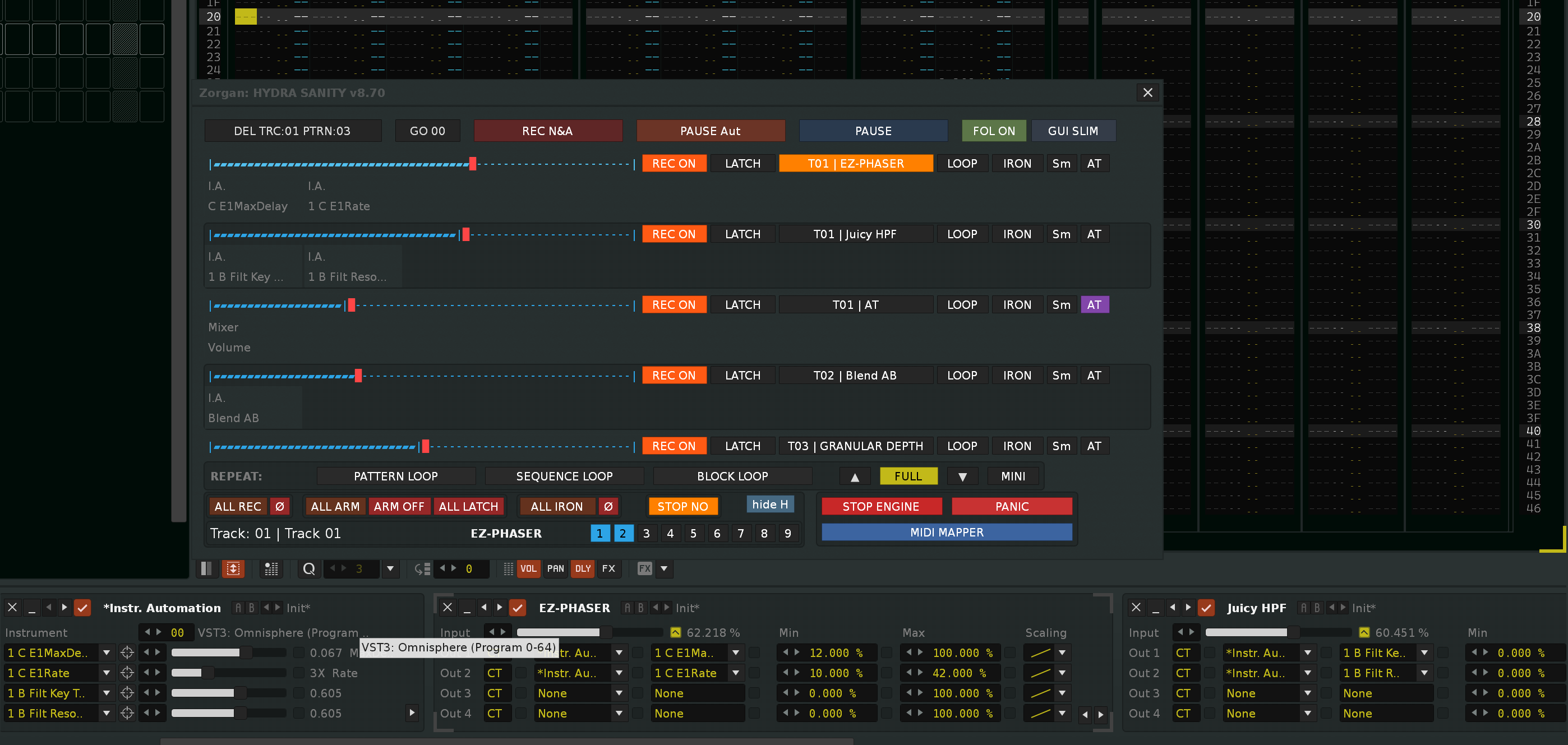
GUI FULL mode

GUI SLIM mode

Tools HYDRA SANITY v8.70

HYDRA SANITY controls Renoise HYDRA DSP automation graphs from MIDI hardware.

  • live automation graph control layer for Renoise DAW.

It lets MIDI hardware write, repeat, repair and protect HYDRA automation graphs
without flooding Renoise with useless controller data.

1. QUICK START

  1. Add HYDRA DSP devices to the tracks you want to control.
  2. Route each HYDRA DSP output to a target parameter.
  3. Open MIDI MAPPER and learn your encoders, faders and buttons.
  4. Return BACK TO STAGE.
  5. Enable REC ON on the row you want to write.
  6. Move the mapped controller — HYDRA SANITY selects and writes the matching automation graph.

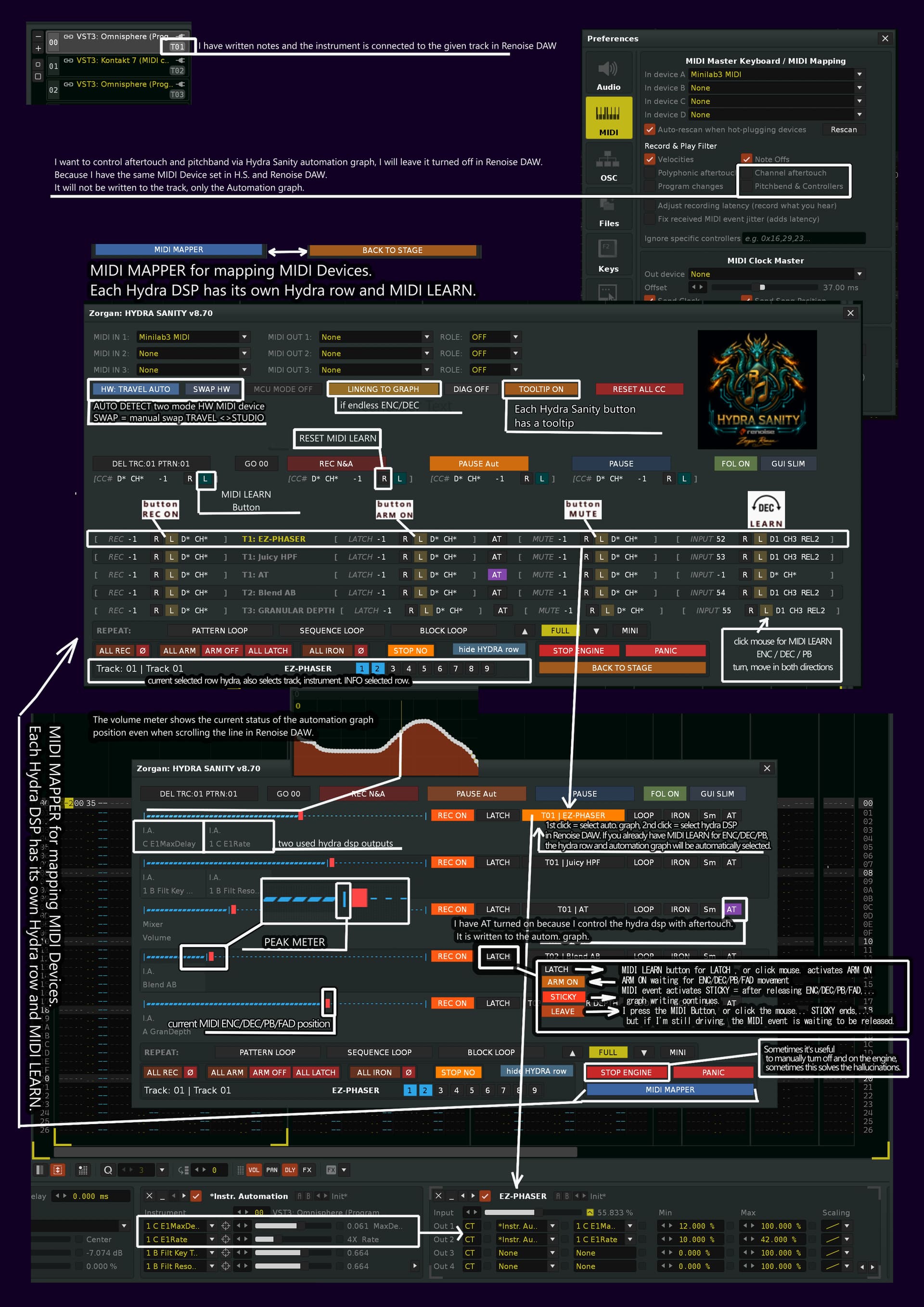
2. MIDI MAPPER

MIDI MAPPER is HYDRA SANITY’s own MIDI Learn system.
It is separate from Renoise native MIDI Mapping.
Use Renoise DAW native MIDI Mapping only for: Tools/ Zorgan/ Hydra Sanity/ Show GUI (show, hide)

Use HYDRA SANITY MIDI MAPPER for:

  • row encoders / faders / Pitch Bend
  • REC buttons
  • LATCH / ARM ON / STICKY / LEAVE buttons
  • AT enable buttons
  • global REC / PLAY / PAUSE / DEL helpers
  • RESET ALL CC clears only HYDRA SANITY internal MIDI Learn mappings. It does not clear Renoise native MIDI mappings.

3. Renoise DAW MIDI warning

Important MIDI routing note
If the same MIDI device is enabled in Renoise and in HYDRA SANITY,
Renoise DAW can write Pitchbend / Controller data into pattern FX columns.
Fix:

  • Renoise Preferences > MIDI > Record & Play Filter

Turn off Pitchbend & Controllers for the shared MIDI input.
This keeps notes active in Renoise, but prevents controller data from being written into the track.

4. STAGE / LIVE WORKFLOW

| REC ON | Allows this row to write automation graph data.
| LATCH . | Writes while touched / moved, then reconnects toward the old graph.
| ARM ON | Arms the row. First real controller movement starts writing.
| STICKY | Holds the last live value as a graph anchor.
| LEAVE . | Ends STICKY and reconnects to the preserved graph.
| LOOP … | Repeats the selected automation grid group during PLAY REC.
| IRON … | Repairs spikes, cliffs and graph edges.
| Sm … … | Smooths the existing automation graph.
| AT … … | Enables Aftertouch input for this row.
| vol. meter | Shows the current automation graph position/value.
| peak meter | Shows the current MIDI ENC / DEC / PB / AT input position.

5. REC / PLAY workflow

REC ON is row-level write permission.
REC PLAY NOTE & Automation starts note recording and automation recording.
REC PLAY Automation records automation only.
PLAY / PAUSE Safe Listen plays safely without writing new automation.

  • REC ON must be enabled on a row before that row can write automation.
    If you don’t activate STICKY, it can also write to the graph, but after deactivating STICKY (MIDI button, mouse), it disconnects the writing.

6. LOOP

LOOP repeats a selected Renoise automation grid group.

  1. Select automation points / grid range in Renoise Automation Graph.
  2. Press LOOP on the HYDRA row.
  3. Start PLAY REC.
  4. HYDRA SANITY writes the selected automation phrase forward.

LOOP supports:

  • PATTERN LOOP
  • SEQUENCE LOOP
  • BLOCK LOOP

STOP NO ON keeps LOOP alive through repeat boundaries.
STOP NO OFF stops LOOP at native Renoise wrap / repeat boundaries.

7. IRON / Sm

IRON repairs unwanted automation graph artifacts:

  • spikes
  • cliffs
  • hard edges
  • short accidental jumps

Sm smooths the whole graph movement.

IRON and Sm can process an existing graph during normal PLAY even when REC ON is OFF.
In that state HYDRA SANITY does not create a new automation lane and does not write new controller movement.

8. AT / Aftertouch

AT enables global Aftertouch control for this row.

HYDRA SANITY supports:

  • Channel Pressure
  • Poly Pressure

AT is routed only to rows where the AT button is enabled.
If AT and CC/PB input arrive in the same write window, AT has priority.

9. HYDRA DSP OUT helper

HYDRA DSP OUT 1-8 helper shows where a HYDRA row is routed.

It can display:

  • output slot
  • target track
  • target device
  • target parameter
  • assignment status

Use OUT 1-8 buttons to inspect different HYDRA DSP outputs.