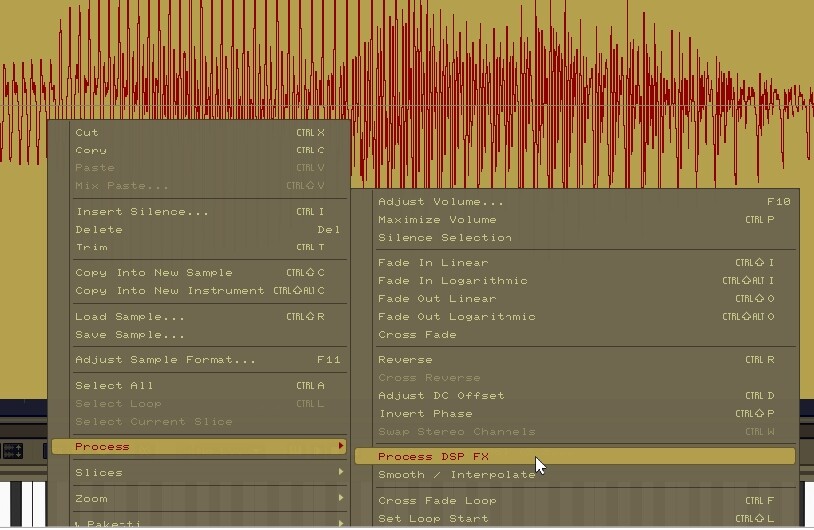
When I have a sample and give it an fx chain (for example, Delay and reverb) then in the waveform view run the “Process DPS FX” option, all it does is mute the fx and leave me with the unchanged dry sample.
How does one get Process DPS FX to Process DPS FX?
feel like i ran into this before and it was something goofy like it only works on track fx
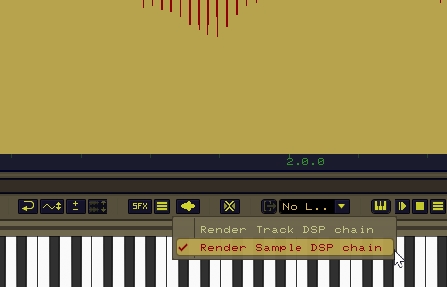
You can render instrument effects to the sample from within the sample editor. I don’t have renoise in front of me right now so I can’t provide a screenshot, but on the bottom of the waveform editor view, there is a button that says either sfx, or tfx (I think). If you left click this, it will render fx to the sample, and if I recall correctly, if you right click it, you can select whether it will render track effects or instrument effects.
If you want to render a Reverb tail, make sure you include an appropriate amount of silence at the end of the sample to allow for the Reverb tail, as this effects rendering doesn’t change sample length
Ooh. There is a TFX button, but it doesn’t work for some reason. Looks like it tries to process but then its just the dry unchanged sample. Does the same if its the FX Chain for the sample and if using fx on the track. no difference.
It doesn’t matter which of these are selected either. It still ignores both and does nothing. It will however unlink the sample from the fx chain like it says, but nothing more, it is at least doing the least needed part of the action.
OK I see why its “not working”.
Id does not adjust the sample length for the fx. If the delay or reverb is longer than the original, it just cuts it off. Would be nice if they updated Renoise to take this into consideration, unless there is a setting for that somewhere. You have to add Silence to the end before processing