I’m on Arch using Pipewire, and while the default behavior of the JACK backend works well for the general case, being able to set a node name/id for it to try to connect to on startup would be a huge QoL feature for my setup.
I use EasyEffects as a DSP for my Framework’s speakers, and while EE itself has no functionality for automatically picking up and redirecting JACK clients as it does for PulseAudio ones, manually changing the connections after launch with qpwgraph gives not only the benefit of speaker EQ correction, but also automatically following headphone plug/unplug with little to no appreciable additional latency. Being able to set up Renoise to connect to the EasyEffects sink instead of the nominal “default” would sand off a proverbial rough patch in my use case.
I mean, I’d set it up to automatically happen on pipewire’s end, but wireplumber’s configuration is frankly inscrutable (I’ve been doing it manually with a Pipewire-specific equivalent of that application, I just figured I might as well ask and see if it’s an easy add or not)
Yes, the pipewire and wireplumber settings are strictly documented and if done well are very flexible and stable, but they are difficult because they require interpretation and application work.
Is it possible to tell us the details of how you configured them?
I would be happy to paste the contents of the configuration file.
I think qjackctl’s patchbay is relatively easy to configure.
I don’t use qpwgraph because it seems a bit cumbersome, but I think you can save the setup and edit the configuration file to reproduce the intended connection.
It may be useful if used well.
Sorry, this setup seems quite difficult.
After starting Renoise, the default output configured in pulseaudio is inevitably connected to it, and I have to disconnect it manually.
Perhaps I can use wireplumber to make it not connect to the default output, but I haven’t figured out how to do that yet.
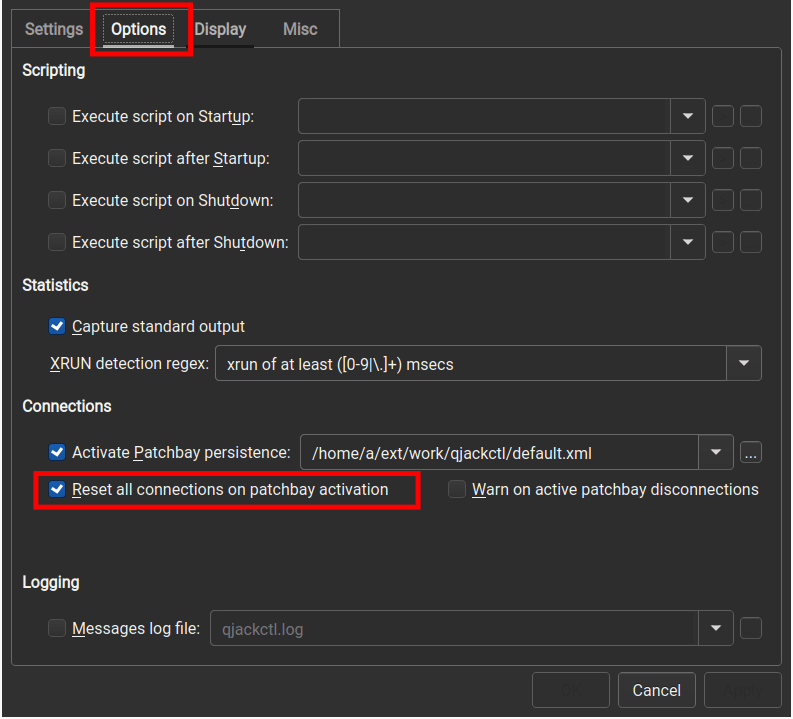
@syliph Ok, I see, if I enable the option Reset all connections on patchbay activation in qjackctl and then invoke Renoise in the following form, I can have Renoise disconnect the default connection.
However, it would certainly be nice to be able to set the default output destination in Renoise so that we do not have to do this.
Changing the output destination after starting Renoise may cause crackling noise. This is obviously undesirable when assuming that you are in a live performance, etc.
I’m not too familiar with the inner workings but it seems like for other applications like for example mpv, will allow specifying the output port, but by default will pick the first physical device. (like mpv -ao=jack --jack-port=“DT770 EQ Filter” audio.wav)
For renoise however, it doesn’t allow specifying and it will always go to some “default” audio device, which is way too loud and bypasses my global EQ. It’s not even the device that is set as the default in wireplumber, but maybe this is not exposed through the jack interface.
I’m also running just pipewire & wireplumber, with pipewire also acting as a jack server for jack clients.
I have tried to configure this using wireplumber however the documentation for configuring jack clients seems to be very sparse.
Anyone know how to handle this?
Maybe if any renoise devs can check if it’s picking some kind of default physical jack device, which seems to be the case.
My current conclusion is that the most reliable way to manage nodes is essentially to use pw-link or similar tools via shell scripts.
I believe that using qjackctl or other node management programs could lead to conflicts with WirePlumber, thereby complicating matters.
While I wish there were a simpler method, I haven’t found any other way to ensure relatively reliable operation during live performances in front of an audience.
#!/bin/bash
#### pw-link-live.sh
#set -x

# function
# --- Common Helper: Get ID Array ---
_get_id_array() {
    local mode=$1; shift
    local patterns=("$@")
    local ids=()
    for patt in "${patterns[@]}"; do
        while read -r id; do
            [[ -n "$id" ]] && ids+=("$id")
        done < <(pw-link "$mode"I | grep -E "$patt" | awk '{print $1}')
    done
    echo "${ids[@]}"
}

# --- seri_patch: 1-to-1 sequential patching, stops when outputs (o) are exhausted ---
seri_patch() {
    local -n o_p=$1; local -n i_p=$2
    local i_ids=( $(_get_id_array -i "${i_p[@]}") )
    local i_count=${#i_ids[@]}

    for patt in "${o_p[@]}"; do
        local o_ids=( $(_get_id_array -o "$patt") )
        # Connect 1-to-1 until either output or input ports are exhausted
        local limit=$(( ${#o_ids[@]} < i_count ? ${#o_ids[@]} : i_count ))

        for (( idx=0; idx<limit; idx++ )); do
            pw-link "${o_ids[$idx]}" "${i_ids[$idx]}" 2>/dev/null
        done
    done
}

# --- para_patch: Parallel patching while maintaining channel attributes (L/R) ---
para_patch() {
    local -n o_p=$1; local -n i_p=$2

    # Retrieve all ports on the input side
    local i_ids=( $(_get_id_array -i "${i_p[@]}") )
    local i_count=${#i_ids[@]}

    if [[ $i_count -eq 0 ]]; then return 1; fi

    echo "=== Starting Stereo Distribution (Total Inputs: $i_count) ==="

    for patt in "${o_p[@]}"; do
        local o_ids=( $(_get_id_array -o "$patt") )

        # Process each port on the output side
        for (( o_idx=0; o_idx<${#o_ids[@]}; o_idx++ )); do
            local oid=${o_ids[$o_idx]}

            # Identify channel attribute (0=L, 1=R, 2=L...)
            local o_chan=$(( o_idx % 2 ))

            # Scan all input ports and connect only to matching attributes
            for (( i_idx=0; i_idx<$i_count; i_idx++ )); do
                local i_chan=$(( i_idx % 2 ))

                if [[ $o_chan -eq $i_chan ]]; then
                    pw-link "$oid" "${i_ids[$i_idx]}" 2>/dev/null
                fi
            done
        done
        echo "  [OK] '$patt' -> Distributed to corresponding channels of all targets"
    done
}

~/.local/bin/pw-link-disconnect-all.sh
# pw-link-disconnect-all.sh:
# #!/bin/bash
# pw-link -lI | grep " |[->]" | awk '{ print $1,$3 }' | xargs -I{} pw-link -d {}

# --- Configuration: Listed in order of priority ---
out_to_monitor=(
    "renoise:output_01"
    "REAPER:out[12]$"
)
in_monitor=(
    "alsa_output.pci-0000_00_1f.3.analog-stereo:playback_F"
    "alsa_output.usb-LOUD_Technologies_Inc._ProFX-00.pro-output-0:playback_AUX[23]$"
)
out_to_floor=(
    renoise:output_02
    REAPER:out[34]$
)
in_floor=(
    alsa_output.usb-BurrBrown_from_Texas_Instruments_USB_AUDIO_CODEC-00.pro-output-0:playback_AUX[01]$
    alsa_output.usb-ZOOM_Corporation_UAC-2_000000000000000000000000250B81D4-00.pro-output-0:playback_AUX[01]$
)
out_to_default_capture_1=(
    alsa_input.usb-LOUD_Technologies_Inc._ProFX-00.pro-input-0:capture_AUX[01]$
)
in_default_capture_1=(
    renoise:input_01
    REAPER:in[12]$
)
out_to_default_capture_2=(
    alsa_input.usb-ZOOM_Corporation_UAC-2_000000000000000000000000250B81D4-00.pro-input-0:capture_AUX[01]$
)
in_default_capture_2=(
    REAPER:in[34]$
)
out_loopback_floor=(
    alsa_output.usb-ZOOM_Corporation_UAC-2_000000000000000000000000250B81D4-00.pro-output-0:monitor_AUX[01]$
)
in_loopback_capture=(
    REAPER:in25[56]$
)
if [ "$1" == "super-renoise-capture" ] ; then
    out_renoise_to_reaper=(
        renoise:output_
    )
else
    out_renoise_to_reaper=(
        renoise:output_02
    )
fi
in_reaper_renoise=( # REAPER: in17-254
    'REAPER:in(1[7-9]|[2-9][0-9]|1[0-9]{2}|2[0-4][0-9]|25[0-4])$'
)

# --- Execution ---

# To Monitor
para_patch out_to_monitor            in_monitor

# To Floor
para_patch out_to_floor              in_floor

# To Capture
# REAPER: in1-8 are reserved for any physical inputs
#         in9-16 are reserved for R16 inputs
para_patch out_to_default_capture_1 in_default_capture_1
para_patch out_to_default_capture_2 in_default_capture_2

# To Loopback
# REAPER: in255-256 for Loopback recording (typically records Floor output)
para_patch out_loopback_floor in_loopback_capture

# REAPER: in17-254 for Renoise
# (Simplified version uses output2 L/R only; full version uses all outputs)
seri_patch out_renoise_to_reaper in_reaper_renoise
For now I’ve just settled for opening qpwgraph(similar to qjackctl but for pipewire) whenever I open renoise, have it load a graph setup with exclusively renoise connected to the desired node, and then just disable exclusive mode in qpwgraph if I want to run other apps that use sound. It’s a bit janky but works, would still prefer some kind of default output setting (or no default, so I can link it manually).
I have considered something like that script with pw-link however when renoise decides to reinitialize the audio, for example when you click reinitialize in the settings, it will just reconnect to some “default” output, so you’d have to rerun the script or keep it running and polling.