Long time Renoise user, and also produce ambient in Bitwig and my Akai Force, which with the horizontal timeline approach seems to suit either long audio or long midi events, more so from the visual aspect of arranging a track.
Is anyone using Renoise for similar and can give some tips on how to visualise the arrangement better when there’s long sustained notes, audio etc. Also it’s dead easy to bounce down, say, 3 mins of a MIDI event in Bitwig (or Live, Logic etc etc) and I’m struggling to see how that could work in Renoise easily.
Bland question, I get it as it’s all quite obvious - use the arranger matrix with notes, label tracks nicely etc etc - and I’m thinking that using shorter arrangements with lots of unpredictability (chance on notes, phrases etc) could be a nice different way of working.
I use Renoise to make long form drone/ambient music.
I typically configure BPM, LPB, and pattern length so each pattern is a known duration of time (e.g. 1 minute, 2 minutes, etc.) to make planning the arrangements easy/basic. This also helps when I need to align notes/effects/etc. with events in a field recording or other long audio.
I am a big fan of using LFOs to slowly automate volume/panning/effects parameters and the Yxx ‘MaYbe trigger’ command - especially when I want to “quickly” sketch out some ideas. I am long overdue to try some of this with phrases, too, but I think you’re on the right path there. I also make extensive use of the Line tool in the graphical automation pane when I need envelopes to span several patterns.
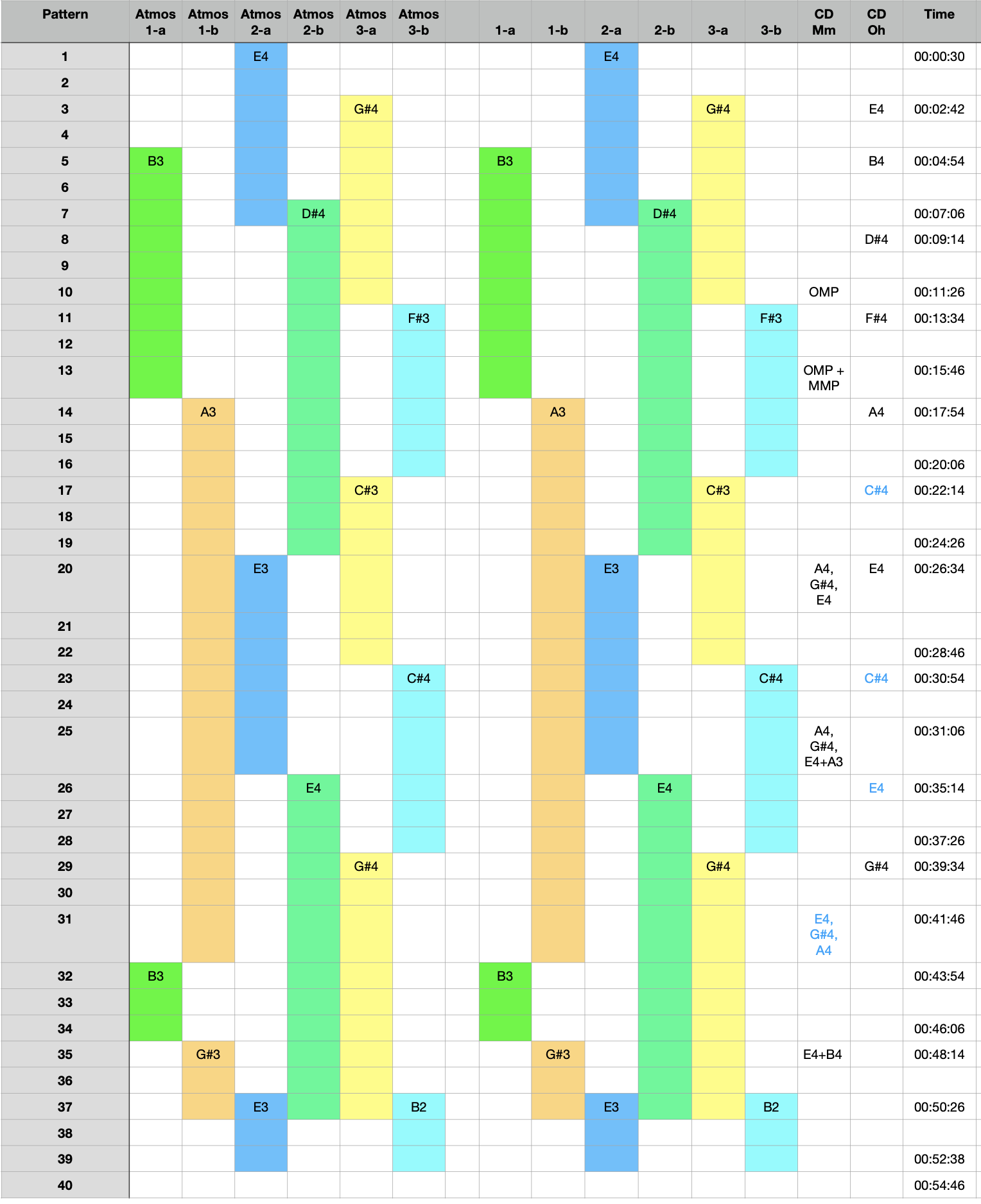
The arranger matrix can be helpful, but agree it is less helpful for tracking long-duration notes. I am lame and use a spreadsheet to graphically map them:
Doing this with Renoise can be very time-consuming since you can’t just scrub around on a timeline. Sometimes I temporarily speed up the tempo to let it “speed run” the track for a quick check; sometimes I render the song to disk so I can scrub around in another DAW to check specific areas. Most of the time, it’s the usual tracker method of playing it through and iterating as needed…which can take hours.
Thanks for your reply mate. I like the idea of setting up a pattern to be 1 min in duration, that’s quite an organisational tip that would suit the way my brain works. I can see the benefit of the spreadsheet but that’s far too organised for me!
Speed runs are good to check out details but if you’ve got long evolving synths running the nuances of that patch doesn’t shine in a speed run. Nor does troubleshooting horrible issues with frequencies if that synth patch is ever evolving! Took me a while to work out bouncing to audio (in Bitwig) and then speed running was the way to sort that out… or just change the patch.
While I’ve never used phrases really as yet, being able to trigger them with chance/maybe and different notes in scale could be a really nice addition to a track.
Couldn’t you replicate your spreadsheet on the arranger matrix and have notes to cover off some of what you’re doing with note data? Just a thought. It’s given me that idea in any case, so thanks for showing that.
The spreadsheet approach just made the most sense to me at the time - the visual map it provides (along with which notes are starting/ending) helped me figure some things out. By all means, you should do whatever makes the most sense to you.
And please share any techniques or tricks you learn/discover along the way. I look forward to learning how you get along.