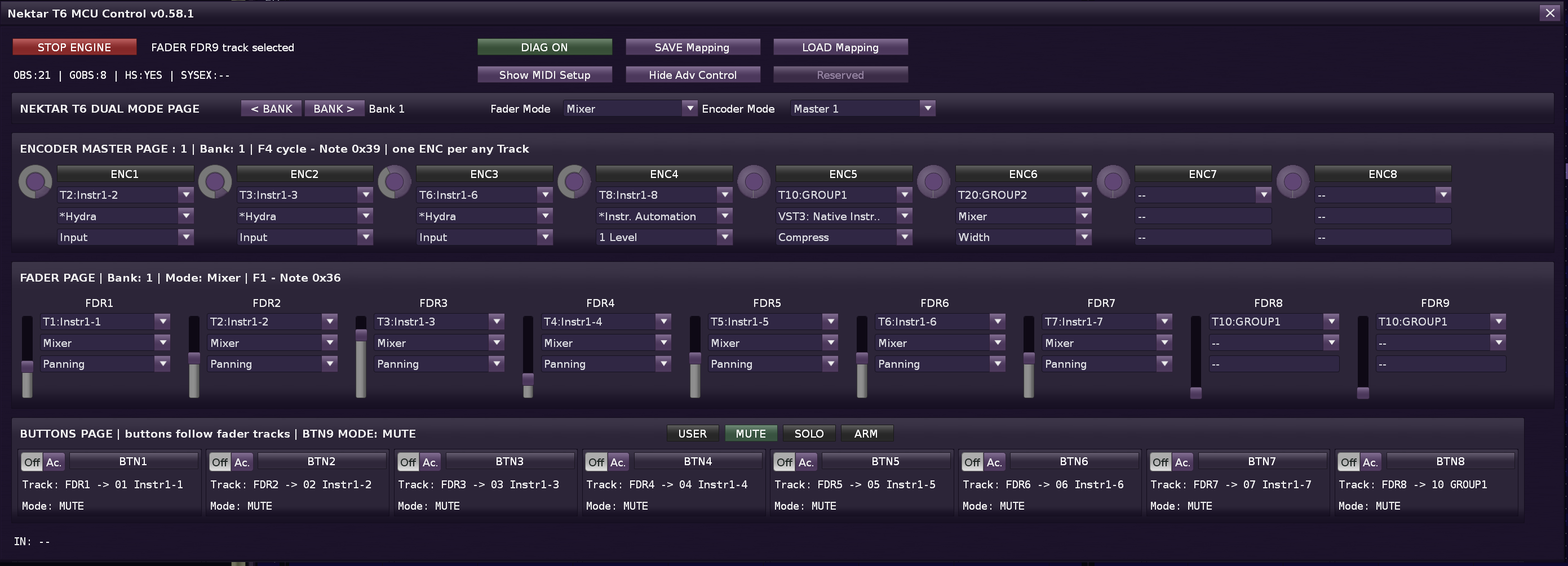
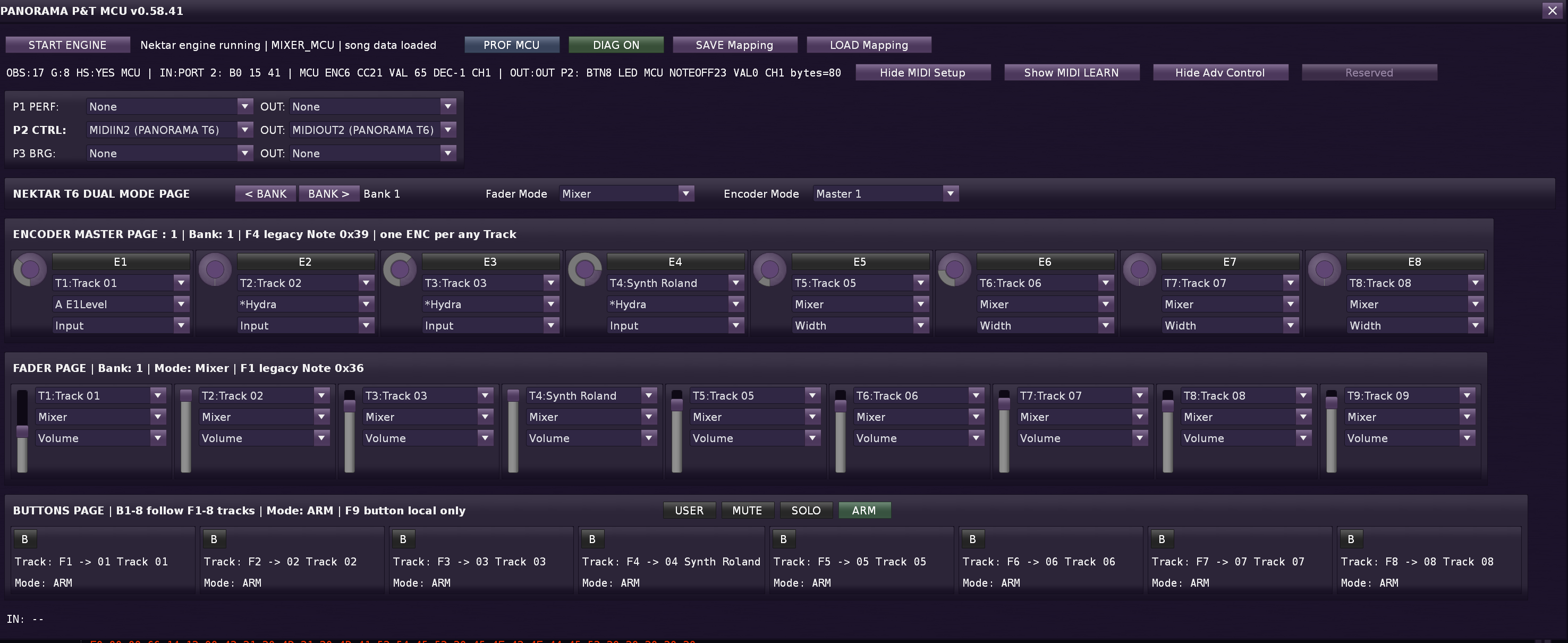
MCU_COM_Panorama tool : Panorama T & P serie & next MC / universal multi MIDI mapping center for 8 encoders, 8 faders, 8 buttons + control buttons

Will any of you appreciate this tool for fully utilizing the Panorama Nektar T4 and T6 keyboards?


The target will be to switch Instrument and Load Host Automation map … and everything will be remapped in Nektar T4, T6 according to the settings for the given instrument. Or driving mode Track DSP select TRACK and every DSP parametr list in Renoise per track for mapping.

with feedback on the display when the button is activated … the name of the assigned parameter is displayed on display Nektar T4,T6

1 Like

What I already have ready:

Fader Mode

  1. Mixer : Volume tracks (8 + Master)
  2. …. see later

Encoder Mode

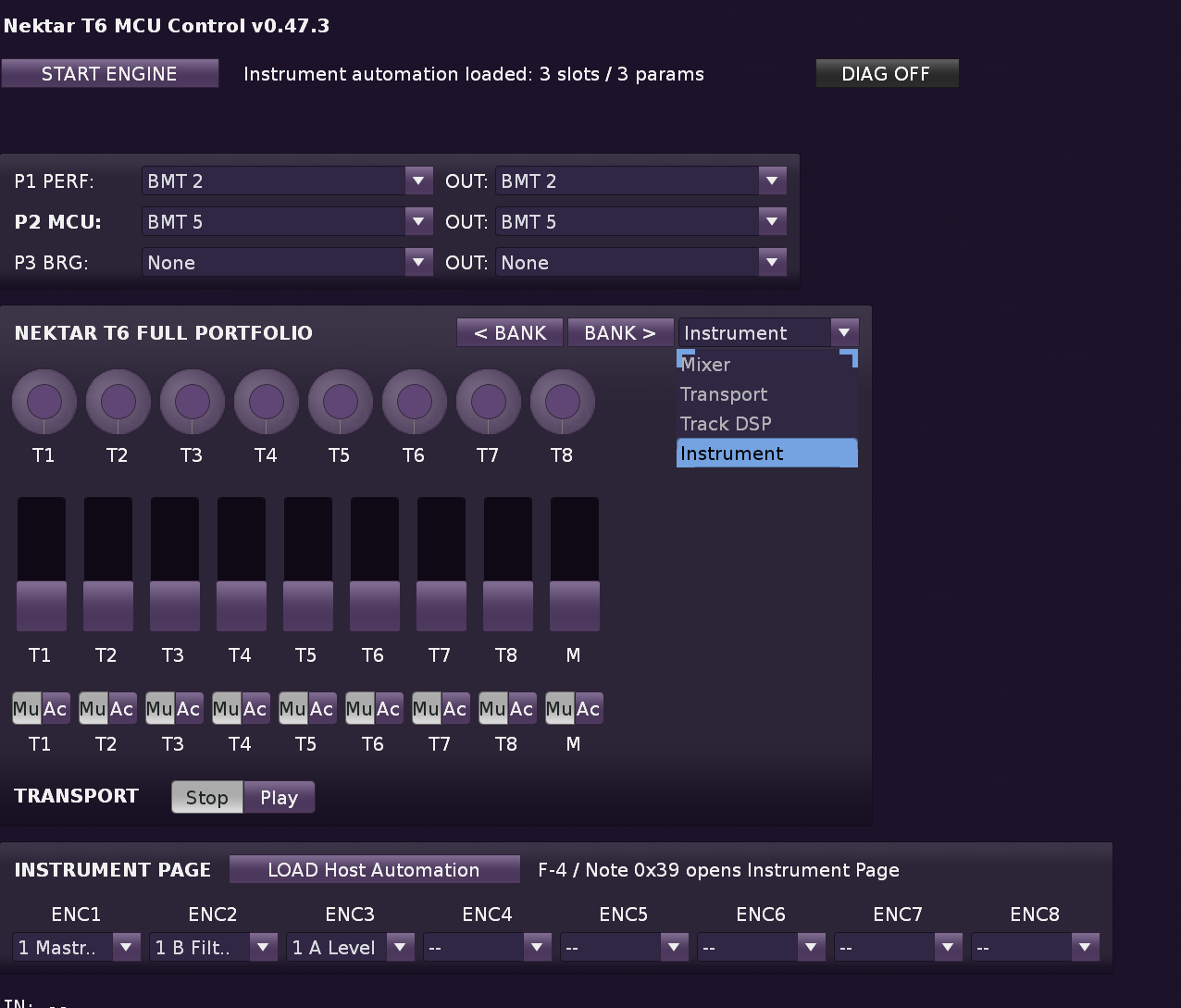
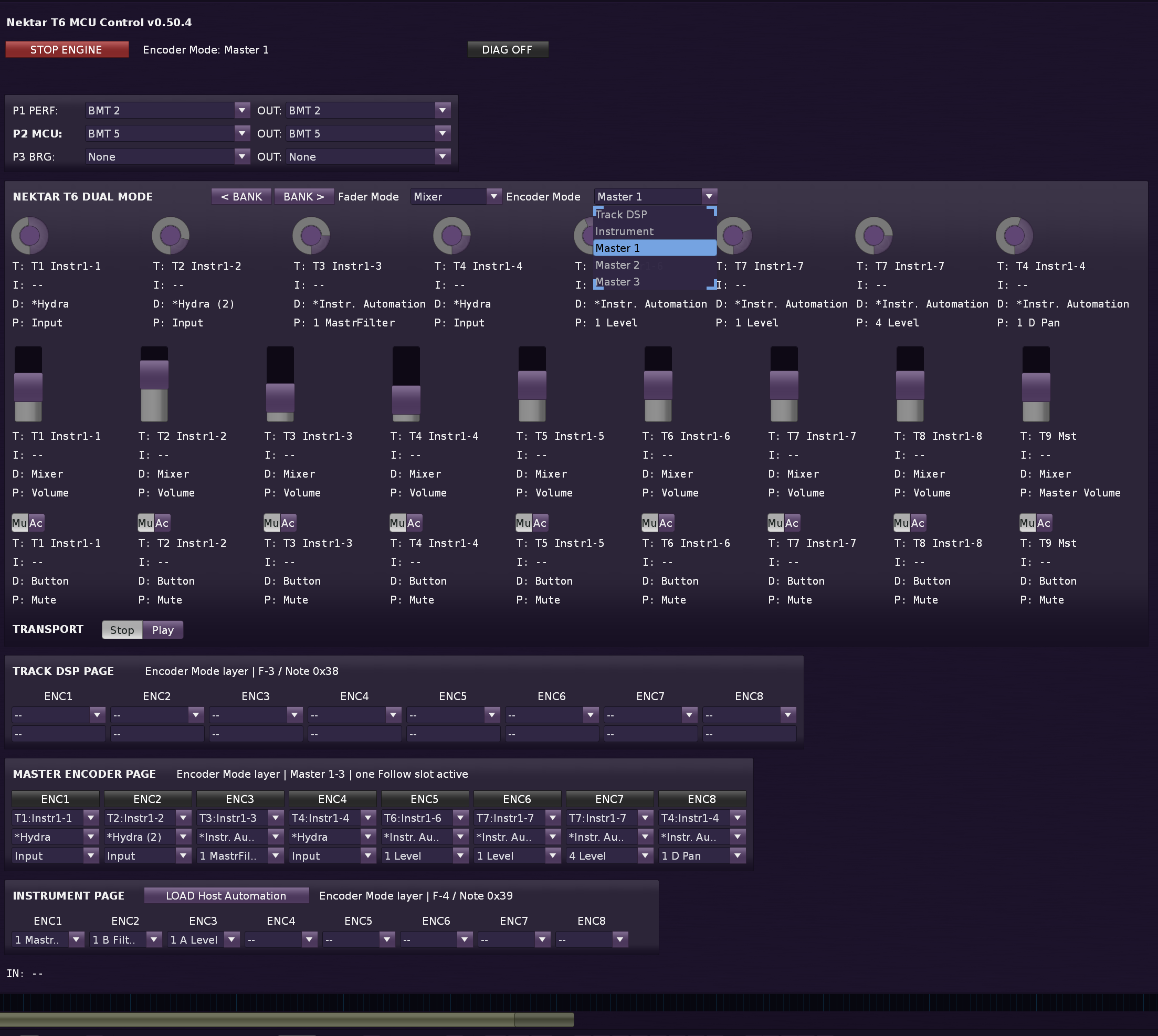
Track DSP : for ENC 1-8 Control DSP devices on a track use list from Renoise Track Automation Editor Pane

Instrument : for ENC 1-8 load One Instrument Host Automation (One NECTAR for One Instrument)

Master 1 / 2 / 3 : For ENC 1-8 Advanced mapping across tracks use list from Renoise Track Automation Editor Pane, separate presets for ENC 1-8 can be set individually from all tracks in the song.
The track is loaded automatically when the ENC x button is activated, then click on the track, or manually select from the popup menu.

1. Two Independent Layers (Dual Mode)

Layer Controls Responsibility
Fader Mode Faders 1–9, Buttons 1–9 Mixing, Transport
Encoder Mode Encoders 1–8 Track parameters, DSP, instruments, Master mapping

Fader Modes

Mode What the faders do
Mixer Volume of 8 tracks + Master Volume. Banking shifts the track range.
Transport Faders control I’m not thinking about it yet. (only the display shows BPM, time, etc.)
  • Buttons (Mute/Active) work only in Mixer mode.

3. Encoder Modes

Mode What the encoders do
Track DSP Each encoder = selection of a DSP device on the selected track + parameter.
Instrument Each encoder = Host Automation parameter of the selected instrument.
Master 1 / 2 / 3 Each encoder = any track (independent of the selected one) + its DSP device + parameter.

4. Nektar Banks

  • Each bank remembers which Fader Mode and Encoder Mode were last active (bank_modes[bank_index]).

  • Each bank remembers which Fader Mode and Encoder Mode were last active (bank_modes[bank_index]).

  • Switching banks automatically restores the saved modes, but encoder data/mappings remain according to the chosen Encoder Mode (Track DSP cache is bound to the selected track, Instrument cache to the selected instrument).

5. Master Bank Matrix (new from v0.51.0)

For Master 1/2/3 there is a second banking dimension:

Bank 1 Bank 2 Bank 3
Master 1 8 independent mappings 8 independent mappings 8 independent mappings
Master 2 8 independent mappings 8 independent mappings 8 independent mappings
Master 3 8 independent mappings 8 independent mappings 8 independent mappings

Each cell (Bank × Master preset) has independent assignments – which encoder controls which track, device, and parameter.

Hardware Shortcuts

Button Function
F1 (Note 0x36) Fader Mode → Mixer ( support Renoise Track Automation edit pane : Mixer, #Send, #Multiband Send, #Sidechain, #ILine Input )
F2 (Note 0x37) Encoder Mode → Instrument = 8 enc to one Instrument, when change Instrument change encoder map
F3 (Note 0x38) Encoder Mode → Track DSP - 8 enc to one Track, when change Track change encoder map
F4 (Note 0x39) Cycle Master 1 → 2 → 3 → 1 … preset global for all track TAEP {Track Automation Edit Pane DSP)
Bank < / > (Notes 0x2E/0x2F) Shift bank 1 - 2 - 3 = all preset x 3
  • F1 - F4 - function buttons under display Nectar

The biggest challenge is the SysEx header 0xF0, 0x00, 0x00, 0x66, 0x14, 0x12 for communication with the Nektar LCD display. This is the imaginary holy grail. A function that translates a text string into a byte array (up to 56 characters) and sends it straight to the port.

Navigation matrix (F1–F4) under display: In the build_registry section, exactly at notes 0x36 to 0x39. You beautifully hung callbacks on them for switching modes (fader_mixer, instrument, track_dsp, master_cycle).

Event-Driven Architecture: An array for managing observers (OBS and GOBS) and using notifiers like value_observable or selected_track_observable is the best solution in terms of CPU optimization. The script does not “polling” the program state for nothing, but reacts strictly only to a change in state.

14-bit fader mapping: Nektar sends faders via Pitch Bend messages (0xDF+i). I parse the LSB and MSB bytes (m[2] and m[3]) there directly into an exact 14-bit resolution divided by 16383. This guarantees a maximally smooth volume step without the “staircase” that regular MIDI does with values ​​0-127.

Nektar users are certainly familiar with the experience with Wrapper Nektarin, it is death for large vst instruments… such as Omnisphere 2.3… that’s why I’m trying this project… natively vst in Renoise… and just sending midi mapping to Nektar, along with display text

work continues successfully…

I managed to fully utilize the Panorama MCU architecture in MIXER mode in a pure Lua script for Renoise (I got Pitch Bend fader fineness and captured Note messages for MCU LED feedback and encoders), completely natively without using the Nektarine wrapper!
Unfortunately, the display is still magically locked:

  1. Nektarine uses a graphical, not a text protocol
    Projects on GitHub have successfully reverse-analyzed controllers from Arturia, Akai, or Korg, because their character displays use simple ASCII tables. However, the Nektar Panorama (T4/T6 and P4/P6) has a graphical display. Their wrapper (Nektarine) does not send text like “Boost this parameter” to the keys. It sends proprietary data packets with bitmaps, pixel drawing coordinates, or instructions for the firmware’s internal graphics engine (drawing those iconic graphs and value indicators). No one in the world has cracked Nektarine enough to map this graphical USB protocol yet.

  2. Fake MCU display
    The moment I sent that sysex F0 00 00 66 14 12… , Nektar knew I was speaking to it in standard Mackie Control (MCU) language (which normally works with two-line character displays). The T6 firmware then tried to “map” these texts to its graphic display.
    But as soon as you touch the encoder, the internal hardware function of the keys (Local Control) is triggered. Nektar thinks: “Ah, he’s turning encoder #1, that’s the MCU Pan protocol, I’ll draw PAN LEFT there.” It will immediately discard your text packet from Renoise, because the internal graphic engine has absolute priority.
    When calling GUI Show (you can also map the call from a keyboard shortcut, or MIDI mapping Renoise - for my standard tools, you can find it in the Tools / Zorgan / Panorama MCU MIDI Controll directory … the service starts … mapping is already working on a complete assignment of almost everything that the Renoise API provides … In the future I will add more MIDI control buttons … and switching via MIDI buttons … mapping modes …
    In tools you set your MIDI virtual MIDI port that you have set in Panorama for Mixer (1-4) usually 2, and in Renoise you set for Panorama its MIDI port 1 = keys and pitchband, modwheel.
    Therefore, you do not have to drag more complex VST instruments through Nektarin Wrapper and they run natively in Renoise. Which is the whole advantage and the reason why I created this tool.

  3. The tool saves the MIDI device and the selected profile in preference.xml , you can change the MIDI mapping track MIDI learn (for experimental purposes only) it is saved in the song. But you just need to click on the PROF MCU button … and the MIDI mapping in the Panorama Nektarin MCU profile is automatically loaded for all ENC, FAD, BUT.

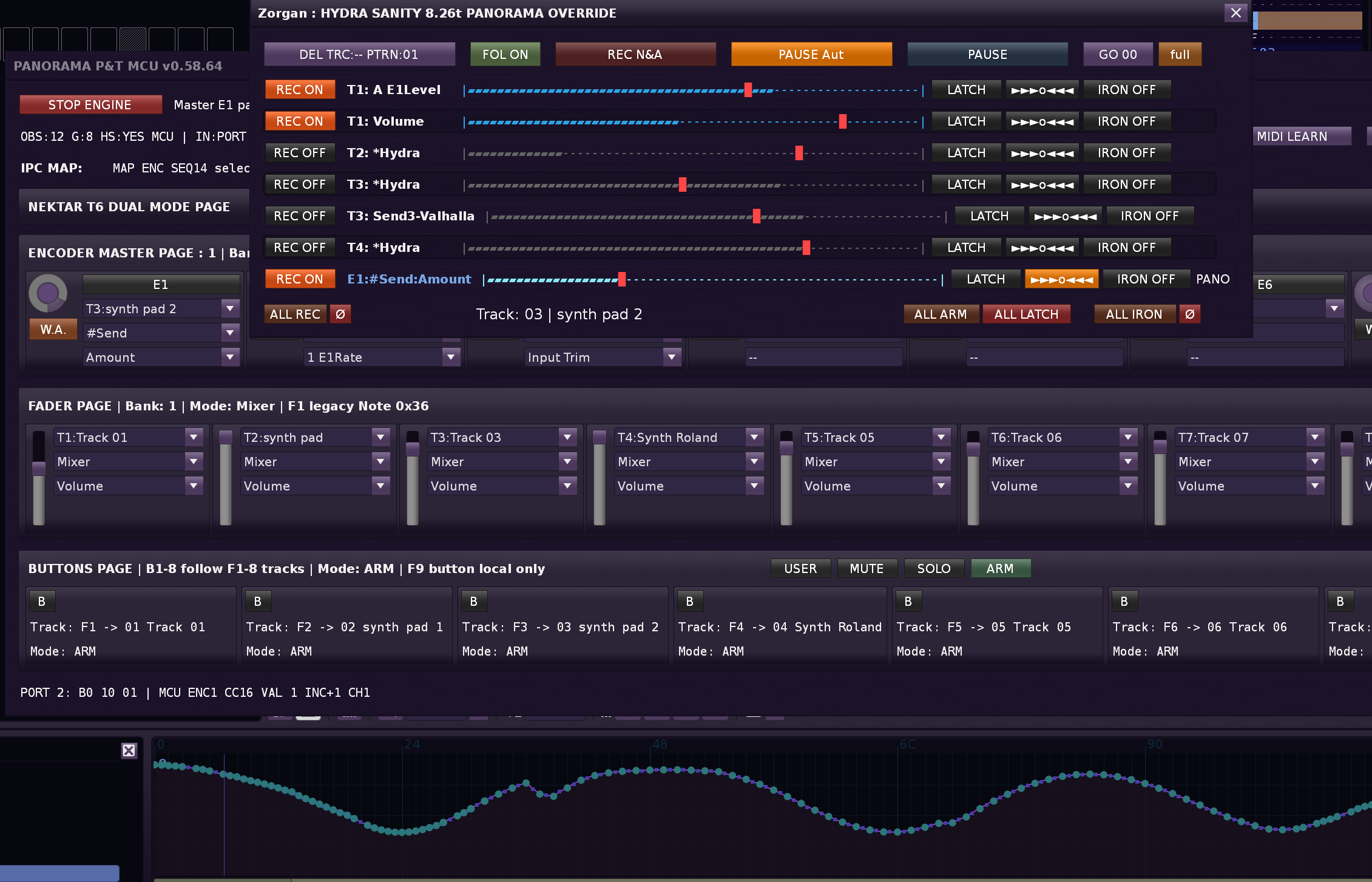
Another plan, I created a communication space between the HYDRA SANITI tool, which can draw very well into the automation graph, and this tool. = If you run HYDRA SANITY, it will recognize that you have the MCU COM PANORAMA tool running and will add ENCODERS from PANORAMA natively so that you can write into the automation graph with endless encoders 1-8 from Panorama HW. It will add them as separate lines with a volume meter, where you can use ARP, IRON.

The best direction is already clear: we will not go the “new writer for Panorama” route. The correct thing to do is to create a virtual d_key for PANORAMA_E# and run it through the same state engine as HYDRA, just with a different target parameter resolver.

Work continues successfully, implementation of the connection of the HYDRA SANITY line with the MCU_Panorama tool, two-way communication …

  1. adding the ENC1-8 line to HYDRA SANITY, will allow you to write and overwrite the automation graph even during playback or record play …
  2. In the MCU_Panorama tool, the buttons can be switched to ARM ON / OFF mode … if you select ARM mode for the button automatically assigned ENC1-8 mapping… you don’t have to worry.
  3. If you turn off REC_ON in HYDRA_SANITY on the Panorama line … it will be automatically removed from HYDRA_SANITY, the same thing. If you click on the W.A. button in the MCU_Panorama tool in the GUI at ENCx, the connection with the HYDRA_SANITY tool will be disconnected. vice versa 2. click will establish the connection again and activate the HYDRA line Panorama_ENCx
  4. when moving the ENC, its automation graph is automatically activated. This will make working with multiple automation graphs clearer.

Finalizing MIXER mod … I continue in INTERNAL mode Panorama T
I’m fine-tuning the MIXER mode in MCU mode with Panorama T, I also got the LED play, rec, repeat, track ±, Bank ± buttons working, but I’ve lost hope of getting the button LED under FADs working. MIXER mod is full of sysex communication. Mixer mode is fast settings preset MIDI mapping.
I’m switching to the 2nd mod MCU_COM_Panorama to Internal mode
MIDI Learn Mapping is already done.
On Panorama T, manually set in SETUP MENU / Controll Editor:
ENC to MSG TYPE: MIDI CC REL, and buttons 1-8 under FADs to MSG TYPE MIDI CC and FADs 1-9 set MSG TYPE to PITCH mode (pitchband) 14bit. support (set MIDI ch 1-9 , no GLOBAL) So that everything works as it should and HYDRA automation works smoothly.
In principle, MCU_COM_Panorama is already ready for drawing automation, everything works with the connection of HW control ARM, MUTE, Select track, switch to graph automation. Thanks to endless ENC and HYDRA SANITY, you can play and at the same time tune the automation graph, without any signs of problems in the sound output.
I created a lot of sysex sequences, I read info from MIDI, but Nektarine kept it hidden for itself.
Hopefully everything will be successful in internal mode.
Once the work on the INTERNAL mode of MCU_COM_Panorama is finished, I will put it in the download tool.

News in the development of tools …
If you have your Nektar Panorama Tx in MCU MIXER mode… you do not need to map MID
In INTERNAL mode you need to map your current preset

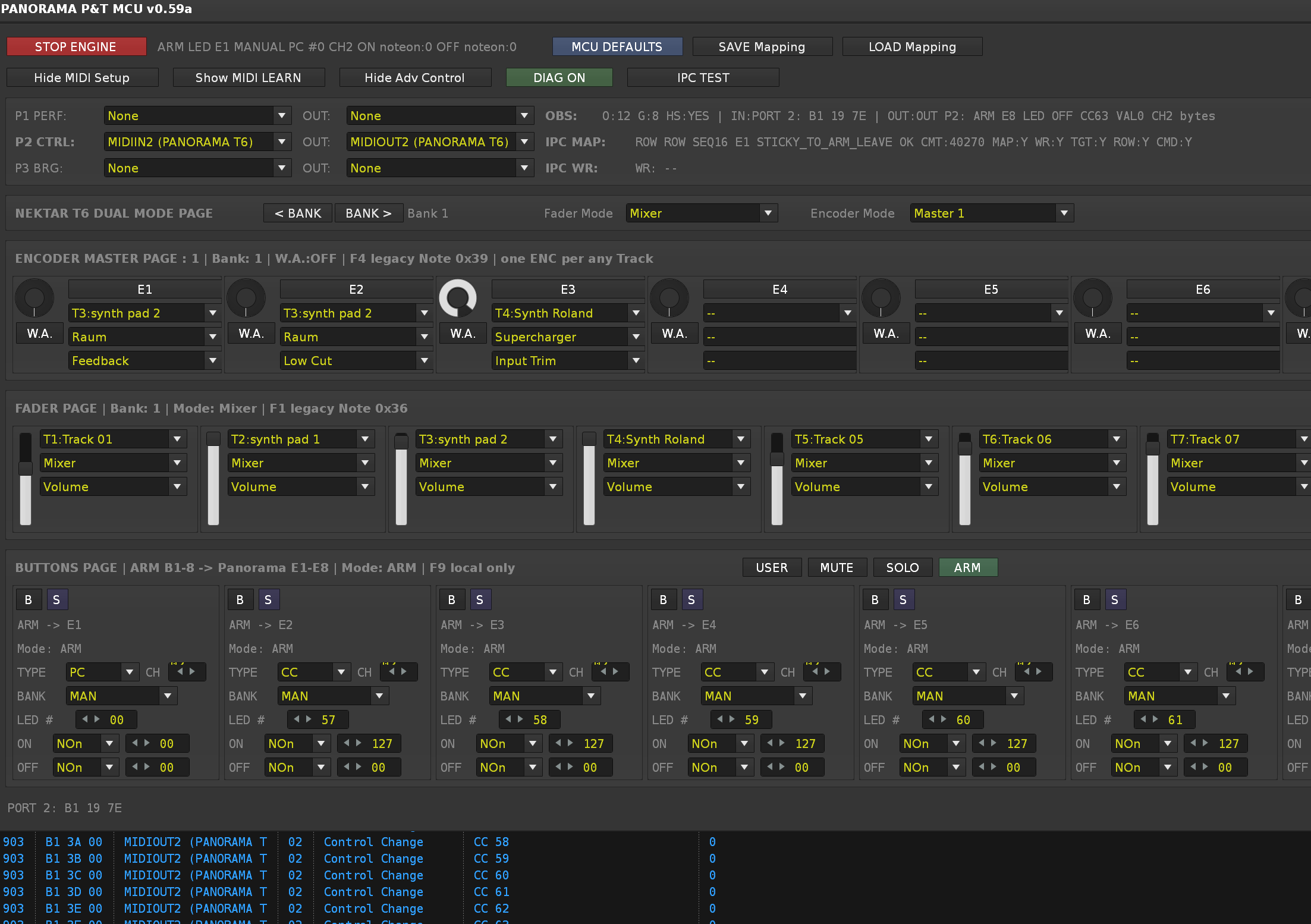
Button 1-8 (B1-B8) PAGEs ARM , MUTE, SOLO, USER

mode Buttons ARM
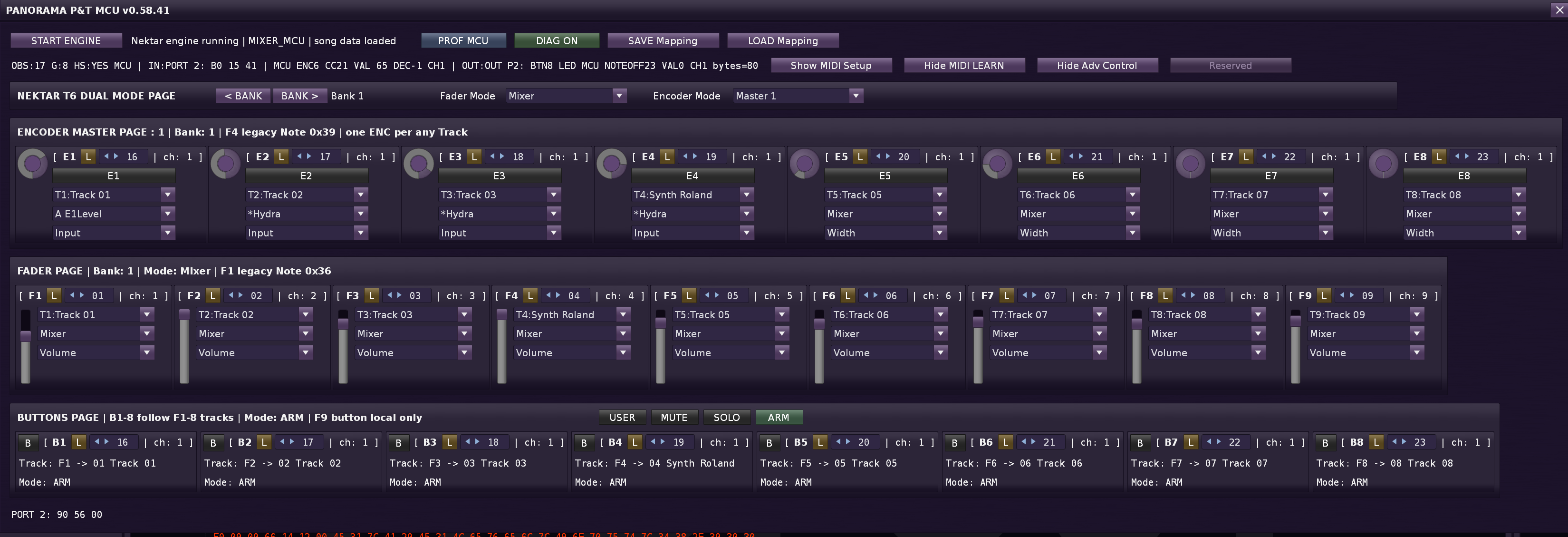
Buttons Learn support MIDI CC NOTE mode, MIDI CC Toggle mode … respect LED On/Off
synchronization of toggle button On / Off state and LED On /Off can be done simply by clicking on the small button B1 - B8 … so that LED Off state = Button Off
B1 - B8 in ARM mode … transmit a message to the HYDRA SANITY tool for ARM ON / Off mode
Activating the addition of an Encoder to Hydra is simple: for ENC 1-8, activate the W.A. (Write Automation) button
In HYDRA SANITY, the ENC with W.A. active will appear on the next line, you can write to the graph.
If you turn off REC ON in HYDRA SANITY by clicking, ENC x will disconnect from HYDRA SANITY.
The track at Bx (1-8) is linked to the track in which the DSP effect set at ENCx (1-8) is active, so the automatic switching in Renoise to the automation graph works, as is standard with HYDRA SANITY. When moving the ENC, its automation graph is automatically displayed.

—————————————————————————————————————————————————-
FADERs PAGE
FADERs support two MIDI input types:
PB = Pitch Bend absolute fader, high-resolution 0–16383.
CC = MIDI CC absolute fader, standard 0–127.

Mixer mode:
FAD1–FAD9 follow the current track bank and control Mixer Volume.

FADER mode:
Each FAD slot can be assigned to a selected track, DSP/send device and automatable parameter.
Buttons Page B1–B8 inherit their target tracks from FAD1–FAD8.

—————————————————————————————————————————————————-
ENCODERs PAGE

Use relative MIDI CC control.
MCU mode uses MCU relative encoder data. ( Panorama mode MIXER MCU )
Panorama INTERNAL mode learns DEC_REL encoders by detecting both directions.
When setting up MIDI Learn on the instrument, you must turn both directions for MIDI Learn to complete.

Track DSP mode:
E1–E8 control selected DSP parameters on one selected track.
This type of ENC mapping is suitable if you use a large number of DSP and parameters, it remembers the mapping for each TRACK. When switching tracks in Renoise, it automatically remaps ENC1-8 to your DSP settings for all parameters. This means I will have 10 tracks … in each 8 DSP parameters = in Renoise I switch a MIDI ENC track I immediately have the current settings mapped for that track.
Track 01 → ENC1–ENC8 = 8 vlastních DSP parametrů
Track 02 → ENC1–ENC8 = jiných 8 DSP parametrů
Track 03 → ENC1–ENC8 = jiných 8 DSP parametrů

Track 10 → ENC1–ENC8 = jiných 8 DSP parametrů

Instrument mode:
E1–E8 control selected host automation parameters of the selected instrument. the LOAD Automation button is used for this, it loads your automation into all ENCs 1-8 one after the other
If I switch to another instrument in Renoise, the faders for the parameters of the selected instrument are automatically remapped.

Master 1–3 modes:
E1–E8 can be assigned independently to any track, DSP/send device and automatable parameter.
One surface for the entire song. 3 surfaces MASTER 1, MASTER2, MASTER3 supported simultaneously

W.A.:
Each encoder has its own W.A. switch. When W.A. is ON, encoder movement is published to HYDRA SANITY as PANORAMA_WRITE data for automation capture.

Full MIDI mapping support x 3 banks

I’m releasing version 0.6 beta.

Next work:

  1. Connect IPC channel to OSC. Communication channel between Zorgan Tools
  • I’m also using the 1st line of Renoise song comments mailbox IPC. If there is a comment on the first line of the song, I automatically move it to the next line, I don’t delete it.
  1. Testing and fixes
  2. Adding support for MIDI mapping control buttons for switching modes and modes in tools, including support for play rec stop repeat
MCU COM Panorama controll v0.64**

originally conceived for the Nektar Panorama P T becomes a universal multi MIDI mapping center for 8 encoders, 8 faders, 8 buttons + control buttons**
The original vision of creating a multi mapping center is, thanks to the implementation of INTERNAL mode in the MCU MIDI mode … becoming a sophisticated system that unifies instant multi mapping of 8 encoders, 8 faders and 8 buttons.
With the help of the Hydra 8 ENC tool, you get the ability to draw realtime through playback into hydra automation graphs. With the help of this tool, you are no longer just fixed to the HYDRA input, which automatically creates a line in Hydra Sanity for working with the auto. graph. You can transfer your own extended mapping immediately, by switching instrument or track, but at the same time use the capabilities of Hydra Sanity.

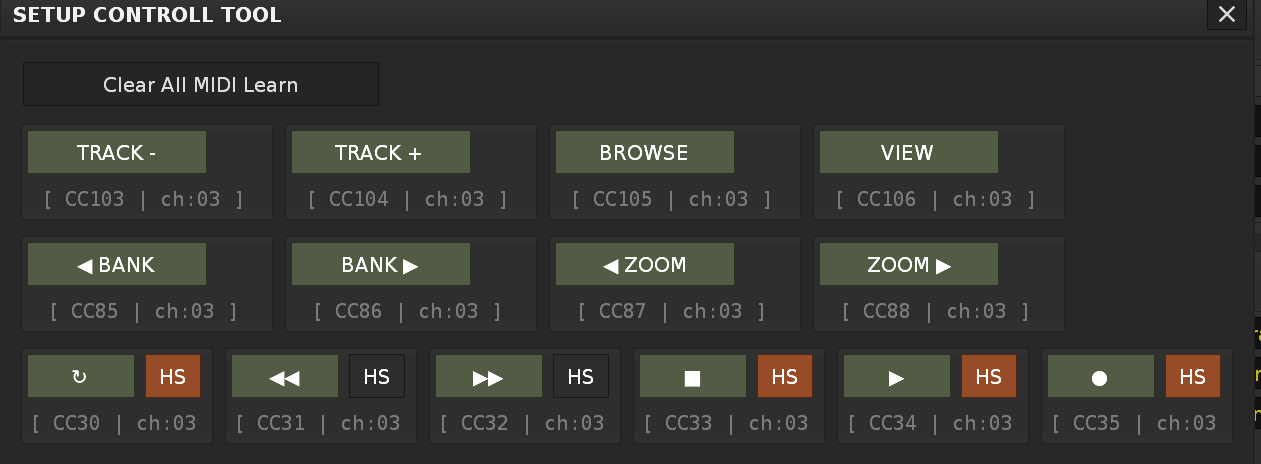
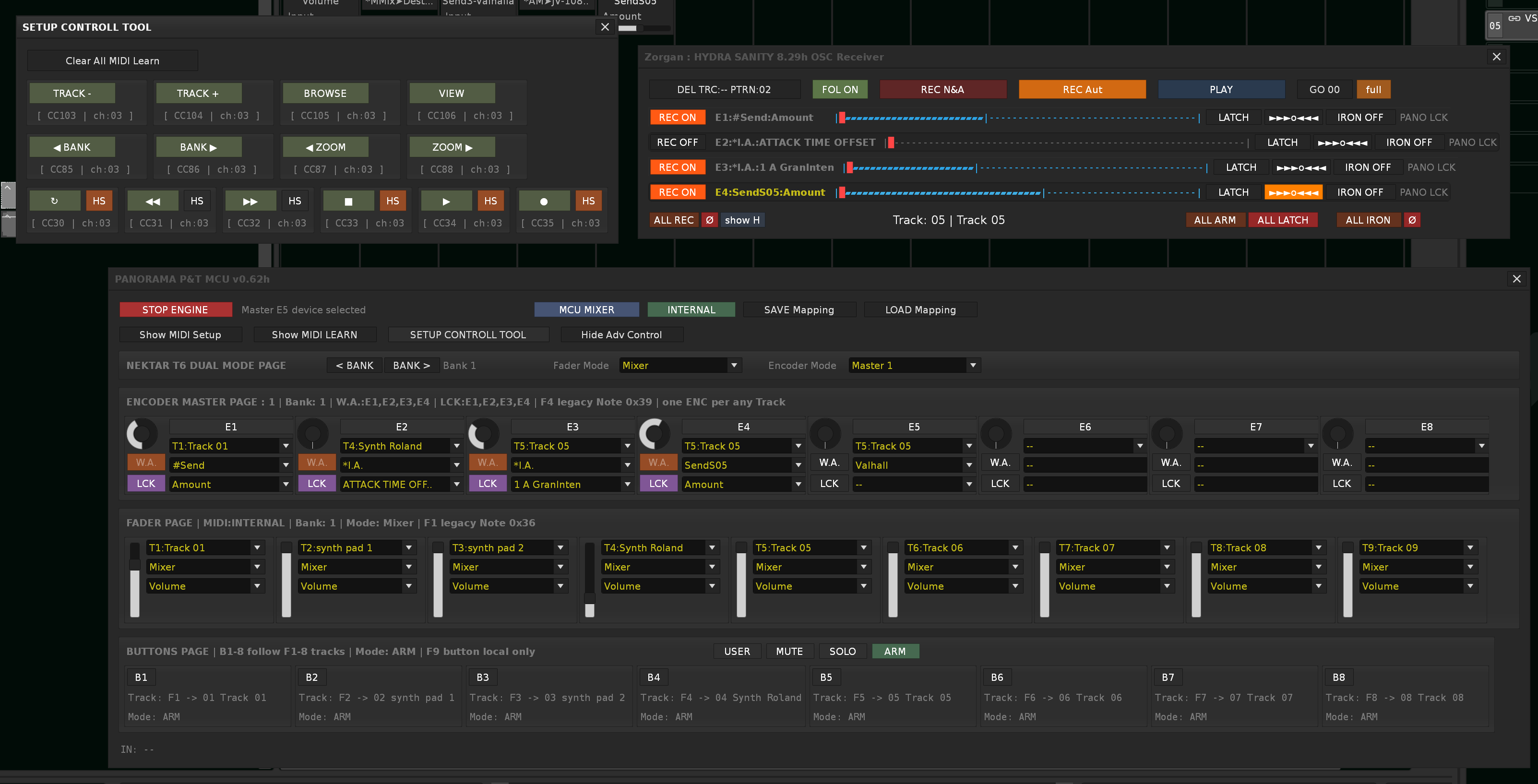
I have recently added a Setup controll window where the control buttons are available.
SETUP CONTROLL PAGE
The HS button activates the connection with the tool H.S. , that is, the PLAY, REC, STOP, and REPEAT buttons instead of performing their simple function are sent to H.S. as an IPC command and the tool H.S. only uses them in its system: PLAY REC NOTE&Automation, PLAY REC Automation, PLAY safe and DEL active track x on pattern y & goto row 00.
in H.S. these buttons are connected in a radio style. That means I switch the PLAY REC N&A button to PLAY REC Automation and they switch to the mode without pause, after pressing the button again, only PAUSE comes.

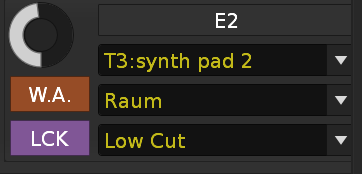
ENCODER PAGE
W.A. button means yes I want to link this ENCODER and its DSP parameter with HYDRA SANITY.
LCK button means lock in H.S. and do not disconnect when pressing REC ON to REC OFF. When LCK is active REC ON, REC OFF works in H.S. in the standard way as for HYDRA automation line.

HYDRA SANITY PAGE in slim mode / full mode GUI
For clarity for those who do not use an external secondary MIDI controller, a “hide H” button has been added, allowing you to keep only the lines from the MCU_COM_Panorama tool …

I have tested both the H.S. and MCU_COM_Panorama tools and they work together smoothly and the writing to the graph is smooth and clean even with audio output operation.
You can still draw the automation graph with a pencil in Renoise, and even record it simultaneously with ENC, the H.S. IRON function is able to iron out the graph so that it sounds dynamically clean in the audio output.

The work on MCU_COM_Panorama finally convinced me to continue, because it will become a universal tool. It can already recognize types ENC, DEC REL, pitchband fader, buttons value >0 , 0 .

Change log v0.63

  • transition of IPC event to OSC server, client for MIDI comunication over H.S. tool and MCU_COM_Panorama tool, H_S server, MCU?_COM client … send & reciever, basic event with flags
    ( also needed for the “Linking to Graph” function )
  • adding support for ENC mode : ENC absolute, ENC REL, DEC REL for writing HYDRA SANTIY graph
  • fix tool when 1. run save state for W.A. and LCK in ENC
  • dafault state on in mode INTERNAL
  • fix for inteligent reshresh prarameter and name DSP, name Tracks, name instrumets
  • fix buttons 1-8 in ARM mode are connected with ENC 1-8 for ARM function in HYDRA SANITY
  • better diagnostic data view ( cache 1000 row ) GUI one row actual last message

I run the tool … MCU_COM_Panorama tool v0.63 and HYDRA_SANITY v8.31

———————– next test and 1 hour later working —-

  • Fix for MCU_COM v0.64
    If the old server/client handle remains non-zero after reload, the start function returns “OK”, but the socket is not physically reopened. This corresponds exactly to: OSC looks on, but data is not flowing; since write fallback is off, linking to graph then has no alternative path

  • Callback is not wrapped in pcall() - with socket callback via Renoise C++ layer it is a risk

  • fix for low cost usage CPU with GUI view

  • full transfer IPC of all communication via OSC

  • disconnecting some diagnostic outputs that are important to me and are no longer needed. This will again rapidly reduce CPU cost.

  • parameter filling validation

  • conversion old of heavy cmd into small flags for OSC ..now 1 answer and command = complete sentence with main stream following it control flags

  • removing the old maras, everything I could disconnect was gone

  • activating the BANK 1-3 function saves the W.A. and LCK states for quick switching according to the mapped control buttons in SETUP CONTROLL BUTTONs
    So BANK is not just a set of mappings, but the entire active controller context.

    web page support here