Who made a bobo we dont know, but i have written Bubsy this message:
Hi bubsy
I have been using the windows protracker for like 4 songs…
Renoise tracker can load all mods i have from old days.
But when you load a PT windows mod, the sample rates are screwed,
the sounds break and flipflop, and sounds like commands arent working at all
complete garbage
What do you think can be wrong ?
Id like to load my track in Renoise, and then do a full sound studio version of it
I think we should tell Renoise team that there is a problem, maybe your version is just a new format, or you can find the fault ? because they should also be compatible with an amiga!
hello from denmark, old Rambones/TST signing off… (94 mods made)
have you checked the Renoise preferences? There’s an option to configurate how the samples should be imported to Renoise. On these mod files the samples are often in .raw sample format and have to be imported with the right settings. Otherwise they will sound weird or thhere’re just loud awful noises.
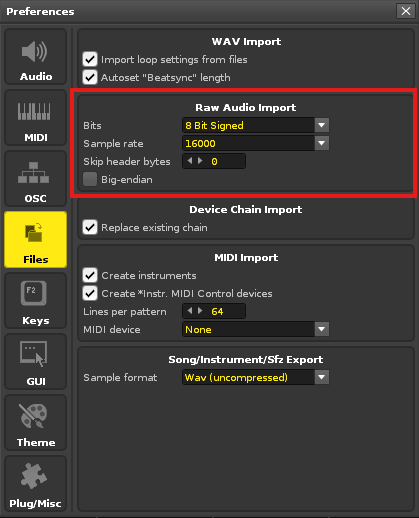
Go into Renoise preferences and choose the Files tab.
There you can find an entry called “Raw Audio Import”.
The samples of these mod files are all in 8 bit Signed format. Set it up like in my screenshot:
This should solve the problem. If this doesn’t help it could be that the mod file or the samples are damaged or the mod file is an exotic mod format that is not supported by Renoise. Not all mod files have the same file structure and are different, even if they all are looking like the same mod file format…
i have just tried it. but there is an issue:
the MOD load, works on all older files, renoise knows mod, so changing the wav import every time we want to load a mod, is not so good. then it has to be changed back, just to load other samples and formats! see ?
i hope that renoise detects mod, and then does what is required, without user interference ?
bubsy is testing the mod now, to see if his thing is bugged
altering the wav import to what pic shows, did nothing at all
i cannot share the mod, before next weekend. as its a tune to be released on coming saturday. that gives bubsy time to investigate
i know about other mod formats, and packed ones, i was a ripper in old days, and converted all ripped mods with multiripper, to standerd protracker 2.3b format
/Jan
mr skizo hunter: if you are personal on me. forget it i dont commend such irrelevant text
to the guy that ask why i bother with protracker, is because i have used it since always, and i have 100 tunes, and some of them i want to make modern versions of, so i load them in renoise and upgrade them to new also there are many good sounds, and picking sounds with renoise and save/altering them with effect is what i also do
Renoise does support mod files yes. But there’re still some exotic mod files that Renoise can’t load, even if they are .mod or mod. files. Some trackers export non-standard mod files. Or the samples of these mods are in an exotic file format which Renoise can’t load correctly. Then you’ll also get samples that are full of terrible noises.
Maybe @taktik can shed some light.
Some exotic mod files even store the samples in a kind of packed file that Renoise will aslo load. The files are also full of noises, but if you go through the sample’s waveform you can find the sposts here and there where the samples are stored and you have to cut them out and copy them to a new empty sample slot to get them.
hi i have just got info from 8bitbubsy who has tested the mod in renoise.
here is what he say:
### Olav Sørensen
21:35 (5 minutes ago)
to me
|
Hi,
I had a quick look, and as I thought, the .MOD loader in Renoise is bugged.
Later versions of the PT2 clone saves ALL the patterns referenced in the full “pos” list during saving, just like original ProTracker on Amiga.
In other words, it includes not only the patterns that will be played in the song, but also ones that you ended up making but not using. This confuses the .MOD loader in Renoise.
Here’s how to make sure your .MOD will load properly in Renoise:
Go through ALL song positions from songLength to 127. Since “prove me wrong” has a song length of 26, this means to check song position 26 to 127 and make sure all those positions are set to 0 (pattern zero). This will exclude those unused patterns from being saved.
Sorry if what I write is a bit unclear, I find it hard to explain this to other people.
But yeah, Renoise has a buggy .MOD loader, and other trackers should load “prove me wrong” just fine.
You can forward this to them instead, since it tells them exactly what
to do:
For the .MOD loader, do not go through “songLength” amount of entries in
the order/pattern list to find out how many patterns to load. Instead, always scan the full table, which is 128 entries long. This way you
always load the correct amount of patterns, so that the following sample
data will be loaded correctly.


 |
|