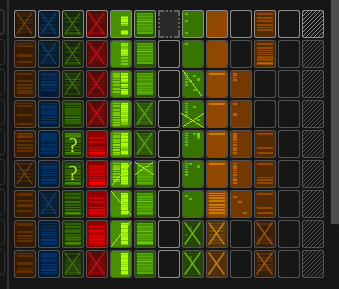
The “X” option in the pattern matrix is getting more use here lately in the pattern matrix, to try out different sounding arrangement options, to create a build up fast;

I think it would be cool to have more symbol options that influence the content (for example volume ramps and more fine tuned muting of note events) of each pattern block to quickly influence the output without diving into the actual pattern or automation editor.
Perhaps through selecting the new arrangement icons somewhere close to the matrix and/or having keyboard shortcuts to change middle mouse click behavior? For example have a “/“ symbol to increase the volume from silence to the set volume and “\” for the opposite. Have finetuned “X“ options that influence the top or bottom half of a pattern, a “?“ symbol to 50/50 note events. The symbols should be handy for quickly shaping the arrangement, for more finetuned control you can always dive into the pattern editor.
What would be useful additional middle mouse click options to quickly shape an arrangement?