Vibe coded tool to shift theme colors in various color spaces. Main use: “perceptually good” hue shifting in comparison to standard HSL. Shift theme colors confidently
Hi Joule! Good Tool mate!
I did some test with it and have a few questions and remarks.
Sometimes in Choosed “OKLCH” Mode and click on Random makes Theme always complete monochrom. Is that expected behaviour?
The Toolwindow Size change when i click on “Reset state” Button because of the right bottom description text. Think better do a status line for this text and avoid window resizing.
Please make a virtual copy on Renoise Theme on Toolstart before any Colorchanging does entry
And give the option to return to that.
Your Tool seems to save latest choosen options. So on closing and reopening it may make extreme Colorchanges that do all controls to unreadable colormix. Do you think this is good way? Maybe it is better to start always with default “0” knob values and default choosen renoise standard colormode?
When i click “random remix” more then 1 time after each other the mirror checkbox is alternating between selected/unselected status? Expected behaviour?
I had that behavoiur a few times before i have do any changes on the sliders. After i change the saturation slider 1 time the behaviour was gone. I will continue testing and give you respone about this.
Ok mate, im flashed!
Outstanding Tool! The Results in my testings are awesome. It really preserved the ergonomics during recoloring.
The “Store state” / “Restore state” mechanism work superp!
On Theme export the default Renoise Themes directory of the used renoise version could be prechoosen. (userthemes)
The mirror Hue checkbox selection in the Master Section still alternating when i press Random remix multible times in line. Is this expected behaviour?
That’s quite trivial but I am not sure wether it is useful or not (?). Better check with an image editor first (two screenshots with layer transparency) to see if it’s usable.
I have some other vague ideas i’m not sure how to implement in a user friendly way. 1) Shifting only certain colors (example: everything that is text). 2) Calibrate one section to another (example: pattern section shifting so pattern background matches main background). The GUI shouldn’t be complicated though, but implementation needs to be general/flexible.
I checked blending many screenshots now… it seems it was more useful in my imagination than it is in reality - i didn`t find a single good looking color blend, everything I tried faded almost to gray
sorry for bothering you with that.
keep up the good work
and yes, modifying only text colors could be usefull, to make a low-contrast theme easyly more readable. I really like your ideas
I love your tool mate! Specially the ability to edit every single control type color above the “Showallcolors” Button! You has done a really great job! I give it the hot reconmended badge in Themes & Stuff discord.
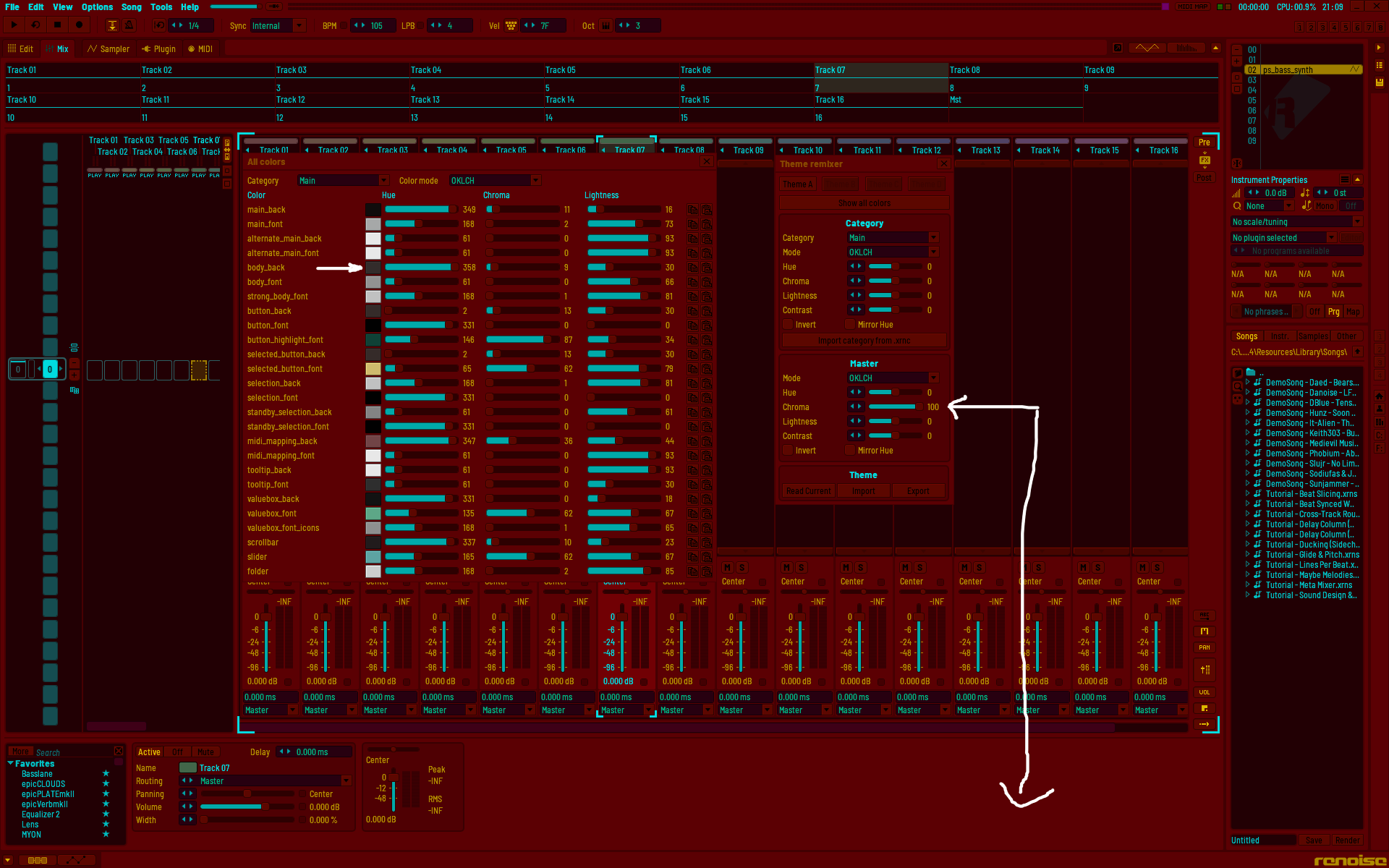
I have a Bugreport! If i change in Mastersection the HUI & CHROMA the Themecolors changing. But when i open the “ShowAllColors” Dialog for finetuning after this, there are still showing up the original colors from last restore state?!
I would suggest always show actual colors in this dialog! Or if not wanted by design, then make a few more temporary snapshot slots. (or at least 1) Then you could store color edits in a temp store, can edit all controls correctly and you has still the ability to get back to original theme condition status from the tool opening.
A ranged Rolling the Dice function for the selected colormode would be nice too maybe.
Can you see how you like this? I don’t want to convolute too much…
Use “Read Current” if you make theme changes from outside the tool and want to update the tool state.
Use the four slots available for any store / restore action. Store by right clicking. User assumes responsibility to set any checkpoints, just like in the native theme editor… (The correct way to babysit would probably be an undo buffer)
I hope that the show all colors dialog is updating correctly now.
Removed the randomize button
Should probably add the theme graphic options (knob shade et c) later on for convenience, but I don’t currently have the formulas for these values. IIRC they are not linear in the xrnc.
Go to the Bottom Section of your tool (Mastersection) and drag the CHROMA Value at 100 (i suggest it shows up the percentage of the Color Saturation variable)
Save it with right Mouse click on “Theme A” Button
The colors will not update until you click “Read Current”. The master section is “post-processing”, just like the native theme editor. Or am I missing something?
Without that “signal flow” you would quickly loose color information/resolution when tweaking back and forward.
Mhhhh… If i press show all colors i would expect to see the actual state. So when the bodycolor is shown red it should be red too in show all colors dialog colorfield. But ok maybe i hit not the thinked workflowcase with my action.
Theme A Button seems to be persistent? So its no temporary store now right?
Ok this is nice with that Store Buttons i can do a store the original Theme for Backswitching/resetting and i can do an real A/B preview, and have an aditional alternative store slot. THIS MAKES THEME CREATION MUCH EASIER! THANKS! YOu not have to switch to desktop now for saving/resetting to old saved themeversion. Very Good! Automatic Changing history for me personally is not needed. I prefer manual load/safe over the store slots. But i naturally cant speak for other users.
happy tracking
//edit
Hi Joule!
I have a Feature Request. Can you give me the ability to write protect Themeslots with save themes to prevent unwanted overwriting? A simply checkbox should be the job.

 Automatic Changing history for me personally is not needed. I prefer manual load/safe over the store slots. But i naturally cant speak for other users.