Hi everyone,
I kept jumping between automation lanes just to line up a filter sweep with a volume dip, so I built a tool to fix that. I’m pretty happy with how it turned out, so here it is.
Multi Automation View
It overlays all the graphical automation envelopes of a track in one floating window, each curve in its own color. Edits are written to the song right away and stay in sync with the native Automation editor.
Install: drag and drop the .xrnx onto the Renoise window, or double-click it.
Open it from:
- the right-click menu of the Track Automation editor or the Pattern Editor (“Multi Automation View…”)
- the Tools menu
- a keyboard shortcut (assign it in Preferences > Keys)
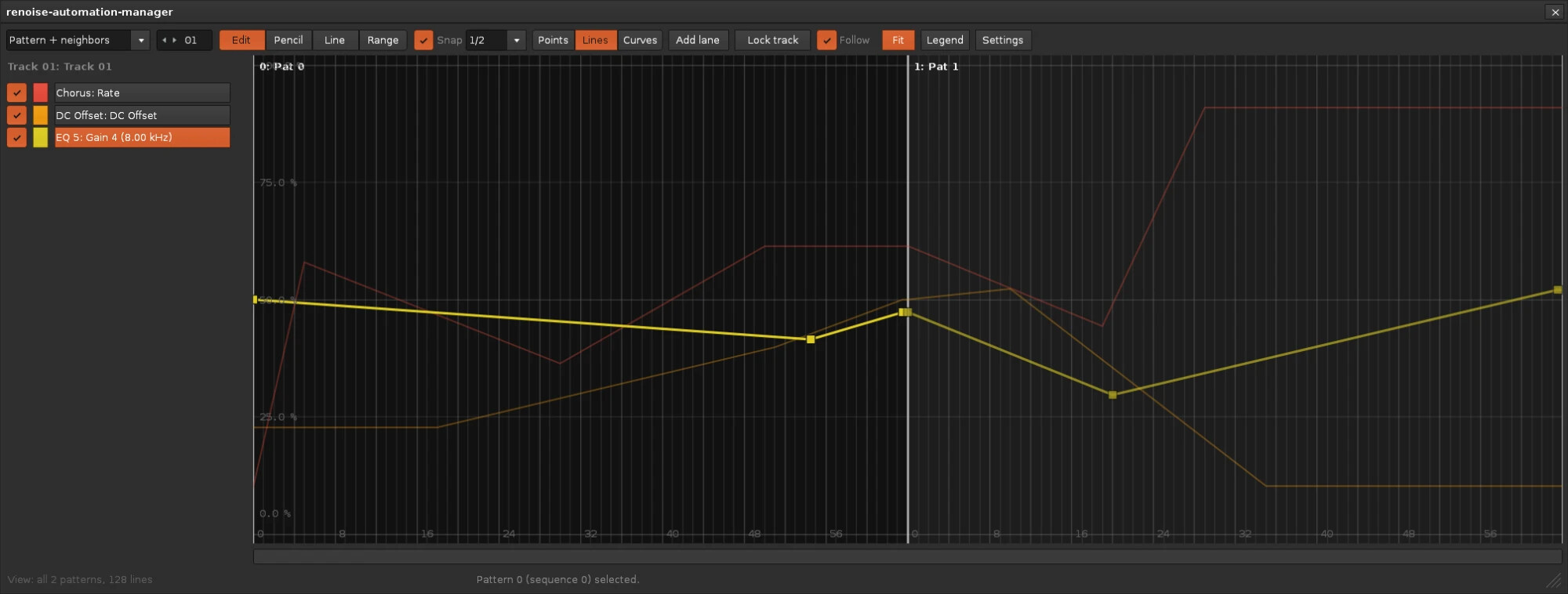
Features
- Legend: one row per automated parameter. Hide curves, change colors, set the active curve. The state is saved in the song.
- Time modes: current pattern, pattern range (several sequence positions side by side), or pattern + neighbors (read-only).
- Tools: Edit (points, drag, rectangle selection), Pencil (freehand), Line (straight ramps) and Range (edit a time span across all visible curves).
- Editing: copy, cut, paste, insert paste, flip, mirror, humanize, scale, plus processes like random points or sine/exponential curves.
- Magnet: snaps points to pattern borders and matches the values of neighboring patterns to join them cleanly.
- Undo: each gesture is a single undo step in Renoise.
- Live sync: drags are written to the song about 20 times per second, so the native editor follows. You can turn it off in Settings.
- Display: time zoom, interface zoom (100 to 200%), window size presets or a custom size.
Limits
- Requires Renoise 3.5 or newer (API 6.2). I only developed and tested it on Windows 11. It should work on macOS and Linux, but I can’t confirm it.
- It’s a floating dialog, so it can’t be docked. Resizing is done with the grip in the bottom right corner.
- Real parameter values are approximate for some devices. Plugin and non-linear parameters are shown as percentages.
- Patterns used several times in the sequence share their automation, so editing one occurrence changes all of them (that’s how Renoise works).
- Curve and point scaling in Lines mode rely on approximations, since the exact Renoise formulas aren’t documented.
- Please check that Ctrl + Z undoes a full drag on your setup. If it doesn’t, turn off “Write while dragging”.
The tool is free and open source (MIT). Questions, bug reports and suggestions are welcome here or on GitHub.
Cheers!