The tool should not change any sample data automatically when starting it.
I will change to log and change the label. The value stating how many harmonics to render (max is number of samples/2 minus 1 btw) is most clear to me.
PS. Btw. Interestingly, regarding “information density”, the number of harmonics is samples/2-1 since each harmonic has an amplitude and a phase value, and one total DC offset. So the amount of information in a waveform is the same as the information in the harmonic space. Just to give context I think the basic maths of the harmonic space were developed in the 1600s or so?
Very nice, what an awesome tool, so simple to use and useful at once. I would like to suggest to have a little “save as default” button in the init sample dialogue (also some “reset to factory default/reset” functionality then, maybe at right click?).
It’s added now! I think if people want to reset to Renoise defaults they can look in the sample editors dialog.
It’s been added. Please have a try.
I added an auto-clone feature for stereo samples that just copies one channel to the other. Ideally I’d want different edit modes where only edits are cloned, the whole waveform, or the channel separately (normal). It’s not clear to me how to convey this feature in a GUI the best way yet…
For me, it works perfectly, especially now that the keyboard works with the tool window open.
About the auto-cloning feature, it might be interesting to rename it “Link L-R” or something similar, but that’s just a detail. Thanks for the tool and tweaks. I’ve been using it a lot since the first version.
If you switch Normalize, it should already re-render the view, because it will go out-of-sync otherwise
Normalize setting could be already saved as default/session value on change (per channel)
“Channel” switch could also have a “dual” option
If you apply knob operations to a single channel, then switch the channel forth and back, it resets to default, so it is destructive. this is a nice workaround to have a widder knob range, but also feels a bit inconsistent? Maybe an additional “Apply” button on the bottom could make this more clear and also make the “workaround” a obvious option? Maybe you could actually save it per channel, and then also add an “apply” button, which renders the current knob settings, while resetting those to default positions.
I think when it comes to stereo operations, it still feels a bit inconsistent and non-intuitive.
I uploaded an update where the session (while sample is open in the tool dialog) remembers post settings per channel now. I think this covers some of your requests.
I don’t want it to change sliders live from the post-processing section. Imo, it would be a bit messy and complex when editing a slider and auto-applying normalization to them at the same time.
Regarding a dual-option, it’s not clear how this would be implemented. What channel would take presedence when switching TO dual mode? I don’t want a popup to appear, selecting what channel to keep. I found the current solution better, but would be very interested in a dual mode and a “mirror edits only” mode if it could be made clear enough to the user.
PS. Also added a toggle keyboard shortcut in Global:Tools:Show/Hide Harmonic Editor with sensible window handling, hopefully. Windows are closed when samples/instruments are deleted et c.
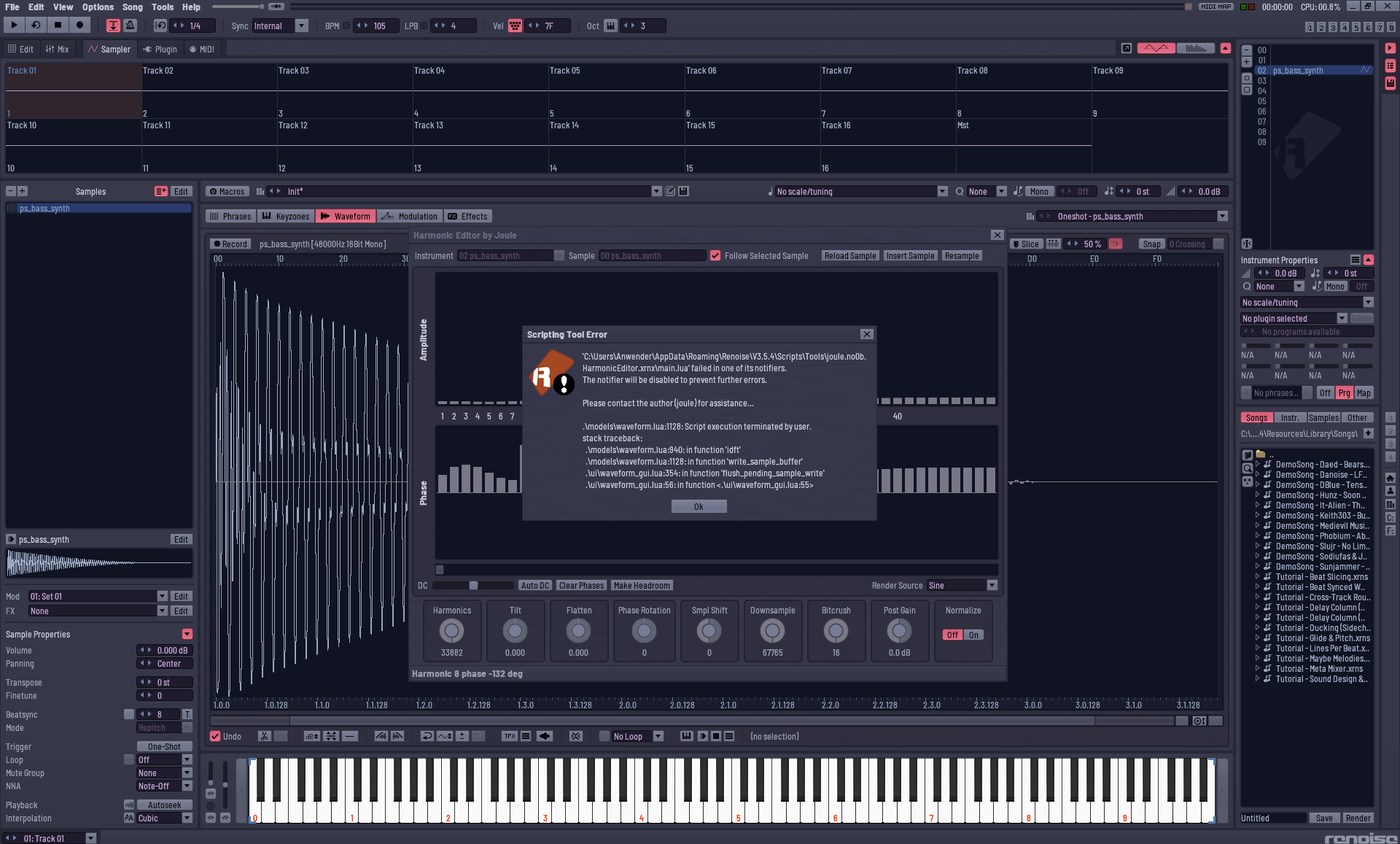
Starting Harmonic Editor on a sample. Change one Phase with Pen result in long loop freezing Renoise. On the third Question of “long term script operation running” message i broke up.
tested with Renoise 3.5.4 and Version 0.94 of Harmonic Tool
I suppose it’s best to put a hard limit on sample sizes, since this tool is meant for single cycle waveforms. Maybe 4096 samples should be max? The user might otherwise be confused when this error happens.
Or if someone can convince me using non-windowed FFT on full waveforms is useful in some way
Edit: Added a limit to 4096 frames. The tool will suggest resampling the waveform to a smaller waveform that keeps the samples note pitch but changing its octave.
 I think the basic maths of the harmonic space were developed in the 1600s or so?