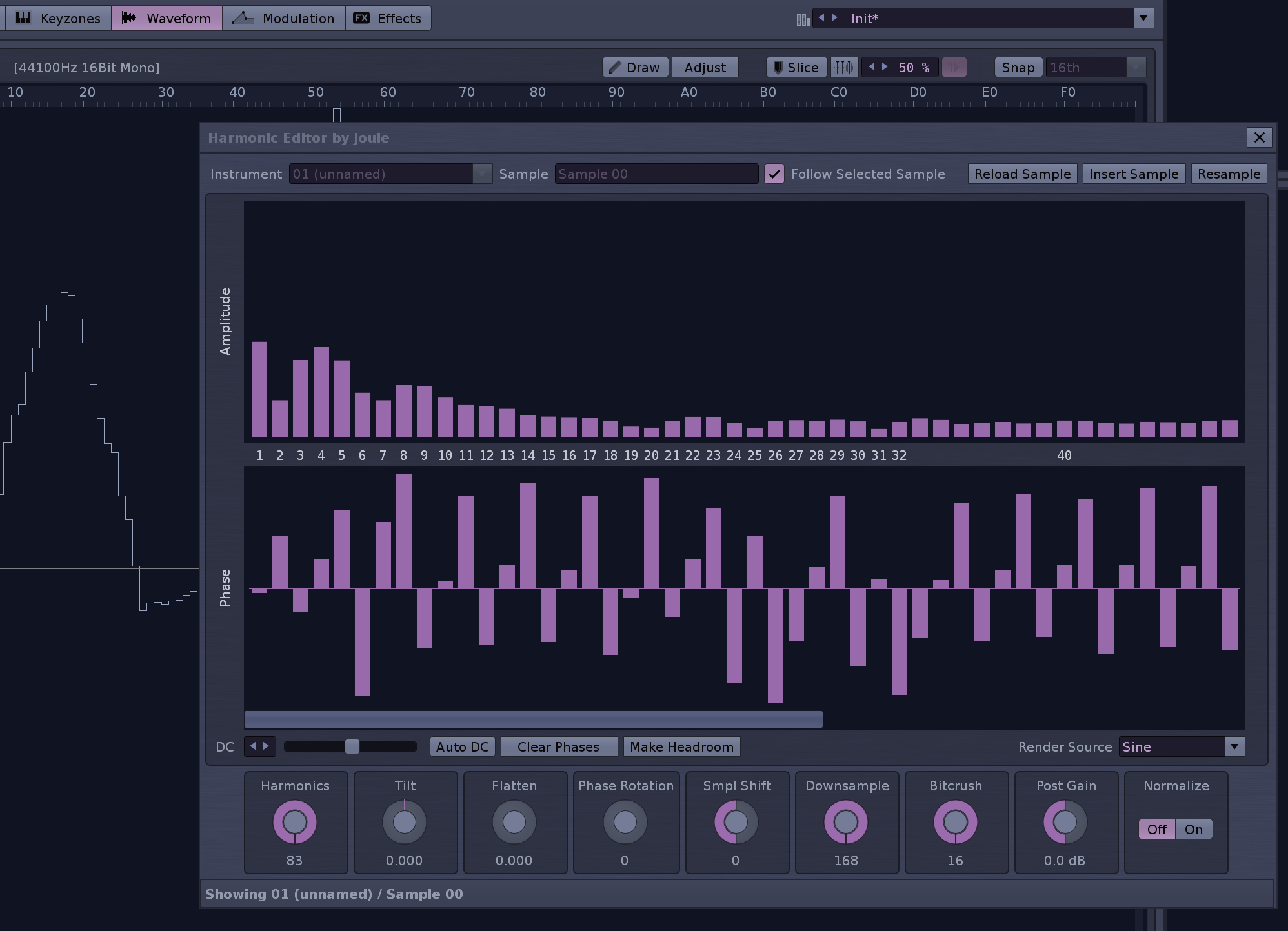
A Renoise tool for editing a sample as a harmonic spectrum instead of as raw waveform points, using FFT/IFFT.
It is mainly meant for short, looped, synthetic material where it is more useful to shape the harmonic content directly than to draw the waveform by hand.
Reasons to use it:
chip-style and wavetable-like single-cycle design
rebuilding or refining simple synthetic waveforms
understanding the harmonic makeup of periodic samples
creating new waveforms from an empty sample slot
You can load an existing sample, analyze it into harmonics, and then reshape it by adjusting amplitude and phase per harmonic. You can also initialize an empty sample slot and build a new waveform from scratch. Or use any of the post-processing features to refine your data.
Find it in the Sample List & Editor context menus. Don’t use it on very large samples
A shortcut can be set in Global:Tools:Show/Hide Harmonic Editor
I am not sure, but can sampledata at 32 bit float hold values below/above -1/+1? If not, you could render into a intermediate buffer first (which can exceed -1/+1) and dynamically adapt to maximum -1/1, so then you could add an option “ do not clip”.
Second point, it also could automatically add a new sample and also set it to forward looping, at least if there is not sample yet.
Ty this is very awesome! I do kind of wish there was a way to manipulate the harmonics and phase of both the left and right channel simultaneously. And do you think there could be any point in the future where it could be used on large samples more easily?
I will think about this. It’s not obvious how this feature is best implemented in terms of UX.
I don’t think so. It’s quite a different thing, but still quite interesting. If it’s not too difficult implementing the windowing/buffersize/pitchdetection (?) needed, the harmonic sliders could be used as a multiplier across a full longer sample. The algorithms aren’t trivial, though.
I’m sorry that I don’t really know anything about what goes into scripting tools like this, but a big part of why it’s not great at the moment for longer samples is how slow it updates the sample in real time right? Perhaps there could be an option to not update the sample in real time and have a sort of “render” button when we’re ready to make the changes on the sample
Flatten to me is a bit counter-intuitive, since the parameter’s name is “Flatten” I’d expect a positive value to make the sample more flat but it works the other way, so calling this Sharpen or flipping the value might be better here.
The LP Cutoff parameter starts from max but when you reset it with double-click it goes to 1, could it reset to max instead?
Rendering the bands above the cutoff point with a darker gray would make this state more clear.
I agree about the horizontal scrollbar, maybe some view options would be handy here, log would be nice but also a zoom that would let you see everything at the cost of having more narrow bands.
Being able to Set all phases is handy but having a small deadzone in the middle of the phase canvas around zero could help resetting individual phases?
Some way to mutate the bands randomly to introduce some noise across the spectrum might be cool.
I am aware of the feeling, but it flattens the spectrum similar to what a spectral compressor does. I know that sample values will look flatter when turning it left, but this tool resides in the harmonic space and not the waveform space
Fixed!
I had an earlier version where post-processing actions were reflected in the slider views, which was quite nice. I’d like that to be consistent for all post-processing, which is complicated. I’ll think about it…
Fixed, but now the “step-clicking” feature of the scrollbar is not perfect due to native vb behavior. I guess that compromise is OK.
I made right clicking/dragging reset a slider to 0. I hope that’s good enough!
The initial plan was not to go too far into “synthesizer” territory with this tool. User needs are very arbritrary when it comes to synthesis. However, I am pondering adding the capability of using an optional “sidechain sample” instead of sines. Additive synthesis with triangles is quite sweet, for example…
Nice! I think the LP cutoff range still is not optimal, at least in my test everything above 50 (of 127) already has no effect anymore. Also why not use percent as label unit? The range also grows with the sample length… Which does not seem to make sense to me…?
The rotary value tells you how many harmonics to keep. This can be used to reduce/control aliasing (more notable without interpolation), or just for the filter effect it gives.
The tool should not change any sample data without the user being aware, so automatically cutting off higher harmonics is not an option.
I will try changing the rotary to log scaling though.
I think there is a way for tools to send computer keyboard input through while having the tool window open, right? Could you implement this please Joule? Right now you have to focus back onto the Renoise gui to have the keyboard note event input to go through. Of course with midi keyboard there is no issue.
Maybe then the label name should be different, since “cutoff” is very commonly a usual filter.
Sorry, then I still do not understand it… Why it has no effect with values above 50? Yeah, maybe log scale is already better, but the maximum should be lowered, too?
Ah! Now I geddit. Sounds much better describing, maybe just “#harmonics”? If interpolation is nuking out those out-of-range-harmonics anyway in every case, I would limit the maximum to 50 then. Or the amount of displayed harmonic bars? Imagine you would divide it with a more raw amount of harmonics. Then the number would be even smaller. That’s why I still think percentage would be the correct unit here, since it seems to be relative.
From a purely user’s perspective: Which scale, which label would be the most useful, intuitively comprehensible?