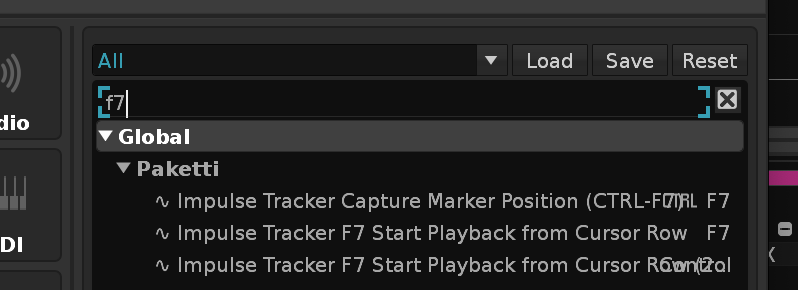
I made this tiny tool to implement a time saving little fonctionnality (same as Impulse Tracker 2 behaviour Ctrl-F7 / F7).
Set a Virtual Marker anywhere in the Song (go to line and use corresponding shortcut)
Play Song from this “timecode” anytime.
Not from cursor, not from top of the pattern but from this marker you set (using corresonding shortcut of your choice).
Usefull to work on specific part and wanting to listen again and again from one section.
It seems someone already made this in 2011 but the tools does not show up in the tools section of the website as of this late 2025.
Look for PlayFromMarker in Keys Biding preferences, you’ll find “CapturePosition” and “PlayFromSavedPosition”
This does not seem to work with the latest build!? Nothing happens when loading the script. And in paketti there is a "impulse tracker marker position“, but not any function for playback?
You have to bind your own key short cut. The SHIFT-CTRL-SPACE on my image is an example.
Just go to Renoise Preferences > Keys and in the search field, look for CapturePosition PlayFromSavedPosition or PlayFromMarker and type any key or key combination to bind to those functions!
Once done, you should have feedback info (oops, in french they are..) in the bottom lane (as usual) when you launch your CapturePosition shortcut
Yes, i’m familiar with how key bindings works. The thing is that the script does not seem to actualize at all, does not give a confirmation that the script has been loaded or anything when dragged into renoise window.
Oops ! You’re totally right. I had my version manually installed in my tool folder (/Users/{User}/Bibliothèque/Preferences/Renoise/{vX.X.X}/Scripts/Tools on mac). It works properly that way.
But I have no idea why it cannot be double clicked..
(I’m new to lua and tools, I zipped my folder com.pinkcell.PlayFromMarker.xrnx to PlayFromMarker.zip then just renamed extension like PlayFromMarker.xrnx. If anyone figures out where I’m wrong, I’d be happy to correct)
Anyway if you’re already using paketti, you should have found your way.. sorry (and sorry for the tutorial, I had not figured )
Zip only the contents of the tool folder instead of zipping the folder itself, so that the manifest and main lua file is at the root of the archive, not one level deeper.