Please consider this

Hello! I got a request : As i use quit a dark theme, it would be very nice to see dark piano keys in Sample Editor, thus inverted color to the existent white keys A-G and the Black keys (accidentals) not white but grayed instead.

**I waiting for that …**thank anyway for considering that…

Kind regards.

1 Like

If you really need this, look for the following files:

Keyboard_Fullnote_Pressed.bmp
Keyboard_Fullnote_Unpressed.bmp
Keyboard_Halfnote_Pressed.bmp
Keyboard_Halfnote_Unpressed.bmp

On MacOS you have to open the App-Package (right click on Renoise app → open package) and there you’ll find them under Resources/Skin/Icons.

Then you can change the color to your liking. :slight_smile:

You will have to replace them again at any update though.

Greetings

2 Likes

Here’s the white key converted to dark gray (it’s a BMP file, remove the TXT extension).

Keyboard_Fullnote_Unpressed.bmp.txt (4.5 KB)

It looks like this:

I’ve only changed one BMP image. Remember to make the change with Renoise closed.

If you want to change the black keys to a lighter gray, you would only need to change the corresponding image. But both (black and white) must have sufficient contrast against the key press images.

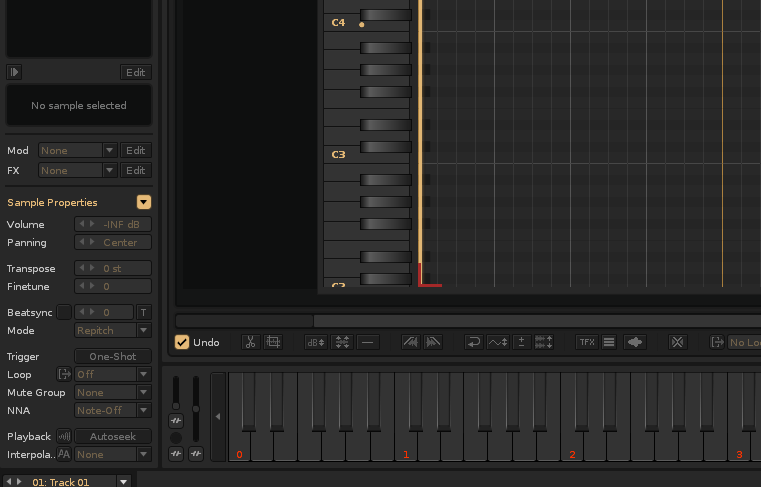
5 Likes

Thanks! Can i either change the cursor to any color as i have desktop cursor blue but it changes to white once hovering back to Renoise….

You can. All the cursors are beneath /Resources/Skin/Cursors/ - They have to be a GIF-File.