i will leave my machine sometimes for an evening and come back late or the next day and the redux window will have only white within its borders. i have to close reaper and reopen. everything is the latest, windows, reaper, redux
is this not interesting? does it sound like a bug? none of the rest of my vst3 do the same thing.
i get the impression that redux is a pain and you guys wish it didnt have problems. you dont want people to report stuff like this and wish we would just use it as is without expecting it to work in scenarios like mine. am i getting warm? or maybe im using it wrong? theres not enough users to make these issues worth the time to fix?
well thanks for the help! nice to know you guys care about users issues enough to respond!
I don’t use Windows but I made some VST3s for wine/opengl. In reaper, too. There might be one of these issues:
When Windows 11 turns off the screen, the graphics card (GPU) is often put into a deeper power-saving mode. During this process, the system can release or discard the so-called OpenGL or Direct2D context. When the screen becomes active again, the GUI framework of the VST plugin actually needs to reinitialize this context and restore the drawing surface (canvas). If this fails, which happens with some audio plugins because they do not cleanly handle the loss of the hardware context, the window remains completely white, as simply nothing is being drawn anymore.
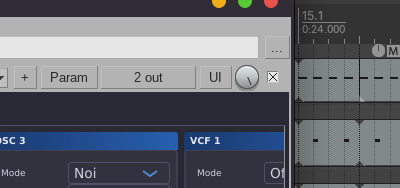
Fix: Click the “UI”-Button in the VST-Window of reaper to reinitialize the GUI.
Another thing I found helpful when using vsts. You can right click the VST before adding it and force reaper to run it as separate process. This usually makes redux run in an “containerized” environment and the window should be „filled“ again, when closing/opening the FX-window in Reaper.
Disclaimer: I don’t use redux at all, but I had similar issues with some self-made VSTs.
you are a gentleman and a scholar!
So I guess, this worked?
i havent had the chance to try it yet. you earned that title for simply responding with a plausible explanation and a step to try. i will report back when i actually have a chance to try it, maybe tomorrow sometime. i need to leave my computer for a while before it happens. and thanks again.
ok for some reason its not doing the same thing now so i guess it fixed its self somehow, theres been an update of reaper since then. 
who knows? but thank you for responding!