As the years go on I find myself leaning more and more into “traditional” songwriting with guitar and vocals. I think Renoise is underappreciated for this and I’d like to share some tips. These are geared primarily towards the writing / demoing process.
Please share your own if you’ve got ‘em. 
Sketching out sections
One workflow I’ve taken up recently is this:
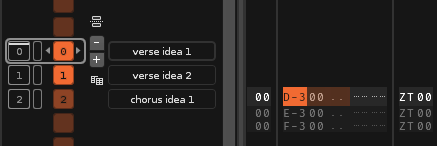
- Make a pattern of length 1.
- Put
ZT00on the master track. - Make / slice a recording and place it on a track.
- Name the section in the sequence matrix.
I end up with something like the below, which makes it very easy to bounce between different sections. You can of course loop sections in the sample editor, which is very handy for e.g. writing lyrics over a chord progression.
Perhaps the biggest advantage I find with this workflow is that BPM does not matter. Writing a song to a metronome can be very stifling.
Guitar and vox together
With the new Splitter tool, you can record (for example) vocals in the left channel and guitar in the right channel, and play them back in the same track. In my experience this is much less painful than having to mess with syncing across tracks. Just set the Splitter to Parallel mode, put a Stereo Expander on each layer (mono L and mono R), and throw in any effects as needed.
G01
This is not my trick but I use it a lot. In short, you can misuse the glide command to playback samples/slices of a longer duration than your pattern. So you can have a 4-bar pattern for your drum loop and throw a 16-bar guitar loop over the top. This feels very Ableton-ish in practice. See this thread for a much better overview.
Set song BPM from sample
This one requires the Paketti tool, but if you’re already using it, you might find this helpful.
First, record a sample freely with no metronome. Then trim or slice it so it loops cleanly. Set an appropriate beatsync value, but do not enable beatsync. Activate Paketti’s Set BPM from Sample Length command. (On Linux I’ve got this bound to Ctrl-Alt-B.) If you set your beatsync correctly, the BPM of your song should now match the BPM of your sample.