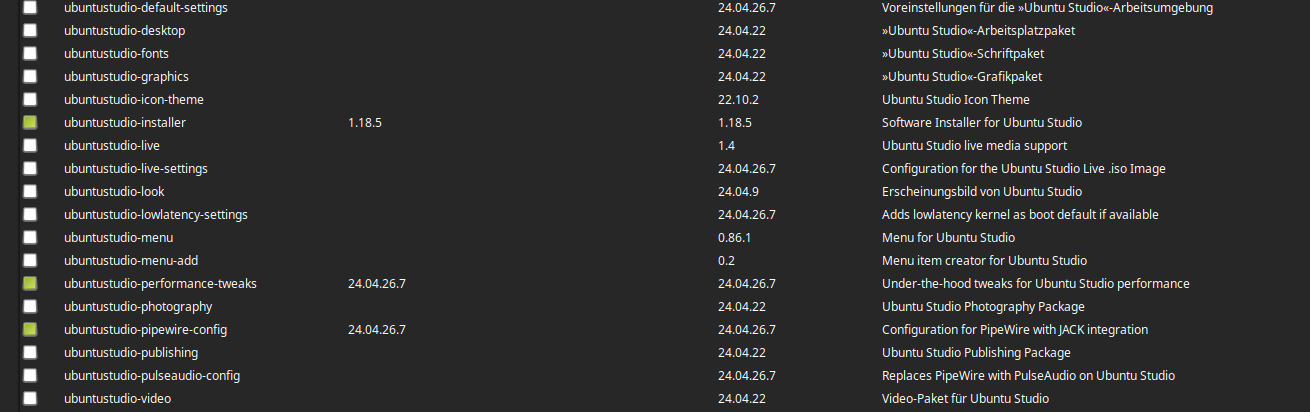
This is definitely not a Renoise bug.
It’s all written in the message.
You don’t have the right to create realtime threads,
so as a user you are not in the “realtime” group.
This is usually related to realtime scheduling permissions on Ubuntu/Mint systems.
The issue can happen when the system is not allowing applications like Renoise to acquire realtime priority correctly. In many cases, this is connected to user audio permissions, realtime limits configuration, PAM session handling, or the way the application package was installed.
It may also depend on the audio stack being used (PipeWire/JACK/ALSA), kernel configuration, or sandboxed package formats such as Flatpak or Snap, which can sometimes interfere with realtime scheduling behavior on Linux audio setups.
I experienced the same issue previously on Linux Mint, and it turned out to be related to system realtime configuration rather than Renoise itself.
As usual, please pass the rtcqs test to some extent.
I think it should be fine as long as the only issues displayed are the ones listed below.
[ WARNING ] Kernel with Spectre/Meltdown mitigations found. This could have a negative impact on the performance of your system. See also System configuration [Linux-Sound]
Thanks - I have edited the CONF file as mentioned in those threads, but the error is the same. How do I go about editing the system realtime configuration?
To enable RT thread creation via PAM, open the /etc/security/limits.conf file as root (or via sudo) and add the following lines to the end of the file:

    YOURUSERNAME - rtprio 99
    YOURUSERNAME - nice −10

Alternatively, you could create a group 'Audio', add your user to that group and then use '@Audio' instead of “YOURUSERNAME”. After this, you should save, log out and then log back in.
Have you try editing the file via sudo or as root?
Hello,
Ugh, it’s very irresponsible to install an unknown kernel.
You don’t know if it contains all the modules you need for your HW.
You don’t know if it’s compiled with instructions that your CPU doesn’t know.
That was bad advice and an even worse decision to do it
Sorry! It did me very good when I had Debian years ago, I was also having issues with xruns and graphics with the default kernel and suddenly everything was running at 60 fps, this was on Intel Gemini Lake. both kernels should appear on the grub and you may be just fine with the default one + setting RT_PREEMPT, rtirq, etc
Thanks everyone for the help - I gave up in the end as I had basically spent 5-6 hours trying to just open the program… thats before getting any VSTs installed etc.
This has always been the solution for me. Did the same in 4 different distros (Kubuntu, Fedora, Cachy and EndeavourOS). As far as I remember, some of them do not ship with realtime-privileges package. It needs to be manually installed.
Also, good to add threadirqs to your /etc/default/grub at the GRUB_CMDLINE_LINUX_DEFAULT=“” line and run grub-mkconfig -o /boot/grub/grub.cfg afterwards, then reboot.
By the way, this is mandatory read for anyone on Linux, in my opinion, regardless if using Arch or not:
And, finally, rtcqs is available at the aur for those who don’t want to use python.
PS: Realtime kernel is absolutely not needed for professional audio, and can actually introduce instabilities. I had a terrible experience using cachyOS rt bore kernel.
Near-zero latency? Yes! But at what cost? Constant plugin crashes, system freezes, crackling…
In the end I opted for a less ‘aggressive’ kernel (Zen) - pun intended. Currently at around 10ms latency at 256 quantum. I’m fine with that (less than half what I had in Windows 10).
Some Pipewire configs do not ship with realtime fallback through RTKit. You can change that under libpipewire-module-rt by uncommenting a few lines:
context.modules = [
# Uses realtime scheduling to boost the audio thread priorities. This uses
# RTKit if the user doesn't have permission to use regular realtime
# scheduling. You can also clamp utilisation values to improve scheduling
# on embedded and heterogeneous systems, e.g. Arm big.LITTLE devices.
# use module.rt.args = { ... } to override the arguments.
{ name = libpipewire-module-rt
args = {
nice.level    = -11
rt.prio       = 88
#rt.time.soft = -1
#rt.time.hard = -1
#uclamp.min = 0
#uclamp.max = 1024
}
flags = [ ifexists nofail ]
condition = [ { module.rt = !false } ]
}
This is only a workaround for ‘actual’ privileges, though.
Most distros will come with some package that configures this for certain groups or users. If this is not set up and DBus is available, then this module will fall back to using the Portal Realtime DBus API or RTKit.
 you should be able to boot the old kernel by hitting the shift or esc key when booting.