renoise.Transport:set_scheduled_sequence() is not accurate in the sound of the first line of the pattern

R3.5.4, W11
The documentation;

---Replace the scheduled sequence list with the given sequence.
---@param sequence_pos integer
function renoise.Transport:set_scheduled_sequence(sequence_pos) end

I think this topic is very old and intricate…

If you use :set_scheduled_sequence(4) at any point during the playback of the current pattern, this function will cause it to immediately change upon completion of the current pattern, jumping to the assigned sequence index 4.

As far as I know, when a note column plays a note from instrument 02 in the current pattern, if another pattern in line 00 of the assigned pattern in sequence 4 has a note from a different instrument than 02, calling it with set_scheduled_sequence() will cause the Renoise audio engine to clear the audio buffer allocated to that note column for the previous instrument. Once it’s free, the new note from the different instrument can then play.

It’s as if it internally assigns to that column of notes the instrument of the note that has sounded.

The problem is that this clearing process can cause the playback of the note in the first line of the pattern assigned by set_scheduled_sequence(4) to be lost.

The sequence of events would be as follows:

  1. A current pattern is played in sequence 00, with an instrument note. 02 in note column 01.
  2. From the API, :set_scheduled_sequence(04) (jump to 04) is invoked. This pattern has a note from instrument 07 in line 00, in the same note column 01.
  3. When the pattern assigned to sequence 00 finishes playing and the pattern from sequence 04 starts playing, the audio buffer assigned to the previous instrument 02 is emptied.
  4. After emptying it, the new notes from the new instrument 07 can be played.
  5. The problem is that emptying the buffer takes a few milliseconds, which prevents the note on the first line from playing correctly. We can say that it can be skipped.

This small discrepancy prevents the reliable use of set_scheduled_sequence() in specific cases like this one.

The composer’s solution is to never mix different instruments on the same track, or, more precisely, to never mix different instruments in the same note column of a specific track.

But this forces the composer to do things they may not know how to do. And the Lua tool developer can go crazy trying to fix a problem they have no control over.

Is there a way in the Renoise API to release that buffer in the specific note column so that these instances of note playback failures on the first line of the trigger pattern don’t occur?

I’m not entirely sure if everything I’ve described is correct. Can we discuss this further? The goal is to be able to use :set_scheduled_sequence(sequence_pos) safely even in these cases…

It seems the buffer is emptied when a new instrument’s note is read. But this should be handled beforehand, at least when there are jumps between patterns.

It occurs to me that when invoking :set_scheduled_sequence(), there should be a way to empty that audio buffer before jumping to the next pattern, at least if nothing is playing. Another scenario would be if the previous note is still playing.

How is this usually solved technically? Is there some kind of preload buffer before real-time playback where everything is prepared beforehand, and where things can be manipulated so as not to affect the sound during playback?

I suppose this is an old issue that was never resolved. Would now be a good time to revisit these things?
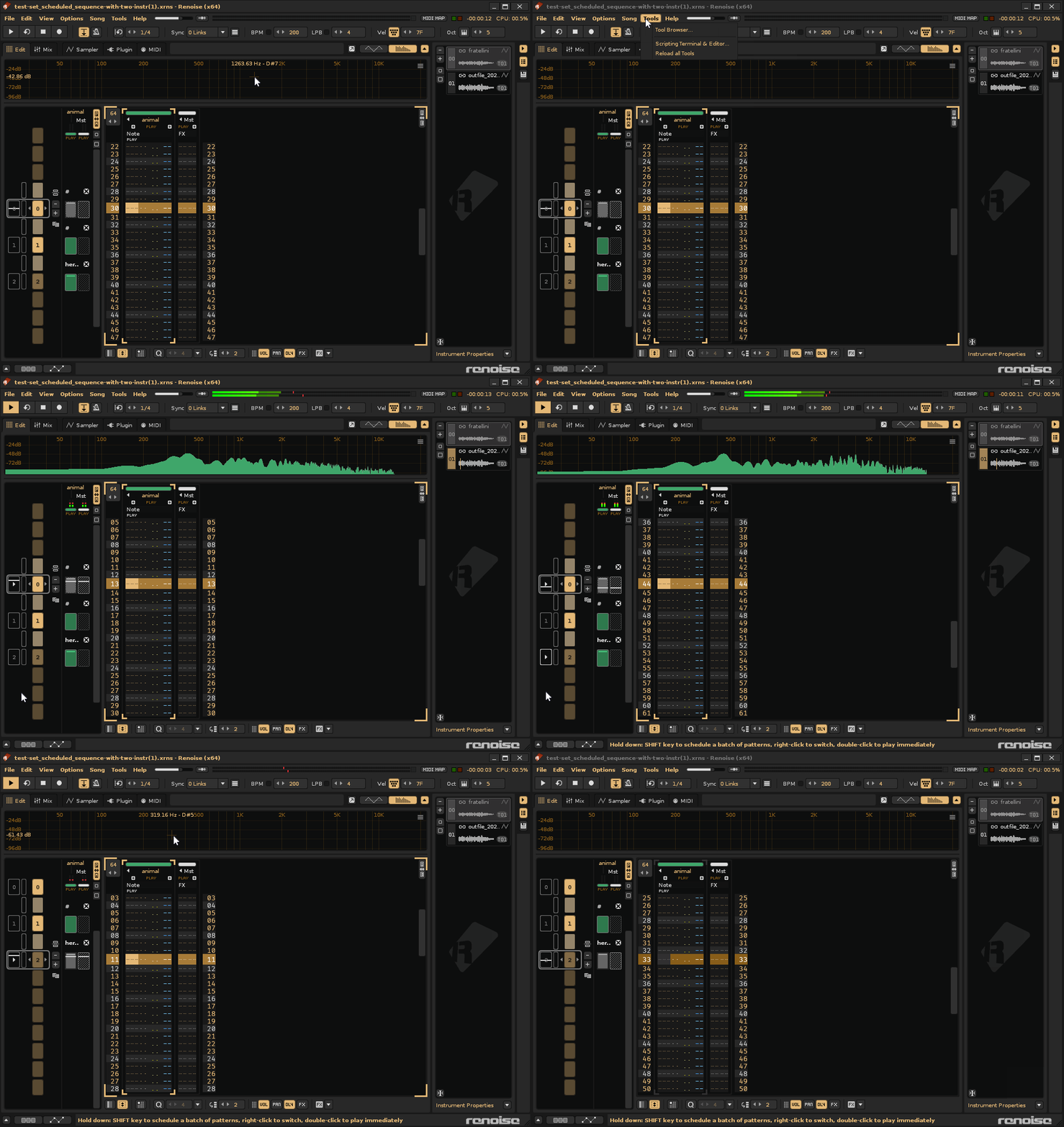
It should behave exactly as if you’re scheduling pattern playback in the GUI:

Does it behave differently for you when triggering this from the Lua API?

I unfortunately don’t understand what exactly you mean with the “audio buffer” and clearing. It may be easier if you create a small example song which demonstrates the problem.

test-set_scheduled_sequence-with-two-instr.xrns (2,2 MB)

Hi @taktik, how are you?

I thought that without using tools, using the sequence jump would work fine, but it does the same thing.

The situation with the problem steps:

A single track, a single note column (01), and two native instruments involved, each with one sample.

  1. Load the song test-set_scheduled_sequence-with-two-instr.xrns in R3.5.4. (I’m using W11).
  2. Play the song.
  3. The song will play in sequence 0.
  4. Click on sequence 2 to jump (make it not play pattern 1).
  5. When playback has completed pattern 0 in slot sequence 0, it will jump to sequence 2, playing pattern 2. Here’s the problem. At the exact moment of jumping to pattern 2, line 0 doesn’t play correctly in note column 01 of the “animal” track. Only in that note column 01, because there’s a note from a different instrument.

What I think is happening:

Since the first note of pattern 0 is from instrument 01, the note column 01 uses this instrument as a reference for subsequent notes from that same instrument. I suppose.

If one of the subsequent notes is from a different instrument, the note column 01 must “do something” that it wouldn’t do if it were the same instrument, causing it to momentarily “skip” the beginning of line 00 of pattern 2. This “something” is what causes the API with :set_scheduled_sequence(sequence_pos) to malfunction (and the same thing happens with Renoise).

The composer’s attempts to fix it:

  1. Changing the note of pattern 2 in the note column 02. This solves the problem (the note column 02 was “free,” there was no previous note from a different instrument).

  2. Or changing the note of pattern 2 on another track. Similar to the previous case.

  3. Or add a small delay to the note in pattern 2, line 00. It works for me starting from the value 08 (08, 09, 0A, 0B…).

The last case is more revealing. Despite using the same line, by simply delaying the note’s trigger by a few milliseconds, the note manages to play inside the line 00.

  1. Another way to avoid this particular problem is to not use two native instruments on the same track (a recommended practice with VST instruments).

I apologize for not being able to explain it better.

In the original song, what “state” related to the audio engine does the note column 01 have that causes it to fail to jump to a new instrument when playing a note on line 00 of another pattern?

It only happens on line 00 in this particular case if you’re scheduling pattern playback in the GUI and the API with :set_scheduled_sequence(sequence_pos).

I suppose this is not an API problem, but a problem with the internal workings of Renoise. This does not happen if you only use one instrument…

Another related issue. It’s possible that using a single instrument with a very long sample and autoseek also causes skips inside the sound. This might be entirely related as well.

In other words, it plays an original pattern (00) with one note (a very long sample with autoseek). It skips the next pattern (01). When playing the new pattern (02), you expect the note from the original pattern to continue playing. But it cuts off.

I haven’t investigated this in depth, but I suspect it’s related to this topic.

Hmm. I can’t replicate that here. The note from pattern 2 plays fine after switching from pattern 0.

Have you tried that without any Renoise tools loaded? Maybe some tool interacts with this here.

For testing purposes, all tools are disabled. This is a Renoise feature. I’m using the original song here (test-set_scheduled_sequence-with-two-instr.xrns). I’ve tried with two different sound cards (integrated nvidia image monitor, and a creative sound blaster ZxR). The same thing happens:

1

This is a problem that another composer reported to me. They’re experiencing the same issue on their computer (probably a laptop).

I’m using an i7 7700K with 32GB of RAM and an Nvidia 1070 graphics card. It’s an older PC, but it performs well.

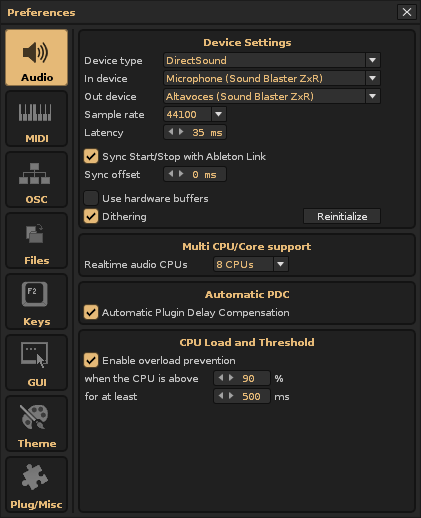
Thanks. Seems this happens only when Sync: Ableton Link is enabled (even though no clients are connected). Could you please verify by setting Sync: internal on your machine?

I’ll check what breaks things with Link. This should not happen, especially when Link is effectively disabled.

In my case, Link doesn’t seem to be the cause:

  1. With Sync Start/Stop with Ableton Link enabled and Snyn: Internal,
  2. With Sync Start/Stop with Ableton Link disabled,

…still failing in exactly the same way.

My deduction: I don’t know the cause, but something is “delaying the reading” of line 00. And by the time it’s ready to play the sound, that part of line 00 has already been scanned. That’s why there’s no sound.

I suspect there’s something between two different instruments, a single no te column, and the native jump that causes the problem…

I can do a test on a laptop, but I suspect the same thing will happen.

Note: Modulation and Effects are disabled in these instruments. At first I suspected about these features.

can confirm here, even without the empty pattern in between, scheduling the following pattern while playing back the first one skips playback.

I think it has something to do with the unused dsp chain in the effects tab of the instruments. Remove them and they will trigger after being scheduled.

edit: *tried my own track to test it and I don’t think it is a particular native device in the chain which causes this. At first I thought the compressor was the culprit out of the deactivated dsp chain, but It seems to me the amount of compressors that will result in silence after scheduling. *
One compressor in the disabled chain and scheduling is ok, two compressors and there is silence. Perhaps a pdc thing?

Wow, well caught! This song is part of a track another composer sent me for testing. To isolate the problem, I even disabled the sample effects chains, but I didn’t delete them.

How to fix

How to fix this particular problem to detect the error while being minimally destructive:

  1. Load the original song.

  2. Go to instrument 00 and in Effects, go to 01:FX Chain 01 (which isn’t assigned to the sample).

  3. Instead of deleting 01:FX Chain 01, simply remove all the effects devices, leaving 01:FX Chain 01 empty.

  4. This “fixes” the problem in Renoise and the API.

Apparently, if a new instrument in a note column has a DSP Chain with at least one effect device loaded, even if that DSP Chain isn’t being used (selected for any sample), the sound in the first line of the pattern will have this described problem of not playing.

I don’t know how it works internally, but it’s as if Note Column 01 has to prepare “something beforehand” so that the new instrument can play its notes. It’s as if Note Column 01 prioritizes the first instrument based on the first note it plays, and it has to do “something beforehand” so that another note from a different instrument can work in that note column. When you jump between sequences, it doesn’t have time to do that “something beforehand.” When he reads the line, the note has already jumped, within line 00. And we know that’s an extremely short time.