I’m using a lot instrument macros these days (especially with renoise pattrns scripts).
When controlling a parameter with a “long value“ (like a scale name, or any “long value name”), the displayed value is truncated (with ellipsis). It forces the user to go the instrument page to check which actual value is precisely used.
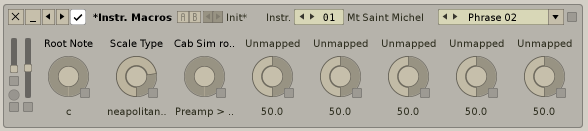
ex (screenshot below):
- I control the scale of a Instrument with a macro. The macro is on “neapolitan major“. In the Edit view, I only see “neapolitan..“, so I have to go in the instrument view to double check if I’m in “neapolitan major“ or “neapolitan minor“.
- Same phenomenon with the Cabinet simulator routing (we only see “Preamp > ..“)
suggestion: I’d like to have a little tooltip (triggered on mouseOver) in Instrument macros, to see the whole active value, like it’s done elsewhere. It would help a lot, when doing automation or locking values in song’s patterns.