In the Renoise instrument trigger options it would be nice to just fetch an array of keys or offsets from root in a scale without me having to do lookup tables. I can set custom scales by sending a set of notes to my Launchpad and could keep it in sync with what’s selected in Renoise. Just more comfort.
Ledger
July 28, 2025, 11:33pm
405
A Terminal request:
Ability to drag and snap the terminal to left or right of the screen to make it 50%. Then you can snap your chatbot/ docs or anything else to the other side using the normal OS snapping.
edit: also a shortcut to toggle show/hide the terminals disk browser
Ledger
July 29, 2025, 5:38pm
406
While on the disk browser subject:
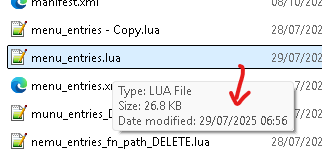
A tooltip when hovering over files in the disk browser, similar to in Windows that shows the files last modified date,
Helps when your temporarily storing junk/ note files in the bundle and got lazy with naming on the fly:
Ledger
July 29, 2025, 11:58pm
407
Also a final one for editor (for now at least)
Ability to tab a selection of code by 1 char space back and forward
beats [down] [space] [down] [back] [space][down] [back] [space]…[mistake] [
renoise.song().selected_sub_column_index
this would complement the read-only
renoise.song().selected_sub_column_type
unless
August 2, 2025, 1:24pm
409
What would that give you?
Control over which subcolumn my Cursor is on, in the selected note column’s subcolumn
unless
August 2, 2025, 3:47pm
411
I see, so a subcolumn_subcolumn, guess it could be character_column_index or something to not confuse with subcolumns.
why?
$ sol sub_colum
2831:renoise.Song.SUB_COLUMN_NOTE
2832:renoise.Song.SUB_COLUMN_INSTRUMENT
2833:renoise.Song.SUB_COLUMN_VOLUME
2834:renoise.Song.SUB_COLUMN_PANNING
2835:renoise.Song.SUB_COLUMN_DELAY
2836:renoise.Song.SUB_COLUMN_SAMPLE_EFFECT_NUMBER
2837:renoise.Song.SUB_COLUMN_SAMPLE_EFFECT_AMOUNT
2838-
2839:renoise.Song.SUB_COLUMN_EFFECT_NUMBER
2840:renoise.Song.SUB_COLUMN_EFFECT_AMOUNT
2841-
--
3175:renoise.song().selected_sub_column_type
3176:  -> [read-only, enum = SUB_COLUMN]
3177-
there’s the names of the subcolumns… what am i missing? why wouldn’t renoise.song().selected_sub_column_index work as a naming convention?
considering there’srenoise.song().selected_sub_column_type
unless
August 2, 2025, 5:30pm
413
Makes sense! I thought you meant getting the info that you cannot get now, like checking whether the cursor is on the first or second character of the volume column for example. I missed that you want to control the cursor.
yep! being able to use a midiknob for instance to cycle through all note columns and their subcolumns, or press a button to hit pan or volume or delay column would be pretty neat
joule
August 10, 2025, 6:14pm
415
renoise.Dialog.visible_observable is quite needed imo.
Now we have to use a timer that checks visible, as a workaround if we want to do other stuff when closing a dialog? (typically, such as closing a secondary dialog that shouldn’t be left hanging - like a small popup dialog for entering a value.)
renoise.song().selected_sub_column_type
this currently only reads the Pattern Editor. it would be great if there was a similar one that reads the Phrase Editor selected subcolumn. Thanks!
tkna
November 27, 2025, 5:00pm
417
I’d like to have this functionality, but it seems impossible to implement without an API to control focus.
opened 03:48PM - 27 Nov 25 UTC
closed 09:51PM - 27 Nov 25 UTC
blockedByAPI
Just as a DJ listens through headphones to find music that fits the floor's vibe… in real time, I sometimes use Disk Browser to listen to songs that suit the situation while searching through them one after another.
However, with an operation like this, I have to press the `Focus/Show Disk Browser` key every time I load Song:
1. Press the `Focus/Show Disk Browser` key
2. Select a song using `Up` or `Down`
3. Press `Enter` to load
4. -> Focus leaves the Disk Browser
I believe step 1 above could be eliminated.
It would be convenient to have something like the following so I don't have to refocus:
- Focus/Show Disk Browser and Select (Next)
- Focus/Show Disk Browser and Select (Previous)
This is equivalent to performing the following operations:
1. Press the `Focus/Show Disk Browser` key
2. Select a song using `Up` or `Down`
https://github.com/user-attachments/assets/cbdd14e5-5ddc-44fc-a5c2-b7233eeeb703
Please reconsider the following.
tkna
November 30, 2025, 6:17pm
418
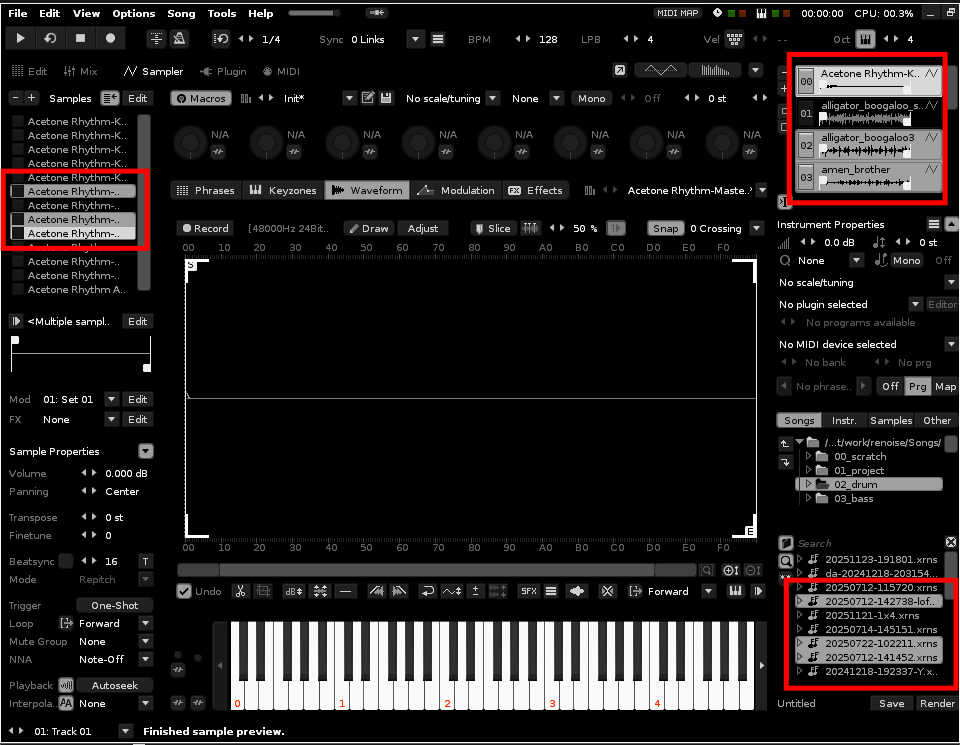
There are countless situations where you’d want to apply an action to multiple selected items, but unfortunately, it seems that’s not possible in the current version (V3.4.5).
Instruments in the Instrument Selector
Files in the Disk Browser
Samples in the Sample List
opened 05:03PM - 30 Nov 25 UTC
closed 05:31PM - 30 Nov 25 UTC
blockedByAPI
Currently, `Set Selected Instrument Transpose *` can only be applied to a single… selected instrument.
It would be useful if it could be applied to all instruments selected.
https://github.com/user-attachments/assets/54d4cbbf-d6c2-4f95-ac7a-ef5ee1a4f9ad
tkna
December 19, 2025, 3:07pm
419
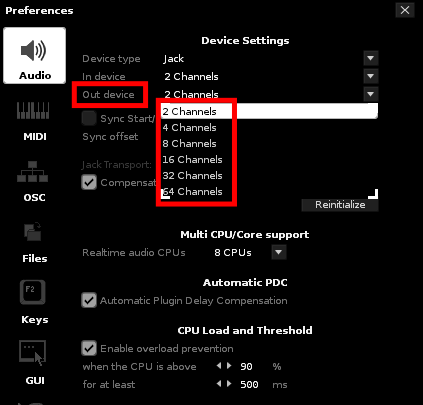
The Set/Get function for the Output Device value is required for features such as changing the output count based on the number of tracks below.
opened 12:58PM - 19 Dec 25 UTC
closed 04:25PM - 21 Dec 25 UTC
blockedByAPI
# Overview
To record each track's performance separately in REAPER (another DAW… ), I use a script to serially assign Renoise outputs to REAPER inputs.
The number of tracks per Renoise instance varies. It could be 1 track or 32 tracks, depending on the case.
To minimize the number of outputs required to cover the number of tracks, it would be useful to have a feature like the one described below.
- Change the number of outputs based on the number of tracks
- Change the number of outputs based on the number of tracks (including Master)
# Change the number of outputs based on the number of tracks
Below, the outputs are changed to 2 (stereo 2x1).
- Track 1
- Master
Below, the outputs are changed to 4 (stereo 2x2).
- Track 1
- Track 2
- Master
Below, the output is changed to 16 (stereo 2x8).
- Track 1
- Track 2
- Track 3
- Master
- Send 1
- Send 2
# Change the number of outputs based on the number of tracks (including the master)
Below, the output is changed to 4 (stereo 2x2).
- Track 1
- Master
Below, the output is changed to 8 (stereo 2x4).
- Track 1
- Track 2
- Master
Below, the output is changed to 16 (stereo 2x8).
- Track 1
- Track 2
- Track 3
- Master
- Send 1
# Workflow Example
This is an example of my workflow where I hope this feature will save me effort.
https://github.com/user-attachments/assets/0f178f57-92d2-4dcb-b5ed-dbe25e810aa0
It’s helpful to be able to draw graphical envelopes for automation.
opened 03:05PM - 26 Sep 24 UTC
automation
It would be useful to be able to record automation when using the [“Enable/Disab… le Nth device on selected track”](https://github.com/esaruoho/org.lackluster.Paketti.xrnx/issues/583) function.
# Pattern Automation Recording Mode: Effects command (x000/x001)
- [ ] editmode is on, playing is off -> write to where cursor is in automation
- [ ] editmode is off, playing is off / on -> parameter change to device.
- [ ] editmode is on, playing is on -> write to where cursor is in automation
- [ ] editmode is on, playing is on, follow pattern is on -> write to where playhead is in automation.
- [ ] if playback is OFF, editmode is ON and follow pattern is ON -> then still type to where cursor is
- [ ] playing, editmode on, no follow pattern -> type to selected row INSTEAD of playhead "as if follow pattern was ON"
- [ ] not playing, editmode on, follow pattern on -> type to selected row INSTEAD of playhead position
# Pattern Automation Recording Mode: Graphical Envelope
- [ ] editmode is on, playing is off -> write to where cursor is in automation
- [ ] editmode is off, playing is off / on -> parameter change to device.
- [ ] editmode is on, playing is on -> write to where cursor is in automation
- [ ] editmode is on, playing is on, follow pattern is on -> write to where playhead is in automation.
- [ ] if playback is OFF, editmode is ON and follow pattern is ON -> then still type to where cursor is
- [ ] playing, editmode on, no follow pattern -> type to selected row INSTEAD of playhead "as if follow pattern was ON"
- [ ] not playing, editmode on, follow pattern on -> type to selected row INSTEAD of playhead position

 ]…[up] [back][back]…