Sigh. I just don’t get it. How do I route what from where to where? (How accurately described, eh!)
Do I need two tracks for this, or what?
Sigh. I just don’t get it. How do I route what from where to where? (How accurately described, eh!)
Do I need two tracks for this, or what?
This is what AI says, not sure if it works as I’m not familiar with reaper;
”That’s a very common question, especially since Redux 1.4 introduced MIDI output capabilities! It requires setting up two tracks and using Reaper’s routing matrix to send the MIDI data.
Here’s a step-by-step guide for dogma00 on how to set up Redux as a MIDI sequencer for another VST instrument in Reaper:
 Two-Track Setup in Reaper
The user is correct—you generally need two tracks for this specific kind of routing:
Track 1: Redux MIDI Sender
This track hosts the Redux VST plugin.
It contains the pattern/phrases in Redux that generate the MIDI notes.
Track 2: VST Instrument Receiver
This track hosts the target VST Instrument (synth, sampler, etc.) that will make the sound.
It receives the MIDI notes from the Redux track.
 Routing Steps
Follow these steps to establish the connection:
Track 1 (Redux): Insert the Redux VSTi plugin on this track.
Open the Redux plugin interface.
Go to the MIDI section (usually accessed via a button or tab in the Redux editor).
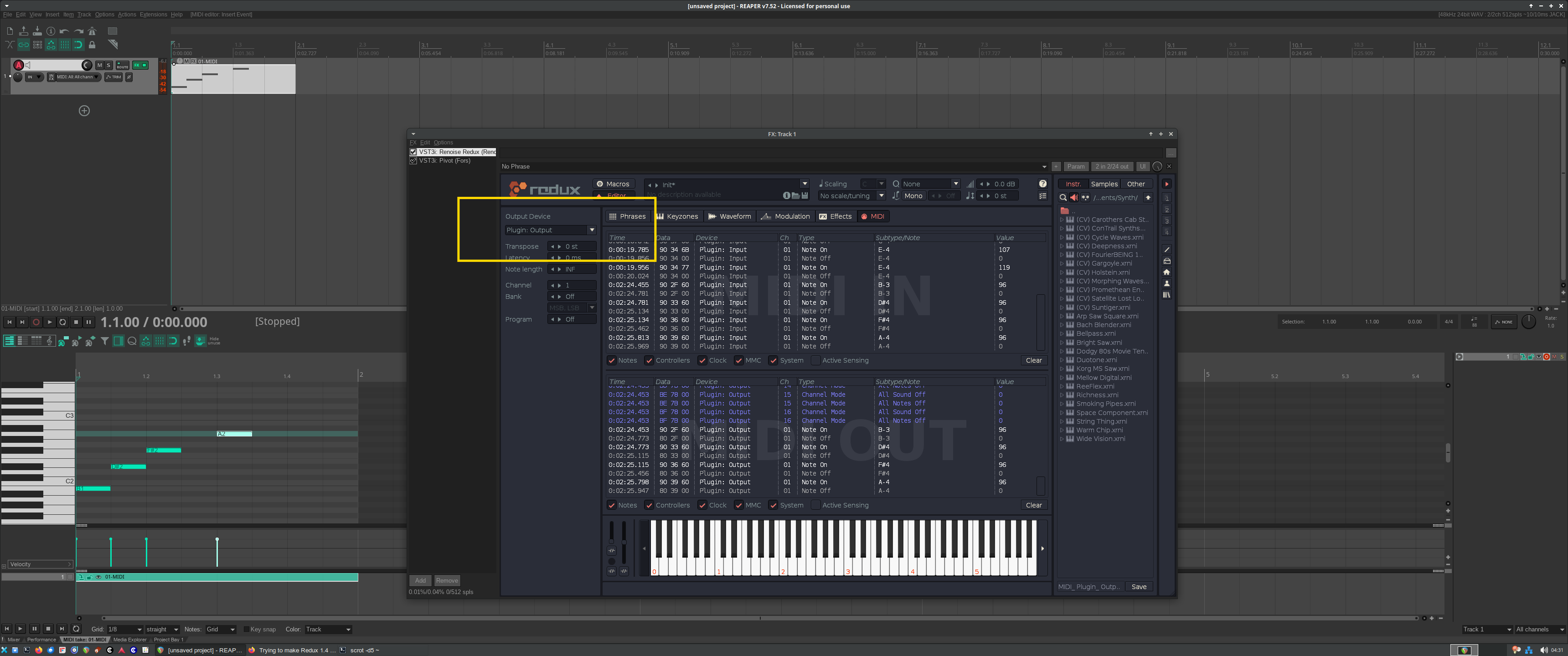
Set the Output Device to Plugin: Output. This tells Redux to send its generated MIDI data out of the plugin to the host DAW (Reaper). You can also set the desired MIDI Channel here if needed.
Track 2 (Target VSTi): Insert the VST Instrument you want to control (e.g., Massive, Serum, Kontakt) on this track.
This is the crucial routing step in Reaper:
On Track 1 (Redux), click the Route button (usually visible in the track control panel or mixer view). A routing window will open.
In the routing window for Track 1, find the section for adding Sends and add a new send to Track 2 (Target VSTi).
In the send options for this new send:
Set the Audio send to None (since you only want to send MIDI, not audio from Track 1).
Crucially, set the MIDI send to All → All (or choose a specific MIDI channel if you configured one in Redux and the VSTi is multi-timbral). This sends the MIDI output from the Redux plugin to the input of Track 2.
On Track 2 (Target VSTi), ensure the track is set to receive the MIDI.
Click the Input button for Track 2.
Select Input: MIDI > Redux Track 1 (or the name you gave Track 1).
Then, select All MIDI (or the specific channel if necessary).
Arm Track 2 for recording (the red circle) and make sure Track Monitoring is enabled (the speaker icon) so you can hear the VSTi as Redux plays it.
Now, when you play your project in Reaper, the MIDI pattern in Redux on Track 1 should trigger the VST instrument on Track 2, and the resulting audio will come from Track 2.
This video demonstrates general MIDI routing from a track to a VSTi in Reaper, which covers the core concepts needed for the Redux setup: Route Midi to VSTi and Back to Separate Audio Tracks.

Tutorials For Reaper | Route Midi to VSTi and Back to Separate Audio Tracks - YouTube
TutorialsFor Reaper · 62K weergaven
”
Thanks, but with both suggested ways the end-result is the same: The data from the actual MIDI item on the Reaper track is transmitted to the other instrument, while Redux phrases are not. Still I see Redux transmitting the phrases as MIDI on the Redux MIDI tab.
If I only wanted to transmit the Reaper MIDI data on the track to the instrument plugin, I wouldn’t need Redux in the first place. What I want is to transmit the Redux phrases as MIDI to the VST instrument.
I’ve tried to change the channel, bank and program in the Redux settings, but no change in the situation so far. What on earth I’m not getting here? …
In short, I’d like to use Redux’s tracker interface (the phrases view) to control the VST instrument inside Reaper.
Transmitting phrases from Redux to VSTi works here. I can e.g. press “C3” on my MIDI keyboard and Redux converts this into an arpeggio, which Pivot plays. I also can insert “C3” into the piano roll and the same arpeggio gets played from Redux to Pivot when I start transport. This works without changing any MIDI channels, banks or programs. What’s is the VSTi you are sending the MIDI notes to?
I had the same issue, sending from one track to another didn’t output anything or it printed the midi pre-phrase. I remembed about input FX (shift+click on the fx button or another depending on your setup) and now it will be on all my midi tracks, Redux is the perfect complement for Reaper!