I’ve experienced this 3-4 times now. It seems to happen the same way every time, but not consistently. I’ll leave Renoise open, do something else for an hour or two, and when I come back, the UI will be frozen, but all interaction still works. I can save the file and click on things, and even start/stop playback. The UI simply displays its last rendered state until I restart. If I try to maximize or resize the window, it goes black.
Fortunately, I can save so I haven’t lost any progress from it. Still, mildly annoying for me, and definitely will cause elevated heart rate for those who first encounter it.
I’m struggling to figure out how much time it takes, and what the conditions are. The last few times it happened, I left a project open in the mixer view with a plugins just idling. I’m not confident that this isn’t some issue with my setup, because I’ve had lots of very strange graphics driver issues lately. I’m running W10x64, with an AMD CPU, integrated Radeon Graphics.
I’ve not seen this with 3.4, so I think it must be related to UI updates. Has anyone else reported or even seen this?
EDIT:
As mentioned below, I can consistently reproduce by turning my displays on and off. Happens even with a blank project. It appears to purely be caused by an interaction between the UI and my graphics drivers.
I suspect something with a power saving option or screensaver. Maybe try to disable sleep for the drives, screen and usb suspend. For the driver issues, you usually only need one driver from the AMD site. They have a smaller web based one and a full offline package. They might have one for your specfic model like they have for my Ryzen 7 5800H.
I suspect something with a power saving option or screensaver.
Interesting, you might be on to something. I just tested turning both my displays on and off and have managed to make the UI hang 100% of the time - exactly the same behavior. Still might just be a me problem, but please give it a try.
Does this happen with a previous version of renoise or other programs or did you change something in your configuration? I can only say that it doesn’t happen here, but I use latest Windows 11. I would try to make another power plan with every option off that says suspend or sleep to narrow it down. Maybe update bios (turn off prefered core option for better system latency) and most importantly the AMD driver if you haven’t already.
This happens every time I restart my displays with 3.5.1, but never happens with 3.4.3. Other programs do not behave this way. I’ve had some crashes, but usually with a warning from the AMD drivers. I have some concerns about the CPU being faulty, but it is really odd given that it runs flawlessly 99% of the time. They seem like very different problems, but I can’t say for certain.
I re-installed the AMD driver and messed around with power settings. No change. Now that I know how this happens it’s not a big inconvenience for me, but hopefully someone else will reproduce it so we can narrow down a cause. Or maybe it’s just me. IDK.
There seems to be something fishy going on if programs crash. It could be a lot of things causing it like overheating, faulty RAM, bad drive, software like malware broke some Windows component /service etc. Temps can be checked with nwinfo (GitHub - a1ive/nwinfo: Hardware information utility for Windows) and memory with Windows itself How to Test Your Computer's RAM for Problems. Maybe a reinstall of Windows 10 helps. Good luck
I actually experienced those hangs, too, recently, but on macOS 14.6.1. Screen stays black after wakeup, getting a beach ball of death, after some time, I can see the screen again, and Renoise is death-hanging…
I suspect that there might be a memory leak somewhere.
I’m experiencing something similar right now (3.5.0) on Win10. I was working on a song and left Renoise open to do something else in between for about 5-10 minutes, and after coming back to Renoise the F keys F9 to F12 aren’t working anymore, as well as the arrow keys up/down and Alt or Ctrl keys. It’s not possible to play the song or to navigate by keyboard. But the mouse is still working and it’s possible to save the song. It’s the very first time this is happening.
I left renoise alone for a few hours, PC went to sleep and after waking up, there was a message, that the ASIO device isn’t responding. That’s weird, because I didn’t happen before when I tried if OP’s issue appears on Win11 a few weeks ago. USB suspend is off. Not a problem in my case, because renoise was working again after closing the message window. Just wanted to mention it.
I have this reproducible almost always. macOS 14.6.1, go to sleep, like 1 hr, while Renoise is opened. After waking up, there will be a beachball for about 5-10 seconds. @taktik sure this is audio driver related? Couldn’t this be related to your recent changes in the host / sandbox processes architecture, something fails to discover something, temporary deadlock or something…? Expert speaking here
What happens after that? Is it perma-frozen, or does it go back to functioning as normal?
I’ve reproduced this on a completely different machine: it’s a thinkpad with an intel CPU - and that has never had any GPU related problems. The problem manifests almost identically. The only difference is that there is no ‘phantom’ interaction with the frozen UI. It’s just completely hanging: For example, the cursor doesn’t change when hovering over something, like it did on my other machine.
To reproduce, I simply start Renoise and then unplug my external monitor. It’s still happening with a fresh install of 3.5.2. I did notice that my tool installs carried forward, so I have to do some more testing to see if any of them are an issue in older versions. I tried disabling them all, but it’s still happening.
Can confirm this bug. I have the same problem, but only sporadic. I have a intel core i7 2600k (sandybrigde) under win10. (Realtek Sounddriver) and Renoise 3.5.2
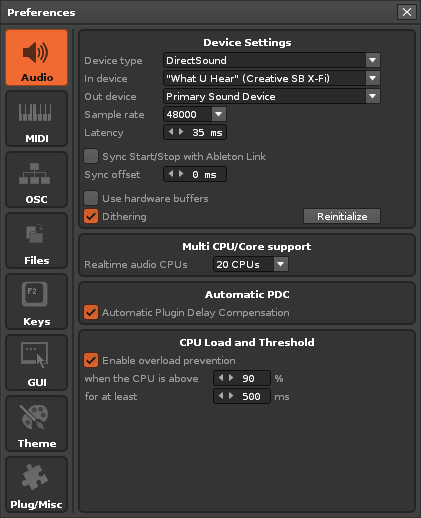
I have another bug too that sporadic happens when i change VST3 presets during songplayback. This turn into an error where entire system is stottering and hanging/lagging much heavy. You can only make a single Gui Mouseinput like a click all 15-20 seconds for a very short time. When i call preferences/audio in this condition and do a click on “Reinitialise Audio”, the system is instand agile again and play song fully normal.
I have notices a third bug which occurs right during loading a song. The Renoise Application switch for 1-2 second to Fullscreen where windows taskbar becomes invisible and back to normal screenmode (full screen windowed maximized with only Windows taskbar visible). Maybe this is related to my other bugreport of some Vst3 Values not set correctly after loading a songproject.
When the Bug with the Fullscreen switch occured i have this in my Renoise logfile.
GUI: Creating the Document GUI…
GraphPort: Trying to load Fallbackfont: ‘Arial Unicode MS’ (PS-Name: ‘’)…
GraphPort: EnumFontFamilies for font family ‘Arial Unicode MS’ failed
Exception: Failed to resolve the font file for font ‘Arial Unicode MS’.
GraphPort: EnumFontFamilies for font family ‘Arial Unicode MS’ failed
Exception: Failed to resolve the font file for font ‘Arial Unicode MS’.
GraphPort: Trying to load Fallbackfont: ‘MS PGothic’ (PS-Name: ‘’)…
GraphPort: Fallbackfont was successfully loaded.
GUI: Successfully constructed
The Strange thing is, that both modded fonts are showed correctly. Pattern and Control font. I dont can see any “MS PGothic” Font loaded in Renoise?! But i can see additional Fonts in Phase Script Editor. Can it be that this is the Font in Renoise Phrase Script Editor?