I am trying to get renoise to work properly with pipewire. Currently the only way I can get audio to work in renoise is by using ALSA audio, which takes full priority over audio, meaning I cannot get audio from anything else on my PC while Renoise is running. I am able to use Bitwig perfectly by running as pulse audio, but there is no option for this in Renoise. Has anyone succesfully used pipewire with Renoise before? How would I go about setting this up?
As Martblek said, pipewire-jack is the way to go.
I believe on linux mint you will then need to modify the renoise launch script and prefix it with ‘pw-jack’, as detailed here: PipeWire: pw-jack.
For instructions on how to use the pipewire implementation of jack system wide, so you don’t need to use pw-jack, see here: PipeWire - Debian Wiki.
You can then use qpwgraph to route audio to and from renoise.
Linux audio has come a long way but can still be quite confusing. Feel free to post any more questions. I use renoise on linux every day and am sure I can help.
Adding pw-jack to the launch script worked immediately! Thanks so much more that fix, everything is working great now. I also appreciate you extending the offer to help, I’ll be sure to keep it in mind as I will undoubtedly run into other audio problems with Linux. Thanks again.
I’m on CachyOS (Arch-based) and initially had trouble getting my RME inputs/outputs working with the stock Renoise ALSA option so found this thread and installed pipewire-jack. Now I have audio inputs so that’s some progress
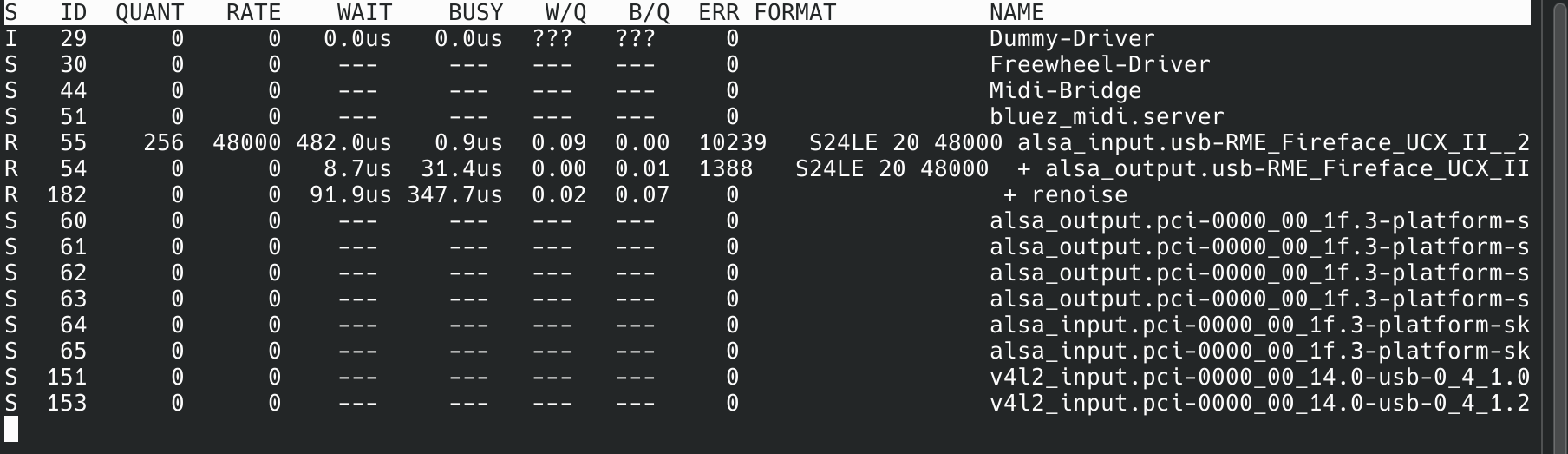
However, the audio is as crackly as all hell. I found how to change the buffer size from the command line so changed it to 256 for testing which should be on the very, very safe side but it hasn’t improved things much. Sample rate is correct looking at pw-top as well:
I’m on the default kernel at the moment (rtp:88 if that matters), not sure if that’s a factor or not with just an empty project and a line-in device. CPU usage is about 7%, which does seem kind of high for how little is going on and a high buffer size.
Any suggestions as to where to go from here much appreciated!
The following are some possible solutions.
(However, it is generally better to ask your distribution’s community. Please do not seek support from Arch even if something seems different.)
There are probably a few things that would be especially good to do.
cpupower frequency-set -g performance
installing realtime-privileges and adding your user to the realtime group
It’s best to set the quantum value as high as possible within acceptable limits. Depending on requirements, real-time performance isn’t always essential; avoiding audio clipping is more important.
The optimal value varies by machine. On my older machine (i5-8350U), 8184 works fine.
Personally, I think it’s fine to use performance mode only during music production, and powersave mode otherwise, switching Wi-Fi on/off and other settings accordingly.
This is because keeping it in performance mode all the time causes issues like higher power consumption and increased CPU fan speed.
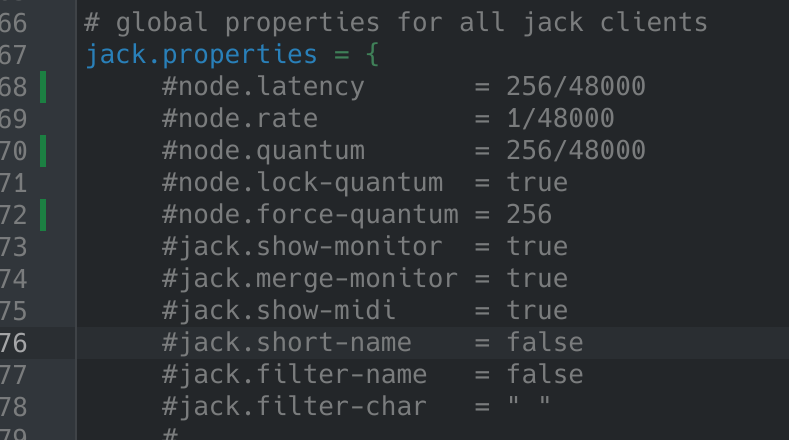
Thanks, I found the settings in jack.conf - it ‘felt’ like some kind of buffer mismatch situation so carefully poking around, things seem much improved like this (hopefully I haven’t done anything stupid):
I’ll need a lower buffer size later but I’ll leave it there at the moment for the sake of not trying to over-optimise while I’m finding my way around.
Enough for today, I’ll figure out why half my ADAT inputs don’t work tomorrow (guessing I don’t have enough channels set somewhere earlier in the process before things get to Renoise..)
Thanks for the other tips, I’ll stick with the default non-RT kernel for now to be on the safe side.
Here my reaction in general about the use of Renoise in Linux. It works great, it can work great, but it also depends on some things, like the hardware you use.
If you’re making something like an podcast or YouTube video, you can do it with the equipment that is built-in into your laptop. But you can also choose to buy external hardware with better quality. Because the built-in is good enough for a normal consumer, but if you get professional or want getting out some more of it (do something special like Renoise is), don’t expect too much from the default sound cards.
Buy and use something professional is my advice. And for Linux? Buy not something that is very fresh and new, buy from a brand that is already for minimal 4 or 5 years at the market. Because the most bugs are gone, and the Linux community has already tackle most bugs.
I recently moved to Kubuntu and pw-jack is enabled by default, as I recall.
All you need to do is launch via terminal or use the KDE Menu Editor to add pw-jack as a prefix.
I do recommend using pw-jack over just pipewire, though. It makes life so much easier when routing stuff. Qpwgraph is super useful. Also, the latency is very nice compared to Windows.
-edit: got my reaction under the wrong user, now corrected -
Strange, I got good results with ALSA. My latency is 2 ms, buffersize=32.
But maybe it depends what sound card people use. I use an ESI Jul@ PCI version. And since I use programs to do something with sound or music, I always ignore the built-in sound cards from the device (the ones in laptops or on motherboards).
I see it this way: if you’re making something like an podcast or YouTube video, you can do it with the equipment that is built-in into your laptop. But you can also choose to buy external hardware with better quality. Because the built-in is good enough for a normal consumer, but if you get professional or want getting out some more of it, don’t expect too much of the default sound cards. Buy and use something professional is my advice. And for Linux? Buy not something that is very fresh and new, buy from a brand that is already for minimal 4 or 5 years at the market. Because the most bugs are gone.
As I mentioned, it’s an RME interface (UCX II). Quality isn’t really the issue
ALSA worked fine for two-channel audio output, latency was fine.. It was good actually, considering you have to use USB class-compliant mode. That wasn’t the problem, routing more inputs and outputs was - I couldn’t get any line input at all with ALSA.
Did you ever fix this under CachyOS? I’ve been testing it and I know it comes with Pipewire-ALSA out of the box. It’s funny, Bitwig works fine under plain ALSA but Renoise sounds awful. Did you add Pipewire-Jack packages? Keen to get it all working and leave W11.
I’m guessing you might have a different issue there, I was fine with ALSA as far as the on-board sound card goes but the crucial thing was changing the buffer to 4/8/16/32 etc. IIRC it was on 6 by default and that sounded a total mess.
My problem was only when getting USB interfaces involved - I spent several solid days learning stuff, delving into config files all over the place, trying all sorts, losing faith in the way audio on Linux is set up in general and have ended up back on Windows for the moment. I might try again at some point, I really wanted it to be a viable solution for me.
Was hoping you didn’t say that, being back on Windows I mean, I will do some digging myself. My Motu M4 is showing up fine and is recognised in Linux, I need to faff about with Jack and see if I can sort something out. Would you be interested in knowing if I sort it?
By all means, it might end up helping another person if nothing else.. There’s so many variables though, not least different makes of interface.
My issue sounded for all the world like when you have buffer mismatches between different programs but after much research, config editing and everything looking consistent in pw-top I was still getting nowhere, it was just incredibly unstable. Constant glitches and full on audio crashes when doing things like changing volume, having other programs open etc.
Not to mention that my inputs and outputs were mapped completely wrongly and in different ways depending on the profile used. Also a nightmare to deal with.
I was prepared to sacrifice a lot to move to Linux (paid VSTs, mixer software for my interface, configuration for my MIDI interface etc.) so trust me, I put an awful lot of time and effort in. It was just far too much of a mess on a couple of fronts.
I ended up with the feeling of ‘even if I get this working, I have no confidence it’ll stay that way and I absolutely don’t want to have to do all this again’.
I haven’t delved too deep into pipewire and have just stuck with basic ALSA and JACK to keep things simple. I’m using a Thinkpad P15v on Ubuntu Studio which for my limited Linux abilities worked the best out of everything I tried. I also use a Behringer UMC1820 interface but before I was using Steinberg UR22 and UR44 which also worked flawlessly. I don’t mind being cut off from other audio while Renoise is open. Honestly kind of keeps me focused. It would be nice to configure pipewire so I could have other audio available but Its a small price for stability. I guess I’m sharing all of this to let you know that Linux audio can work really well. Hope you get it working in the future.
Thanks, yeah you’re no doubt doing it the better way there! Almost every post I saw in my troubleshooting where someone was content with a more complex audio setup on Linux (ie with multi-channel interfaces etc. involved) they were just using ALSA and JACK.
CachyOS coming with Pipewire and Pipewire supposedly being ‘the future’ made it seem to make the most sense to get used to that straight out of the gate but at the moment it just seems like an extra layer of complication around a stack which was already messy enough that a more modern solution was desired in the first place..
Having to delve into the guts of all that and seeing how fragile/finicky it seems to be was offputting for sure and I kind of reached the point of ‘OS installation/configuration fatigue’. I may well try another approach or distro in future though

 Have you tried to use the RTCQS tool? It’s a GUI which is starting from the command line. Last version I used is 0.67. See here: