 HYDRA SANITY v7.1 – THE SIGNAL SYNTHESIS
 0. SYSTEM PHILOSOPHY
HYDRA SANITY is not an automation recorder. It is a deterministic real-time signal processor for human input.
Welcome to Paradigm v7.1: The Continuous Signal Buffer (CSB)
In version 7.0+, we completely abandoned the traditional “DAW data editing” paradigm. Previous automation writers suffered from the Target Moving problem (C0 discontinuity)—causing zipper noise and audio glitches because they constantly rewrote future points while the audio DSP was trying to interpolate them.
Hydra Sanity introduces the Continuous Signal Buffer. The engine operates as an independent, mathematically perfect virtual oscillator. We no longer use clear_range or “plow” the DAW lanes. Renoise is now merely a “dumb display” rendering the exact, glitch-free mathematical output of the signal in absolute global time.
 IMPORTANT: Updated MIDI Mapping Rule (Hydra v6.8+)
Do NOT rely on Renoise’s CTRL+M MIDI mapping for parameters that are controlled by Hydra Sanity. Hydra must remain the primary handler of MIDI CC data to ensure deterministic behavior, predictive smoothing, and state control.
However — unlike earlier versions — your MIDI device CAN now be active in Renoise at the same time.
 Notes (keys) are allowed and should be routed into Renoise normally (for playing instruments).
MIDI CC for Hydra must still be assigned ONLY via the CC# buttons inside the Hydra Sanity interface.
Don’t forget to enable the OSC server in Renoise so that you can map MIDI devices that you use in both the HYDRA SANITY tool and the Renoise DAW.
Hydra intercepts MIDI data, processes it through its signal engine, and then safely forwards it back into Renoise (MIDI THRU), ensuring:
- no loss of MIDI input
- full compatibility with instrument playback
- smooth, glitch-free automation writing
 In short: Use Renoise for playing notes. Use Hydra for controlling parameters.
 How to Launch & Activate the Tool
Locate the Tool in Renoise: To open the interface, go to the top menu bar in Renoise and navigate to Tools > Zorgan > HYDRA SANITY.
Keyboard & MIDI Shortcuts (New in v7.1): You can bind a hotkey to instantly show or hide the GUI. Go to Renoise Preferences > Keys > Global > Hydra Sanity > Show GUI. You can also map a MIDI button via Renoise’s native MIDI mapping (Tools > Zorgan > Hydra Sanity > Show GUI).
Start the Engine: Simply opening the window is not enough! For the tool to actually listen to your MIDI controller and write automation, you must click the “START ENGINE” button located in the top section of the window.
When activated, the button will turn red and change its text to “STOP ENGINE”. Once it’s red, the Crystal Sentinel is online, monitoring your playhead, and ready to record!
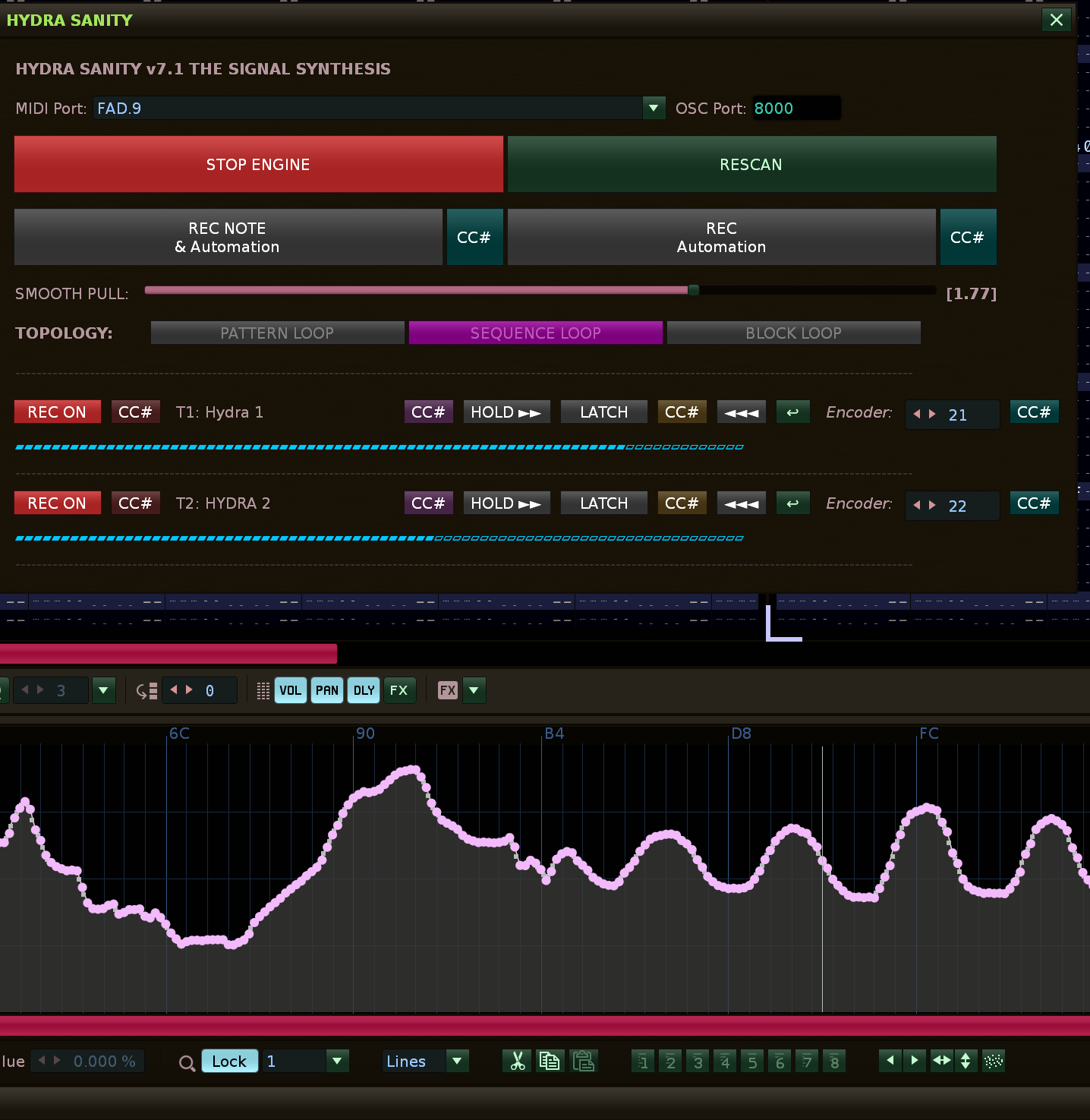
 1. Global Settings (Top Panel)
MIDI Port: Select your hardware controller here.
OSC Port: The port used for the engine’s internal communication with Renoise (default is 8000). Do not change this unless you are resolving network conflicts.
START / STOP ENGINE: The main power switch. If it’s not glowing red, the engine is not listening to MIDI messages.
RESCAN: If you add a new Hydra device instance to your project, click here so the engine discovers it and adds it to the list.
REC NOTE & Automation / REC Automation: Smart transport controls replacing standard play/record.
- “REC NOTE & Automation” toggles the native Renoise Edit Mode along with playback, allowing you to write both notes and automation.
- “REC Automation” starts playback but explicitly disables the native Edit Mode. This acts as a safety feature to ensure you are ONLY writing automation without accidentally overwriting pattern notes.
 2. Curve Behavior (The Kinematic Engine)
SMOOTH PULL: Sets the strength of the smoothing algorithm (elasticity). The curve is constantly recalculating and stretching toward existing points. A value of 1.0 is neutral. Increasing it will result in extremely smooth, drawn-out transitions.
 3. Intelligent Topology (TOPOLOGY)
This panel is not meant to be clicked; it is a live signal board. The engine constantly monitors where the playhead is within the song. This prevents errors and automation glitches at loop boundaries.
 PATTERN LOOP: The playhead is looping inside a single pattern.
 SEQUENCE LOOP: The playhead is jumping across multiple patterns (e.g., 1 ➔ 2 ➔ 1 ➔ 2). The engine recognizes this even if you trigger the patterns live and manually!
 BLOCK LOOP: A small fractional loop is active (Numpad Enter). Fader writing in this mode is specially protected so it doesn’t “spill” outside the block.
 4. The Hydra Module (Device List)
Every device named Hydra in your project gets its own dedicated row.
Color-Coded CC# Mapping: The CC# learn buttons are now color-coded to match their associated function (Red for REC, Purple for HOLD, Orange for LATCH, and Teal for the main data fader).
REC ON/OFF: Arms or disarms the automation writing for this specific Hydra.
T: Name: Shows which track the device is located on.
HOLD ►► (Lock Sticky): A brilliant feature for live performance. If the lock is glowing red, the engine knows that when you let go of the fader, it should not merge back into the existing automation. Instead, it will instantly “hold a straight line” at the exact value where you left the fader, until you either turn the lock off or move the fader again.
LATCH / STICKY: A manual toggle button to force the Sticky Hold function temporarily.
◄◄◄ (Show Automation): Click this button to instantly switch Renoise’s lower frame to the Track Automation view and focus on this specific Hydra’s envelope lane.
 (Return Selection): After jumping to an automation lane using the ◄◄◄ button, click this to quickly restore your previous track, device, and parameter selection.
Encoder (0-127): This is where you assign the MIDI CC number that your physical fader/knob transmits. You can type the number manually, or click the rightmost Teal CC# button and simply move your fader—the engine will assign it automatically.
Blue LCD Bar: Visual feedback showing the current value of the parameter exactly as the engine sees it.
 5. Technical Specification / Engine Architecture
 CORE PRINCIPLE
Human Input → Continuous Signal Buffer (CSB) → Time-Sampled Output → Render Layer
5.1 Signal Domain vs Render Domain
Signal Domain: Continuous mathematical representation of value over absolute time (global_time).
Render Domain: Discrete projection into Renoise automation lanes.
Key rule: The engine must never treat Renoise automation lanes as ground truth. Lanes are output only.
 5.2 The Demise of the “Clear Range” Bug
By moving to the Continuous Signal Buffer, we eliminated the need to “plow” or clear automation lanes ahead of the playhead. The engine calculates the sample_signal(t) dynamically and safely writes only the immediate mathematical reality. This permanently eradicated “zipper noise” and end-of-pattern audio scratches.
 5.3 STATE MACHINE
STATES: MIDI_INC, ARMED, LATCH_INIT, LATCH_WAIT, STICKY_HOLD, IRON.
RELEASE DETECTION: released = was_active and not is_active. Replaces idle-based heuristics. At the moment of release, the CSB mathematically zeros out the velocity vector, creating a perfectly flat hold curve without generating excessive points.
 CHANGELOG
v7.1 - The UI & Workflow Integration Update
- Feature: Added global Keybinding and MIDI mapping support for toggling the GUI window.
- Feature: Added
◄◄◄focus button to instantly jump to a specific Hydra’s automation lane in the Renoise lower frame. - Feature: Added
↩Quick Return button to instantly restore the previous track/device selection after editing curves. - UI/UX: Overhauled transport buttons (
REC NOTE & AutomationandREC Automation) to explicitly manage Renoise Edit Mode and prevent accidental pattern overwriting. - UI/UX: Implemented semantic color-coding for CC# learn buttons (Red, Purple, Orange, Teal).
- UI/UX: Renamed the hardware lock icon to
HOLD ►►for clean cross-platform ASCII rendering.
v7.0 - The Signal Synthesis (Paradigm Shift)
- Architecture: Introduced the Continuous Signal Buffer (CSB).
- Fix: Completely removed the destructive
clear_rangemethod. Future points are no longer constantly overwritten, eliminating all zipper noise. - Logic: Re-engineered Release logic. Velocity vectors instantly zero out upon fader release for perfect flat-line holds.