I rewrote much of how this tool handles track coloring to be more sophisticated.
swapping tracks should be properly handled now (an issue @Garf reported some time ago)
original track colors should be always preserved, including their background blend property (a problem @NPC1 faced before)
changing colors on the selected track works properly
Highlight Updates
there is a setting to use a Fixed Color for highlighting instead of the color of the track (as requested by @bigfake above)
backported the “only highlight on edit mode” behaviour from Paketti, enabled by selecting Edit Only or Separate for the highlight mode, the latter will let you customize normal and edit mode highlighting separately (for example use blend for normal mode and fixed red color for edit).
Autocolor Tracks by Name Rules
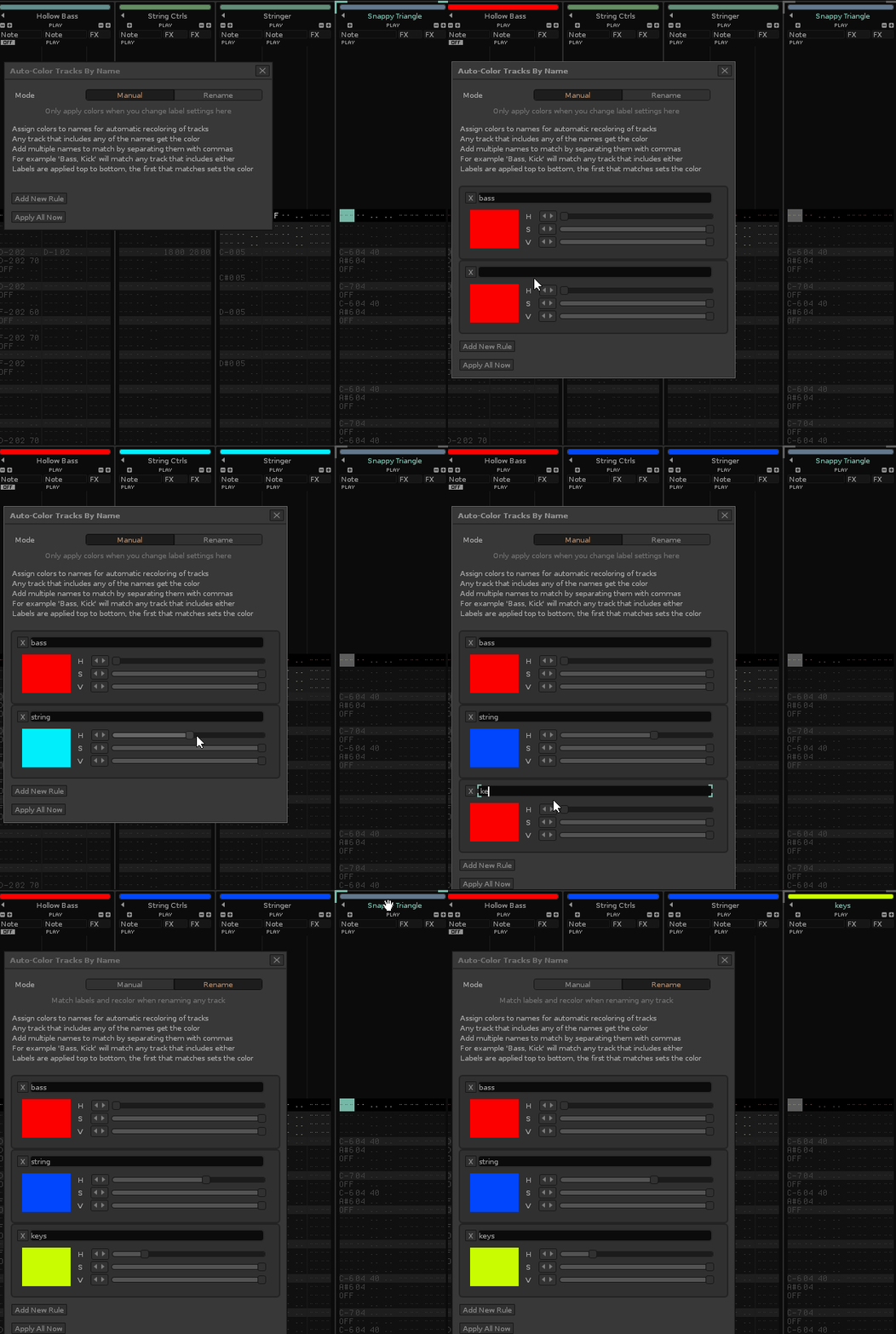
a new feature allows you to setup name rules paired with colors and have the tool auto-color any track when you rename them and the new name matches one of your rules (for example setting a rule “drum” with and orange color will automatically recolor any track if its name includes “drum” anywhere), by default this behaviour is set to Manual meaning tracks are only colored when you are editing rules (or press Apply Now in the menu), changing to Rename will make it so it always responds to renames.
These different features are now in separate dialogs under Tools / tint.
Get it from the tools page (or use the Tool Updater).
Really nice new features @unless ! I had the same idea before some time and wanted to merge the both Tools ”auto-track-colors” and “Autocolors” (by M.Ehrmann) like i describe in channel #tool-function-ideas of Themes & Stuff discord. Sadly i fail because of old API problems and Lack of time. I hope it will work without the Command thing of Autocolors. I will enjoy checkout your new version! Thanks for all your invested work and time.
Didn’t know about the Autocolors tool, guess I should’ve looked this idea up beforehand? I saw Garf mention the Auto-track colors tool and that’s still working in current Renoise I think.
If I understand correctly, this Autocolors tool had a full syntax for applying colors? In tint, I made a menu element with a text field and HSV sliders for picking a color. You type the name(s) you want to match and set the color with sliders.
Technically some subset of lua string patterns will work, but I wanted to make this simple and free from any regexp-like syntax needed. You type “words” separated by commas to match for multiple different values.
For example bass will match both “Bass” “bassdrum” “bass guitar” “contrabass” and so on.
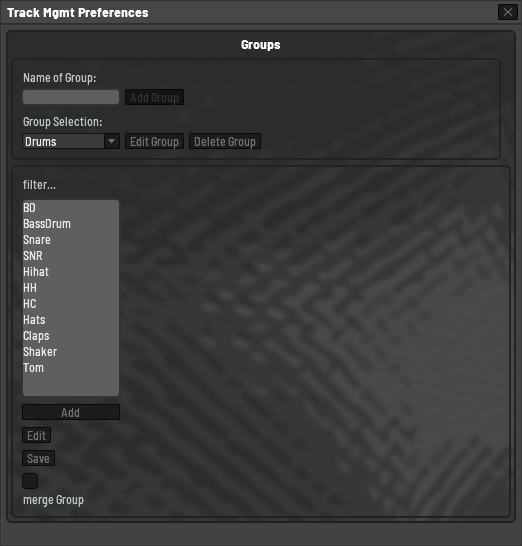
Yes, “Autocolors” use Regex for autodetection on Trackrenaming and livecoloring, but as i remind it was some clunky to use. On Track Rename you had to use a command systax to do a coloring. You must start with a “:” in a Trackname string to shape it as a Command for Autocolor, then add “Drum” for Category and then a defined colorvariable. Complete command was the something like this string as Trackname “:Drum, clblue” give as result a blue colored Track with name “Drum”. As far i Know the tools is very old and outdated but i have it found in the Net and it implements a working Regex detection for LUA script. My goal was it to make a instant half or fully automatic grouping & coloring mode by Trackrename without the command needed. I had written a category dialog, where i can enter a few Regex Phrases to define and detect a “Drum” category track for example. Then i get fucked up on Renoise Dialog structuring options. There you should setting up a defined colorvalue to the category with a color chooser dialog. This was my userinterface so far.
So the idea was… If you enter some Phrase from the FilterList in Trackname Renoise should be
search for a category “Drums” and move your Track to this group then coloring the track with a Shade of the defined category color
OR
create the category “Drums” if not exist in Renoise Project and move the Track to this category and coloring it with a shade of defined category color.
I know a fairly complex functionallity. It was thinked to use with my Renoise Template Project, for better Workflow experience in Renoise. If you want i could do an upload of the original “Autocolor” tool for you to inspect the regex class sourcefile and i would give you my project sources if you want to upset on it and want continua develoment maybe. Entering/choosing categorys works very good, but not 100% safe because of Renoise old EditApi only support an “Enter” keypress to ending input. But for safe behaviour it would need an Onkeydown event. For instance to safe reaction and abort the inputprocess when press “ESC” key. Maybe the Edit has become Onkeydown event with new API. I dont know about it.
happy tracking
/Edit
The Category Definitions with its Phrase filterlist and category Color definitions should be able to export via xml config file. So that users off the Tool can easely Import or exchange the toolconfigs.
//Edit end
/Edit2
The coolest Thing would be a manual “Update Project” function where you can automatic groupstructuring existing projects by categorys. Open old projects and let the manual grouping function running over it. As Result you have a project with on “Drums” group, and one “Synths” group, and some “Voices” group and so on, corresponding to you category grouping configuration. So an Art of Renoise project structure Template Refactoring.
//Edit
/Edit3
I think Regex would be work fairly good. The only what you need would and some options per filterphrase. StringBeginWith, StringEndWith, or StringContainsIt. And when you hit enter you could do a safety Request in this way. “We has detect a Regroup Reason for the Track! Would you really do this?” YES|NO
//Edit3
That is some extra stuff with groups! I feel like rearranging groups might be better done in another tool though, I like that this tool only ever handles the colors of tracks and nothing else across all its features. That said, some coloring related to groups would make sense as an addition.
The GUI for this feature works like this: when you set labels the currently matching tracks get recolored automatically.
I should probably make a proper color picker with the new canvas functions, but I wanted to wrap up this update for now. But this feature is definitely up to change as this is just a first test on my part. I think both the behaviour a color picking could be improved/extended. The next thing I want to implement here is being able to select track color index from the theme instead of a concrete color. This way you don’t have to match the color of your theme and you could change your theme and have the recoloring behaviour stay “in sync”.
Ähm, this is not implemented? But i had use it so with my template?! I must take a look on my old dev PC on weekend! With your Tint tool i get such result. Look at the “Drums” group!!! Im pretty sure this was from you awesome Tint tool!!! The grouping was manual, but the shades of groups underlying tracks was instant updated when i change the group color!
I mean for the auto-coloring by name, not the selection. The selection highlighting uses whatever color the track has (if you select Blend Only mode, the default).
What I am referring to is for setting up “name - color” pairs for automatic recoloring of tracks. So currently you need to set a specific color value for each, but I’ll make it so that you can choose to use a track color by index from your current theme (not the actual tracks in the currently opened song). This is actually fairly easy to add so it might be easier to show than tell.