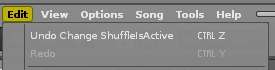
Since yesterday I have this tiny issue that the ‘save changes ?’ dialog pops up everytime I load another song or create a new one, even if I didn’t change anything to it.
It is only mildly annoying but anyways strange, because it wasn’t like that before. Even if i save and then open, the dialog pops… is there some item in the preferences i might have checked without realizing?
So I was about to open a new thread, but this thread already describes perfectly what I’m facing since round about half a year now. So it doesn’t matter what I do, everytime when I open or close anything in Renoise version 3.4.4. this pop up window “Do you want to save changes” pops up. Even if I just have started running Renoise and would like to open the disk browser to load a song. So in this case Renoise obviously asks me if I would like to save the template before I can open a xrns file via disk browser. I just have installed the tool “Paketti” by esaruoho a few days ago, but as I wrote the issue persists for half a year now (at least), and during that time I didn’t install anything new. It’s definitely not because of Paketti. There are two other tools installed, “Place Selected Notes Evenly” and “Native DSP Context Menu”, that’s it. It’s only in Renoise 3.4.4, in Renoise 3.4.3 and other versions this doesn’t happen. I’m on Windows 10. What could possibly cause this?
Perfect, thanks. Indeed “ShuffleIsActive” is listed there even if I didn’t activate it. And if I deactivate shuffle, save as template and reopen the template (File/New Song), shuffle is activated again (and Renoise asks me if I would like to save changes in case I want to load a song). But why? There’s also no active pattern effect command that could be responsible for that.
ha, 2014
I can’t really remember if I did anything special back then. But I remember another bug that occassionally happened in the past. (completely unrelated, sometimes all shortcuts with alt and ctrl are gone), but that one (I think) occurs when renoise/windows crashes and I can repair it by deleting all init files and reinstalling. Do you have a custom startup file that could have been scrambled by a crash?
I’d definitely try a fresh install, perhaps in another location in case you haven’t tried that already.
Yes, a fresh installation is probably the best to fix that. It’s weird and it’s only in 3.4.4. Thanks.
Edit:
I deinstalled and reinstalled Renoise 3.4.4, but the issue is still there. No big deal, but annoying.
Renoise 3.4.5 is about to get released soon, isn’t it? I’ll kick 3.4.4 immediately.
Strangely Renoise 3.5 behaves the same way as Renoise 3.4.4 does. Everytime when I want to load a song or to close Renoise, Renoise asks if I would like to save changes because shuffle gets activated automatically. I deinstalled everything related to Renoise, rebooted the computer, installed and launched Renoise 3.5 for the first time and this is what happens even without touching anything:
But why? What else can I do? What could cause this? It’s annoying.
Two tools are installed, but nothing else. “Paketti” and “Place Selected Notes Evenly”.
Btw., I installed Renoise 3.4.3 again and it behaves as expected. No weird behavior.
Ok, thanks for the hint. I’ve got Paketti v3.54, which is the newest one, but indeed it’s the culprit. After disabling Paketti and relaunching Renoise the error disappeared. Thanks! Gotta fix this, @esaruoho.
Ah, I use bleeding edge releases from GitHub, so that could be it. Either that or it’s a preferences issue (but Paketti no longer messes with Groove settings by default).
hmm… this shufflersactive has been fixed multiple weeks ago, maybe a month ago or so.
Global Groove is Off by default (and not modified) by Paketti. unless if you decide it should be On by default and then you’ve set it up like that:)
i would recommend getting Releases · esaruoho/paketti · GitHub - whatever version is on tools page here is grossly outdated by multiple months. i can’t both push a release up to github and upload the same thing here. actually, maybe i should check the new website, if it’s user-friendlier for uploading files.
the Paketti v3.54 on Tools page was from April
after a lot of help from @unless - i’m now able to resume uploading! there’s a July 9th version of Paketti on the Tools page.
 ) delete me